Choosing between CUDIMM and UDIMM memory requires more than comparing advertised DDR5 speeds. CUDIMM vs UDIMM explained comes down to one important hardware difference: CUDIMMs include a clock driver that improves clock-signal integrity at high frequencies. However, motherboard, CPU, and BIOS support determine whether that feature actually benefits your gaming PC.
How to Choose Between CUDIMM and UDIMM
The right memory depends on your processor platform, motherboard, capacity requirements, and target frequency. Standard DDR5 UDIMMs remain suitable for most gaming computers, while CUDIMMs target newer platforms designed to support higher memory frequencies. Understanding these differences helps prevent compatibility problems and unnecessary spending.
1. Understand the Clock Driver Difference
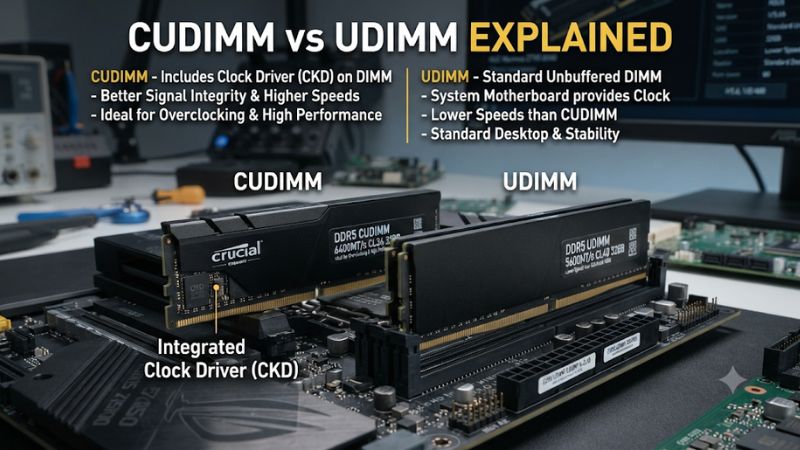
A UDIMM is an unbuffered dual inline memory module. It communicates with the processor’s integrated memory controller without the additional client clock driver found on a CUDIMM. This conventional design is widely used in consumer desktop DDR5 systems.
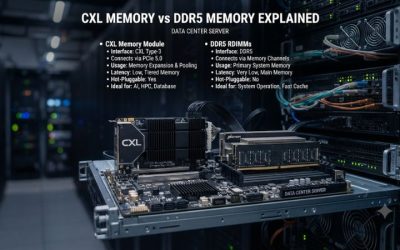
A CUDIMM, or Clocked Unbuffered Dual Inline Memory Module, adds a Client Clock Driver (CKD) to the memory module. The CKD regenerates the clock signal before distributing it to the memory chips, improving signal integrity at higher operating frequencies. It does not make the module registered memory or turn it into a server RDIMM.
store.accuristech.com+1
2. Consider Supported DDR5 Frequencies
The main reason to consider CUDIMM memory is its ability to support higher DDR5 operating frequencies on compatible platforms. JEDEC’s DDR5 CUDIMM standard specifies the module design, including the clock driver, while compatible processors and motherboards determine the supported operating configuration.
For example, Intel Core Ultra Series 2 desktop processors with compatible 800-series motherboards support JEDEC DDR5-6400 CUDIMMs under the applicable one-DIMM-per-channel configuration. Standard UDIMMs on this platform have a lower official baseline of DDR5-5600. Faster XMP configurations are a separate matter and depend on the complete system.
Kingston Technology – Kingston Technology+1
3. Check CPU and Motherboard Compatibility
Physical compatibility does not automatically mean full feature compatibility. DDR5 CUDIMMs and UDIMMs use the same 288-pin desktop DDR5 connector, but the motherboard BIOS and processor memory controller must support the appropriate clock-driver operating mode.
Intel’s 800-series desktop platform is an important distinction because it supports CUDIMM clock-driver operation. Older Intel platforms may recognize compatible modules but operate their CKD in bypass mode, limiting the benefits. AMD AM5 compatibility also requires particular attention because support for CUDIMMs’ advanced clock-driver modes is not equivalent to Intel’s implementation.
Kingston Technology+1
4. Match Memory Capacity and Configuration to Your Workload
Memory capacity remains important regardless of whether you choose a CUDIMM or UDIMM. Gaming systems commonly benefit from a balanced dual-channel configuration, while streaming, video editing, and demanding multitasking may justify additional capacity.
Before buying, check the motherboard’s memory QVL, supported capacities, module population rules, and recommended DIMM slots. A high-frequency kit installed with four modules may operate at a lower frequency than the same kit installed with two. Capacity, stability, and actual platform support should take priority over the largest speed printed on the packaging.
Kingston Technology+1
CUDIMM vs UDIMM: Key Differences and Performance
The practical differences become clearer when comparing module architecture, operating frequencies, compatibility, and gaming applications. Neither memory type is automatically faster in every computer. A CUDIMM can offer advantages on a supported platform, but a conventional UDIMM may deliver better value when the processor and motherboard cannot use its clock driver.
CUDIMM vs UDIMM Comparison Table
| Feature | DDR5 CUDIMM | DDR5 UDIMM |
| Full name | Clocked Unbuffered DIMM | Unbuffered DIMM |
| Memory generation | DDR5 | DDR5 and DDR4 variants |
| Clock driver | Includes CKD | No separate CKD |
| Desktop connector | 288-pin DDR5 | 288-pin DDR5 |
| Signal handling | Regenerates clock signal through CKD | Uses the conventional memory clock path |
| High-frequency support | Designed for higher-frequency operation | More dependent on conventional signaling limits |
| Intel compatibility | Advanced support on compatible 800-series platforms | Broad DDR5 platform support |
| AMD compatibility | Platform and BIOS dependent | Standard choice for AM5 DDR5 systems |
| Gaming suitability | High-frequency enthusiast builds | Mainstream and enthusiast gaming builds |
| Main consideration | Requires appropriate CKD support | Advertised speed still depends on CPU and motherboard |
The comparison concerns desktop DDR5 modules. DDR4 UDIMMs are not physically or electrically interchangeable with DDR5 memory.
1. Gaming Performance: Does CUDIMM Deliver More FPS?
CUDIMMs can support higher memory frequencies, but higher bandwidth does not automatically translate into proportionally higher gaming performance. Actual FPS depends on the game engine, CPU architecture, GPU limitations, memory latency, and the frequency the system can maintain.
For GPU-limited gaming at high resolutions, changing from a supported DDR5 UDIMM configuration to a faster CUDIMM may produce little noticeable improvement. CPU-limited games, competitive titles targeting high refresh rates, and memory-sensitive workloads have more potential to benefit from increased memory bandwidth.
2. Memory Latency and Bandwidth
Memory bandwidth describes how much data the memory subsystem can transfer over time. Increasing DDR5 transfer rates can improve bandwidth, which may help applications that move large amounts of data between the processor and memory.
Latency is a separate consideration. Memory timings, including CAS latency (CL), affect how long certain memory operations take. A faster-rated CUDIMM with relatively loose timings is not automatically better than a lower-frequency UDIMM with tighter timings. Compare actual operating frequency and timings rather than relying on the advertised MT/s figure alone.
3. Intel vs AMD Platform Support
Intel Core Ultra Series 2 desktop processors and compatible Intel 800-series motherboards provide the clearest consumer platform for CUDIMM operation. Under Intel’s published memory configuration rules, a single DIMM per channel can support DDR5-6400 CUDIMM operation, while installing additional modules can reduce the supported frequency.
AMD AM5 buyers should be more cautious. Kingston’s compatibility guidance identifies bypass operation for Ryzen 9000 systems with 800-series chipsets, while older Ryzen 7000-series systems with 600-series chipsets may fail to boot with certain CUDIMMs. Check the exact memory kit and motherboard documentation instead of assuming that matching DDR5 connectors mean equivalent functionality.
Kingston Technology+1
4. Price, Upgrade Value, and Long-Term Use
UDIMMs generally make more sense for buyers building mainstream gaming computers because they offer a broad range of capacities, frequencies, and platform choices. You do not need a CUDIMM simply because it represents a newer DDR5 module design.
CUDIMMs are more relevant to enthusiasts building compatible Intel systems around high-frequency memory. However, the extra hardware is worthwhile only when the platform can use it. If a CUDIMM operates in bypass mode, paying extra for its clock driver may provide no practical advantage over an appropriate UDIMM.
FAQ: CUDIMM vs UDIMM Explained
1. Can You Install a CUDIMM in a UDIMM Motherboard?
Sometimes, but successful installation does not guarantee full CUDIMM functionality. Both desktop DDR5 types use a 288-pin connector, but the motherboard firmware and CPU must support the module’s operating mode.
On certain older Intel platforms, the BIOS can bypass the CUDIMM clock driver and run the memory at a supported lower frequency. On AMD systems, behavior depends on the processor and motherboard generation. Always check the motherboard manufacturer’s memory compatibility documentation before purchasing.
2. Is CUDIMM Faster Than UDIMM for Gaming?
CUDIMM can achieve higher memory frequencies on supported platforms, but it does not automatically deliver higher FPS in every game. The performance difference depends on memory timings, CPU architecture, game workload, and whether the system is CPU- or GPU-limited.
For a gaming PC, compare complete memory configurations rather than module labels. A well-configured UDIMM kit can remain a sensible choice when the motherboard does not support advanced CUDIMM operation.
3. Does AMD Ryzen Support CUDIMM Memory?
AMD Ryzen compatibility depends on the processor generation, motherboard chipset, and BIOS implementation. Kingston’s published guidance describes CUDIMM bypass behavior on Ryzen 9000 with 800-series chipsets and potential boot problems on older AM5 combinations.
This distinction matters because bypass operation does not provide the full clock-driver functionality. Before upgrading, verify the exact memory part number against the motherboard QVL and consult the memory manufacturer’s compatibility information.
4. Should You Upgrade from UDIMM to CUDIMM?
Upgrade only if your processor and motherboard support the CUDIMM operating mode and your workload can benefit from higher memory bandwidth. For many existing gaming computers, replacing a functioning UDIMM kit offers limited practical value.
If you are building a new Intel Core Ultra Series 2 system with a compatible 800-series motherboard, CUDIMM is worth considering. Otherwise, prioritize sufficient capacity, stable operation, suitable timings, and verified motherboard compatibility.
Final Thoughts
The choice in CUDIMM vs UDIMM explained ultimately depends on platform compatibility rather than memory speed alone. UDIMMs remain practical for most gaming PCs, while CUDIMMs offer additional high-frequency potential on supported Intel systems. Check your CPU, motherboard QVL, and BIOS before deciding which DDR5 configuration to buy.