🛒 Best Price Today on Amazon
Prime members get fast, free shipping on everything above, plus member-only deals. New members get a 30-day free trial — cancel anytime.
Evaluating cloud gaming vs pc gaming comes down to balancing upfront hardware investment against network connection stability. Local computers run games directly on internal graphics processors, while remote platforms stream encoded video feeds over internet routes. Understanding how each method impacts responsiveness, visual clarity, and ongoing expenses helps you select the right setup.
Quick answer: Our top pick in 2026 is the Step — our #1 rated choice. See the full ranked comparison, alternatives and buying advice below.
What Cloud Gaming vs PC Gaming Really Comes Down To
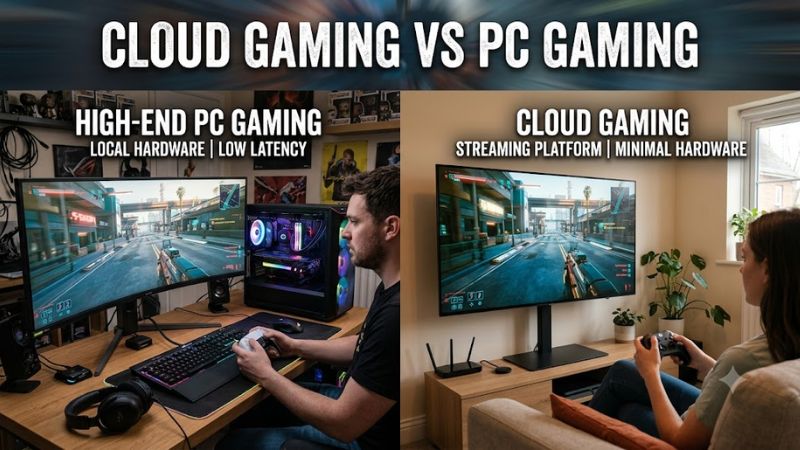
The fundamental distinction between cloud platforms and local desktop systems lies in where data rendering occurs. Local computers execute instructions directly on internal silicon components to deliver raw frame output without network overhead. Remote platforms shift that processing burden to offsite server clusters, sending compressed video feeds across internet routes directly to your display screen.
Input Latency and Render Pipeline Differences
Local computer systems process controller inputs through internal system buses directly to the graphics card, yielding input latencies under 15 milliseconds. Cloud platforms must transmit user actions to a distant data center, render the frame, encode the video stream, and decode it locally. This additional network hop introduces total latency ranging from 35 to 70 milliseconds depending on router distance.
Competitive titles like fast first-person shooters reveal these transmission delays instantly during quick mouse movements. A local desktop using an NVIDIA GeForce RTX 4070 Super paired with an AMD Ryzen 7 7800X3D CPU processes player inputs without network transmission delays. Cloud users experience slight delays that make rapid aiming adjustments feel sluggish during high-speed online matches.
Visual Fidelity and Video Codec Compression
Local rendering provides uncompressed frame output directly over DisplayPort or HDMI cables to your gaming monitor. Every individual pixel displays sharp edge detail, precise color depth, and artifact-free dark gradients. Local graphics hardware maintains consistent visual density regardless of network congestion or local internet bandwidth limits.
Cloud platforms rely on video codecs like H.265 or AV1 to compress output before sending it across web connections. High-motion scenes with dense foliage, fog, or particle effects often exhibit compression banding and reduced clarity. While NVIDIA GeForce NOW Ultimate delivers up to 4K resolution at 120 frames per second, streaming bitrates compress subtle shadow details.
Hardware Upfront Cost and Long Term Value
Building a modern 1440p desktop requires an initial outlay between $1,200 and $1,600 for components and peripherals. Users must procure a dedicated graphics card, multi-core processor, DDR5 memory modules, and high-speed NVMe storage. Despite high initial expenses, local systems offer full component upgradeability and long-term hardware ownership.
Cloud services eliminate expensive initial equipment purchases by allowing users to stream games on thin clients or mini PCs. NVIDIA GeForce NOW Ultimate costs $19.99 monthly, while Xbox Game Pass Ultimate provides cloud access for $19.99 per month. Over three years, subscription fees total around $720, making remote streaming cheaper short term.
What Does Not Help Streaming Performance
Attempting to fix cloud stream stuttering through system registry adjustments or memory cleaning utilities yields zero operational benefit. Software utilities that clear background system memory cannot fix network routing delays or packet loss between your router and remote servers. Disabling Windows telemetry services also fails to alter streaming stream consistency.
Network stability depends strictly on physical connection infrastructure rather than internal operating system tweaks. Replacing wireless connections with a Cat6 Ethernet cable directly reduces packet jitter and unexpected latency spikes. Subscribing to higher internet bandwidth tiers or upgrading local router firmware provides actual stability improvements for game streaming.
How to Decide Between Cloud Gaming vs PC Gaming: Step by Step
Choosing between a cloud subscription and building a local computer requires evaluating your personal home network and performance goals. Follow these four diagnostic steps to determine whether your current setup supports smooth remote streaming or requires dedicated local desktop hardware. Comparing these requirements ensures you invest in the correct gaming platform.
| Step | Where | Effect | Risk |
| Measure Network Ping | Router & Speedtest | Establishes transmission delay limits | High latency over Wi-Fi connections |
| Assess Display Specs | Monitor Settings | Determines target frame rate potential | Panel refresh bottlenecks |
| Review Game Titles | Steam & Epic Stores | Confirms publisher streaming rights | Game removals from catalogs |
| Calculate Total Costs | Hardware Retailers | Balances initial outlay with subscription | Component obsolescence over time |
Step 1: Measure Network Bandwidth and Network Ping
Begin by checking your home internet connection using dedicated network diagnostic tools to measure download bandwidth and latency. Streaming 4K video at 120 frames per second on NVIDIA GeForce NOW Ultimate requires at least 45 Mbps bandwidth. Xbox Cloud Gaming requires a minimum 20 Mbps connection for stable 1080p streaming output.
Physical distance to remote data centers dictates whether your ping remains below the recommended 40 millisecond threshold. A high-bandwidth connection with 80 milliseconds of latency results in noticeable control lag during gameplay. Connecting your device directly to your router via Ethernet prevents packet loss caused by wireless network interference.
Step 2: Compare Display Capabilities and Target Frame Rates
Examine your monitor resolution and refresh rate capabilities before selecting a platform path for your setup. Local mid-range graphics cards, like the NVIDIA GeForce RTX 4070 Super, average 85 FPS in Cyberpunk 2077 at 1440p Ultra settings according to Tom’s Hardware benchmarks. Local hardware drives high-refresh panels cleanly without streaming compression.
If you own a standard 60 Hz television or basic office monitor, cloud streaming services provide adequate visual performance. However, driving a 240 Hz competitive display requires consistent local frame delivery that cloud networks struggle to match. Matching your platform to display capabilities prevents wasting money on unutilized monitor specs.
Step 3: Review Digital Game Libraries and License Rights
Check whether your favorite game titles are supported on cloud platform server networks before purchasing subscriptions. GeForce NOW requires you to own supported titles on Steam or Epic Games Store, but some publishers opt out. Xbox Cloud Gaming includes a curated library, though games periodically leave the service rotation without warning.
Local desktop computers run any PC compatible software title without publisher restriction or remote library removals. Owning hardware allows installing custom mods, user patches, and offline single-player modes without active internet connections. Evaluating your game library preferences prevents unexpected access losses on subscription platforms.
Step 4: Calculate Total Local Hardware Investment Costs
Calculate your long-term budget across a three-year period to compare total financial ownership expenses accurately. A custom desktop built with an Intel Core i5-14600K, 32GB DDR5 RAM, and PCIe 4.0 SSD costs roughly $1,400 initially. This setup handles local gaming independently without requiring ongoing monthly membership charges or active internet connectivity.
Cloud streaming requires minimal initial expenditure, making it ideal for casual players unwilling to spend $1,000 upfront. However, three years of continuous top-tier subscriptions plus required high-speed internet service narrows the long-term cost gap. Choosing between cloud gaming vs pc gaming ultimately balances immediate cash output against total ownership freedom.
Frequently Asked Questions
Understanding network requirements and hardware capabilities helps clarify common questions about remote streaming performance. Below are direct answers regarding responsiveness, internet bandwidth demands, mod support, and total platform ownership costs.
Is cloud gaming faster than local PC gaming?
Local PC gaming delivers faster input responsiveness because system processing occurs directly on internal desktop hardware. Cloud platforms require extra time to encode, transmit, and decode video signals across distant internet servers. This transmission pipeline adds between 20 and 50 milliseconds of input delay compared to dedicated local computer setups.
High-end cloud tiers run on fast server GPUs, but network distance prevents them from matching local input speeds. Players seeking maximum competitive responsiveness in fast esports titles benefit from local execution. For slower single-player titles, cloud platform speeds remain sufficient for enjoyable everyday casual gameplay experiences.
Does cloud gaming require a fast internet connection?
Cloud gaming requires a stable internet connection with at least 25 Mbps for 1080p and 45 Mbps for 4K streaming. Connection consistency and low network ping matter significantly more than raw download speed numbers alone. A 100 Mbps connection with high jitter produces worse stream stuttering than a stable 50 Mbps fiber link.
Using a wired Ethernet connection prevents packet drops and signal degradation common on 5GHz Wi-Fi networks. High network latency above 80 milliseconds introduces noticeable button lag during interactive game sessions. Verifying your router stability ensures your internet setup supports continuous high-bitrate video decoding.
Can you play mods when using cloud gaming platforms?
Cloud gaming platforms generally do not support custom file mods or third-party game modifications on their servers. Services stream pre-configured game installations from protected data centers to maintain security and system stability. Players cannot access local game directories to install custom scripts, texture packs, or community add-ons.
Local desktop computers offer total access to system drives, enabling complete game modding through platforms like Nexus Mods. Local installations allow customizing game files, applying fan patches, and running reshade scripts freely. If game modding is central to your experience, local desktop hardware remains the necessary platform choice.
Which option costs less over a three year period?
Cloud gaming costs less over three years for users who already own compatible display devices and client hardware. A three-year subscription to GeForce NOW Ultimate totals approximately $720 compared to $1,400 for a mid-range local PC. However, local hardware retains residual resale value and functions without mandatory monthly subscription payments.
Users who stream games casually save substantial funds upfront by avoiding expensive graphics card purchases. Gamers playing daily for multiple years often prefer owning physical hardware despite higher initial entry costs. Comparing long-term subscription fees against hardware depreciation clarifies the true financial investment required.
Final Thoughts
Deciding between cloud gaming vs pc gaming rests on your budget flexibility, internet stability, and performance expectations. Cloud streaming offers an accessible entry point without expensive upfront hardware purchases, provided you possess low-latency fiber internet. Local desktop computers require higher initial investments but deliver uncompressed graphics, zero network latency, full modding freedom, and permanent offline access.
Ready to decide? Our #1 pick for 2026 is the Step.
Live price & availability on Amazon.