You can play cloud games in your browser by opening a browser-based service such as GeForce NOW, Xbox Cloud Gaming or Boosteroid, signing in, and launching a supported game; nothing needs to be installed. Chrome and Edge are the safest browsers across all of them. What differs is the catalog model: some services stream games you already own, while others stream a library included with a subscription.
- Short answer: which cloud gaming websites work in a browser
- Cloud gaming websites: how browser play works
- Free cloud gaming website: what really costs nothing
- Cloudgaming sites to download: when you need an app and when you do not
- What internet speed does a browser stream need?
- Step-by-step: your first browser session
- Which browser, device and service? A decision matrix
- Troubleshooting: symptom, cause, fix
- Frequently asked questions
- Sources we checked
Short answer: which cloud gaming websites work in a browser
Four cloud gaming websites matter for browser play in November 2026, and each lists browser access on its own pages. The table below shows how they differ before the detail. If you only want the no-cost options, our hub on free cloud gaming services ranks them by how much they actually let you play.

XBOX Wireless Gaming Controller | Carbon Black | Textured triggers and bumpers, Hybrid D-pad, XBOX Wireless, Bluetooth, USB-C, Play across Console & PC & Cloud Devices
Included for 'How to Play Cloud Games in Your Browser Without Installing Anything' because the listing specifies Carbon Black and Textured triggers and bumpers, details this guide uses to compare options.
View on Amazon
GameSir G7 Pro Wireless XBOX Controller,TMR Sticks,Windows,Trigger Stops | XBOX Series X|S,Hall Effect Triggers, 4 Remappable Buttons,1000Hz ,PC Controller,Charging Dock,Zenless Zone Zero Edition
Included for 'How to Play Cloud Games in Your Browser Without Installing Anything' because the listing specifies TMR Sticks and Windows, details this guide uses to compare options.
View on Amazon
Xbox Wireless Controller – Black
Included for 'How to Play Cloud Games in Your Browser Without Installing Anything' because the listing specifies Black, details this guide uses to compare options.
View on Amazon| Service | Browser play | Games come from | Free route |
|---|---|---|---|
| GeForce NOW | Yes, at play.geforcenow.com on Windows, macOS and supported Chromebooks | Games you own on supported stores | Free membership with queues |
| Xbox Cloud Gaming | Yes, in Edge, Chrome or Safari | Xbox catalog, games you own, a qualifying Game Pass plan | Ad-supported with session limits |
| Boosteroid | Yes, “No downloads! Play in browser” | Games you already own on supported stores | None listed on its home page |
| Luna | Yes, as a web app, per reports (Chrome, Edge, Safari) | Luna’s own catalog under its plans | Check Luna’s page; plans changed in 2026 |
Cloud gaming websites: how browser play works
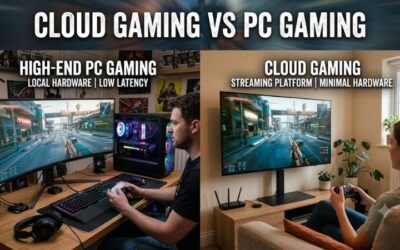
In browser cloud gaming, a remote machine runs the game and your browser only receives video and sends back your inputs. That is why a weak laptop or a Chromebook can run demanding games. The browser decodes the stream, so a recent version of Chrome, Edge or Safari matters more than your graphics card. It also explains why the connection, not the hardware, usually decides how good the game feels.
The general steps are the same everywhere: open the service’s site in a supported browser, sign in with the account the game library is tied to, link or pick your games, then launch. The details below cover what each service asks for.
GeForce NOW in a browser
GeForce NOW streams in the browser at play.geforcenow.com, and NVIDIA’s own FAQ names Windows, macOS and supported Chromebooks for that route. NVIDIA’s system requirements list Chrome 77 or later, Edge 91 or later on Windows, and Safari 16.4 or later on macOS, with Opera GX and Firefox on Windows also listed. NVIDIA’s download page directs iPhone and iPad users to a separate “learn more” route instead of a plain browser launch, so check that page for your device.
You need to own the game on a supported store: NVIDIA’s FAQ names Steam, Epic Games Store, Ubisoft Connect, Battle.net, EA app, GOG and Xbox. Free members can hit queues at busy times, and NVIDIA says paid members get priority access with less waiting. Our GeForce NOW free guide covers the free tier in detail.
Xbox Cloud Gaming in a browser
Xbox Cloud Gaming runs in Microsoft Edge, Google Chrome or Safari, and it now has an ad-supported free route as well as Game Pass cloud hours. Xbox’s page says you can stream eligible games for free with ads where available, with session limits. A plan adds monthly hours: Xbox lists 5 for Essential, 10 for Premium and 15 for Ultimate. You also need a controller over Bluetooth or USB for most games, although select games support touch. The full breakdown is in our guide on whether Xbox Cloud Gaming is free.
Boosteroid in a browser
Boosteroid describes itself as browser-first, with “No downloads! Play in browser” on its home page. It lists browser access on Windows, Apple and Linux, a web app on ChromeOS, and browsers on Android and webOS TVs. It requires a subscription, and its page frames the model as launching games you already own, with no free tier or trial mentioned there. If a free trial exists, it will be on the service’s own sign-up flow, so confirm before you sign up.
Luna in a browser
Luna runs as a web app. Reports list Chrome, Edge and Safari as supported, including on iPhone and iPad, where it runs in the browser instead of an app-store app. Luna’s catalog and plans were reorganized during 2026, so read Luna’s own page for the current plan list and which games are available before you commit time to it.
What about Shadow?
Shadow is different from the others: editorial comparisons describe it as a full cloud Windows PC where you install your own launchers, rather than a streamed game list. It is aimed at people who want a remote desktop that behaves like a gaming PC. Because it is a persistent PC, check its page for current browser and device support before relying on it.
Free cloud gaming website: what really costs nothing
The legitimate free routes are Xbox’s ad-supported tier and GeForce NOW’s free membership, and both come with limits. Xbox asks you to watch ads and caps session length. GeForce NOW free members get basic rigs and may wait in a queue. Anything described as free with no limits, no account and a huge library should be treated with suspicion.
Warning signs on “free cloud PC” sites
- No sign-in at all. Licensed games need an account somewhere.
- Cracked or “unlocked” games or shared accounts. This is piracy or account misuse, and we do not recommend it.
- Requests for card details for a “free” trial from a service you cannot verify.
- Unfamiliar download links for a client you do not need. See the next section.
- Addresses that imitate a known service with extra words or odd domains.
Cloudgaming sites to download: when you need an app and when you do not
For most services you do not need to download anything; an app is an optional convenience, not a requirement. NVIDIA’s own wording is “Download the GeForce NOW app, or start playing directly from your supported browser.” Apps can add features such as higher-resolution modes or better controller handling on some platforms, so check what your plan lists for your device.
If you do choose an app, get it from the service’s own website or your device’s official app store, and type the address yourself instead of following an ad. A search for “cloud gaming download” is a common route for look-alike installers. Do not install a client that a random site, video description or forum post links to.
What internet speed does a browser stream need?
Plan on at least 15 to 25 Mbps for one 720p to 1080p stream, and more for higher quality, with 5 GHz Wi-Fi or Ethernet. NVIDIA publishes the clearest table, and it shows how quality scales with speed.
| Quality target | GeForce NOW stated speed | Data per hour at that rate |
|---|---|---|
| 720p at 60 fps | 15 Mbps | about 6.75 GB |
| 1080p at 60 fps | 25 Mbps | about 11.25 GB |
| 1440p at 120 fps | 35 Mbps | about 15.75 GB |
| 4K at 120 fps | 45 Mbps | about 20.25 GB |
Worked example: is your connection enough?
Say your line gives you 100 Mbps, but two others in the house are streaming video at 25 Mbps each. That leaves about 50 Mbps. A 1080p60 stream at 25 Mbps fits comfortably, and a 1440p120 stream at 35 Mbps also fits, though with only 15 Mbps spare you have little margin for a speed dip. The data column is a simple conversion, not a measurement: Mbps divided by 8 gives megabytes per second, times 3,600 gives megabytes per hour. At 25 Mbps that is 3.125 MB per second, or 11.25 GB an hour, so a capped data plan matters.
NVIDIA also says network latency should stay below 80 ms to its data centers and recommends wired Ethernet or a 5 GHz router. Xbox’s reported requirements are 10 Mbps minimum with 20 Mbps better on consoles, PCs and tablets. For the full picture of ping, jitter and Wi-Fi, read cloud gaming internet speed requirements.
Step-by-step: your first browser session
- Update your browser. Use the current Chrome, Edge or Safari. Disable extensions that block scripts or video on the service’s site if the stream will not start.
- Pick a service by library. If you own games on Steam or Epic, start with GeForce NOW or Boosteroid. If you want Xbox games, start with Xbox.
- Go to the official site by typing the address, then sign in with your own account.
- Link your game stores where the service asks, so it can see what you own.
- Connect a controller by Bluetooth or USB, or use the touch controls where a game offers them.
- Use 5 GHz Wi-Fi or Ethernet and close downloads and video calls.
- Launch a short, forgiving game first to check picture quality and delay before you commit to a long session.
- Adjust quality settings down one step if you see stutter, instead of changing your whole network.
Which browser, device and service? A decision matrix
| Your situation | Start with | Why |
|---|---|---|
| Windows laptop, games on Steam or Epic | GeForce NOW in Chrome or Edge | Plays games you own; browser route listed by NVIDIA |
| Chromebook | GeForce NOW or Boosteroid | Both list ChromeOS support; see cloud gaming on a Chromebook |
| Mac with Safari | GeForce NOW (Safari 16.4 or later) or Xbox | Safari is on the supported lists |
| You want to try something for free | Xbox free tier or GeForce NOW free | Both have limits; ads or queues |
| You want to compare two big names | Read the head to head | See GeForce NOW vs Xbox Cloud Gaming |
| Steam Deck desktop mode | Xbox in a browser | See Xbox Cloud Gaming on Steam Deck |
Troubleshooting: symptom, cause, fix
| Symptom | Likely cause | Fix |
|---|---|---|
| Stream will not start | Unsupported or outdated browser | Update Chrome or Edge, or switch to another supported browser |
| Black screen or no audio | Autoplay or permissions blocked | Allow sound and full-screen for the site; reload |
| Long wait before launch | Free-tier queue | Try off-peak hours or a different service |
| Blocky picture | Low bandwidth or busy Wi-Fi | Move to 5 GHz or Ethernet; lower the stream quality |
| Input delay | High latency or Wi-Fi interference | Wired connection; closer router; see routers for gaming |
| Controller ignored | Not paired or a browser permission | Pair first, then open the site; press a button to wake it |
| Game not in the list | Not cloud-enabled or not owned | Check the service’s supported-game list |
Frequently asked questions
Can you play cloud games in a browser without installing anything?
Yes. GeForce NOW, Xbox Cloud Gaming, Boosteroid and Luna all offer browser play, though apps are optional on some.
Which browser is best for cloud gaming?
Chrome and Edge are on every supported list. Safari works for Xbox and for GeForce NOW on macOS 16.4 or later. Keep your browser updated.
Is there a free cloud gaming website?
Xbox’s ad-supported tier and GeForce NOW’s free membership are free, with session limits or queues. Both need an account.
Do cloud gaming sites give me games?
It depends. GeForce NOW and Boosteroid stream games you already own. Xbox and Luna include catalogs under their plans.
Is it safe to download a cloud gaming client?
Only from the service’s official site or your device’s official store. Avoid links from ads, forums or videos.
Do I need a controller?
Many games work with mouse and keyboard on a PC. Xbox usually needs a Bluetooth or USB controller, with touch for select games.
Will it work on a Chromebook?
Yes on supported models: NVIDIA lists supported Chromebooks and Boosteroid lists a ChromeOS web app. Check each service’s compatibility page.
Why does the stream look worse than my own PC?
The video is compressed and capped by your bandwidth. A faster, wired connection and a higher quality setting help.
Sources we checked
NVIDIA GeForce NOW system requirements; NVIDIA GeForce NOW FAQ; NVIDIA GeForce NOW download page; Xbox Cloud Gaming page on xbox.com; Boosteroid home page; editorial roundups of cloud gaming services for Luna and Shadow details.
Last updated: November 2026