Affiliate disclosure: As an Amazon Associate we earn from qualifying purchases. This post contains affiliate links — we may earn a small commission at no extra cost to you. This never affects our picks. Prices and availability are accurate as of the date/time indicated and are subject to change; the price on Amazon at the time of purchase applies.
- Quick Comparison Table
- 1. Aula WIN60 HE: Best for fast, adjustable 60% play
- 2. Keychron B6 Pro: Best for quiet, wireless full-size typing
- 3. Logitech G213 Prodigy: Best for a dependable wired membrane-style board
- 4. Redragon K521: Best for a full-size mechanical-feeling starter
- How to Choose
- Frequently Asked Questions
- About the Author
- Related Articles
Quick answer: The best keyboards under 50 start with the Aula WIN60 HE for fast 60% gaming. The Keychron B6 Pro suits quiet wireless typing, the Logitech G213 is a dependable wired board, and the Redragon K521 is a full-size starter.
This guide compares four keyboards that fit a strict budget of 50 dollars, covering a 60% magnetic-switch gaming board, a slim wireless typing board and two full-size wired options. Comparisons use each listing’s published specs; we did not run our own benchmarks. Our store has only a few keyboards in this range that clearly state what they are, so we skipped unbranded listings and keyboard-and-mouse bundles.
Quick Comparison Table
| # | Model | Key specs (per listing) | Best for |
|---|---|---|---|
| 1 | Aula WIN60 HE | 60% wired, magnetic switches, hot-swappable, rapid trigger, 8000 Hz polling | fast, adjustable 60% play |
| 2 | Keychron B6 Pro | Full-size, ultra-slim, 2.4 GHz/Bluetooth 5.2/USB-C, up to 1200 hours | quiet, wireless full-size typing |
| 3 | Logitech G213 Prodigy | Full-size wired, Mech-Dome keys, palm rest, LIGHTSYNC RGB, media controls | a dependable wired membrane-style board |
| 4 | Redragon K521 | 104-key wired, mechanical feeling, rainbow LED, anti-ghosting, multimedia keys | a full-size mechanical-feeling starter |
1. Aula WIN60 HE: Best for fast, adjustable 60% play
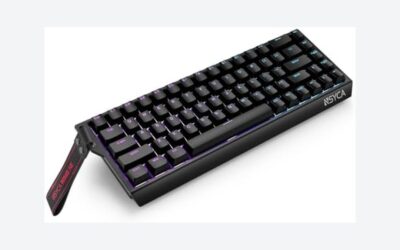
Specs per the listing: 60% wired mechanical gaming keyboard, magnetic switches, hot-swappable, adjustable actuation, Rapid Trigger mode, 8000 Hz polling rate, RGB, compact design. Key count not listed.
Magnetic switches with adjustable actuation and a Rapid Trigger mode are features that used to appear only on far more expensive boards. Rapid Trigger resets a key the moment you let it rise, which helps in fast shooters where quick direction changes matter. The 8000 Hz polling rate is also high for a keyboard in this class.
The 60% layout drops the function row, arrow keys and numpad, so you reach those through a function layer. That is fine for gaming and tight desks, but a poor fit for spreadsheets or anyone who uses arrow keys all day. Hot-swappable switches suggest you can change switches later, though the listing does not say which types fit.
- Pros: Adjustable actuation and Rapid Trigger; 8000 Hz polling rate; Hot-swappable
- Cons: 60% layout lacks arrows and numpad; Compatible switch types not listed
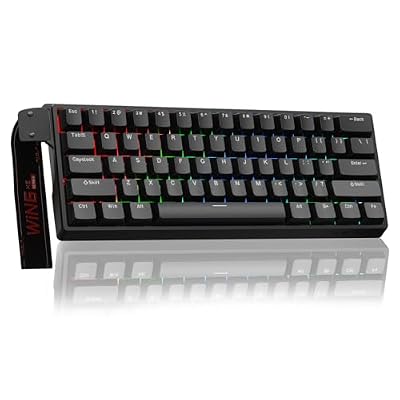
Aula WIN60 HE - 60% Mechanical Gaming Keyboard Wired, Magnetic Switch Hot Swappable, Adjustable Actuation Rapid Trigger Mode, 8000 Hz Polling Rate, RGB Small Keyboard 60 Percent Compact Design for PC
Included for 'Best Keyboards Under 50 Dollars for Gaming and Typing' as a representative home product in this roundup; selection reflects the product set returned for this topic.
View on Amazon2. Keychron B6 Pro: Best for quiet, wireless full-size typing
Specs per the listing: Ultra-slim full-size wireless keyboard with numeric keypad, quiet typing, multi-device connection via 2.4 GHz, Bluetooth 5.2 or USB-C wired, ZMK launcher, up to 1200 hours battery life.
This is the pick for someone who types as much as they play. A full-size layout with a numeric keypad, quiet keys and three connection modes makes it easy to switch between a desktop and a laptop. The listing quotes up to 1200 hours of battery life, which is long for a wireless board.
It is built as an office keyboard, not a gaming one. The ultra-slim profile and low-travel keys feel different from tall mechanical switches, and the listing does not mention gaming features such as Rapid Trigger or RGB. Choose it if comfort and quiet matter more than raw speed.
- Pros: Wireless with Bluetooth and 2.4 GHz; Long battery life per the title; Quiet, slim, full-size
- Cons: Not a gaming-focused board; Slim keys differ from tall mechanical switches

Keychron B6 Pro Ultra-Slim Full-Size Wireless Keyboard - Space Gray | Numeric Keypad Quiet Typing Multi-Device 2.4 GHz/Bluetooth 5.2/USB-C Wired ZMK Launcher Up to 1200 Hours Battery Life
Included for 'Best Keyboards Under 50 Dollars for Gaming and Typing' as a representative home product in this roundup; selection reflects the product set returned for this topic.
View on Amazon3. Logitech G213 Prodigy: Best for a dependable wired membrane-style board
Specs per the listing: Wired full-size gaming keyboard with Mech-Dome keys, integrated palm rest, adjustable feet, media controls, LIGHTSYNC RGB, USB, compatible with Windows.
The G213 is a known name with a simple setup: plug it in and play. Mech-Dome keys aim to give a feel between a standard membrane keyboard and a mechanical one, and the palm rest and media controls add everyday comfort that many compact boards skip.
This is not a mechanical keyboard in the strict sense, so enthusiasts expecting a clicky or linear switch will find the feel different. The listing names only Windows compatibility, so Mac and Linux users should check the maker page. For a plain, reliable board from a well-known brand, it makes a safe pick.
- Pros: Palm rest and media controls; LIGHTSYNC RGB; Familiar brand
- Cons: Mech-Dome, not true mechanical; Only Windows listed

Logitech G213 Prodigy Gaming Keyboard, Wired Keyboard – Black | Mech-Dome Keys, Palm Rest, Adjustable Feet, Media Controls, LIGHTSYNC RGB, USB, Compatible with Windows
Included for 'Best Keyboards Under 50 Dollars for Gaming and Typing' as a representative home product in this roundup; selection reflects the product set returned for this topic.
View on Amazon4. Redragon K521: Best for a full-size mechanical-feeling starter
Specs per the listing: Wired 104-key gaming keyboard, mechanical feeling, rainbow LED backlight, multimedia keys, one-touch backlit control, anti-ghosting, compatible with PC, Mac, PS4/5 and Xbox.
The K521 covers the basics for someone who wants a full-size layout with lighting and works with multiple platforms, including consoles. It lists anti-ghosting and multimedia keys, which handle simultaneous inputs and everyday controls.
Note the wording: mechanical feeling, which usually means a non-mechanical key mechanism designed to feel similar. That is a fair starting point, but it will not match a true mechanical keyboard. If you plan to upgrade later, treat this as an affordable first board, and check the maker page for details such as cable length.
- Pros: Full 104-key layout; Works with PC, Mac and consoles; Anti-ghosting
- Cons: Mechanical feeling is not true mechanical; Cable and build details not listed
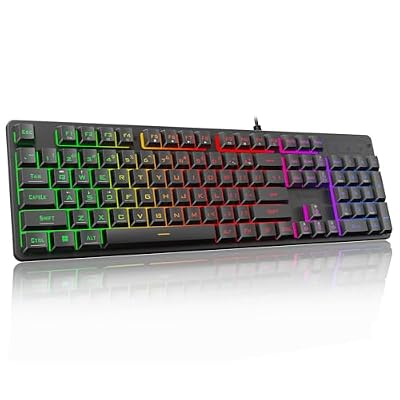
Redragon K521 Upgrade Rainbow LED Gaming Keyboard, 104 Keys Wired Mechanical Feeling Keyboard with Multimedia Keys, One-Touch Backlit, Anti-Ghosting, Compatible with PC, Mac, PS4/5, Xbox
Included for 'Best Keyboards Under 50 Dollars for Gaming and Typing' as a representative home product in this roundup; selection reflects the product set returned for this topic.
View on AmazonHow to Choose
Decide on layout first
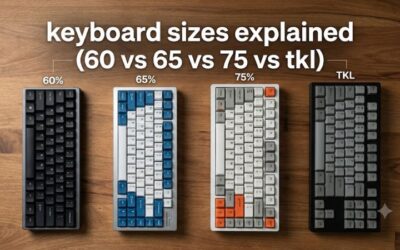
Full-size boards have a numeric keypad and suit office work. 60% boards save desk space and give the mouse more room, but you lose the arrow keys and function row as dedicated keys. If you use spreadsheets or need arrow keys often, a full-size board is easier. For pure gaming, 60% is fine.
Know what the switch type means
True mechanical keyboards use individual switches. Mech-Dome and mechanical-feeling keyboards use rubber domes designed to feel similar. Magnetic switches, as on the Aula, use sensors for adjustable actuation. Read the listing carefully, since mechanical feeling is not the same as mechanical, and set expectations accordingly.
Wired or wireless
Wired boards have no latency from wireless and never need charging, which is why competitive players prefer them. Wireless boards such as the Keychron B6 Pro are tidier and let you switch between devices. If you choose wireless, check the connection types: 2.4 GHz is usually lower latency than Bluetooth.
Check compatibility and extras
Confirm the keyboard works with your operating system, since one listing here names only Windows. Palm rests, media keys and RGB lighting are comfort features, not performance features. Spend your limited budget on the layout and switch feel you will use daily, and skip no-name listings with vague titles.
Why we left some listings out
Two other listings in the store were skipped on purpose. One is an unbranded 60% board whose title names no maker, and the other is a keyboard-and-mouse set, which bundles a mouse you may not need. When a known brand with a clear title exists, it is the safer choice, because you can look up the manual, driver software and warranty terms on the maker page before buying. That is why this list has four picks, not five.
Keep realistic expectations at this level
A keyboard in this range will not have the heft, sound dampening or switch quality of boards that cost several times more. Expect plastic cases and basic keycaps. What you can reasonably expect is a clean layout, working lighting and dependable input, so judge each board on the one or two features that matter most to you.
Frequently Asked Questions
Can a keyboard under 50 be good for gaming?
Yes. Features such as adjustable actuation and high polling rates now appear on lower-cost boards. Pick a layout you like, and keep expectations realistic about build quality.
What does 60% mean?
A 60% keyboard removes the function row, arrow keys and numpad to save space. You access them through a function layer. It suits gaming and small desks, but not heavy typing.
Is a mechanical-feeling keyboard the same as mechanical?
No. It uses a different key mechanism designed to feel similar. It is fine for starters, but it will not have the swappable switches or feel of a true mechanical board.
Is wireless good enough for gaming?
A 2.4 GHz connection is usually good for casual gaming, and wired is safer for competitive play. Bluetooth has more latency. The Keychron B6 Pro is designed more for typing.
Do these keyboards work on Mac?
Compatibility varies. The Redragon K521 lists PC, Mac and consoles, while the Logitech G213 lists Windows. Check the maker page for the Aula and Keychron models before buying.