
- Top Pick: TECKNET Wired Gaming Keyboard, RGB Backlit Keyboard with Metal Panel Design
- Best Value: Redragon S101M-KS Gaming Keyboard and Mouse Wireless with Tri-Mode, RGB Keyboard and 4800 DPI Gaming Mouse, 10 Independent Multimedia Keys for Wins, PC, Computer, Wireless S101 Ideal for Gamer
- Premium Choice: Redragon S101-3 PRO Gaming Keyboard and Mouse, RGB Backlit Programmable Keyboard Mouse with Software, Independent Macro Record Keys, Value Combo Set, New Update Version
Shopping for a gaming keyboard means wading through vague marketing terms like “mechanical feel,” conflicting DPI numbers on bundled mice, and a sea of RGB lighting claims that don’t tell you anything about actual performance. Most buyers end up overpaying for features they’ll never use or underpaying for a keyboard that starts double-registering keystrokes within a few months of daily play.
This guide cuts through the noise and breaks down six popular options, from budget wired boards to wireless combos with rechargeable batteries, so you can match a keyboard to your genre, budget, and setup without guesswork.
Related guide: Logitech mouse under $100


As an Amazon Associate we earn from qualifying purchases at no extra cost to you.




🎮 Get More From Your Setup — Free
Prime Gaming gives you free PC games every month, in-game loot, and a free Twitch channel sub — plus fast free shipping on all the gear above. New members get a 30-day free trial.
Watch: Best Gaming PC Keyboard — Video Review
How to Choose a Gaming PC Keyboard (2026)
- Switch type: True mechanical switches offer the most precise, consistent feedback, but well-tuned “mechanical-feel” membrane keyboards can be a solid budget alternative for casual play.
- Wired vs. wireless: Wired keyboards guarantee zero input lag for competitive games, while wireless models add desk flexibility but need good battery life and a reliable 2.4GHz or tri-mode connection.
- Anti-ghosting and key rollover: Make sure the keyboard supports full anti-ghosting on common key combos (WASD plus movement keys) so simultaneous inputs register correctly during fast-paced action.
- Programmable macros and software: If you play MMOs, MOBAs, or shooters with complex binds, look for dedicated macro keys and companion software to save custom profiles.
- Build and layout: A metal top panel resists flex and feels sturdier long-term, while a full 104-key layout with a numpad matters if you also use the keyboard for work or spreadsheets.
The Best Gaming PC Keyboard (2026)s Reviewed
TECKNET Wired Gaming Keyboard
The metal top panel gives this budget wired board a noticeably sturdier feel than most keyboards in its price range, and the RGB backlighting is bright and evenly distributed across keycaps. It’s a smart pick for anyone who wants a reliable, no-frills board for everyday gaming without spending on mechanical switches.
Redragon S101M-KS Wireless Combo
Tri-mode connectivity (2.4GHz, Bluetooth, and wired) makes this combo unusually flexible for a budget set, and the 4800 DPI mouse pairs well with the keyboard’s 10 independent multimedia keys. It’s a strong value option for gamers who want to go cable-free without giving up quick media controls.
Redragon S101-3 PRO Combo
This updated version adds independent macro record keys and companion software, letting you save custom binds directly to the keyboard, a genuine upgrade for MMO and strategy players. The RGB backlighting and programmable layout make it punch above its price point as a full desk setup.
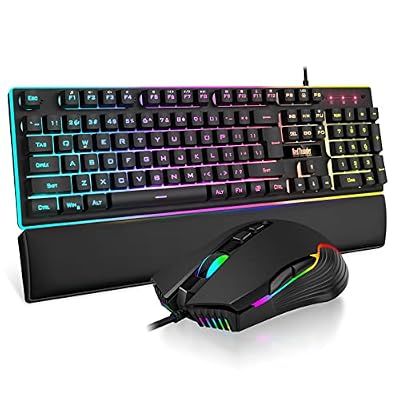
RedThunder K10 Wireless Combo
A 3800mAh rechargeable battery keeps this combo running for extended sessions between charges, and the mechanical-feel switches with anti-ghosting hold up well under fast key presses. The included 7D 3200 DPI mouse rounds out a capable wireless package for gamers who hate cable clutter.
Logitech G213 Prodigy
Logitech’s build quality and driver support shine here, with consistent RGB lighting via Logitech G Hub and a spill-resistant design that’s held up well in long-term use reports. It’s a dependable wired choice for gamers who want brand reliability over flashy extras.
Related Guides
- Best MSI Gaming PCs in 2026
- Origin PC Chronos vs Falcon Northwest: 2026 Verdict
- Best Wireless Controller For PC in 2026: Complete Buyer's Guide
- Best Portable Gaming PCs (2026 Guide)
- Best Xbox 360 Wireless Controller in 2026: Complete Buyer's Guide
Frequently Asked Questions
Do I need a mechanical keyboard to game competitively?
Not strictly. True mechanical switches offer more consistent actuation and durability, but well-built mechanical-feel membrane keyboards with good anti-ghosting can still perform well for most players below a pro-competitive level.
Is wireless input lag noticeable for gaming?
Modern 2.4GHz wireless keyboards, like the tri-mode and rechargeable options here, are fast enough for the vast majority of gamers and won’t introduce perceptible lag outside of frame-perfect esports play.
What’s the benefit of a keyboard and mouse combo over separate peripherals?
Combos like the Redragon and RedThunder sets are usually cheaper than buying separately and guarantee compatible connectivity, though dedicated single-purpose peripherals can offer more specialized features if budget allows.
Are these keyboards compatible with consoles as well as PC?
Some are: the Redragon K521, for example, explicitly supports PS4/5 and Xbox in addition to PC and Mac, while others in this list are PC-focused, so check compatibility notes before buying if you switch between platforms.
Final Thoughts
For most gamers, the Redragon S101-3 PRO offers the best mix of programmable features and value, while the Logitech G213 Prodigy is the safer pick if you prioritize brand reliability and driver support; budget shoppers who want to go wireless should take a close look at the RedThunder K10 combo.
Top picks from this guide
 iBUYPOWERiBUYPOWER Scale Gaming PC Desktop Computer Intel Core i5 14400F…
 RedragonRedragon S101M-KS Gaming Keyboard and Mouse Wireless with Tri-Mode, RGB…
 RedThunderRedThunder K10 Wired Gaming Keyboard and Mouse and Wrist Rest…RedragonRedragon S101-3 PRO Gaming Keyboard and Mouse, RGB Backlit Programmable…








