🛒 Best Price Today on Amazon
Prime members get fast, free shipping on everything above, plus member-only deals. New members get a 30-day free trial — cancel anytime.
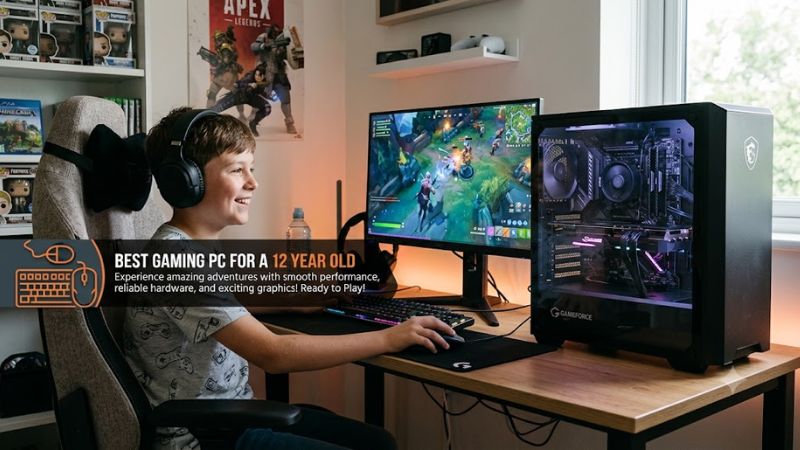
Buying the best gaming pc for a 12 year old is less about chasing maximum power and more about matching games, monitor resolution, storage needs, and family budget. For Roblox, Minecraft, Fortnite, schoolwork, and newer 1080p games, a balanced modern desktop with practical upgrade options makes more sense than a flagship tower.
How to Choose a Gaming PC for a 12 Year Old
For a first gaming desktop, prioritize a current discrete GPU, 16 GB of memory, SSD storage, and a processor appropriate for mainstream gaming. An RTX 5060-class system is a sensible 1080p target in 2026, while 32 GB becomes more useful for video editing, streaming, large modpacks, or heavier multitasking.
Match the GPU to the Games and Monitor
Start with the games and monitor rather than a brand name. A 1080p display keeps graphics demands below 1440p, so a GeForce RTX 5060 desktop can cover mainstream gaming without immediately moving into a higher GPU tier. The NZXT Player One combines that GPU with a Core i5-14400F, DDR5 memory, and NVMe storage.
The best gaming pc for a 12 year old should also fit expected settings. Roblox officially supports far weaker hardware, while Epic recommends 16 GB RAM and an NVMe SSD for Fortnite. An RTX 5060 system therefore provides considerable headroom for those games, although more demanding releases may still require adjusted settings at higher resolutions.
Choose Enough Storage for a Growing Library
Do not overlook storage because a child’s game library can grow quickly. A 1 TB SSD is a more comfortable starting capacity than 512 GB when Windows, launchers, several games, recordings, and school files share one drive. Every desktop selected here offers 1 TB-class NVMe storage or configurations that support it.
The Skytech Nebula combines a 1 TB NVMe SSD with 16 GB DDR5-6000 memory and a B760 DDR5 motherboard. That provides a straightforward first-PC platform without forcing an immediate storage replacement. Its notable compromise is the standard one-year parts, labor, and shipping warranty listed by Skytech.
Check Upgrade Compatibility Before Buying
Compatibility matters if future upgrades are expected. DDR5 memory cannot be installed in DDR4-only slots, while processor upgrades remain restricted by motherboard socket, chipset, firmware, and vendor support. Lenovo’s Legion Tower 5i Gen 10 uses a B860 motherboard platform with DDR5 and several modern graphics configurations.
A prebuilt also needs sufficient PSU capacity and physical clearance for later GPU upgrades. Check the exact card length, case clearance, PSU wattage, and power connector requirements for the specific configuration before purchasing replacement hardware. Never assume every model carrying the same family name uses identical internal components.
Consider Warranty and Parent-Friendly Ownership
Warranty coverage can matter more than a minor specification advantage when the owner is 12. NZXT lists a two-year warranty for Player systems, while Skytech lists a one-year standard warranty for the Nebula configuration. Other manufacturers vary by model and retailer, so confirm the precise SKU and support terms before checkout.
For a family wanting straightforward setup and conventional components, NZXT’s Player One is the easiest fit here. Buyers chasing a lower current price can consider Skytech, expansion-focused households can examine Lenovo, and families with limited desk space may prefer HP’s smaller OMEN 16L chassis rather than a larger full tower.
Top Picks for a 12-Year-Old Gaming PC
These systems target modern Windows gaming but use different platforms. NZXT and Skytech pair the Core i5-14400F with DDR5 and RTX 5060 graphics, Lenovo offers B860-based Core Ultra configurations, and HP sells several OMEN 16L processor and memory combinations. Always purchase by exact specification, not the product-family name alone.
| Product | Best For | Key Spec | Compatibility | Watch Out For |
| NZXT Player One | Best Overall | Core i5-14400F, RTX 5060 | DDR5, ATX PSU, NVMe SSD | Price can change |
| Skytech Nebula | Best Value | Core i5-14400F, RTX 5060 | B760 DDR5, 650 W Gold PSU | One-year standard warranty |
| Lenovo Legion Tower 5i Gen 10 | Best For Upgrades | B860, RTX 5060 options | DDR5, multiple SSD options | Higher pricing |
| HP OMEN 16L | Best For Small Desks | RTX 5060 configurations | DDR5, PCIe Gen4 NVMe | Many configuration variants |
NZXT Player One: Best Overall
For the best gaming pc for a 12 year old overall, Player One balances practical components: a Core i5-14400F processor, GeForce RTX 5060 8 GB graphics, 16 GB DDR5-5200 memory, and a 1 TB NVMe M.2 SSD. NZXT also specifies an H3 Flow case and a 650 W Gold ATX power supply for this configuration.
Who should buy it: families targeting 1080p gaming, schoolwork, and a desktop built around familiar components. The real weakness is price fluctuation; NZXT’s listed price has moved across recent crawls, so compare the live checkout price first. Families buying primarily for Roblox may not need this much graphics performance.
Skytech Nebula: Best Value
The Skytech Nebula is the value-focused choice because its current listing combines a Core i5-14400F and RTX 5060 with 16 GB DDR5-6000 and a 1 TB NVMe SSD. Skytech also specifies a B760 DDR5 motherboard and 650 W Gold PSU, avoiding the older DDR4 platform sometimes found in cheaper gaming desktops.
Who should buy it: parents wanting the same broad 1080p GPU class at a lower listed price and who accept shorter included coverage. Its main weakness is the one-year standard warranty rather than the component specification. It is less attractive for households that prioritize longer bundled support over upfront savings.
Lenovo Legion Tower 5i Gen 10: Best for Upgrades
The Legion Tower 5i Gen 10 is the stronger option for expansion-focused households. Lenovo lists a B860 mATX motherboard, DDR5 memory support, RTX 5060 through RTX 5070 Ti graphics options, and extensive SSD support. That gives the platform more upgrade flexibility than many basic prebuilts aimed strictly at entry-level use.
Who should buy it: families expecting to keep the tower for years while adding storage, memory, or potentially faster graphics. Its weakness is pricing; Lenovo’s current gaming listings can cost considerably more than simpler RTX 5060 prebuilts. It makes less sense when casual 1080p gaming and minimum spending are the priorities.
HP OMEN 16L: Best for Smaller Spaces
The OMEN 16L is the space-conscious pick. HP lists configurations with RTX 5060 graphics, DDR5 memory, and 1 TB PCIe Gen4 NVMe storage while using a comparatively compact desktop enclosure. That combination suits a smaller desk while retaining desktop-class graphics rather than relying on a mobile GPU inside a gaming laptop.
Who should buy it: families with limited floor or desk space that still want replaceable memory and storage. Its main weakness is configuration complexity because HP sells several processor, RAM, and GPU combinations under the OMEN 16L name. Verify the exact product number so the delivered hardware matches the intended specification.
Frequently Asked Questions
Parents usually ask about age suitability, memory, storage, and whether a desktop is preferable to a laptop. Those questions matter more than chasing small performance differences between similar RTX 5060 systems. The answers below focus on practical ownership, upgrade compatibility, and the needs of a first-time young PC gamer.
Is a Gaming PC Appropriate for a 12-Year-Old?
Yes, a gaming PC can be appropriate for a 12-year-old when the hardware matches the games and parents configure suitable account, privacy, purchase, and screen-time controls. The best gaming pc for a 12 year old does not require enthusiast components; a modern 1080p desktop already covers common gaming and school workloads.
Windows supports Microsoft Family Safety controls for connected child accounts, including screen-time schedules and app or game limits. Microsoft recommends using a standard user account for the child so family controls function correctly. These features are separate from hardware performance and should be configured before regular use begins.
Is 16 GB of RAM Enough for a 12-Year-Old?
Yes, 16 GB of RAM is enough for most mainstream gaming, browsing, voice chat, and homework workloads. Epic currently lists 16 GB RAM or higher in Fortnite’s recommended requirements. Moving to 32 GB becomes more relevant for video editing, Blender, large Minecraft modpacks, streaming, or unusually heavy multitasking.
The best gaming pc for a 12 year old should not be judged by memory capacity alone. A 32 GB machine with much weaker graphics can perform worse in games than a balanced 16 GB desktop with a stronger GPU. When upgrading later, match the motherboard’s DDR generation and follow the system vendor’s supported memory specifications.
Is a 1 TB SSD Enough for a Gaming PC?
Yes, a 1 TB SSD is a practical starting capacity for a first gaming desktop. It provides substantially more working room than 512 GB for Windows, launchers, games, recordings, and school files without immediately paying for oversized storage. Large libraries can still fill it, so available M.2 expansion matters for long-term ownership.
You do not need additional storage on day one. Use the included SSD first, monitor free capacity in Windows, and add another drive when the game library actually requires it. Lenovo explicitly lists multiple SSD expansion possibilities for the Legion Tower 5i Gen 10; other machines should be checked against their exact motherboard configuration.
Is a Desktop Better Than a Laptop for a 12-Year-Old?
A desktop is generally better when the computer will remain at one desk, because servicing and component upgrades are usually easier. A gaming laptop is more suitable when the child frequently moves between homes, school, or travel. The correct choice therefore depends more on mobility requirements than on the child’s age.
For the best gaming pc for a 12 year old, a tower also lets families replace the monitor, keyboard, mouse, storage, memory, or graphics hardware independently. The tradeoff is physical space because a desktop needs a monitor and dedicated setup area. Compact towers such as HP’s OMEN 16L reduce that footprint without becoming portable.
Final Thoughts
The best gaming pc for a 12 year old in 2026 is a balanced 1080p desktop rather than the most expensive tower available. Start around 16 GB DDR5, a 1 TB NVMe SSD, and an RTX 5060-class GPU, then choose NZXT, Skytech, Lenovo, or HP according to current price, warranty coverage, available space, and likely future upgrades.