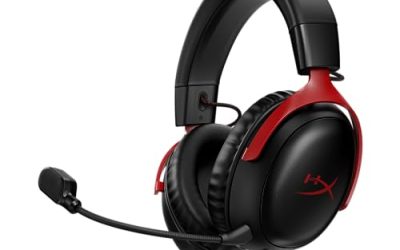
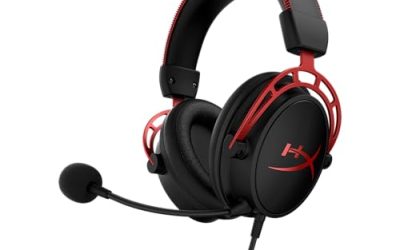
Our Short List of 3

- Best for: Singers who want a clear cardioid microphone, light comfort, and a direct wired connection to a phone or a PC.
- Drivers: 50mm TriForce Titanium drivers
- Surround sound: 7.1 surround sound, Windows 10 only
- Microphone: HyperClear cardioid microphone
- Noise isolation: advanced passive noise cancellation with closed earcups

- Best for: Singers who want USB and analog connections, a flip-to-mute microphone, and surround processing in one headset for phone and PC.
- Drivers: 50mm audio drivers
- Surround sound: 7.1 surround sound, DTS Headphone:X 2.0
- Microphone: flip-to-mute boom microphone
- Ear pads: leatherette ear pads

- Best for: Long singing sessions where a detachable microphone, a choice of ear pad textures, and a sturdy frame matter most.
- 53mm drivers
- 7.1 virtual surround sound through the included USB sound card
- Memory foam ear pads in leatherette and velour
- Durable aluminium frame
All 3 Picks at a Glance
| Product | Specs | Action |
|---|---|---|
| Razer BlackShark V2 X |
| Check price on Amazon |
| Logitech G432 Wired Gaming Headset |
| Check price on Amazon |
| HyperX Cloud II |
| Check price on Amazon |
Singing into a phone or a PC sounds simple until the recording plays back thin and muffled, and the headset is usually the reason. This guide reads the keyword exactly as written: “singingwith” is a joined-up spelling of singing with, so this article covers headsets for singing with mobile phones and PC, whether that means karaoke practice, recording cover vocals, or a live singalong session. The three picks pair closed-back ear cups that keep backing tracks in your ears with a boom microphone that captures your voice.
Each headset here connects by wire, which matters for singing, because a wired connection avoids delay that can throw your timing off against a backing track. All three work with both a phone and a PC through an audio jack or USB, so one headset covers rehearsal on the sofa and recording at the desk. We chose them for microphone clarity, a natural vocal sound, comfort during long sessions, and a connection that works on both kinds of device without extra hardware.
Quick Picks
As an Amazon Associate we earn from qualifying purchases
| Product | Best for | Key spec from title |
|---|---|---|
| Razer BlackShark V2 X | Clear vocals and light comfort | 50mm TriForce Titanium drivers, HyperClear cardioid microphone |
| Logitech G432 Wired Gaming Headset | Phone and PC recording with two connections | 50mm drivers, DTS Headphone:X 2.0, flip-to-mute boom microphone |
| HyperX Cloud II | Long sessions and a detachable microphone | 53mm drivers, 7.1 virtual surround sound, USB sound card |
How to Choose
Microphone clarity matters more than driver size
Big drivers make backing tracks sound full, but they do nothing for the voice your listeners hear, so judge a singing headset by its microphone first. A cardioid boom microphone placed near your mouth picks up far more of your voice and far less of the room than a microphone built into an ear cup or a cable. Look for a microphone you can position close to your mouth, a mute control you can reach without looking, and a windscreen or foam cover that softens breath sounds. All three headsets in this guide use a boom microphone, which is the single most useful feature for anyone recording vocals through a phone or a PC.
Choose a wired connection for timing
Singing against a backing track exposes delay that gaming and calls can hide, because even a small lag between the music in your ears and your own voice makes it hard to stay on the beat. A wired headset sends sound with no noticeable delay, while a wireless connection always adds some, and that gap grows when a phone is also handling recording and playback at once. Wired headsets also need no charging, so a long practice session never ends with a dead battery halfway through a song. If your phone has no headphone jack, a small USB-C or Lightning adapter keeps the wired connection and its timing advantage.
Check the plug your phone actually uses
A headset that works perfectly on a PC can still be awkward on a phone if the plug does not match, so check the connection before you buy. Most phones that still have a headphone jack use a single combined plug that carries both headphones and microphone, and all three picks here connect that way with the cable supplied. Phones without a jack need an adapter that passes the microphone through, not just the headphones, and a cheap adapter that only carries audio out will leave you with no vocal input at all. On a PC, the same headsets connect through the audio jack, and two of them also include a USB option.
Fit and isolation shape every take
A headset that slips, pinches, or lets backing track leak into the microphone will spoil more takes than any specification difference, so fit deserves the same attention as sound. Closed-back ear cups keep the music in your ears and out of the microphone, which matters when you record vocals and backing track at the same time. Memory foam pads seal better around the ears and stay comfortable through long sessions, while a light frame reduces neck strain when you sing standing up. Try the fit with glasses on if you wear them, because pressure on the temples becomes distracting within minutes.
The 3 Best Options
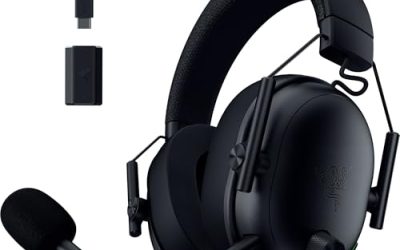
Razer BlackShark V2 X
- Best for: Singers who want a clear cardioid microphone, light comfort, and a direct wired connection to a phone or a PC.
- Drivers: 50mm TriForce Titanium drivers
- Surround sound: 7.1 surround sound, Windows 10 only
- Microphone: HyperClear cardioid microphone
- Noise isolation: advanced passive noise cancellation with closed earcups
Singers who want a clear cardioid microphone, light comfort, and a direct wired connection to a phone or a PC.
Surround sound works through software on Windows, so phone and console play uses stereo sound, and the wired cable is fixed rather than detachable.
The BlackShark V2 X is the lightest pick in this guide at 240 grams, and its HyperClear cardioid microphone is the reason it leads for singing, because a cardioid pattern focuses on your voice and rejects sound from the sides and behind. Its 50mm TriForce Titanium drivers split sound into separate highs, mids, and lows, so backing tracks stay clear enough to follow pitch and timing, and the closed ear cups with passive noise isolation keep that track out of the microphone. Memory foam cushions make long practice sessions easy, and the wired 3.5mm connection works directly with phones and PC alike.
Watch out for: Surround sound works through software on Windows, so phone and console play uses stereo sound, and the wired cable is fixed rather than detachable.
Logitech G432 Wired Gaming Headset
- Best for: Singers who want USB and analog connections, a flip-to-mute microphone, and surround processing in one headset for phone and PC.
- Drivers: 50mm audio drivers
- Surround sound: 7.1 surround sound, DTS Headphone:X 2.0
- Microphone: flip-to-mute boom microphone
- Ear pads: leatherette ear pads
Singers who want USB and analog connections, a flip-to-mute microphone, and surround processing in one headset for phone and PC.
At 1.2 pounds it is the heaviest headset in this guide, so gauge how that weight feels over a long session, and surround processing depends on a compatible PC setup.
The G432 suits a singer who records on both a phone and a PC, because it provides two ways to connect: a USB connection for the desk and a 3.5mm jack for the phone. Its large 50mm drivers give backing tracks and music a full, roomy presentation, while DTS Headphone:X 2.0 processing adds a sense of space to positional audio on a compatible PC. The flip-to-mute boom microphone makes muting yourself a single, unmistakable motion between takes, and leatherette ear pads with a padded headband spread the weight across long sessions. It also works with Mac, Xbox One, PlayStation 4, and Nintendo Switch through its analog connection.
Watch out for: At 1.2 pounds it is the heaviest headset in this guide, so gauge how that weight feels over a long session, and surround processing depends on a compatible PC setup.
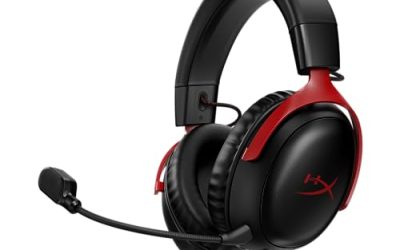
HyperX Cloud II
- Best for: Long singing sessions where a detachable microphone, a choice of ear pad textures, and a sturdy frame matter most.
- 53mm drivers
- 7.1 virtual surround sound through the included USB sound card
- Memory foam ear pads in leatherette and velour
- Durable aluminium frame
Long singing sessions where a detachable microphone, a choice of ear pad textures, and a sturdy frame matter most.
7.1 surround works through the USB sound card on PC, Mac, and PS4, so a phone connected by 3.5mm gets stereo sound, and the headset is an older model that has been selling for years.
The Cloud II is the long-running wired pick in this group, built around a USB sound card that adds 7.1 surround sound on a PC. Its 53mm drivers give backing tracks a full, warm sound, and the memory foam ear pads come in leatherette and velour so you can choose the texture for long sessions. The aluminium frame keeps it rigid without adding bulk, and the detachable microphone lifts away when you only want to listen, then clips back on to sing. It connects through the USB sound card or a 3.5mm jack, which keeps it usable across PC, PlayStation, and Xbox hardware; use the 3.5mm connection with a phone.
Watch out for: 7.1 surround works through the USB sound card on PC, Mac, and PS4, so a phone connected by 3.5mm gets stereo sound, and the headset is an older model that has been selling for years.
Which One Fits Your Situation
You sing mostly on your phone
Choose the Razer BlackShark V2 X, because its single 3.5mm cable plugs straight into a phone with a headphone jack and its cardioid microphone keeps your voice forward in the recording. At 240 grams it is light enough to wear while moving around, and the closed ear cups keep the backing track from leaking into the microphone. Add a microphone-capable adapter if your phone has no jack, and keep the volume moderate.
You record covers on a PC
Choose the Logitech G432, because its USB connection gives you the full feature set on a PC, including DTS Headphone:X 2.0 processing, while the 3.5mm jack stays available for phone sessions. The flip-to-mute boom microphone is perfect between takes, letting you silence the input with one motion while you check a recording. Its 50mm drivers keep backing tracks detailed enough to hear pitch and timing clearly.
You practise for hours at a time
Choose the HyperX Cloud II, because its memory foam pads in leatherette and velour let you pick the texture that stays comfortable longest, and the aluminium frame holds its shape session after session. The detachable microphone means you can take the headset off the desk, listen to music without the boom in front of your face, and clip it back on when practice begins. At 275 grams with the microphone attached, it stays light for its class.
You switch between phone and PC every day
Choose the Razer BlackShark V2 X for the simplest daily swap, because one 3.5mm cable moves between phone and PC with nothing to reconfigure. The Logitech G432 is the alternative if you prefer a USB connection at the desk and a 3.5mm connection on the move, since it gives you both without buying extra cables. Either way, keep one adapter in your bag for phones without a headphone jack so the swap never stalls.
Common Mistakes
- Singing with a wireless headset and wondering why the voice drifts off the backing track, when the delay in the wireless connection is the cause.
- Using a microphone built into a cable or an ear cup instead of a boom microphone, which picks up far more room noise and far less voice.
- Buying an adapter that carries headphone audio only, then finding the phone records no vocal input at all.
- Turning the backing track up so loud that it leaks from the ear cups into the microphone and doubles in the recording.
- Recording in a bare, echoing room and blaming the headset, when soft furnishings or a closer microphone position would fix most of the echo.
Frequently Asked Questions
What does “singingwith” mean in this guide?
“Singingwith” is the keyword written without a space, and it means singing with mobile phones and PC. This guide covers headsets for singing with a mobile phone or a PC, including karaoke practice, recording cover vocals, and live singalong sessions. Every pick here connects by wire to both a phone and a PC, so one headset covers rehearsal and recording on either device.
Can I use a gaming headset to record singing on my phone?
Yes, a wired gaming headset with a boom microphone works well for recording singing on a phone, because the boom microphone sits close to your mouth. Plug the 3.5mm cable into the phone, or use a microphone-capable adapter if the phone has no headphone jack. Record in a quiet room, keep the backing track volume moderate, and test a short take before recording a full song.
Do I need a separate microphone for singing?
Not for practice, karaoke, or casual cover recordings, because a good boom microphone on a headset captures vocals clearly enough for a phone or PC recording. A separate microphone becomes worth considering when you want studio-style vocal recordings with more detail and control over the sound. For most singers beginning, a headset with a clear cardioid microphone is the simpler and cheaper way to begin.
Will a wired headset work with a phone that has no headphone jack?
Yes, with the right adapter, because a USB-C or Lightning adapter that passes microphone input lets a wired headset work fully on a modern phone. Check that the adapter supports both headphone audio and microphone input, since adapters that carry audio out only will leave you with no vocal recording. Once connected, the headset behaves the same as it would on a phone with a built-in jack.