A travel mouse has a different job from a desk mouse. It has to disappear into a laptop bag without adding bulk, survive being tossed between hotel desks and airport tables, and still track like a proper gaming mouse when you finally sit down to play. The tension is size against stamina: the smallest shells are easy to pack but can cramp your grip, and a battery that dies mid-trip turns a gaming mouse into luggage.
This guide is for laptop gamers who play away from home, students moving between rooms and libraries, and anyone who wants one compact mouse for both work trips and evening sessions. The picks below were chosen for stated dimensions, low weight, receiver handling and battery figures taken from their listings, so you can judge how each one actually packs and lasts rather than guessing from photos.
Quick Picks
As an Amazon Associate we earn from qualifying purchases
| Product | Best for | Key spec from title |
|---|---|---|
| Razer Orochi V2 | Trips measured in weeks, not days | Up to 950 hours of battery life |
| Logitech G305 LIGHTSPEED | A receiver that cannot get lost | Built-in receiver storage, 250-hour AA run |
| Pulsar X2H Mini | The lightest full-spec pick | 52 g, PAW3395 sensor |
| HyperX Pulsefire Haste 2 Mini | Two machines, one small mouse | 2.4 GHz plus Bluetooth, up to 100 hours |
| Cooler Master MM712 | Hybrid connections in a compact shell | 2.4 GHz, Bluetooth and wired modes |
How to Choose
Measure the shell against your bag and your hand
Travel mice range from truly tiny to merely compact, and the stated dimensions decide both how a mouse packs and how it feels at hour two. The Pulsar X2H Mini lists 115.6 mm in length, while the Orochi V2 is shorter still and built to vanish into a sleeve pocket. A very short shell forces a fingertip or claw grip, which many players love for quick flicks but some find tiring. Compare the listed length with the mouse you use now, and favour the smallest size that still supports your grip style.
Plan how the receiver travels
A loose 2.4 GHz dongle is the easiest thing to lose on a trip, and a gaming mouse without its receiver is just a Bluetooth mouse. The G305 answers this with a storage compartment inside the shell, so the receiver rides inside the mouse itself. Other models expect you to park the dongle in a laptop port or a bag pocket. If your pick has no internal storage, build the habit of a single pocket or pouch for the receiver and cable before your first trip, not after your first loss.
Match battery style to your travel rhythm
Listings here split into two camps: AA-powered mice like the Orochi V2 and G305, which run for hundreds of hours and revive instantly with a fresh cell you can buy anywhere, and rechargeable mice like the X2H Mini and Haste 2 Mini, which sip from USB-C but need a cable when they fade. For long trips with no routine, AA power is hard to beat. For short, regular trips where a laptop charger is always nearby, a rechargeable cell keeps the bag lighter and simpler.
Check that small does not mean stripped down
A travel mouse still needs a sensor that tracks fast movement without spinning out, switches that register clean clicks, and at least two side buttons for in-game actions. Every pick here keeps a gaming-grade optical sensor and a proper 2.4 GHz gaming mode alongside any Bluetooth option. What you give up at this size is usually extras: no charging docks, fewer buttons, and simpler lighting. If a listing hides its sensor or wireless details, treat that as a warning sign rather than a mystery worth solving.
The 5 Best Options
Razer Orochi V2

The Orochi V2 was designed from the start as a mobile gaming mouse, and its listing reads like a travel checklist: two wireless modes, a shell listed under 60 g without its battery, and a battery figure of up to 950 hours. It runs on a single AA or AAA cell, so a dead mouse on the road is a two-minute fix at any shop rather than a hunt for a cable. HyperSpeed mode handles gaming while Bluetooth covers work on the same trip, and the 18K optical sensor means none of that portability costs you tracking quality.
Specs
- 2 wireless modes: HyperSpeed 2.4 GHz and Bluetooth
- Up to 950 hours of battery life as listed
- 5G advanced optical sensor, 18,000 DPI
- Razer Mechanical Mouse Switches Gen-2
- Runs on a single AA or AAA battery
- Ultra-lightweight shell, under 60 g without battery
- Model RZ01-03600100-R3U1 (Black)
Best for: Long trips where charging chances are rare
Watch out for: This is a variant family with separate listings per colour, so confirm the Black model code on the listing; the battery figure also assumes the lighter-duty mode and a suitable cell.
Logitech G305 LIGHTSPEED

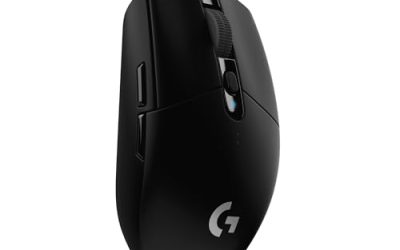
The G305 is the practical traveller of this group. Its listing leads with the HERO sensor at 12,000 DPI, six programmable buttons and up to 250 hours from one AA battery, but the detail that matters most on the road is the receiver storage built into the shell, which removes the classic lost-dongle problem entirely. LIGHTSPEED wireless keeps its response in gaming territory, on-board memory keeps your settings with the mouse rather than the laptop, and the compact, rounded shape shrugs off life in a bag without sharp edges or a fragile finish.
Specs
- LIGHTSPEED 2.4 GHz wireless
- HERO sensor, 12,000 DPI
- 6 programmable buttons
- Up to 250 hours of battery life on 1 AA battery
- On-board memory for stored settings
- Built-in storage compartment for the USB receiver
- Weight: 99 g
- Colour: White
Best for: Travellers who have lost a dongle before and refuse to repeat it
Watch out for: There is no Bluetooth here, so a laptop without a free USB port needs the receiver and possibly an adapter; colour variants carry separate listings, and this one is the White version.
Pulsar X2H Mini

The X2H Mini is the enthusiast pick: a genuinely small shell at 115.6 mm long and a listed weight of just 52 g, yet the sensor is the flagship PAW3395 with up to 26,000 DPI and 650 IPS tracking. Optical switches keep the clicks crisp, the 2.4 GHz link runs at a 1 ms report rate, and the listing quotes up to 70 hours of battery life, which covers a week of evening play between charges. Its raised rear hump fills a claw grip nicely, giving a small mouse more control than its size suggests.
Specs
- Weight: 52 g
- Dimensions: 115.6 x 62 x 38 mm
- PAW3395 sensor, up to 26,000 DPI and 650 IPS
- Optical switches
- 2.4 GHz wireless at 1 ms, plus wired mode
- Up to 70 hours of battery life as listed
- USB-C cable, wireless receiver and adapter in the box
- Model PX2H11 (Black)
Best for: Claw-grip players who want the lightest bag possible
Watch out for: The receiver has no home inside the shell, so it needs a pouch or pocket of its own; the mini shape also suits fingertip and claw grips far better than a full palm grip.
HyperX Pulsefire Haste 2 Mini

HyperX shrank its Haste line into this Mini, and the listing keeps the two features travellers actually use: dual wireless, with 2.4 GHz for gaming and Bluetooth 5.1 for pairing straight to a laptop, plus a wired mode that doubles as charging. At 59 g it stays light in the bag, the HyperX 26K sensor tracks up to 26,000 DPI, and the quoted battery life runs up to 100 hours. The box includes the wireless dongle and a USB extension adapter, which helps when a hotel desk puts the laptop port out of comfortable reach.
Specs
- HyperX 26K sensor, up to 26,000 DPI
- Weight: 59 g
- 2.4 GHz wireless, Bluetooth 5.1 and wired modes
- Up to 100 hours of battery life as listed
- 6 buttons
- USB wireless dongle and extension adapter in the box
- Model 7D388AA (Black)
Best for: Trips split between a gaming laptop and a work machine
Watch out for: Published dimensions for this model differ between sources, so judge its size by the listed weight and class rather than a single measurement; the White version is a separate listing from the Black one here.
Cooler Master MM712

The MM712 covers every connection a trip can throw at it: 2.4 GHz for gaming, Bluetooth for a second device, and a wired mode over its Ultraweave cable for the moments when the battery fades at the worst time. The listing quotes an adjustable 19,000 DPI optical sensor, PTFE feet for a clean glide on unfamiliar desk surfaces, and MasterPlus+ software for setting up buttons and lighting before you leave. Its compact, rounded shell packs without snagging, and the solid top panel keeps dust and crumbs from bag life out of the inside.
Specs
- Optical sensor, adjustable up to 19,000 DPI
- Hybrid wireless: 2.4 GHz and Bluetooth, plus wired mode
- Ultraweave cable included
- PTFE feet
- RGB lighting with MasterPlus+ software support
- Model MM-712-WWOH1 (White)
Best for: One mouse that connects to anything you meet on a trip
Watch out for: Weight figures for this model vary slightly between sources, so treat it as a roughly 58 g class mouse; this listing is the White version, and the Black version is sold under a separate listing.
Which One Fits Your Situation
You travel for weeks and charge rarely
Take the Orochi V2. Its listed battery life runs to hundreds of hours, and because it takes a single AA or AAA cell, a low battery is solved at any corner shop instead of tying the mouse to a cable overnight. The tiny shell also leaves the most room in a packed bag.
You play in hotel rooms and borrowed spaces
The G305 fits unpredictable setups best. The receiver lives inside the mouse, the AA cell lasts up to 250 hours, and LIGHTSPEED keeps response sharp on whatever table you get. It is also the mouse here you would mind least replacing, which matters when gear travels in checked bags and shared rooms.
You want real gaming performance in the smallest shell
Choose the X2H Mini if your grip is claw or fingertip. It pairs the lightest body in this guide with a flagship sensor, so fast turns in shooters feel no different from your desk setup. Just give its receiver a dedicated spot in your bag, since the shell has no storage slot for it.
You carry one laptop for work and play
The Haste 2 Mini and the MM712 both pair over Bluetooth for work and switch to 2.4 GHz for games, so one mouse covers the whole trip. Pick the HyperX for the longer listed battery life, or the Cooler Master if you value the wired fallback and the included flexible cable.
Common Mistakes
- Buying the smallest mouse available, then discovering your grip style needs more shell than it has
- Tossing the receiver loose into a bag instead of using built-in storage or a fixed pouch
- Comparing battery headlines without noticing that some figures belong to Bluetooth mode
- Forgetting that a rechargeable mouse still needs its cable packed for longer trips
- Judging travel size from photos instead of the dimensions and weight stated in the listing
Frequently Asked Questions
Is a small mouse good enough for fast-paced games?
Yes, provided the sensor and wireless link are gaming grade, as they are on every pick here. Small shells actually help quick flick movements because there is less mass to start and stop. The real limits are grip comfort over long sessions and fewer buttons, not tracking quality, so match the size to your grip rather than to the game.
How do I avoid losing the wireless receiver while travelling?
Start with storage: the G305 carries its receiver inside the shell, which removes the problem entirely. For other mice, keep the dongle in the same pouch as the mouse, or leave it plugged into the laptop if the port layout allows it. Building one fixed place for it matters more than any accessory, because receivers are lost through routine, not bad luck.
AA batteries or a rechargeable cell for travel?
AA models like the Orochi V2 and G305 run far longer per cell and revive instantly with a battery bought anywhere, though you will want to carry a spare. Rechargeable models like the X2H Mini avoid spare cells but depend on you packing a USB-C cable and finding charge time. Frequent long-haul travellers usually favour AA; short-trip travellers often prefer rechargeable.
Can a travel mouse replace my desk mouse full time?
For many players, yes. The sensors and wireless links here match what larger gaming mice use, so performance at your desk will feel familiar. What you may miss is a fuller palm fit during very long sessions and extras like charging docks or big button counts. Plenty of players keep the compact mouse as their only mouse and never notice the trade.