A CPU memory controller explained in practical terms starts with one job: managing communication between the processor and system RAM. It affects supported memory types, speeds, channels, and stability. Understanding how it works helps you choose compatible DDR4 or DDR5 memory and avoid unnecessary upgrades.
What a CPU Memory Controller Really Does
A CPU memory controller is the hardware responsible for coordinating data transfers between the processor and system memory. Modern desktop CPUs generally integrate this controller directly into the processor, rather than relying on a separate motherboard chipset. Its capabilities influence RAM compatibility, bandwidth, supported configurations, and memory overclocking limits.
1. How the Integrated Memory Controller Works
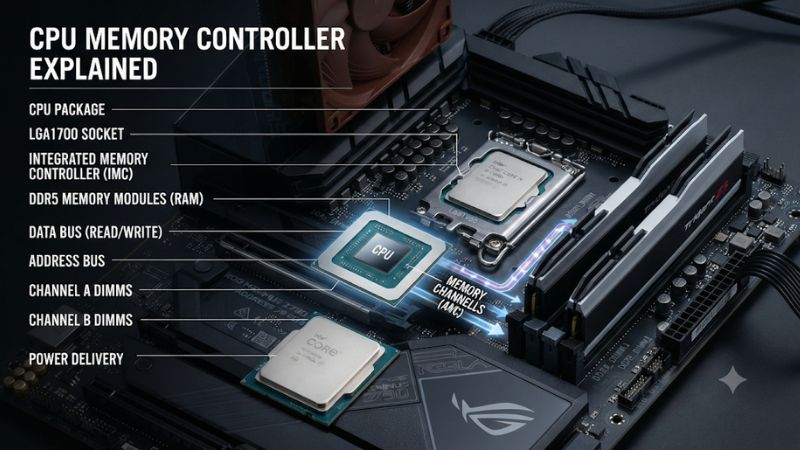
The integrated memory controller (IMC) acts as the communication manager between CPU cores and DRAM. When a game or application needs information stored in RAM, the processor requests the data through the memory subsystem. The controller coordinates memory commands, transfers, and timing so that information reaches the processor correctly.
Its responsibilities extend beyond simply reading and writing data. It also manages memory refresh operations and coordinates access to memory channels. Intel’s processor documentation describes the controller as responsible for transferring data between the processor and DRAM, as well as DRAM maintenance. This makes it an important part of overall system architecture.
2. Why the CPU Has a Memory Controller Instead of the Motherboard
Older PC architectures commonly used a northbridge chip to manage communication between the processor and memory. Moving the memory controller into the CPU reduced the distance between processing hardware and RAM, changing how the processor communicates with the memory subsystem.
Modern motherboards still matter because their wiring, BIOS, memory slots, and chipset determine platform compatibility and configuration options. However, the motherboard does not independently determine every supported RAM speed. The CPU’s integrated controller has its own specifications and operating limits, which must be considered alongside the motherboard’s capabilities.
3. Memory Channels and Available Bandwidth
Memory channels provide separate data paths between the memory controller and RAM. A dual-channel configuration can provide more theoretical bandwidth than a single-channel configuration when the system is populated correctly. This is particularly relevant to gaming PCs with integrated graphics, which use system memory instead of dedicated video memory.
Channel count is not the same as the number of installed memory sticks. Two DIMMs do not automatically mean two active channels if they are installed incorrectly or the platform has a different memory architecture. Always check the motherboard manual for the recommended slots and the processor specifications for its supported memory configuration.
4. What Doesn’t Help: Confusing RAM Capacity With Controller Performance
Adding more RAM does not automatically increase memory bandwidth or improve the controller’s operating speed. Capacity determines how much data and how many applications can remain in memory without relying as heavily on storage. Bandwidth depends on factors such as memory speed, channel configuration, and the controller’s supported operating mode.
Likewise, buying a higher-rated DDR5 kit does not guarantee that the CPU can operate it at its advertised overclocked speed. The memory controller, motherboard, BIOS, module configuration, and memory profile all influence the final result. A balanced configuration is usually more useful than chasing the highest specification on a RAM package.
How to Understand and Configure Your CPU Memory Controller
Understanding the controller’s specifications is only the first step. For a gaming PC, the practical task is matching the processor, motherboard, and RAM configuration. Before enabling a memory profile or purchasing a faster kit, check the CPU’s official memory specifications, the motherboard’s supported configurations, and the number of DIMMs installed.
1. Check the CPU’s Supported Memory Specifications
Start with the processor manufacturer’s specification page. Look for memory technology, maximum supported capacity, channel count, and supported transfer rates. These details describe the processor’s official memory capabilities and provide a baseline for selecting compatible modules.
For example, AMD lists the Ryzen 5 9600 as an AM5 processor supporting DDR5, two memory channels, and up to 256 GB. Its published memory-speed specifications also vary with DIMM population and rank configuration. This illustrates why checking the exact CPU model is more useful than relying on a general Ryzen or Intel compatibility claim.
2. Understand DDR4, DDR5, and Memory Channel Differences
DDR4 and DDR5 are different memory technologies, not interchangeable operating modes. A motherboard designed for DDR5 cannot accept DDR4 DIMMs, even when both generations use similar-looking desktop memory modules. The CPU and motherboard must support the same memory generation.
DDR5 also changes the internal organization of a memory module. A standard DDR5 DIMM contains two independent 32-bit subchannels, rather than the single 64-bit channel arrangement used by a conventional DDR4 DIMM. These subchannels improve access flexibility, but they do not mean that one DDR5 stick automatically provides the same system-level configuration as two physical memory channels.
3. Enable XMP or AMD EXPO Carefully
Intel XMP and AMD EXPO are memory profiles that allow compatible systems to apply predefined memory settings beyond the default configuration. Depending on the platform, these settings can adjust transfer rates, timings, and voltage. They are useful when a compatible memory kit is not running at its advertised profile speed.
To enable a profile, enter UEFI/BIOS during startup and locate the memory overclocking section. The setting may be called XMP, EXPO, or a manufacturer-specific equivalent. Profile availability depends on the CPU, motherboard, BIOS, and memory kit. Enabling one is optional, not a requirement for a functioning gaming PC.
4. Verify Memory Stability After Configuration
A computer successfully booting does not establish that its memory configuration is stable under demanding workloads. Memory instability can appear as application crashes, game errors, unexpected restarts, or intermittent blue screens. These symptoms can also have unrelated causes, so avoid blaming the controller without further diagnosis.
After changing memory settings, run a suitable memory stability test and use the PC normally across demanding applications. If errors appear, return the BIOS to default memory settings and retest. If the system becomes unstable after enabling EXPO or XMP, running RAM at a lower supported speed is often preferable to maintaining an unreliable overclock.
Practical Memory Controller Configuration Checklist
| Setting or Step | Where | Effect | Risk |
|---|---|---|---|
| Check CPU memory support | CPU manufacturer’s specifications | Identifies supported RAM generation, channels, and speeds | None |
| Verify DIMM compatibility | Motherboard manual and memory support list | Helps confirm module and slot compatibility | None |
| Install RAM in recommended slots | Physical motherboard DIMM slots | Enables the intended channel configuration | Incorrect installation can prevent booting |
| Enable XMP or EXPO | UEFI/BIOS memory settings | Applies the kit’s configured performance profile | Instability or failed boot |
| Verify memory stability | Memory diagnostic software | Identifies errors after configuration changes | Testing takes time; errors require investigation |
CPU Memory Controller and Gaming Performance: What Matters
The memory controller influences how efficiently a gaming PC accesses system RAM, but it does not determine FPS on its own. Actual performance depends on the game, CPU architecture, GPU, memory capacity, bandwidth, and latency. Understanding these relationships helps distinguish a genuine memory limitation from a CPU or GPU bottleneck.
1. Does the Memory Controller Affect Gaming FPS?
Yes, the memory controller can influence gaming performance by determining how system memory is accessed and how much bandwidth is available. Games that frequently move data between the CPU and RAM can be sensitive to memory configuration, especially in CPU-limited scenarios.
However, increasing RAM speed does not produce the same improvement in every game. GPU-limited workloads may show little difference because the graphics card is doing most of the performance-limiting work. CPU-intensive games, simulation workloads, and competitive titles can respond differently depending on their engine and system configuration.
2. Memory Bandwidth Versus Memory Latency
Bandwidth describes how much data memory can transfer over time, while latency describes how long it takes to complete a memory access. Both matter, but neither alone tells the whole story. A higher DDR5 transfer rate can increase theoretical bandwidth without guaranteeing lower access latency.
For gaming, this distinction explains why two memory kits with different specifications may deliver similar results. The memory controller must coordinate the actual operating timings and data transfers. CPU architecture, cache behavior, memory frequency, and application workload all contribute to the final performance difference.
3. Why CPU Cache and RAM Work Together
CPU cache stores frequently accessed information close to the processing cores. L1, L2, and L3 caches help reduce the need to retrieve every piece of data from system RAM. When a requested item is available in cache, the processor can access it without waiting for a DRAM transaction.
When the required information is not available in cache, the memory subsystem becomes more important. The integrated controller coordinates the request to RAM and returns the requested data. This is one reason processors with larger caches can perform differently in certain games even when their supported memory specifications appear similar.
4. When Should You Upgrade Your RAM or CPU?
Consider a RAM upgrade when your current capacity is insufficient, your memory configuration is running below its intended supported settings, or a verified workload benefits from additional bandwidth. Before buying anything, check whether the existing memory is installed in the recommended slots and whether its intended profile is enabled.
A CPU upgrade becomes more relevant when the processor itself is limiting game performance or when you need a newer platform with different memory support. Replacing a processor solely because its memory controller supports a higher advertised DDR5 speed is difficult to justify without evidence that memory bandwidth is actually limiting your workload.
FAQ
1. Is the Memory Controller Inside the CPU or Motherboard?
The memory controller is generally integrated into the CPU on modern desktop platforms. The motherboard provides the physical memory slots, electrical connections, BIOS configuration, and platform support needed to operate RAM. Both components must be compatible for the system to work correctly.
2. Does Every CPU Support DDR5?
No, DDR5 support depends on the processor and motherboard platform. Some CPUs support DDR4, others support DDR5, and certain platforms have separate motherboard versions for each memory generation. Check both specifications before purchasing RAM because DDR4 and DDR5 are physically and electrically incompatible.
3. Can a Better Memory Controller Improve Gaming Performance?
Yes, a capable memory controller can help support higher memory bandwidth and more efficient memory configurations. However, gaming performance also depends on CPU architecture, cache, GPU, and game workload. A faster controller does not automatically produce higher FPS if memory performance is not the system’s limiting factor.
4. Is Enabling XMP or EXPO Safe?
XMP and EXPO are optional memory overclocking profiles that can improve performance when supported by the hardware. They can also introduce instability if the processor’s memory controller or motherboard cannot reliably operate the selected settings. If problems occur, disable the profile in BIOS and return to default memory settings.
Final Thoughts
Understanding the CPU memory controller explained here makes RAM upgrades and gaming PC configuration easier. The controller affects memory compatibility, bandwidth, and stability, but faster RAM alone does not guarantee better FPS. Check your processor and motherboard specifications first, then prioritize a compatible, stable memory configuration over maximum advertised speeds.