🛒 Best Price Today on Amazon
Prime members get fast, free shipping on everything above, plus member-only deals. New members get a 30-day free trial — cancel anytime.
A high-end gaming PC needs more than a basic power strip. The best surge protector for high wattage gaming pc setups should combine verified surge protection, sufficient electrical capacity, grounded outlets, and enough connections for monitors and accessories. This guide compares suitable models and explains which specifications matter most.
How to Choose a Best Surge Protector for High-Wattage Gaming PC
Choosing a surge protector for an expensive gaming desktop requires looking beyond the advertised joule rating. A powerful PSU does not automatically mean the computer continuously draws its full rated wattage. You need to consider actual system consumption, the electrical circuit, protection certification, and everything sharing the same strip.
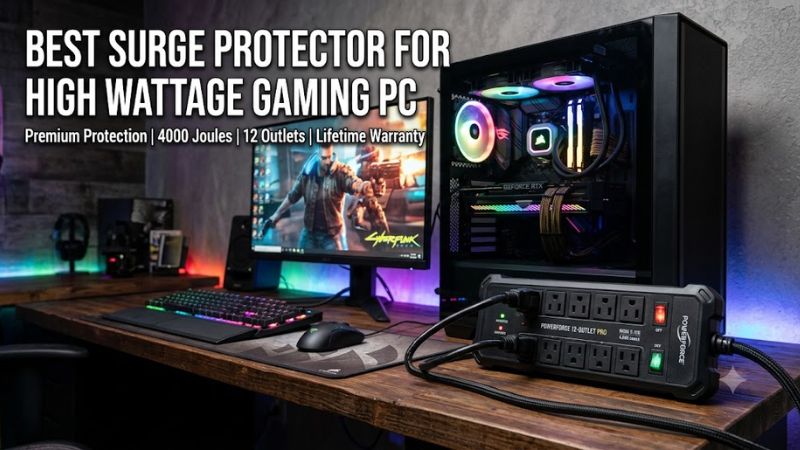
1. Check Electrical Load and Amperage
Start by checking the surge protector’s maximum current rating and the electrical supply in your region. In a typical US 120V setup, a 15A device has a nominal maximum capacity of 1,800W at 120V. The total load includes the PC, monitors, speakers, chargers, and other connected equipment.
A 1,000W PSU does not continuously consume 1,000W. Its actual input varies with CPU and GPU workloads, efficiency, and other components. However, a high-power build can create substantial demand during gaming, rendering, or simultaneous workloads. Never exceed the strip’s rating or the wall circuit’s capacity.
2. Compare Joule Ratings and Voltage Protection Ratings
Joules indicate the amount of surge energy a protector is designed to absorb under its specified rating. For an expensive gaming setup, looking at products in the 2,000–4,000-joule range is a reasonable starting point. However, a higher number alone does not establish better overall protection.
Also check the UL 1449 Voltage Protection Rating (VPR), commonly described as let-through voltage. Lower values indicate a lower measured voltage passed through under the applicable standardized test. Compare the actual certified specifications rather than relying on vague descriptions such as heavy-duty or professional-grade.
3. Prioritize UL 1449 Certification and Protection Indicators
UL 1449 is an important safety and performance standard for surge protective devices in the US. Check that the exact model is listed, not merely that its packaging advertises general electrical safety certification. UL 1363 by itself relates to relocatable power taps and does not establish surge-protection performance.
Look for a grounded indicator and a protected-status indicator. These help identify wiring problems or a protection component that has stopped functioning. Some surge protectors use metal oxide varistors (MOVs), which can degrade after absorbing surges. A warning light or automatic shutdown feature is useful when available.
4. Consider Outlets, Cord Length, and Build Quality
A high-end gaming desk can include a tower, two monitors, speakers, a router, external storage, and charging accessories. Count the devices before buying. Widely spaced outlets are particularly useful because bulky adapters can block neighboring sockets on compact power strips.
Cord length and plug orientation also affect installation. A short cable may force awkward positioning, while a grounded right-angle plug can help behind a desk. Metal housings, mounting slots, and individual switches are useful conveniences, but they should never take priority over verified surge protection and electrical ratings.
Top Surge Protectors for High-Wattage Gaming PCs
These four options cover different gaming desk requirements, from a high-outlet-count setup to premium electrical filtering. The recommendations are based on manufacturer-published specifications rather than comparative electrical testing. Importantly, all four are US-market, 120V products; their plugs and electrical ratings must match the installation.
| Product | Best For | Key Spec | Compatibility | Watch Out For |
| Eaton Tripp Lite TLP1208SAT | Best Overall | 2,880J, 12 outlets | 120V, 15A | Plastic housing |
| CyberPower P1208UC15BK | Best Value | 3,000J, 12 outlets | 120V, 15A | 800V clamping rating |
| Eaton Isobar IBAR6ULTRAUSBB | Best Premium | 3,840J, 330V let-through | 120V, 12A | Only 6 outlets |
| CyberPower GXS1005C2 | Best for Gaming Desks | 3,000J, 10 outlets | 120V, 15A | Only 5-foot cord |
1. Eaton Tripp Lite TLP1208SAT – Best Overall
The Eaton Tripp Lite TLP1208SAT is a strong choice for a high-end gaming desk that needs multiple connections. It provides 12 AC outlets, 2,880 joules of surge suppression, and an eight-foot power cord. Its 15A circuit breaker and UL 1449 certification make it a practical candidate for a compatible US household circuit.
Eaton
Another useful feature is its published UL 1449 let-through rating of 330/400/400V, alongside diagnostic indicators for protection and grounding. The model also includes Ethernet, coaxial, and telephone-line protection. However, it has a plastic enclosure rather than the metal construction found on premium Isobar models.
This is a suitable option if you want to connect a gaming tower, monitors, router, and accessories through one surge protector. Its limitation is that the standard outlets are not all widely spaced, so bulky adapters may occupy neighboring sockets. Consider the Isobar if metal construction and outlet isolation are more important than outlet count.
2. CyberPower P1208UC15BK – Best Value
The CyberPower P1208UC15BK combines 3,000 joules of surge suppression with 12 AC outlets and an eight-foot cord. It also includes one USB-A and one USB-C charging port, making it convenient for a gaming setup with controllers, phones, and other accessories. Its published MSRP is $39.99.
CyberPower
The manufacturer specifies a 15A circuit breaker, a maximum input current of 15A, and a 1,875W maximum rating. It also lists UL 1363 and UL 1449 safety certifications. The 800V clamping specification is worth comparing with models offering lower let-through ratings, particularly if voltage protection is your main buying priority.
This is a sensible choice if you want many outlets and a useful combination of charging connections without spending on a premium metal enclosure. However, its USB charging output is limited, and the higher joule rating does not automatically make it electrically superior to every alternative.
3. Eaton Isobar IBAR6ULTRAUSBB – Best Premium Option
The Eaton Isobar IBAR6ULTRAUSBB prioritizes construction and surge suppression rather than maximum outlet count. Its specifications include 3,840 joules, six widely spaced AC outlets, a 10-foot power cord, and a metal enclosure. The manufacturer also lists UL 1449 certification and 330V let-through ratings across its protection modes.
Eaton
Its isolated filter banks and EMI/RFI filtering make it particularly interesting for a desk containing a gaming PC, monitor, and audio equipment. It also includes diagnostic LEDs, automatic shutdown, and two USB-A charging ports. Eaton specifies a 12A circuit breaker, which means its maximum current capacity is lower than the 15A alternatives in this roundup.
The main trade-off is its six-outlet layout. A multi-monitor setup with several accessories may run out of connections quickly. Choose this model when its metal construction, filtering features, and published surge specifications matter more than having a large number of outlets.
4. CyberPower GXS1005C2 – Best for Gaming Desks
The CyberPower GXS1005C2 is specifically marketed toward gaming setups. It offers ten AC outlets, 3,000 joules of surge suppression, four widely spaced outlets, and two USB-C charging ports. Its right-angle plug and compact design also make it easier to position behind a gaming desk.
CyberPower
CyberPower lists a 15A circuit breaker, a 1,875W maximum rating, and UL 1449 certification. The manufacturer also specifies an 800V clamping voltage, a five-foot cord, and a $39.99 MSRP. Its connected-equipment guarantee is advertised at up to $300,000, subject to the manufacturer’s terms and exclusions.
The biggest drawback is the short power cord, which may be inconvenient if your wall outlet is far from the desk. It also lacks the metal housing and lower let-through rating of the Isobar. Nevertheless, it offers a useful balance of outlet spacing, charging convenience, and gaming-oriented design.
Important Compatibility Note: 120V Versus 220–240V
The products above are intended for the US electrical market. Their NEMA 5-15 plugs and 120V ratings are not interchangeable with Vietnamese 220–240V outlets. Do not use a travel adapter to bypass this limitation.
If you are buying from Vietnam or another 220–240V market, choose a surge protector explicitly rated for your local mains voltage, frequency, grounding arrangement, and plug standard. Check the manufacturer’s documentation for its continuous current rating and applicable surge-protection certification before connecting an expensive gaming PC.
FAQ
1. How many joules should a surge protector have for a high-wattage gaming PC?
A surge protector with 2,000–4,000 joules is a reasonable starting range for an expensive gaming PC. Higher joule ratings provide greater rated energy-absorption capacity, but they do not independently determine protection quality.
Also compare UL 1449 certification, Voltage Protection Rating, grounding indicators, and the manufacturer’s replacement guidance. A 3,000-joule model with an 800V clamping rating is not automatically better than a 2,880-joule model with a 330V let-through rating.
2. Can a 1,500W PSU work with a 15A surge protector?
Yes, provided the computer’s actual input consumption and all other connected loads remain within the surge protector and branch circuit ratings. A 1,500W PSU describes its rated DC output capacity, not constant wall consumption.
For a US 120V, 15A device, the nominal maximum is 1,800W. However, you should also account for the electrical circuit’s continuous-load requirements and other connected equipment. Never assume that a 1,500W PSU leaves sufficient capacity for multiple monitors and accessories.
3. Does a surge protector improve gaming performance?
No, a surge protector does not directly increase FPS, reduce input latency, or improve GPU performance. Its primary purpose is to protect connected electronics against transient voltage spikes.
If your PC experiences frequent shutdowns, instability, or unexpected restarts, investigate the PSU, electrical supply, temperatures, and system logs. A surge protector cannot correct an undersized PSU, sustained undervoltage, or defective household wiring.
4. Should I buy a UPS instead of a surge protector for my gaming PC?
A UPS is the better choice if you also need temporary battery power during outages. Unlike a conventional surge protector, a UPS can provide backup runtime that allows you to save work and shut down Windows safely.
For a powerful gaming desktop, check the UPS’s watt rating rather than choosing by VA capacity alone. A pure sine wave output model with sufficient wattage is worth considering, especially with modern active-PFC power supplies. Match its capacity to the PC’s actual maximum load, monitor consumption, and desired runtime.
Final Thoughts
The best surge protector for high wattage gaming pc setups should balance electrical capacity, UL 1449 certification, surge ratings, and outlet availability. Eaton and CyberPower offer several suitable US-market options, but always verify voltage compatibility and circuit limits before purchasing. For blackout protection, consider a properly sized UPS instead.