🛒 Best Price Today on Amazon
Prime members get fast, free shipping on everything above, plus member-only deals. New members get a 30-day free trial — cancel anytime.
CPU boost clock is the highest speed a processor core is allowed to reach automatically when there is enough thermal and power headroom. It is not a guaranteed constant speed: the figure on the box is a ceiling, and your real in-game clocks depend on cooling, power limits, and how many cores are busy.
What Boost Clock Means
Every modern desktop processor lists at least two frequencies. The base clock is the frequency the processor maker designs the chip to sustain within its rated power. The boost clock, sometimes called turbo, is the maximum frequency the chip can reach on one or a few cores when conditions allow. The processor adjusts clocks many times each second, rising when the work is light enough and temperatures are low, and falling when limits are reached.

Micro Center AMD Ryzen 5 5600X3D Vermeer AM4 DDR4 6-Core Boxed Processor | Heatsink Not Included, 6 Cores, 12 Threads, PCIe 4.0, Up to 4.4 GHz Boost Clock, 99 MB L2+L3 Cache, 105W TDP
Included for 'What Is CPU Boost Clock? What It Means for Gaming PCs' because the listing specifies Heatsink Not Included and 6 Cores, details this guide uses to compare options.
View on Amazon
ASRock Radeon RX 9070 XT Challenger 16GB OC Graphics Card - AMD RDNA 4 Architecture, 2970 MHz Boost Clock, GDDR6, PCIe 5.0, DisplayPort 2.1a, HDMI 2.1b, Triple Fan Cooling 800W
Included for 'What Is CPU Boost Clock? What It Means for Gaming PCs' because the listing specifies AMD RDNA 4 Architecture and 2970 MHz Boost Clock, details this guide uses to compare options.
View on Amazon
AMD Ryzen 9 5900X 12 Cores, 24 Threads 3.7GHz 64MB Unlocked Desktop Gaming Processor - 7nm, 5th Gen, 4.8GHz Max Boost Clock CPU - 100-100000061WOF - BROAGE HDMI Cable - 1 Pack
Included for 'What Is CPU Boost Clock? What It Means for Gaming PCs' because the listing specifies 24 Threads 3.7GHz 64MB Unlocked Desktop Gaming Processor and 7nm, details this guide uses to compare options.
View on Amazon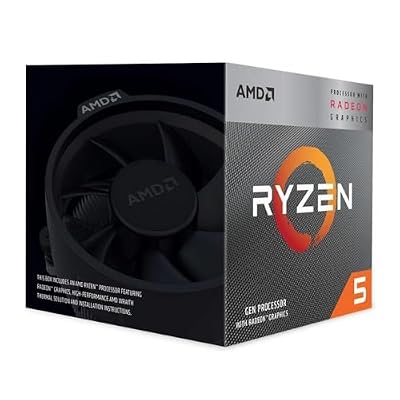
AMD Ryzen 5 3400G Processor (Integrated Radeon™ RX Vega 11 Graphics. 4 cores/8 threads. 65W TDP. Socket AM4. L2+L3 Cache 6 MB. Up to 4.2 GHz Boost Clock. Wraith Stealth Cooler)
Included for 'What Is CPU Boost Clock? What It Means for Gaming PCs' as a relevant option in this category; details come from the product listing.
View on AmazonEach maker uses its own names. AMD describes its automatic feature as Precision Boost, with Precision Boost Overdrive (PBO) as an optional extension. Intel lists Turbo Boost Max Technology 3.0 on many of its chips and sometimes a higher single-core figure on top-tier models. The maker’s product page lists the maximum boost frequency for each processor, for example the AMD Ryzen 7 9800X3D and the Intel Core Ultra 9 285K each have a stated maximum boost speed on their official spec pages.
How Boost Works
The chip continuously measures temperature, current, power draw and the number of active cores. It then picks the highest clock that stays within those limits. The main inputs are:
- Temperature: cooler chips can sustain higher clocks. Hitting the thermal limit causes the clock to drop.
- Power limits: motherboard and BIOS settings set how much sustained power the chip may draw. Boards that apply higher limits allow longer boost periods.
- Active cores: boost is typically highest when only one or two cores are busy. Loads that use all cores run at a lower all-core boost.
- Voltage and silicon quality: individual chips differ, so two identical models may boost slightly differently.
- Firmware and power plan: the Windows power plan and BIOS version can change how readily clocks rise.
Because of these factors, the advertised max boost is often seen only in short bursts on a single core, such as when opening an application, rather than constantly during a game.
Why It Matters for Gaming PCs
Many games rely heavily on a few fast threads, so single-core boost frequency can influence frame rates, especially at lower resolutions where the CPU limits performance. At higher resolutions, the graphics card usually becomes the bottleneck and CPU boost matters less. Reviewers also point out that clock speed alone does not compare processors across generations or brands; architecture, cache size and memory speed matter too. AMD’s X3D chips, for example, rely on a large cache and can compete with higher-clocked processors in many games despite their stated boost speeds.
Quick-Reference Table
| Term | What it means | Typical effect |
|---|---|---|
| Base clock | Designed sustained frequency within rated power | Lower figure; not what you see while gaming |
| Boost / turbo clock | Maximum automatic frequency on one or few cores | Seen in short or lightly threaded loads |
| All-core boost | Frequency when many cores are loaded | Lower than max boost; matters for rendering |
| Thermal throttling | Clock reduced to protect the chip | Caused by heat; fix with cooling |
| Power limit | BIOS cap on sustained power | Can restrict boost duration |
| PBO / manual overclock | Optional, user-enabled extra headroom | May increase heat; can affect warranty |
How to Check Your CPU Boost Clock
- Find the official figure. Look up the processor’s product page on the maker’s site for the base and max boost values.
- Use Task Manager. In Windows, open Task Manager, the Performance tab, and the CPU graph. The speed shown is an averaged figure that may not capture short boost peaks.
- Use a monitoring tool. Programs such as HWiNFO or CPU-Z show per-core clocks and temperatures in real time. Run a game, then look at the maximum per-core clock rather than the average.
- Compare idle and load. At idle, clocks drop to save power; under a game load they should rise. If they stay low, check the Windows power plan.
- Watch temperature and power. If clocks drop when the temperature reaches the chip’s limit, cooling is the constraint.
How to Set or Improve It Safely
Boost is automatic, but you can help the CPU sustain it:
- Keep the Windows power plan on Balanced or a performance plan as the processor or motherboard maker advises.
- Update the BIOS and chipset drivers, since these can alter boost behavior. AMD and Intel publish guidance for their platforms.
- Improve cooling with a better cooler, fresh paste, and good case airflow.
- Check that the motherboard’s power limit settings are within the processor maker’s recommended values.
- Consider optional features such as PBO or manual overclocking only if you accept the risks. These can increase temperature and power, may cause instability and can void warranties. Keep changes small and test stability.
The BIOS menu names differ by motherboard maker, so consult the board’s manual for the location of power and boost settings.
Common Misconceptions
- “My CPU never reaches the advertised boost, so it is defective.” The max boost is a ceiling reached under favorable conditions, often only on one or two cores. Short peaks may be missed by monitoring software.
- “Higher GHz always means a faster chip.” Different architectures do different amounts of work per clock.
- “Boost is overclocking.” Standard boost is built into the processor’s specification; overclocking goes beyond it.
- “A cooler always raises boost.” Better cooling helps up to the point where other limits, such as power or voltage, apply.
- “Boost is the same on every chip.” Silicon varies, so identical models can reach slightly different clocks.
When to Care and When to Ignore It
Care if you play CPU-limited games at high frame rates, if you suspect thermal throttling, or if your clocks seem far below the maker’s listing during gaming. Ignore small differences between your reading and the box number, especially when your frame rates are fine. If you game at high resolution with a mid-range graphics card, CPU boost differences of a few hundred MHz are unlikely to be noticeable.
Frequently Asked Questions
Is boost clock the same as turbo clock?
For practical purposes, yes. Intel uses the term Turbo Boost while AMD uses boost or Precision Boost, and both describe automatic speed increases above the base clock.
Why is my CPU clock lower in games than the listed boost?
Many games load several cores, so the chip may operate below its single-core peak. Temperature, power limits and Windows power settings also influence it. Compare your reading with the maker’s all-core expectations rather than the headline number alone.
Does a higher boost clock improve FPS?
It can in CPU-bound games, especially at lower resolutions. At high resolutions or with demanding graphics settings, the graphics card usually limits frame rate.
Is it safe to enable PBO or overclock for higher boost?
It can work, but it increases heat and power and can cause instability. It may also affect warranty coverage, depending on the maker. Use conservative settings and monitor temperatures.
Can a laptop CPU hold boost like a desktop?
Usually not for long, because laptops have tighter thermal and power limits. The listed boost on a laptop chip is often reached only briefly.