🛒 Best Price Today on Amazon
Prime members get fast, free shipping on everything above, plus member-only deals. New members get a 30-day free trial — cancel anytime.
The intel core i7-14700 review: gaming performance and price question comes down to whether this 14th-generation desktop processor offers enough gaming speed and multitasking capacity for its cost. With 20 cores, integrated graphics and support for DDR4 or DDR5, it remains versatile, but platform costs and newer alternatives matter before you buy.
How to Choose a Desktop Gaming CPU
The Core i7-14700 suits gamers who also stream, compile software or run demanding applications. Its eight Performance-cores and 12 Efficient-cores provide 28 threads, while a maximum turbo frequency of 5.4 GHz supports demanding workloads. However, gaming value depends on the graphics card, target resolution, cooling and the total cost of the platform rather than core count alone.
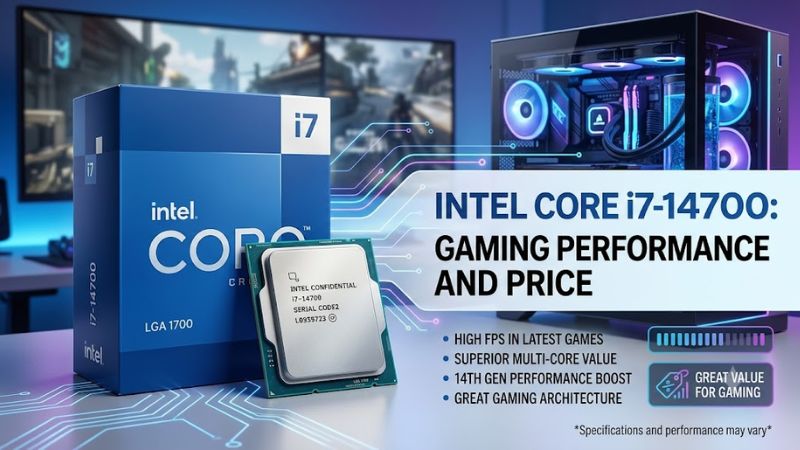
Gaming performance and graphics card pairing
For competitive gaming at 1080p, CPU performance can influence frame rates and frame-time consistency when a powerful graphics card has spare rendering capacity. The i7-14700 offers substantial processing resources, but individual results depend on the game engine, memory configuration and background workloads. At 1440p or 4K, graphics performance often becomes a larger constraint.
For this intel core i7-14700 review, avoid treating benchmark results from the i7-14700K as direct measurements of the non-K model. The processors share a similar core layout, but clock speeds, power limits and motherboard settings can change results. Compare independent tests using the same games, graphics card, resolution and quality settings before estimating expected frame rates.
Core count for streaming and productivity
The 20-core configuration combines eight Performance-cores with Hyper-Threading and 12 Efficient-cores, producing 28 threads. That layout benefits workloads that can distribute tasks across multiple cores, including video encoding, rendering and compiling. Gamers who stream or keep several applications open may find this extra capacity more useful than buyers who run games alone.
A high core count does not automatically translate into higher gaming frame rates. Many games depend heavily on a smaller number of fast threads, and results vary by title. If gaming is the only priority, compare the i7-14700 against less expensive CPUs and gaming-focused alternatives instead of paying extra for productivity capacity you rarely use.
Motherboard, memory and upgrade compatibility
The i7-14700 uses Intel’s FCLGA1700 socket and works with compatible motherboards designed for supported Intel desktop processors. Depending on the board, memory support can include DDR4 or DDR5, but the two memory types use different slots and cannot be interchanged. Check the exact motherboard model, CPU support list and BIOS requirements before purchasing.
Intel specifies memory support up to DDR5-5600 or DDR4-3200, with up to 192GB depending on memory type and system configuration. Faster memory kits may operate through overclocking profiles, subject to motherboard and CPU capability. A compatible LGA1700 motherboard can reduce upgrade costs if you already own one, but it offers less forward-looking flexibility than moving to a newer socket.
Cooling, power and system stability
Intel lists a Processor Base Power of 65W and Maximum Turbo Power of 219W for this CPU. The lower base-power figure should not be mistaken for a strict maximum during demanding work. Actual consumption depends on the workload, motherboard power settings, firmware and cooling, so a capable CPU cooler and adequate case airflow are important for sustained performance.
The boxed processor’s included thermal solution and availability can vary by package and retailer, so confirm what comes with the specific SKU. A suitable aftermarket cooler may be necessary for sustained all-core workloads. Also check the motherboard’s voltage and power configuration and install current firmware appropriate to the system, particularly when building with a 14th-generation Intel desktop CPU.
Top Picks: Price, Specifications and Alternatives
Intel’s official recommended customer price for the Core i7-14700 is 384–394, but that is launch-era pricing guidance, not a guarantee of today’s retail price. PassMark’s live listing reported an average CPU Mark score of 40,192 and a single-thread rating of 4,232 when accessed for this review. These are synthetic CPU scores, not gaming FPS measurements, and results can change as more submissions arrive.
| Product | Best For | Key Spec | Compatibility | Watch Out For |
| Intel Core i7-14700 | Best Overall for gaming and productivity | 20 cores, 28 threads; up to 5.4 GHz | LGA1700; DDR4 or DDR5 motherboard | Cooling and platform costs |
| Intel Core i5-14600K | Best Value for mixed use when discounted | 14 cores, 20 threads; up to 5.3 GHz | LGA1700; DDR4 or DDR5 board | Lower core count; cooling needs |
| AMD Ryzen 7 9700X | Best For gaming-focused new builds | 8 cores, 16 threads; up to 5.5 GHz | AM5; DDR5 memory | Requires a different motherboard |
| Intel Core Ultra 7 265K | Best For newer Intel-platform builds | 20 cores, 20 threads; up to 5.5 GHz | LGA1851; DDR5 memory | Requires a new platform |
Prices vary by retailer and region, so compare current processor prices alongside the motherboard, RAM and cooler. The i5-14600K is an unlocked alternative, while the Ryzen 7 9700X uses AMD’s newer AM5 platform. The Core Ultra 7 265K moves to LGA1851, so neither newer Intel processor fits an LGA1700 motherboard.
Best Overall: Intel Core i7-14700
The standard i7-14700 makes sense for buyers who need strong gaming performance alongside substantial multithreaded capacity. It includes Intel UHD Graphics 770, which is useful for basic display output and troubleshooting when a discrete graphics card is unavailable. Its 33MB of Intel Smart Cache also supports demanding desktop workloads.
Its main weakness is the price-to-performance calculation for a gaming-only PC. Buyers who already own a compatible LGA1700 board can save on platform costs, but someone starting from scratch should compare the full build against newer alternatives. The i7-14700 is also multiplier-locked, making it less suitable for traditional CPU multiplier overclocking.
Best Value: Intel Core i5-14600K
The Core i5-14600K is worth comparing when its retail price is substantially lower than the i7-14700. It offers six Performance-cores and eight Efficient-cores, with 20 threads overall and a maximum turbo frequency of 5.3 GHz. That combination can suit gaming and everyday productivity without paying for the i7’s additional cores.
However, this is not automatically the better buy. Its unlocked design can support CPU multiplier overclocking on a suitable motherboard, but the resulting power and cooling demands need consideration. It also uses LGA1700 and does not provide the i7-14700’s full 20-core configuration, so heavy rendering or encoding workloads may favor the larger processor.
Best For Gaming: AMD Ryzen 7 9700X
The Ryzen 7 9700X deserves consideration for a new gaming PC because its Zen 5 architecture, eight cores and 16 threads provide a modern alternative to the older Intel platform. It supports the AM5 socket and DDR5 memory, and its maximum boost frequency reaches 5.5 GHz. Choose it when gaming and future platform upgrades matter more than matching Intel’s core count.
Its disadvantage is compatibility: it cannot reuse an LGA1700 motherboard or DDR4 memory kit. The overall build price must include an AM5 motherboard and DDR5 RAM. Gaming results also vary by title, GPU and settings, so use independent comparisons with matching test conditions rather than assuming the higher boost clock guarantees higher frame rates.
Best For a Newer Intel Platform: Core Ultra 7 265K
The Core Ultra 7 265K provides a newer Intel desktop platform with 20 cores and 20 threads, along with a maximum turbo frequency of 5.5 GHz. It uses the LGA1851 socket and DDR5 memory, making it an option for buyers who want to assemble a new Intel system instead of investing in the older LGA1700 platform.
The drawback is the cost of replacing the motherboard and potentially the memory kit. It also uses a different core and thread configuration from the i7-14700, so compare application benchmarks and game results separately. This option is most relevant when the total system price and upgrade plans justify changing platforms.
Frequently Asked Questions
Is the Intel Core i7-14700 good for gaming?
Yes, the Intel Core i7-14700 is a capable gaming CPU, particularly when paired with a suitable discrete graphics card. Its eight Performance-cores and high turbo frequency support demanding games, while its additional Efficient-cores help with streaming and background tasks. Actual FPS depends on the game, GPU, resolution, memory and power settings.
How much does the Intel Core i7-14700 cost?
Intel lists a recommended customer price of 384–394 for the boxed processor, but current retail prices can differ considerably. Check the seller’s price, warranty and package contents before buying. Compare the complete system cost, including a compatible motherboard, memory and adequate cooling, rather than judging value from the CPU price alone.
Does the Intel Core i7-14700 support DDR4 and DDR5?
Yes, the Intel Core i7-14700 supports DDR4-3200 and DDR5-5600 memory specifications. However, your motherboard determines which memory type you can install, because DDR4 and DDR5 modules are physically incompatible with each other’s slots. Check the motherboard’s CPU support list, BIOS version and memory compatibility information before upgrading.
Is the Intel Core i7-14700 worth buying in 2026?
It can be worth buying if you already own a compatible LGA1700 motherboard or need its combination of gaming and multithreaded performance at an attractive price. For a new build, compare it with the Core Ultra 7 265K and Ryzen 7 9700X, including platform costs, power consumption and the upgrade options each system provides.
Final Thoughts
The intel core i7-14700 review: gaming performance and price verdict is favorable for gamers who also run demanding productivity workloads, especially when reusing an LGA1700 motherboard. Its main drawbacks are power demands under heavy loads and a limited upgrade path. Compare current prices against newer CPUs before committing to a complete build.