🛒 Best Price Today on Amazon
Prime members get fast, free shipping on everything above, plus member-only deals. New members get a 30-day free trial — cancel anytime.
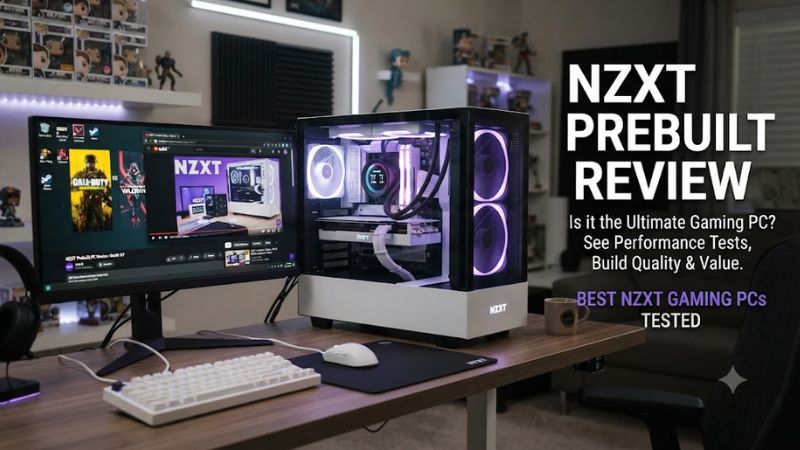
A nzxt prebuilt review should look beyond RGB lighting and advertised frame rates to determine whether a ready-made gaming PC justifies its price. NZXT’s current Player lineup covers entry-level 1080p gaming through premium 4K systems, with different graphics cards, processors, memory capacities, and storage options for different budgets.
How to Choose an NZXT Prebuilt Gaming PC
Choosing an NZXT gaming desktop starts with your monitor resolution, favorite games, and total budget. The Player One targets mainstream gaming, Player Two moves toward stronger 1440p performance, and Player Three serves demanding gaming and creative workloads. Compare the exact configuration and current checkout price rather than relying on the series name alone.
Match the Graphics Card to Your Resolution
The graphics card usually has the greatest influence on gaming performance at higher resolutions. NZXT’s current lineup includes configurations with NVIDIA GeForce RTX 5060, RTX 5060 Ti, RTX 5070, RTX 5070 Ti, RTX 5080, and RTX 5090 graphics, depending on the model and availability. Choose according to the games you play, image quality, and target frame rate.
For competitive games at 1080p, an entry-level configuration may be sufficient, while demanding games at 1440p benefit from a stronger GPU. For 4K gaming, prioritize graphics performance and available video memory. A product-page FPS estimate is not a universal result: game version, resolution, graphics settings, upscaling, and CPU limits can change the outcome considerably.
Check the Processor and Memory
Processor choice matters in simulation games, strategy titles, high-refresh-rate gaming, streaming, and other CPU-intensive workloads. Current NZXT configurations include the Intel Core i5-14400F, Intel Core Ultra 7 270K Plus, AMD Ryzen 7 9800X3D, AMD Ryzen 9 9900X, and AMD Ryzen 9 9950X3D, depending on the specific model. These processors serve different performance and workload priorities.
Memory capacity also affects multitasking and demanding games. The listed Player One configuration includes 16GB of DDR5 memory, while several higher-tier models have 32GB. Check the exact speed and module arrangement before ordering. Do not assume every NZXT desktop uses the same memory kit or that an advertised upgrade is necessary for every game.
Compare the Complete Price, Not Just the GPU
A prebuilt PC bundles assembly, Windows, cooling, a case, a power supply, and customer support. Those extras have value, but they do not automatically make a system cheaper than building a comparable desktop yourself. Compare equivalent processors, graphics cards, memory, storage, cooling, and warranty coverage before deciding whether the convenience justifies the premium.
NZXT’s US store lists different prices across the Player range, and discounts, stock, and configurations can change. Treat the listed figures below as reference prices from the manufacturer’s current product listings, not permanent offers. Also budget for a monitor, peripherals, and any additional storage you might need instead of using the entire budget on the tower.
Verify Compatibility and Upgrade Options
NZXT assembles complete systems, so buyers do not have to select a motherboard socket, memory generation, or power supply from scratch. Nevertheless, future upgrades depend on the actual components fitted to the selected configuration. Check motherboard specifications, available M.2 slots, PCIe expansion, power connectors, GPU dimensions, cooling clearance, and the case before purchasing replacement hardware.
Current Player systems use DDR5 memory, but processor sockets and motherboard platforms differ between Intel and AMD configurations. A CPU upgrade therefore requires checking the exact motherboard and firmware support, not just matching a brand. NZXT’s advertised power-supply wattage is useful context, but connector compatibility and available power must also be confirmed for a future GPU.
Top Picks: Current NZXT Player PCs
NZXT’s Player desktops provide a straightforward way to buy a gaming system without sourcing individual parts. The following comparison uses configurations and prices listed by NZXT’s US store. These are manufacturer specifications, not independent lab results, and the recommended roles reflect hardware positioning rather than a shared benchmark suite.
| Product | Best For | Key Spec | Compatibility | Watch Out For |
| Player Two | Best Overall | Core Ultra 7 270K Plus; RTX 5070 12GB | DDR5; Intel platform | Higher entry cost |
| Player One | Best Value | Core i5-14400F; RTX 5060 8GB | DDR5; Intel platform | 16GB RAM |
| Player One Prime | Best For 1080p upgrades | RTX 5060 Ti 8GB; 16GB DDR5 | DDR5; Intel platform | Limited VRAM for some workloads |
| Player Two Prime | Best For demanding 1440p gaming | Ryzen 9 9900X; RTX 5070 Ti 16GB | DDR5; AMD platform | Premium price |
Reference prices and specifications are from NZXT’s US product listings accessed October 9, 2026. Verify the selected configuration and checkout price before purchasing.
NZXT Player Two: Best Overall
The Player Two is a balanced choice for buyers who want stronger gaming performance alongside streaming and productivity capability. NZXT lists an Intel Core Ultra 7 270K Plus processor, GeForce RTX 5070 with 12GB of video memory, 32GB of DDR5-6000 memory, and a 2TB NVMe SSD at a reference price of $2,649. The precise configuration should be confirmed on the product page.
Its combination of a modern processor, 32GB of memory, and 2TB of storage gives buyers room for a substantial game library and background applications. The main drawback is the purchase price, which may be difficult to justify for someone playing lighter titles at 1080p. Buyers focused on competitive gaming alone should compare less expensive systems before choosing this tier.
NZXT Player One: Best Value
The standard Player One is the entry point in NZXT’s current lineup. The manufacturer lists a Core i5-14400F processor, RTX 5060 with 8GB of video memory, 16GB of DDR5-5200 memory, and a 1TB NVMe SSD at $1,489. This combination is intended for mainstream 1080p gaming rather than serving as a premium 4K desktop.
Its advantage is a lower starting price and a conventional component mix for everyday gaming. The trade-offs are its smaller memory and storage allocations compared with higher-tier configurations, plus the graphics card’s more limited capacity for demanding high-resolution workloads. It is less compelling for buyers who already require 32GB of RAM, extensive storage, or sustained high-end 1440p performance.
NZXT Player One Prime: Best for an Entry-Level Upgrade
NZXT lists the Player One Prime at $1,749, with an RTX 5060 Ti featuring 8GB of video memory. This configuration targets buyers who want more graphics capability than the standard Player One without moving directly into the more expensive Player Two range. The exact processor, memory, storage, and cooling configuration should be checked before ordering because specifications can vary by listing.
The stronger graphics tier makes this model worth comparing for high-refresh-rate 1080p gaming and selected 1440p games. However, 8GB of video memory can constrain some newer games at high texture settings, especially at higher resolutions. Buyers who prioritize demanding 1440p workloads or want more VRAM should compare the RTX 5070 and RTX 5070 Ti configurations before committing.
NZXT Player Two Prime: Best for Demanding 1440p Gaming
The Player Two Prime is a higher-tier option featuring an AMD Ryzen 9 9900X, GeForce RTX 5070 Ti with 16GB of video memory, 32GB of DDR5-6000 memory, and a 2TB SSD. NZXT lists a 360mm Kraken Core liquid cooler, an H5 Flow RGB case, and a 750W Gold-rated ATX power supply. Its reference price is around $3,099, although promotional pricing may differ.
This configuration suits players who want strong 1440p graphics performance while keeping substantial CPU resources for streaming or content creation. The downside is the premium cost: buyers who mainly play esports or less demanding titles may not use the extra capability. Its AM5 platform and DDR5 memory also mean future CPU and memory upgrades must be checked against motherboard and firmware support rather than assumed.
FAQ
Is an NZXT prebuilt gaming PC worth the price?
An NZXT prebuilt gaming PC can be worth the price if you value a ready-to-use system, coordinated components, and manufacturer support more than assembling a PC yourself. Compare the total cost with a similar self-built configuration, including Windows, cooling, and warranty coverage, before deciding.
Which NZXT prebuilt is best for 1440p gaming?
The Player Two and Player Two Prime are the main options to compare for 1440p gaming, with the Prime model offering the stronger RTX 5070 Ti graphics card in its listed configuration. Actual frame rates depend on the game, resolution, graphics settings, and rendering features, so check independent benchmarks for your specific titles.
Can you upgrade an NZXT prebuilt PC later?
Yes, many NZXT Player PCs can be upgraded, but the available options depend on the installed motherboard, power supply, case, and cooling hardware. Check supported CPUs, DDR5 memory capacity, M.2 slots, GPU clearance, and power connectors before buying replacement parts. Opening the system or changing components may also affect support or warranty terms.
Does NZXT provide a warranty for its prebuilt PCs?
NZXT advertises a two-year warranty for its Player PCs, alongside lifetime technical support on its current prebuilt collection page. Review the applicable warranty and return terms for your exact purchase, since coverage conditions and regional policies can differ. Keep the order details and original configuration information in case you need troubleshooting or service.
Final Thoughts
This nzxt prebuilt review finds that NZXT’s Player lineup covers several useful gaming tiers, from the RTX 5060 entry-level configuration to more powerful RTX 5070 Ti and RTX 5080 systems. The right purchase depends on the current price, your target resolution, and upgrade plans. Compare exact specifications and independent game benchmarks before ordering.