🛒 Best Price Today on Amazon
Prime members get fast, free shipping on everything above, plus member-only deals. New members get a 30-day free trial — cancel anytime.

Sandisk 1TB Optimus GX C50 Storage Expansion Card for Xbox
Included for 'Best ssd for xbox series x expansion: Complete Best Guide' as a relevant option in this category; details come from the product listing.
View on AmazonSandisk 512GB Optimus GX C50 Storage Expansion Card for Xbox
Included for 'Best ssd for xbox series x expansion: Complete Best Guide' as a relevant option in this category; details come from the product listing.
View on Amazon
HWAYO 1TB Expansion Card for Xbox Series X|S NVMe SSD Storage
Included for 'Best ssd for xbox series x expansion: Complete Best Guide' because the listing specifies S NVMe SSD Storage, details this guide uses to compare options.
View on AmazonIf you need the best ssd for xbox series x expansion, choose an Xbox Storage Expansion Card rather than a standard USB SSD for Series X|S games. Seagate and WD_BLACK offer compatible cards that use the console’s expansion slot, while USB drives remain useful for storage and backward-compatible titles.
How to Choose an Xbox Series X Expansion SSD
The right card comes down to four practical criteria: native Series X|S game support, capacity, price tier, and the amount of library management you want to avoid. Official expansion cards support the console’s storage architecture, so these criteria point toward Seagate or WD_BLACK rather than ordinary PC NVMe drives or USB SSDs.
Native Xbox compatibility matters most
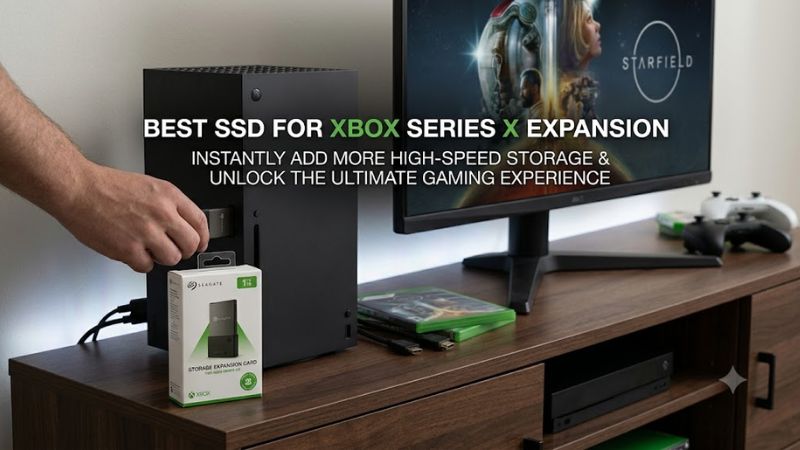
For the best ssd for xbox series x expansion, compatibility starts with the dedicated expansion port. Xbox states that Storage Expansion Cards add space while matching the internal storage experience, and Seagate specifies Series X and Series S compatibility. A normal M.2 SSD cannot simply be installed because the console has no user-accessible M.2 expansion bay.
The practical distinction is important: Xbox Series X|S optimized games can run from an official expansion card, while USB storage can store those games but requires moving them back to internal storage or an expansion card before play. That makes the Seagate and WD_BLACK cards fundamentally different from ordinary external SSDs.
Capacity should match your library
Capacity is the second major choice. Seagate currently lists 1TB, 2TB, and 4TB expansion-card options, while WD_BLACK C50 models are available in 512GB, 1TB, and 2TB capacities. A larger card reduces how often you need to uninstall or move large games, but the initial purchase cost also rises with capacity.
For the best ssd for xbox series x expansion, 1TB suits players adding a moderate amount of space, 2TB gives more room for a larger installed library, and 4TB targets users who want to keep a particularly large collection available. Those capacity choices are product configurations, not claims about any specific number of installed games.
Price tier changes the value equation
The current Xbox accessory catalog lists the WD_BLACK C50 2TB at $199.99 and the Seagate 2TB card at $299.99, while the Seagate 4TB card is listed at $549.99 in the US. These are manufacturer-listed prices and can change, so street pricing should be checked before purchase.
That price spread makes the WD_BLACK C50 2TB especially relevant for shoppers comparing capacity against upfront cost, while Seagate provides more capacity choices, including 4TB. For the best ssd for xbox series x expansion, compare the actual current price of the capacity you need rather than assuming the largest card is automatically the better purchase.
Transfer behavior still matters
Expansion-card performance is not just about loading games. Independent testing has recorded substantial transfer differences between expansion cards and USB hard drives. TechRadar moved a 24.6GB game from internal storage to a Seagate card in 1 minute 6 seconds versus 3 minutes 50 seconds using a USB 3 HDD. The test was performed on Xbox hardware.
Independent testing of the WD_BLACK C50 2TB also found that roughly 75GB game transfers took about 1 minute 40 seconds in one direction. GamesRadar reported the test on an Xbox Series X, while the same review notes that the C50’s raw transfer behavior should not be treated as a substitute for official Xbox performance specifications.
Top Picks for Xbox Series X Expansion
| Product | Best For | Key Spec | Compatibility | Watch Out For |
| Seagate Storage Expansion Card 4TB | Best Overall | 4TB; dedicated expansion card | Xbox Series X | S |
| WD_BLACK C50 2TB | Best Value | 2TB; NVMe-based expansion card | Xbox Series X | S |
| Seagate Storage Expansion Card 2TB | Best For Large Libraries | 2TB; dedicated expansion card | Xbox Series X | S |
| WD_BLACK C50 1TB | Best For Moderate Expansion | 1TB; NVMe-based expansion card | Xbox Series X | S |
Seagate Storage Expansion Card 4TB — Best Overall
The Seagate 4TB card is aimed at Xbox Series X owners who want the largest currently listed expansion capacity from the Seagate line. Xbox lists the 4TB model in its US accessory catalog, while Seagate describes its Storage Expansion Card range as using the dedicated Xbox expansion interface and supporting Series X|S consoles.
For the best ssd for xbox series x expansion when capacity is the priority, this model provides four times the nominal capacity of a 1TB card. An independent Laptop Mag test on Xbox Series X recorded 7.39 seconds to load Clair Obscur: Expedition 33 from the 4TB card versus 7.33 seconds internally, while a 42.3GB transfer took 1 minute 47 seconds.
The main weakness is price: Xbox lists the 4TB Seagate card at $549.99, placing it far above the 2TB alternatives. Buyers who regularly rotate a smaller group of games should not pay for capacity they will not use. The card is for Series X|S consoles with the dedicated expansion port, not PCs or standard USB storage.
WD_BLACK C50 2TB — Best Value
The WD_BLACK C50 2TB combines a dedicated Xbox expansion interface with 2TB of capacity. Western Digital lists the 2TB model as WDBMPH0020BNC, while Xbox currently lists the US model at $199.99. The card is officially licensed for Xbox Series X|S and uses the console’s storage expansion architecture.
Independent GamesRadar testing moved roughly 75GB each of Avowed and Hogwarts Legacy to the 2TB C50 in about 1 minute 40 seconds, with reported transfer speeds around 6.2Gbps. The test used an Xbox Series X, and loading times were close to the internal drive in that review.
Its weakness is simply capacity relative to Seagate’s 4TB option. For the best ssd for xbox series x expansion on a lower expansion-card budget, the C50 2TB is better suited to buyers who want substantial native storage without stepping into the 4TB price tier. Players needing maximum capacity should consider Seagate’s larger option instead.
Seagate Storage Expansion Card 2TB — Best For Large Libraries
The Seagate 2TB card is a middle point between the company’s 1TB and 4TB models. Seagate lists the 2TB STJR2000400 model for Xbox Series X|S, and Xbox’s US accessory catalog currently lists the 2TB version at $299.99. It connects through the console’s dedicated expansion port rather than USB.
For the best ssd for xbox series x expansion with a large library, 2TB adds substantially more room without reaching the physical capacity ceiling of the 4TB card. Windows Central’s Xbox Series X transfer tests used a 1TB Seagate card and recorded 102.4GB of Forza Horizon 5 moving from internal storage in 4 minutes 22 seconds, illustrating the card family’s intended role.
The real weakness is its listed price compared with the WD_BLACK C50 2TB. Buyers choosing between the two should compare current retailer pricing and warranty terms rather than assuming the brands perform identically in every workload. It is compatible with Xbox Series X|S, but it is not a general-purpose PC NVMe replacement.
WD_BLACK C50 1TB — Best For Moderate Expansion
The WD_BLACK C50 1TB provides the same dedicated Xbox expansion approach in a smaller capacity. Western Digital lists the model WDBMPH0010BNC, while Xbox lists C50 expansion cards as storage accessories for Series X and Series S. The card is intended for the console expansion slot rather than a USB enclosure.
For shoppers seeking the best ssd for xbox series x expansion without paying for 2TB or 4TB, 1TB can be a practical capacity step. Xbox Wire describes the C50 as supporting Xbox Velocity Architecture and Quick Resume, while independent testing found only small loading-time differences in several games compared with internal storage.
Its weakness is limited headroom for a large modern library. A buyer with many large Series X|S installations may reach the card’s capacity sooner than expected, while a player who mainly keeps a rotating selection installed may have little reason to move up. The C50 remains specific to Xbox Series X|S expansion rather than general PC storage.
FAQ
The key questions are whether a regular SSD works, whether USB storage can run new games, whether Seagate or WD_BLACK is compatible, and how much capacity makes sense. The answers depend more on Xbox’s storage interface and game-generation rules than on the advertised sequential speed of a conventional PC SSD.
Can a normal external SSD expand Xbox Series X storage?
A USB SSD can expand the amount of game data stored on an Xbox Series X, but it does not provide the same function as an official Storage Expansion Card. Xbox requires Series X|S optimized games stored on USB storage to be moved to internal storage or an expansion card before they can be played.
That means a USB SSD can still make sense as an archive or transfer drive, especially for backward-compatible Xbox One, Xbox 360, and original Xbox games. For native Series X|S game execution from the added storage, the dedicated expansion-card format is the relevant requirement.
Does the best ssd for xbox series x expansion need Xbox certification?
For native expansion-card functionality, use a model specifically designed and licensed for Xbox Series X|S. Xbox identifies Storage Expansion Cards as the way to add storage while matching the console’s internal storage performance, and both Seagate and WD_BLACK publish Series X|S-specific expansion products.
A generic PCIe 4.0 NVMe drive is not an interchangeable option. Xbox Series X does not expose a standard M.2 slot for users to install a desktop SSD, so buying a high-end PC drive based only on its sequential read specification does not provide a compatible upgrade path.
Is 1TB or 2TB better for Xbox Series X?
The answer depends on how much installed storage you actually use. Seagate and WD_BLACK both offer 1TB-class expansion cards, while both product families also extend into larger capacities. A 1TB card adds substantial space, whereas a 2TB card gives more room for users who keep a broader installed library.
For the best ssd for xbox series x expansion, compare the current price difference rather than treating capacity as the only factor. If the additional capacity is likely to prevent frequent game transfers, 2TB may be easier to justify; otherwise, a 1TB card keeps the initial purchase smaller.
Does an Xbox expansion card affect loading times?
Independent testing generally shows expansion cards operating close to the Xbox Series X internal storage experience, although results vary by game and workload. GamesRadar’s C50 testing found small loading-time differences, while Laptop Mag’s 4TB Seagate testing recorded nearly identical load times for several games on internal and expansion storage.
Transfer measurements are more variable and should not be treated as a universal speed guarantee. For example, Windows Central’s Xbox Series X tests recorded different transfer times for Halo Infinite, Forza Horizon 5, and Call of Duty: Warzone, demonstrating that file size and workload can affect results.
Final Thoughts
The best ssd for xbox series x expansion is an official Storage Expansion Card when the goal is to play Series X|S optimized games directly from added storage. Seagate offers the broadest capacity range, while WD_BLACK C50 provides 1TB and 2TB choices. Compare current prices, capacity needs, and verified Xbox compatibility before buying.