🛒 Best Price Today on Amazon
Prime members get fast, free shipping on everything above, plus member-only deals. New members get a 30-day free trial — cancel anytime.
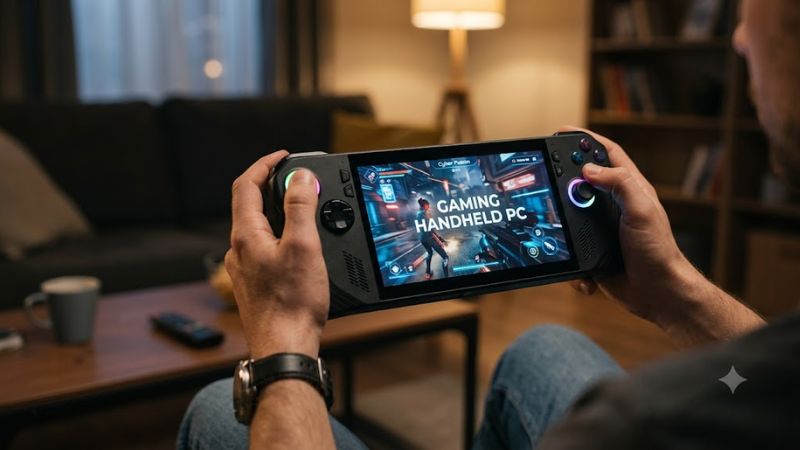
Modern portable systems bring full desktop game libraries into a portable form factor with high-refresh displays and custom processors. Selecting the right gaming handheld pc involves balancing total power against battery drain and operating system software flexibility. Hardware specs determine how demanding titles perform on travel.
How to Choose a Gaming Handheld PC
Evaluating individual gaming handheld pc hardware capabilities ensures that your mobile system runs modern AAA releases without overheating or dying mid-session. Buyers should review chip architectures, memory allocation, panel technology, and operating system ecosystems before settling on a specific design. Each core metric directly impacts usability.
Processor Architecture and Memory Headroom
Modern handheld APUs combine CPU cores and graphics Compute Units onto a single piece of silicon. Silicon options like the AMD Ryzen Z1 Extreme and AMD Ryzen AI Z2 Extreme deliver 12 Compute Units capable of handling demanding 3D workloads. Stronger integrated graphics permit higher frame rates in modern titles at lower resolutions.
System memory bandwidth directly limits integrated GPU rendering speeds in portable hardware. Designs featuring 24GB of LPDDR5X RAM enable allocating 8GB specifically for VRAM in BIOS without starving system memory. This extra headroom prevents texture stuttering in modern open-world titles like Cyberpunk 2077 at 1080p medium settings.
Battery Capacity and Power Profiles
Battery capacity dictates how long a gaming handheld pc operates away from an AC wall outlet. Stored energy ranges from smaller 50Wh cells up to massive 80Wh batteries found in high-end models. Running demanding titles at a 25W TDP drains smaller batteries in roughly one hour, whereas 80Wh batteries deliver up to two hours of uninterrupted play.
Power profiles managed through software overlays let users adjust operating wattages on the fly. Dropping operating power down to 15W extends game time significantly while keeping lighter indie titles at steady frame rates. Choosing a device with a larger battery cell ensures longer sessions without tethering to a portable wall charger.
Platform Compatibility and Operating Systems
Operating system selection determines store access and game anti-cheat compatibility across gaming handheld pc titles. Windows 11 provides native support for Xbox Game Pass, Epic Games Store, and competitive titles using kernel-level anti-cheat. SteamOS offers a streamlined console interface but restricts games requiring non-Linux anti-cheat tools.
Hardware expansion ports also impact compatibility with external accessories and storage drives. Devices featuring USB4 or Thunderbolt 4 ports allow connecting high-speed external GPUs and desktop docks. MicroSD card slots formatted with UHS-II standard support fast storage expansion for expanding library capacities easily.
Display Technology and Refresh Rates
Screen technology defines visual clarity and motion fluidity during gaming handheld pc sessions. Modern handheld displays range from 7-inch 1080p IPS panels up to 8.8-inch high-resolution displays running at 144Hz refresh rates. Vibrant OLED panels deliver infinite contrast ratios and near-instant pixel response times under 1ms.
Variable Refresh Rate support prevents screen tearing when frame rates drop below display refresh targets. VRR enables smooth visual output even when demanding titles fluctuate between 40 FPS and 60 FPS. Selecting a screen with VRR technology ensures smooth motion without requiring strict vertical sync buffers.
Top Gaming Handheld PC Picks
Comparing key hardware specifications, operating systems, and display panels reveals the best gaming handheld pc choices currently available for mobile players. The following summary table outlines top picks across price points, highlighting core specs, platform compatibility, and potential weaknesses to consider before buying.
| Product | Best For | Key Spec | Compatibility | Watch Out For |
| ASUS ROG Xbox Ally X | Best Overall | Ryzen AI Z2 Extreme, 24GB LPDDR5X, 80Wh | Windows 11, USB4, Xbox UI | IPS screen instead of OLED |
| Valve Steam Deck OLED | Best Value | Custom AMD APU, 16GB LPDDR5, 7.4″ OLED | SteamOS, Linux Proton | Linux anti-cheat restrictions |
| Lenovo Legion Go S | Best Screen | Ryzen Z1 Extreme, 16GB RAM, 8″ 120Hz IPS | SteamOS, dual USB4 | Smaller 55.5Wh battery cell |
| MSI Claw 8 EX AI+ | Best Performance | Intel Arc G3 Extreme, 32GB RAM, 80Wh | Windows 11, Thunderbolt 4 | Premium price at $1,799 |
ASUS ROG Xbox Ally X
The ASUS ROG Xbox Ally X serves as a premier gaming handheld pc for players wanting complete Windows game compatibility and long battery life. Powered by the AMD Ryzen AI Z2 Extreme processor and 24GB of high-speed LPDDR5X-8000 memory, this handheld delivers smooth 1080p performance across modern AAA titles while running an Xbox interface.
Its massive 80Wh battery cell provides two to three hours of active gameplay at a 25W TDP profile. In Cyberpunk 2077 at 1080p low settings at 25W, independent benchmarks show averages of 45 to 55 FPS. The primary drawback is its around $1,000 price tag and IPS display, making it less ideal for buyers seeking per-pixel OLED contrast.
Valve Steam Deck OLED
The Valve Steam Deck OLED remains a standout value option for PC gamers prioritizing overall screen quality and intuitive console navigation. Featuring a vibrant 7.4-inch 90Hz HDR OLED panel and custom AMD APU, it renders games with rich colors and fast response times while selling at $789 for 512GB and $949 for 1TB models.
Its custom APU and 50Wh battery achieve long real-world play times, lasting two to three hours in AAA titles at lower power draws. The primary limitation of SteamOS is Linux anti-cheat incompatibility with titles like Destiny 2 or Fortnite. It is not suitable for competitive gamers who require native Windows 11 desktop launchers or kernel-level anti-cheat compatibility.
Lenovo Legion Go S
The Lenovo Legion Go S targets buyers who want SteamOS combined with a larger 8-inch screen and AMD Ryzen Z1 Extreme hardware. Priced at around $1,100, it pairs a 1920×1200 IPS touchscreen running at 120Hz with Variable Refresh Rate support. This expansive display layout offers a noticeably roomier gaming viewport than standard 7-inch alternatives for reading dense strategy game text easily.
Equipped with 16GB of RAM and dual USB4 expansion ports, it maintains strong performance across steam library titles. However, its smaller 55.5Wh battery drains quickly when powering the larger 120Hz screen during heavy gaming sessions. Mobile players who travel frequently without constant access to AC chargers should consider devices with larger battery capacities instead.
MSI Claw 8 EX AI+
The MSI Claw 8 EX AI+ caters to enthusiast buyers seeking maximum graphics throughput in a portable Windows 11 form factor. Driven by an Intel Arc G3 Extreme processor with Arc B390 graphics, 32GB of LPDDR5X memory, and a 1TB SSD, it delivers high frame rates on an 8-inch 1200p 120Hz VRR touchscreen. Dual Thunderbolt 4 ports expand desktop docking capabilities for home setups.
An integrated 80Wh battery keeps this demanding hardware running for two hours under intense gaming loads. The primary hurdle for most buyers is its premium $1,799 price point and hefty chassis weight. Budget-conscious gamers or buyers seeking lightweight builds with OLED screens should look toward lower priced mainstream alternatives instead.
Frequently Asked Questions About Gaming Handheld PCs
Understanding hardware limits, power management settings, and operating system trade-offs helps buyers select their ideal gaming handheld pc setup. Below are four common inquiries regarding mobile PC hardware capabilities, battery management, upscaling options, and store access, with answers focused on real performance metrics.
Can a Gaming Handheld PC Run Demanding AAA Games?
Yes, modern handheld systems run demanding AAA titles when configured with active resolution scaling like AMD FSR 3 or Intel XeSS. Devices equipped with chips like the Ryzen AI Z2 Extreme achieve 45 to 55 FPS in Cyberpunk 2077 at 1080p low settings at 25W. Frame rate stability depends heavily on selecting proper operating TDP profiles and managing VRAM allocation within BIOS menus.
Adjusting graphic presets and capping target frame rates prevents performance thermal throttling during extended sessions. Lowering shadow detail, crowd density, and volumetric fog reduces GPU load while preserving visual clarity on compact 7-inch and 8-inch screens. Upscaling technologies maintain smooth rendering speeds easily.
How Long Does a Battery Last on a Gaming Handheld PC?
A gaming handheld pc battery lasts between one and six hours depending on cell size, screen brightness, and processor power draw. Standard 50Wh cells drain in roughly one hour at 25W TDP, whereas 80Wh cells extend intense play to over two hours. Lowering operating TDP profiles down to 15W increases real-world battery life up to four hours for lighter 2D or indie titles.
Power management software allows quick switching between performance modes directly from in-game overlay menus. Utilizing airplane mode, lowering screen brightness, and setting display refresh rates to 60Hz further conserves charge. External USB Power Delivery power banks rated at 65W or higher can safely recharge the internal battery cell while playing on long trips.
Is Windows 11 Better Than SteamOS on Portable Hardware?
Windows 11 is better for multi-launcher access and competitive anti-cheat titles, while SteamOS is better for console simplicity. Windows 11 natively supports PC Game Pass, Battle.net, and anti-cheat games like Fortnite without workarounds. SteamOS provides an optimized suspend and resume feature that instantly freezes game states for convenient pause breaks on travel.
Choosing between operating platforms depends on which games you play most and how much technical desktop configuration you prefer. Windows systems require navigating desktop updates and driver management but offer unrestricted game installation. SteamOS delivers a polished controller interface ideal for dedicated Steam library collections.
Can You Upgrade Internal SSD Storage on Mobile Devices?
Yes, most handheld devices feature user-replaceable NVMe SSD storage that can be upgraded using standard tools. Handhelds utilize compact M.2 2230 or M.2 2280 drive form factors depending on internal chassis space. Upgrading internal storage to a high-capacity 2TB or 4TB NVMe drive expands game library capacity without relying on bulky external dongles.
Disassembling chassis panels requires disconnecting the battery cable before removing the factory drive to prevent electrical shorts. Reinstallation involves cloning the existing operating system or downloading recovery installation images onto a USB flash drive. Expanding internal storage capacity ensures adequate room for installing multiple heavy modern AAA titles simultaneously.
Final Thoughts
Choosing the right gaming handheld pc comes down to balancing hardware performance, battery capacity, screen display technology, and software compatibility. Options like the ROG Xbox Ally X offer high power and long battery life, while the Steam Deck OLED provides top visual contrast. Selecting the specific model that fits your primary game library and mobility needs ensures an optimal portable experience on travel.