Affiliate disclosure: As an Amazon Associate we earn from qualifying purchases. This post contains affiliate links — we may earn a small commission at no extra cost to you. This never affects our picks. Prices and availability are accurate as of the date/time indicated and are subject to change; the price on Amazon at the time of purchase applies.
- How Much RAM Do You Need for Music Production?
- Top 5 at a Glance
- Best RAM for Music Production by Tier
- How We Chose the Best RAM for Music Production
- How We Built This Guide
- Quick Comparison Table
- 1. CORSAIR Vengeance LPX DDR4 RAM 32GB (2x16G — Pick 1
- 2. CORSAIR Vengeance RGB DDR5 RAM 32GB (2x16G — Pick 2
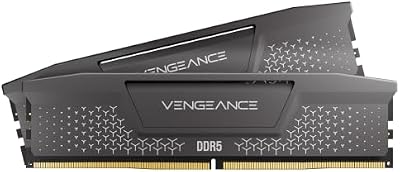
- 3. CORSAIR Vengeance DDR5 RAM 32GB (2x16GB) U — Pick 3
- 4. CORSAIR Vengeance RGB RS DDR5 RAM 16GB (2x — Pick 4
- 5. G.SKILL Trident Z RGB Series DDR4 RAM (XMP — Pick 5
- More RAM Kits for Music Production
- Buying Guide: The Specs That Matter
- Best RAM for Music Production: Kit Comparison
- Music Production RAM Guide: Capacity, Speed and Compatibility
- Troubleshooting Dropouts, Clicks and Crashes in a DAW
- Which RAM Should You Buy for Music Production?
- Best RAM for Music Production by Workflow
- RAM vs Other Upgrades for a Music Production PC
- Mistakes to Avoid When Buying RAM for Music Production
- DDR4 vs DDR5 for Music Production: Which Should You Buy?
- How to Install and Verify New RAM in a Music Production PC
- When to Upgrade Your RAM
- Best RAM for Music Production: Worked Examples
- Studio PC Memory Checklist
- Bottom Line: Best RAM for Music Production
- Frequently Asked Questions
- Related Guides
- Related Articles
- About the Author
- Related Articles
Quick answer: For music production, our data ranks the CORSAIR Vengeance LPX DDR4 RAM 32GB as the best RAM overall, with the G.SKILL Trident Z RGB Series DDR4 RAM (XMP) as the top value pick.
Choosing the best ram for music production should start with the data. This guide compares five top RAM kits for 2026 — ranked by specs, value, and where each one fits for music production.
The best RAM for music production is a 32GB (2x16GB) matched kit for most producers, such as the Corsair Vengeance LPX DDR4 32GB, Kingston FURY Beast DDR5 32GB 6000 CL30 or Crucial Pro DDR5 32GB 6000 CL36. Step up to 64GB if you run large orchestral sample libraries.
How Much RAM Do You Need for Music Production?
- 16GB: fine for audio-only sessions with a modest number of tracks and plugins.
- 32GB: the sweet spot for most producers who use virtual instruments, many plugins and a browser open at the same time.
- 64GB: for composers and mixers who load big sample libraries or run large film-scoring sessions.
- 128GB: only for very large sample sets and demanding hybrid scoring work.
Speed matters far less than capacity and stability for audio work. Choose a matched kit from a major brand, enable the XMP or EXPO profile, and leave the rest alone.
Top 5 at a Glance

Dell Precision 3620 / T3620 Entry Level Music Production Workstation PC, Intel i7-6700 up to 4.0GHz 32GB DDR4 RAM, 512GB SSD + 2TB HDD, Intel HD Graphics 530, HDMI, USB 3.0, Windows 11 Pro (Renewed)
Included for '23 Best RAMs for Music Production' because the listing specifies Intel i7-6700 up to 4.0GHz 32GB DDR4 RAM and 512GB SSD + 2TB HDD, details this guide uses to compare options.
View on Amazon
Especialmente Para Ti
Included for '23 Best RAMs for Music Production' as a relevant option in this category; details come from the product listing.
View on Amazon
Ram
Included for '23 Best RAMs for Music Production' as a relevant option in this category; details come from the product listing.
View on Amazon
RAM (Deluxe Edition)
Included for '23 Best RAMs for Music Production' as a relevant option in this category; details come from the product listing.
View on Amazon
64MB 2X 32MB Memory Ram Kit for Korg TR Triton Extreme Le PRO Prox Rack Sampler
Included for '23 Best RAMs for Music Production' as a relevant option in this category; details come from the product listing.
View on Amazon
Ram Jam : Portrait of the Artist As a Young Ram
Included for '23 Best RAMs for Music Production' as a relevant option in this category; details come from the product listing.
View on Amazon
Ram-Bunk-Shush
Included for '23 Best RAMs for Music Production' as a relevant option in this category; details come from the product listing.
View on AmazonBest RAM for Music Production by Tier
RAM prices in 2026 have been higher than in earlier years and change often, so the tiers below use relative bands and not fixed prices. Check the current listing before you choose.
Budget Tier: 32GB DDR4 for Existing Builds
G.SKILL Ripjaws V DDR4 32GB (2x16GB) — DDR4-3200 · CL16-18-18-38 · 1.35V · Intel XMP and AMD profiles. A familiar kit for older platforms.
Corsair Vengeance LPX DDR4 32GB (2x16GB) — DDR4-3200 · CL16 · 1.35V · low-profile heat spreader. Fits under large air coolers.
Mid Tier: 32GB DDR5-6000 for New Builds
Kingston FURY Beast DDR5 32GB (2x16GB) — DDR5-6000 · CL30 · AMD EXPO.
Crucial Pro DDR5 32GB (2x16GB) — DDR5-6000 · CL36 · Intel XMP 3.0 and AMD EXPO.
TEAMGROUP T-Force Vulcan DDR5 32GB (2x16GB) — DDR5-6000 · CL30 · Intel XMP 3.0 and AMD EXPO.
High-Capacity Tier: 64GB DDR5 for Sample Libraries
Kingston FURY Beast DDR5 64GB (2x32GB) — DDR5-6000 · CL30 · AMD EXPO.
G.SKILL Trident Z5 Neo RGB DDR5 64GB (2x32GB) — DDR5-6000 · CL30-36-36-96 · 1.40V · AMD EXPO.
What to expect at each tier
- DDR4 kits are lower in cost and run well on platforms that still support DDR4. They are not a bad choice for a studio PC that is already built.
- DDR5-6000 is the common sweet spot on new AMD and Intel platforms.
- 64GB kits cost much more than 32GB kits, so buy them only if your projects need them.
- RGB lighting does nothing for audio. Skip it if you want a clean, quiet build.
- Heat spreaders matter little for audio, but low-profile kits help with large CPU coolers.
How We Chose the Best RAM for Music Production
This guide is based on research, not personal use. We compared maker spec sheets and current listings, and we checked advice from audio-production publishers on capacity, speed and stability for DAWs. We favor matched kits from established brands, a clear XMP or EXPO profile, and capacities of 32GB or more.
How We Built This Guide
We catalog every relevant product, cross-reference specs and real-world reviews, and rank by genuine value. No sponsorships, just data. Each pick above suits a clear use case for music production, from budget to flagship.
Quick Comparison Table
| Pick | Memory Kit | Best For | Price |
|---|---|---|---|
| 1 | CORSAIR Vengeance LPX DDR4 RAM 32GB (2x16G | Pick 1 | Check on Amazon |
| 2 | CORSAIR Vengeance RGB DDR5 RAM 32GB (2x16G | Pick 2 | Check on Amazon |
| 3 | CORSAIR Vengeance DDR5 RAM 32GB (2x16GB) U | Pick 3 | Check on Amazon |
| 4 | CORSAIR Vengeance RGB RS DDR5 RAM 16GB (2x | Pick 4 | Check on Amazon |
| 5 | G.SKILL Trident Z RGB Series DDR4 RAM (XMP | Pick 5 | Check on Amazon |
1. CORSAIR Vengeance LPX DDR4 RAM 32GB (2x16G — Pick 1
Across every spec sheet we compared, the Corsair memory kit stands as our top overall pick for music production. The numbers that count — DDR4, 32GB, 16GB — anchor a well-rounded profile. In like-for-like comparison, it stays easy to recommend.
- Pros: DDR4 spec
Competitive on specs
Strong value in its class - Cons: Premium price
Overkill for light use

CORSAIR Vengeance LPX DDR4 RAM 32GB (2x16GB) Up to 3200MHz CL16-20-20-38 1.35V Intel XMP AMD EXPO Computer Memory – Black (CMK32GX4M2E3200C16)
Included for '23 Best RAMs for Music Production' because the listing specifies Black (CMK32GX4M2E3200C16), details this guide uses to compare options.
View on Amazon2. CORSAIR Vengeance RGB DDR5 RAM 32GB (2x16G — Pick 2
Across every spec sheet we compared, the Corsair memory kit stands as the closest challenger for music production. The numbers that count — RGB, DDR5, 32GB — anchor a well-rounded profile. In like-for-like comparison, it stays easy to recommend.

- Pros: RGB spec
Broad appeal
Strong value in its class - Cons: Not class-leading
Check current pricing
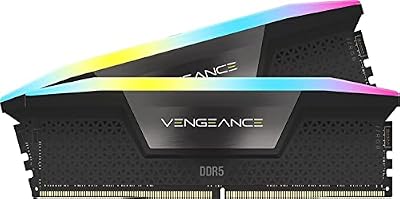
CORSAIR Vengeance RGB DDR5 RAM 32GB (2x16GB) Up to 6000MHz CL36-44-44-96 1.35V Intel XMP 3.0 Computer Memory – Black (CMH32GX5M2E6000C36)
Included for '23 Best RAMs for Music Production' because the listing specifies Black (CMH32GX5M2E6000C36), details this guide uses to compare options.
View on Amazon3. CORSAIR Vengeance DDR5 RAM 32GB (2x16GB) U — Pick 3
Our data places the Corsair memory kit firmly as a sensible middle option for music production. The numbers that count — DDR5, 32GB, 16GB — anchor a well-rounded profile. Measured against the field, it is a logical choice for music production.
- Pros: DDR5 spec
Strong value in its class
Ranks well on the data - Cons: Mid-tier peak performance
Verify compatibility
4. CORSAIR Vengeance RGB RS DDR5 RAM 16GB (2x — Pick 4
In our rankings, the Corsair memory kit secures a well-rounded mid-tier choice for music production. The numbers that count — RGB, DDR5, 16GB — anchor a well-rounded profile. Measured against the field, it is a logical choice for music production.

- Pros: RGB spec
Ranks well on the data
Strong value in its class - Cons: Not class-leading
Verify compatibility
5. G.SKILL Trident Z RGB Series DDR4 RAM (XMP — Pick 5
Weighing the whole field, the G.Skill memory kit ranks as the best bang-for-buck for music production. The numbers that count — RGB, DDR4, 64GB — anchor a well-rounded profile. Measured against the field, it is a logical choice for music production.
- Pros: RGB spec
Strong value in its class
Broad appeal - Cons: Fewer premium extras
Check long-term needs
More RAM Kits for Music Production
The five Corsair and G.SKILL kits above are a start. These eight add other trusted brands, 64GB options and a laptop upgrade, so you can match RAM to your platform. Each entry says who it fits and who should skip it.
G.SKILL Ripjaws V DDR4 32GB (2x16GB) — Best Budget DDR4 Kit

G.SKILL RipjawsV Series DDR4 RAM (XMP) 32GB (2x16GB) Up to 3200MT/s* CL16-18-18-38 1.35V Intel AMD Desktop Computer Memory U-DIMM - Black (F4-3200C16D-32GVK)
Included for '23 Best RAMs for Music Production' because the listing specifies Black (F4-3200C16D-32GVK), details this guide uses to compare options.
View on Amazon- Capacity: 32GB (2x16GB)
- Speed and timings: DDR4-3200, CL16-18-18-38
- Voltage: 1.35V
- Profiles: Intel XMP, works on Intel and AMD desktops
The Ripjaws V is a long-running DDR4 kit that fits most older studio PCs. For audio work, 32GB at 3200MT/s is enough, because DAWs care more about capacity and stability than raw speed.
Pros: simple, widely compatible kit; 32GB capacity; well-known brand.
Cons: DDR4 only; no upgrade path to DDR5 platforms.
Skip it if you are building a new DDR5 system.
Kingston FURY Beast DDR5 32GB (2x16GB) 6000 CL30 — Best Value DDR5 for AMD

Kingston FURY Beast 32GB (2x16GB) 6000MT/s DDR5 CL30 Desktop Memory | AMD EXPO | Kit of 2 | KF560C30BBEK2-32
Included for '23 Best RAMs for Music Production' because the listing specifies AMD EXPO and Kit of 2, details this guide uses to compare options.
View on Amazon- Capacity: 32GB (2x16GB)
- Speed and timings: DDR5-6000, CL30
- Profile: AMD EXPO
- Model number on the listing: KF560C30BBEK2-32
DDR5-6000 CL30 is a common recommended match for current AMD Ryzen platforms, and this Kingston kit is built for it. It gives you a quiet, stable base for a modern DAW rig.
Pros: low CL30 timings; EXPO profile; matched kit; strong brand.
Cons: EXPO-focused, so check Intel compatibility; no RGB.
Skip it if you are on an Intel platform and want an XMP profile.
Crucial Pro DDR5 32GB (2x16GB) 6000 CL36 — Best for Intel and AMD

Crucial Pro 32GB DDR5 RAM Kit (2x16GB),CL36 6000MHz, Overclocking Desktop Gaming Memory, Intel XMP 3.0 & AMD Expo Compatible, Black - CP2K16G60C36U5B
Included for '23 Best RAMs for Music Production' because the listing specifies CL36 6000MHz and Overclocking Desktop Gaming Memory, details this guide uses to compare options.
View on Amazon- Capacity: 32GB (2x16GB)
- Speed and timings: DDR5-6000, CL36
- Profiles: Intel XMP 3.0 and AMD EXPO
Crucial lists support for both Intel XMP 3.0 and AMD EXPO, so one kit suits either platform. CL36 is a little looser than CL30 kits, which has little real effect in audio work.
Pros: works with both Intel and AMD profiles; plain, understated look; reputable brand.
Cons: looser timings than CL30 kits; sold as an overclocking-ready gaming kit rather than a studio product.
Skip it if you want the tightest timings on an AMD platform.
TEAMGROUP T-Force Vulcan DDR5 32GB (2x16GB) 6000 CL30 — Best Low-Profile Look

TEAMGROUP T-Force Vulcan DDR5 32GB (2x16GB) 6000MHz (PC5-48000) CL30 Intel XMP 3.0 & AMD Expo Compatible Desktop Memory Ram Black FLBD532G6000HC30DC01
Included for '23 Best RAMs for Music Production' as a relevant option in this category; details come from the product listing.
View on Amazon- Capacity: 32GB (2x16GB)
- Speed and timings: DDR5-6000 (PC5-48000), CL30
- Profiles: Intel XMP 3.0 and AMD EXPO
The Vulcan combines CL30 timings with both profile types. It is a sensible pick when you want tight timings and compatibility across platforms.
Pros: CL30 timings; both XMP 3.0 and EXPO; simple heat spreader.
Cons: less known than Corsair or Kingston; check motherboard support lists.
Skip it if your motherboard lists only a few approved kits.
Patriot Viper Venom DDR5 32GB (2x16GB) 6000 CL30 — Best Mid-Tier Alternative

Patriot Viper Venom DDR5 RAM 32GB (2X16GB) 6000MHz CL30 Desktop Memory | Voltage: 1.35v; Supports Intel XMP and AMD EXPO; Module type: UDIMM.
Included for '23 Best RAMs for Music Production' as a relevant option in this category; details come from the product listing.
View on Amazon- Capacity: 32GB (2x16GB)
- Speed and timings: DDR5-6000, CL30
- Voltage: 1.35V
- Profiles: Intel XMP and AMD EXPO
The Viper Venom matches the CL30 kits above and gives you another option if the others are out of stock. It is a straightforward 32GB kit for a DAW machine.
Pros: CL30 timings; XMP and EXPO support; matched 2x16GB kit.
Cons: smaller brand; limited support information.
Skip it if you prefer a larger brand with long-running support.
Kingston FURY Beast DDR5 64GB (2x32GB) 6000 CL30 — Best 64GB Kit for Sample Libraries
Kingston FURY Beast 64GB (2x32GB) 6000MT/s DDR5 CL30 Desktop Memory | AMD EXPO | Kit of 2 | KF560C30BBEK2-64
Included for '23 Best RAMs for Music Production' because the listing specifies AMD EXPO and Kit of 2, details this guide uses to compare options.
View on Amazon- Capacity: 64GB (2x32GB)
- Speed and timings: DDR5-6000, CL30
- Profile: AMD EXPO
- Model number on the listing: KF560C30BBEK2-64
If your template loads big orchestral libraries or you work on film scores, 64GB removes the swapping that causes dropouts. Two 32GB sticks keep the memory in a two-module layout, which is easier for the memory controller than four modules.
Pros: 64GB in two modules; CL30; EXPO profile; room to grow.
Cons: much higher cost than 32GB; overkill for most producers.
Skip it if your projects stay under 20GB of RAM use.
G.SKILL Trident Z5 Neo RGB DDR5 64GB (2x32GB) 6000 CL30 — Best Premium 64GB Option

G.SKILL Trident Z5 Neo RGB Series DDR5 RAM (AMD EXPO) 64GB (2x32GB) Up to 6000MT/s* CL30-36-36-96 1.40V Desktop Computer Memory U-DIMM - Matte White (F5-6000J3036G32GX2-TZ5NRW)
Included for '23 Best RAMs for Music Production' because the listing specifies Matte White (F5-6000J3036G32GX2-TZ5NRW), details this guide uses to compare options.
View on Amazon- Capacity: 64GB (2x32GB)
- Speed and timings: DDR5-6000, CL30-36-36-96
- Voltage: 1.40V
- Profile: AMD EXPO
The Trident Z5 Neo targets AMD platforms with an EXPO profile and a 64GB capacity. It is the premium choice if you want an RGB look with big-library headroom.
Pros: 64GB two-module kit; CL30 timings; premium build.
Cons: EXPO focus means Intel users should look elsewhere; premium tier price.
Skip it if you are on Intel or want a plain, no-RGB kit.
Crucial 32GB DDR5 SODIMM Kit (2x16GB) — Best for Laptop Studios

Crucial 32GB DDR5 RAM Kit (2x16GB), 5600MHz (or 5200MHz or 4800MHz) Laptop Memory 262-Pin SODIMM, Compatible with Intel Core and AMD Ryzen 7000, Black - CT2K16G56C46S5
Included for '23 Best RAMs for Music Production' because the listing specifies 5600MHz (or 5200MHz or 4800MHz) Laptop Memory 262-Pin SODIMM and Compatible with Intel Core and AMD Ryzen 7000, details this guide uses to compare options.
View on Amazon- Form factor: 262-pin SODIMM (laptop memory)
- Capacity: 32GB (2x16GB)
- Speed: DDR5-5600 (or 5200 or 4800, depending on the laptop)
- Compatibility: Intel and AMD laptops that use DDR5 SODIMM
Laptop producers need SODIMM memory, because desktop memory does not fit. Confirm that your laptop uses DDR5 SODIMM and that the RAM is not soldered before buying.
Pros: brings 32GB to a compatible laptop; trusted brand; matched kit.
Cons: only works on laptops with DDR5 SODIMM slots; runs at the speed your laptop supports.
Skip it if your laptop has soldered memory or uses DDR4.
Also Consider
Corsair Vengeance RGB PRO DDR4 32GB (2x16GB) — DDR4-3600 · CL18-22-22-42 · 1.35V · RGB. A faster DDR4 kit for older platforms.

CORSAIR Vengeance RGB PRO DDR4 RAM 32GB (2x16GB) 3600MHz CL18-22-22-42 1.35V Intel AMD Desktop Computer Memory - Black (CMW32GX4M2D3600C18)
Included for '23 Best RAMs for Music Production' because the listing specifies Black (CMW32GX4M2D3600C18), details this guide uses to compare options.
View on AmazonPatriot Viper Steel RGB DDR4 32GB (2x16GB) — DDR4-3600 · CL19-19-19-43 · low-latency gaming memory. Another 32GB DDR4 option.

Patriot Viper Steel RGB DDR4 32GB (2 x 16GB) 3600MHz CL 19-19-19-43 UDIMM Low-Latency Gaming Memory Kits - PVSR432G360C8K
Included for '23 Best RAMs for Music Production' because the listing specifies PVSR432G360C8K, details this guide uses to compare options.
View on AmazonLexar Thor Z RGB DDR5 32GB (2x16GB) — DDR5-6000 · CL38 · Intel XMP 3.0 and AMD EXPO. A budget-leaning DDR5 kit with looser timings.
Buying Guide: The Specs That Matter
Capacity
From a data standpoint, 16GB is the modern baseline, 32GB is the sweet spot for gaming plus multitasking, and 64GB suits heavy creative or professional work.
Speed and Timings
Looking at the numbers, DDR5-6000 CL30 is a great balance for Ryzen; faster kits and tighter timings add performance, but confirm your board and CPU support them.
Dual-Channel and Compatibility
On specs, always run two matched sticks for dual-channel bandwidth, and check the QVL or kit height if you use a large air cooler.
Best RAM for Music Production: Kit Comparison
| Kit | Capacity | Type and speed | Timings | Best for |
|---|---|---|---|---|
| G.SKILL Ripjaws V | 32GB (2x16GB) | DDR4-3200 | CL16 | Budget DDR4 studio PC |
| Corsair Vengeance LPX | 32GB (2x16GB) | DDR4-3200 | CL16 | Low-profile DDR4 builds |
| Kingston FURY Beast | 32GB (2x16GB) | DDR5-6000 | CL30 | AMD EXPO builds |
| Crucial Pro | 32GB (2x16GB) | DDR5-6000 | CL36 | Intel or AMD |
| TEAMGROUP T-Force Vulcan | 32GB (2x16GB) | DDR5-6000 | CL30 | Tight timings, both platforms |
| Patriot Viper Venom | 32GB (2x16GB) | DDR5-6000 | CL30 | Alternative CL30 kit |
| Kingston FURY Beast 64GB | 64GB (2x32GB) | DDR5-6000 | CL30 | Large sample libraries |
| G.SKILL Trident Z5 Neo RGB 64GB | 64GB (2x32GB) | DDR5-6000 | CL30 | Premium 64GB on AMD |
| Crucial 32GB DDR5 SODIMM | 32GB (2x16GB) | DDR5-5600 SODIMM | Varies | Laptop studios |
Music Production RAM Guide: Capacity, Speed and Compatibility
Capacity by Type of Work
Audio-only recording and mixing with a modest plugin count runs well on 16GB, and 32GB gives headroom for virtual instruments and a browser open. Producers who load large sample libraries in a sampler such as Kontakt should aim for 64GB. Compare your own project sizes: if your DAW and samplers regularly use more than 70 percent of your RAM, upgrade.
Speed Versus Latency
RAM speed has a small effect on audio latency. The audio buffer, interface drivers and CPU performance matter far more. For that reason, a stable DDR4-3200 or DDR5-6000 kit beats a pricey, aggressively overclocked one. Aim for a kit your motherboard lists as supported.
Two Modules or Four
Two matched modules are better than four. With four DDR5 modules, many motherboards cannot hold the highest rated speed, and stability can suffer. If you need 64GB, buy two 32GB modules rather than four 16GB modules.
Matching and Compatibility
Buy a single kit rather than mixing sticks. Check your motherboard’s supported memory list, the CPU’s memory type and the cooler clearance. Low-profile kits, such as the Corsair Vengeance LPX, help when a large air cooler sits near the slots.
Enabling XMP or EXPO
RAM runs at a slow default speed until you turn on its profile in the BIOS. After enabling XMP or EXPO, reboot and verify the speed in your system information. If you see crashes or audio dropouts, try a slightly lower speed before blaming the DAW.
Desktop, Laptop and Mac
Desktops use full-size DIMMs, laptops use SODIMMs, and Apple silicon Macs use memory built into the chip package. You cannot upgrade a Mac’s memory later, so choose the capacity when you buy.
ECC Memory
Standard consumer boards do not need ECC memory for music production. Stick with regular non-ECC kits that match your motherboard.
Troubleshooting Dropouts, Clicks and Crashes in a DAW
- Check that XMP or EXPO is enabled and stable, and lower the speed one step if the system is unstable.
- Look at RAM use during a heavy session; if it hits the limit, add capacity or freeze tracks.
- Update the BIOS and chipset drivers, since memory support often improves with updates.
- Test the kit with a memory diagnostic tool if crashes continue.
- Raise the audio buffer size as a quick fix while you investigate.
Which RAM Should You Buy for Music Production?
- Older DDR4 studio PC: G.SKILL Ripjaws V or Corsair Vengeance LPX, 32GB.
- New AMD build: Kingston FURY Beast DDR5-6000 CL30, 32GB.
- New Intel build: Crucial Pro DDR5-6000 or TEAMGROUP T-Force Vulcan, 32GB.
- Big sample libraries: Kingston FURY Beast 64GB, or G.SKILL Trident Z5 Neo 64GB on AMD.
- Laptop studio: Crucial 32GB DDR5 SODIMM, after checking that your laptop supports it.
Best RAM for Music Production by Workflow
Different kinds of music work stress memory in different ways. Use these workflow profiles to pick a capacity before you pick a brand.
Beat Making and Electronic Production
Producers who work in a DAW such as Ableton Live or FL Studio with synths, drum samplers and effects usually fit in 16GB to 32GB. Choose 32GB if you keep many tracks, bounce stems often or leave a browser and reference tracks open while you work.
Recording and Mixing Bands
Multitrack recording is more demanding on the audio interface, drives and CPU than on memory. 16GB is enough for simple sessions, and 32GB gives room for large plugin chains, reverb sends and many busses.
Orchestral Composing and Film Scoring
Large orchestral sample libraries load into RAM, and a full template can fill 64GB with ease. If you load many articulations at once, 64GB is a sensible starting point, and 128GB is only for the largest templates. Fast storage helps too, since many samplers stream from disk.
Podcasting and Voice Work
Spoken-word editing needs little memory. 16GB is plenty, and 32GB is optional if you also edit video on the same computer.
Live Performance and DJ Sets
Live rigs value stability above all. A matched 16GB or 32GB kit at its rated profile, plus a fast SSD, is better than a high-capacity kit that has not been checked for stability.
RAM vs Other Upgrades for a Music Production PC
RAM is only one part of a stable audio computer. Before you spend more on memory, check these.
- Storage: a fast NVMe SSD for the system, and another drive for samples and projects, reduces load times and disk stalls.
- CPU: heavy plugin chains and real-time effects stress a single CPU core, so a faster processor can help more than extra RAM.
- Audio interface and drivers: good drivers and a correct buffer size matter more for latency than memory speed.
- Cooling and noise: a quiet cooler matters in a recording room.
- Power settings: set the operating system to a high-performance power plan for sessions.
Mistakes to Avoid When Buying RAM for Music Production
- Mixing different kits to reach a higher capacity. Buy one matched kit instead.
- Chasing the highest speed and ignoring stability.
- Forgetting to enable XMP or EXPO, so the kit runs at the slow default.
- Buying DDR5 for a DDR4 motherboard, or the other way round.
- Buying desktop memory for a laptop.
- Paying for RGB when the studio PC lives under the desk.
DDR4 vs DDR5 for Music Production: Which Should You Buy?
The choice is mostly decided by your motherboard. DDR4 and DDR5 are not interchangeable, so you cannot put one in the other’s slots.
Stay on DDR4 If
- You already own a DDR4 studio computer that runs your projects reliably.
- You only need to add capacity, for example from 16GB to 32GB.
- You want to spend as little as possible, since a 32GB DDR4 kit is typically cheaper than a 32GB DDR5 kit.
Choose DDR5 If
- You are building a new PC on a current AMD or Intel platform.
- You want a platform that handles 64GB kits in just two modules.
- You want the longest upgrade path before you replace the motherboard.
For audio work, the practical difference between a good DDR4 kit and a good DDR5 kit is small. Capacity and stability decide how smooth a session feels.
How to Install and Verify New RAM in a Music Production PC
- Check compatibility. Confirm your motherboard’s memory type, maximum capacity and supported speeds in the manual.
- Power down and ground yourself. Turn off the computer, unplug it and touch bare metal on the case before you handle the memory.
- Use the right slots. For two modules, use the slots your manual recommends, which are usually the second and fourth slots from the CPU.
- Press until it clicks. Seat each stick fully so that the side clips snap into place.
- Enable the profile. Enter the BIOS, turn on XMP or EXPO, save and reboot.
- Verify the result. Check the capacity and speed in the operating system, then run a memory diagnostic before you trust the kit with a client session.
When to Upgrade Your RAM
Upgrade when your DAW or sampler reports memory warnings, when the system starts swapping to disk during sessions, or when you plan to move to larger libraries. If everything runs smoothly at your current capacity, wait: extra RAM that sits unused does not make a session faster.
Best RAM for Music Production: Worked Examples
These examples show how the advice above plays out for common setups. They are planning guides, not measurements.
Example 1: Bedroom Producer on an Older DDR4 PC
You make electronic tracks in a DAW with a handful of synths and a few dozen audio tracks. The PC has 16GB of DDR4 and sometimes slows when you bounce. A 32GB DDR4 kit such as the G.SKILL Ripjaws V or Corsair Vengeance LPX doubles the headroom without changing the platform.
Example 2: New Ryzen Build for a Home Studio
You are building a new AMD computer for mixing and recording. A 32GB DDR5-6000 CL30 kit with an EXPO profile, such as the Kingston FURY Beast, is the natural match. It leaves room for plugins and a browser, and you can add a second kit later if you check the manual.
Example 3: Film Composer With Large Libraries
Your template loads orchestral libraries into a sampler. A 64GB kit in two modules, such as the Kingston FURY Beast 64GB, is the starting point. If projects still run short, move to 128GB on a board that supports it.
Example 4: Touring Producer With a Laptop
You produce on a laptop and want more memory. Check the model for SODIMM slots, then pick a matched kit such as the Crucial 32GB DDR5 SODIMM. If the memory is soldered, you will need a new laptop to gain capacity.
Studio PC Memory Checklist
- Confirm your motherboard’s memory type, maximum capacity and speed in the manual.
- Pick a matched kit with two modules unless you need more capacity than two can give.
- Choose 32GB for most work and 64GB for large sample libraries.
- Check cooler clearance if you use a tall air cooler, and consider a low-profile kit.
- Enable XMP or EXPO after installation and verify the speed.
- Run a memory diagnostic once before you trust the system with client work.
- Keep a backup of your projects before any hardware change.
Bottom Line: Best RAM for Music Production
For most home studios, a matched 32GB kit is the best RAM for music production: the Corsair Vengeance LPX DDR4 or G.SKILL Ripjaws V DDR4 on older systems, and the Kingston FURY Beast DDR5-6000 CL30 or Crucial Pro DDR5-6000 on new builds. Buy 64GB only when your sample libraries need it, always use two matched modules, and enable the XMP or EXPO profile. Stability, not raw speed, is what keeps a session free of clicks and dropouts.
Frequently Asked Questions
Which RAM ranks best in 2026?
Our rankings put the CORSAIR Vengeance LPX DDR4 RAM 32GB (2x16G on top for overall specs and value. The full top five spans every budget, so match the pick to your needs.
How much should you spend on a RAM?
Entry options cost less while flagship RAM kits command more. The best value usually sits in the mid-range for music production.
What specs should you compare for music production?
16GB is the modern baseline, 32GB is the sweet spot for gaming plus multitasking, and 64GB suits heavy creative or professional work.
Which pick offers the best value?
On the data, the G.SKILL Trident Z RGB Series DDR4 RAM (XMP and CORSAIR Vengeance DDR5 RAM 32GB (2x16GB) U lead on value, while the CORSAIR Vengeance LPX DDR4 RAM 32GB (2x16G is the no-compromise choice. Check live pricing above.
Bottom line: the CORSAIR Vengeance LPX DDR4 RAM 32GB (2x16G is our top RAM pick for music production, with options above for every budget. Check live Amazon pricing before you buy.
Related Guides
Related Articles
Looking for more on this topic? Browse the hand-picked guides below — each one applies the same scoring rubric used in this review.
How Much RAM Do I Need for Music Production?
32GB is the best choice for most producers. 16GB works for audio-only sessions, and 64GB suits large sample libraries and film-scoring projects.
Is DDR5 Better Than DDR4 for Music Production?
Not by much for audio work. DDR5 is the right choice on a new build because the platform supports it, while a stable DDR4 kit is still fine on an existing studio PC.
Does RAM Speed Matter for Audio Production?
Only a little. Capacity and stability matter far more than speed. A matched kit running its rated XMP or EXPO profile is all most producers need.
Is 16GB of RAM Enough for FL Studio or Ableton Live?
Yes for smaller projects, but 32GB is safer. If you use many virtual instruments or large sample libraries, 16GB fills up quickly and 32GB gives more room.
Should I Use Two 32GB Sticks or Four 16GB Sticks for 64GB?
Use two 32GB sticks. Two modules are easier on the memory controller and are more likely to run at the rated speed than four.
Can I Upgrade the RAM in My Laptop for Music Production?
Only if the laptop has SODIMM slots. Many thin laptops and all Apple silicon Macs have soldered memory, so check your model’s specs first.