Affiliate disclosure: As an Amazon Associate we earn from qualifying purchases. This post contains affiliate links — we may earn a small commission at no extra cost to you. This never affects our picks. Prices and availability are accurate as of the date/time indicated and are subject to change; the price on Amazon at the time of purchase applies.
- Quick Comparison Table
- 1. Patriot Viper Venom 32GB DDR5-6000 CL30: Best for fast gaming kit with tight timing
- 2. Kingston FURY Beast RGB 32GB DDR5-6400 CL32: Best for speed seekers and RGB builds
- 3. Corsair Vengeance RS 32GB DDR5-6000 CL38: Best for mainstream 32GB upgrades
- 4. Crucial Pro 64GB DDR5-6000 CL40: Best for creators and heavy multitasking
- 5. Patriot Viper Venom 16GB DDR5-6000 CL36: Best for entry builds and tight plans
- How to Choose
- Frequently Asked Questions
- About the Author
- Related Articles
Quick answer: For the best DDR5 RAM, start with the Patriot Viper Venom 32GB 6000MHz CL30 as a fast gaming kit. The Kingston FURY Beast RGB 6400 suits tuners, the Corsair Vengeance RS is a mainstream 32GB option, the Crucial Pro 64GB is for creators, and Patriot 16GB covers entry builds.
This guide compares five DDR5 desktop memory kits, covering 16GB, 32GB and 64GB capacities. We rely on the speed, CL latency, voltage and profile details printed in each listing, and note where a detail is missing. We did not run our own benchmarks, so use the notes to narrow the field and confirm motherboard support on the memory vendor’s compatibility list.
Quick Comparison Table
| # | Model | Key specs (per listing) | Best for |
|---|---|---|---|
| 1 | Patriot Viper Venom 32GB DDR5-6000 CL30 | 32GB (2x16GB), 6000MHz, CL30, 1.35V | fast gaming kit with tight timing |
| 2 | Kingston FURY Beast RGB 32GB DDR5-6400 CL32 | 32GB (2x16GB), 6400MT/s, CL32, AMD EXPO | speed seekers and RGB builds |
| 3 | Corsair Vengeance RS 32GB DDR5-6000 CL38 | 32GB (2x16GB), up to 6000MHz, CL38, EXPO and XMP 3.0 | mainstream 32GB upgrades |
| 4 | Crucial Pro 64GB DDR5-6000 CL40 | 64GB (2x32GB), 6000MHz, CL40, XMP 3.0 and EXPO | creators and heavy multitasking |
| 5 | Patriot Viper Venom 16GB DDR5-6000 CL36 | 16GB (2x8GB), 6000MT/s, CL36, 1.35V | entry builds and tight plans |
1. Patriot Viper Venom 32GB DDR5-6000 CL30: Best for fast gaming kit with tight timing
Specs per the listing: 32GB kit of 2x16GB, 6000MHz, CL30, 1.35V, UDIMM, supports Intel XMP and AMD EXPO.
A 32GB kit at 6000MHz with CL30 timing is a common sweet spot for DDR5 gaming PCs, and this listing combines both. Low CL at 6000MHz means data arrives quickly, and AMD Ryzen platforms in particular tend to favour this speed range.
The kit supports both Intel XMP and AMD EXPO profiles, so one product fits either platform. The listing shows no heat spreader colour or height, so check clearance if you plan to use a large air cooler.
- Pros: CL30 at 6000MHz; 32GB capacity; XMP and EXPO support; 1.35V
- Cons: Height and RGB details not listed; 1.35V is higher than some kits

Patriot Viper Venom DDR5 RAM 32GB (2X16GB) 6000MHz CL30 Desktop Memory | Voltage: 1.35v; Supports Intel XMP and AMD EXPO; Module type: UDIMM.
Included for 'Best DDR5 RAM for Gaming PCs: 16GB, 32GB and 64GB Kits' as a representative home product in this roundup; selection reflects the product set returned for this topic.
View on Amazon2. Kingston FURY Beast RGB 32GB DDR5-6400 CL32: Best for speed seekers and RGB builds
Specs per the listing: 32GB kit of 2x16GB, 6400MT/s, CL32, AMD EXPO profile, RGB lighting, model KF564C32BBEAK2-32.
This kit pushes the transfer rate to 6400MT/s, which appeals to enthusiasts who want a faster profile. The listing names an AMD EXPO profile, so it is aimed at Ryzen AM5 builds; Intel owners should confirm whether it also offers an XMP profile.
Faster kits are not always better on every board, because memory controllers have limits. If your CPU runs most reliably at 6000MHz, the faster rating may go unused. The RGB lighting is a plus if your case has a window.
- Pros: 6400MT/s rating; CL32 timing; RGB lighting; EXPO profile for AM5
- Cons: XMP support not listed; faster speed may need a good board

Kingston FURY Beast RGB 32GB (2x16GB) 6400MT/s DDR5 CL32 Desktop Memory | AMD EXPO | Kit of 2 | KF564C32BBEAK2-32
Included for 'Best DDR5 RAM for Gaming PCs: 16GB, 32GB and 64GB Kits' as a representative home product in this roundup; selection reflects the product set returned for this topic.
View on Amazon3. Corsair Vengeance RS 32GB DDR5-6000 CL38: Best for mainstream 32GB upgrades
Specs per the listing: 32GB kit of 2x16GB, up to 6000MHz, CL38, AMD EXPO and Intel XMP 3.0 compatible, gray, CML32GX5M2D6000Z38.
Corsair’s Vengeance RS is a plain, low-profile style kit that avoids RGB, which keeps cost and visual clutter down. The CL38 rating is looser than the Patriot above, so it trades a little latency for a mainstream positioning.
It works with both AMD EXPO and Intel XMP 3.0, so it is a safe pick when you are unsure which platform you will end up on. For general gaming and office work at 32GB, the difference from tighter kits is small in daily use.
- Pros: EXPO and XMP 3.0; no-fuss design; 32GB capacity; recognised brand
- Cons: CL38 is looser than CL30 kits; no lighting
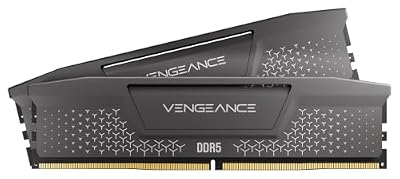
CORSAIR VENGEANCE RS DDR5 32GB (2 x 16GB) Up To 6000MHz AMD INTEL RAM | Desktop Gaming Memory, AMD EXPO & Intel XMP 3.0 Compatible, CL38, Gray, CML32GX5M2D6000Z38
Included for 'Best DDR5 RAM for Gaming PCs: 16GB, 32GB and 64GB Kits' as a representative home product in this roundup; selection reflects the product set returned for this topic.
View on Amazon4. Crucial Pro 64GB DDR5-6000 CL40: Best for creators and heavy multitasking
Specs per the listing: 64GB kit of 2x32GB, 6000MHz, CL40, overclocking desktop memory, Intel XMP 3.0 and AMD EXPO compatible, model CP2K32G60C40U5B.
Sixty-four gigabytes is for video editors, virtual machine users and anyone with dozens of browser tabs and a design suite open. Two 32GB sticks keep the layout simple, leaving two slots free on a four-slot board for later expansion.
CL40 timing is looser, which is typical for high-capacity kits. Gamers do not need this much memory, so choose it for productivity rather than frame rate.
- Pros: 64GB capacity; two modules leave slots free; EXPO and XMP 3.0; suits editing and virtual machines
- Cons: CL40 timing; unnecessary for games alone

Crucial Pro DDR5 RAM 64GB Kit (2x32GB) 6000MHz CL40, Overclocking Desktop Gaming Memory, Intel XMP 3.0 & AMD Expo Compatible – Black CP2K32G60C40U5B
Included for 'Best DDR5 RAM for Gaming PCs: 16GB, 32GB and 64GB Kits' as a representative home product in this roundup; selection reflects the product set returned for this topic.
View on Amazon5. Patriot Viper Venom 16GB DDR5-6000 CL36: Best for entry builds and tight plans
Specs per the listing: 16GB kit of 2x8GB, 6000MT/s, CL36, 1.35V, UDIMM, supports Intel XMP and AMD EXPO.
A 16GB kit is the minimum worth considering for a new DDR5 gaming PC, and this one keeps the 6000MT/s speed that Ryzen boards like. It suits esports titles, light gaming and general use, and you can add a second matching kit later if the board has four slots.
Newer games and background apps can use more than 16GB, so treat this as an entry tier. Two 8GB sticks run in dual channel, which is better than one 16GB stick for performance.
- Pros: 6000MT/s speed; dual-channel pair; XMP and EXPO; entry capacity
- Cons: Only 16GB; CL36 is looser than CL30; may limit newer games

Patriot Viper Venom DDR5 RAM 16GB (2X8GB) 6000MT/s CL36 Desktop Memory | Voltage: 1.35v; Supports Intel XMP and AMD EXPO; Module type: UDIMM.
Included for 'Best DDR5 RAM for Gaming PCs: 16GB, 32GB and 64GB Kits' as a representative home product in this roundup; selection reflects the product set returned for this topic.
View on AmazonHow to Choose
Pick capacity first
Sixteen gigabytes covers esports and light gaming, 32GB is the practical default for new builds, and 64GB is for editing, virtual machines and heavy multitasking. Buy two matching modules rather than one so the memory runs in dual channel.
Match speed to your CPU
For AMD AM5 boards, 6000MT/s is a widely used sweet spot. Higher speeds such as 6400MT/s may need a strong board and a good memory controller. Intel platforms can take higher rated kits, but check the board’s supported speeds on its page.
Read timing and voltage
Lower CL at the same speed means shorter delays, so CL30 beats CL38 at 6000MHz. Voltage differences are small, but some kits run at 1.35V. Do not chase a CL number if the platform runs the kit at a lower default until you enable the XMP or EXPO profile.
Check profile support and fit
The profile type matters: EXPO is for AMD, XMP for Intel, and some kits support both. Tall RGB heat spreaders can block large air coolers, so look up module height. Use the motherboard’s memory support list for the final confirmation.
Avoid common mistakes
Do not mix different kits to reach a higher capacity, because mismatched speeds and timings can force the whole set to run at the slowest rating. Remember to enable the XMP or EXPO profile in the BIOS, otherwise the memory runs at a lower default speed. Finally, skip DDR4 kits on a DDR5 board; the slots are not compatible.
Frequently Asked Questions
Is DDR5-6000 CL30 worth choosing?
It is a popular target for AM5 builds because it balances speed and latency. If your board runs it stably, it is an excellent default for gaming.
Should I buy 2x16GB or 4x8GB?
Choose two modules. Fewer sticks put less strain on the memory controller, make higher speeds easier to reach, and leave slots free to expand later.
Is 16GB enough for a gaming PC now?
It works for esports and many games, but 32GB gives more room for new releases, streaming and browser tabs. Plan for 32GB if the plan allows.
Will EXPO kits work on Intel boards?
Often they run at default speeds, but the profile may not apply. For Intel, prefer kits that list XMP support, such as the Corsair and Crucial kits here.
Do I need to enable a memory profile?
Yes. Memory usually starts at a lower default speed, so turn on XMP or EXPO in the BIOS to reach the rated 6000MHz or 6400MT/s and the listed CL timing.