- Top Pick: Logitech G502 Hero Wired Gaming Mouse – Black
- Best Value: Logitech G305 Lightspeed Wireless Gaming Mouse – Black
- Premium Choice: Logitech G203 Wired Gaming Mouse – Black
Gaming on a Mac has never been more viable, thanks to Apple Silicon and a growing native library, but you still need a mouse that plays nicely with macOS. The best Mac gaming mice offer reliable driver support, precise sensors, and comfortable ergonomics, whether you’re fragging in a shooter or grinding through a strategy epic.
We researched a lineup of gaming mice known to work smoothly on macOS, evaluating sensor accuracy, software compatibility, comfort, and value. Here are the top picks for Mac gamers.


Prime
Limited Time
Redragon M991 Wireless Gaming Mouse, 26000 DPI 3-Mode Gamer Mice w/Rapid Fire Key, 9 Macro Buttons, Powerful Capacity and RGB Backlight for PC/Mac/Laptop, Black

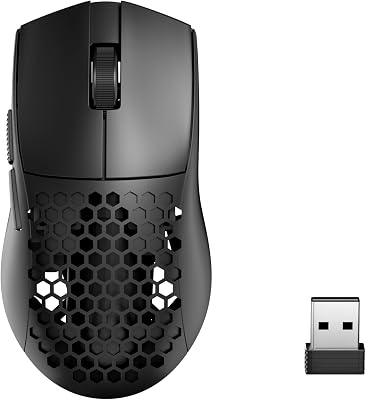
As an Amazon Associate we earn from qualifying purchases at no extra cost to you. Product prices and availability are accurate as of the date shown and are subject to change.





🎮 Get More From Your Setup — Free
Prime Gaming gives you free PC games every month, in-game loot, and a free Twitch channel sub — plus fast free shipping on all the gear above. New members get a 30-day free trial.
Watch: Best Mac Gaming Mouse — Video Review
How to Choose a Mac Gaming Mouse
- macOS compatibility: Confirm the mouse works with macOS, ideally with native software for customizing DPI and buttons.
- Sensor accuracy: A precise, high-DPI sensor ensures smooth, responsive tracking across resolutions.
- Wired or wireless: Wired mice are simple and lag-free, while Lightspeed wireless offers freedom without latency.
- Ergonomics: Choose a shape and weight that suit your grip style for comfort during long sessions.
- Programmable buttons: Extra buttons add functionality for MMOs, productivity, and shortcuts.
The Best Mac Gaming Mice Reviewed
Logitech G502 Hero
A wired icon with a superb HERO sensor, adjustable weights, and eleven programmable buttons, offering excellent precision and macOS support.
Logitech G305 Lightspeed
A lightweight wireless mouse with reliable Lightspeed connectivity and long battery life, delivering lag-free performance and clean macOS compatibility.
Razer Basilisk V3
An ergonomic wired mouse with customizable RGB, a smart scroll wheel, and eleven buttons, comfortable for extended Mac gaming and work.
Logitech G305 Lightspeed (White)
The same dependable wireless performer in a clean white finish, a stylish match for Apple’s aesthetic on any desk.
Logitech G203
A budget-friendly wired mouse with a solid sensor and crisp RGB, an ideal affordable entry point for Mac gamers.
Related Guides
- Best Razer Gaming Mouse (2026)
- Is An Ergonomic Mouse Worth It (2026)
- Best Computer Mouse Wired (2026)
Frequently Asked Questions
Do gaming mice work on Mac?
Yes, most do, and Logitech and Razer offer macOS software for customizing DPI, buttons, and lighting.
Is wireless reliable on macOS?
Absolutely. Lightspeed and similar 2.4GHz connections are lag-free and work seamlessly with Macs.
Do I need special drivers?
Basic functions work plug-and-play, but installing the manufacturer’s macOS software unlocks full customization.
Which grip style should I choose?
Palm grips suit larger ergonomic mice, while claw and fingertip grips favor lighter, smaller shapes; pick what feels natural.
Final Thoughts
For feature-rich precision, the Logitech G502 Hero leads, while the G305 Lightspeed wins for wireless freedom. Budget-conscious Mac gamers should grab the reliable Logitech G203.
Top picks from this guide
 Logitech GLogitech G502 Hero Wired Gaming Mouse - Black$38 \xc2\xb7 99/100
 Logitech GLogitech G203 Wired Gaming Mouse - Black$26 \xc2\xb7 99/100
 RedragonRedragon M991 3-Mode Wireless RGB Gaming Mouse 26000 DPI Remapping…$35 \xc2\xb7 96/100
 Logitech GLogitech G PRO 2 Lightspeed Ambidextrous Wireless Gaming Mouse -…$111 \xc2\xb7 96/100