Affiliate disclosure: As an Amazon Associate we earn from qualifying purchases. This post contains affiliate links — we may earn a small commission at no extra cost to you. This never affects our picks. Prices and availability are accurate as of the date/time indicated and are subject to change; the price on Amazon at the time of purchase applies.
- Quick Comparison Table
- 1. Keychron B6 Pro: Best for quiet, multi-device office typing
- 2. Keychron K2 HE: Best for gamers who want rapid trigger on Bluetooth
- 3. Redragon K742: Best for a full-size wireless mechanical board
- 4. Kisnt KN85: Best for a compact hot-swap board with a creamy sound
- 5. Redragon 75% Wireless Gaming Keyboard: Best for a quiet, portable membrane board
- How to Choose
- Frequently Asked Questions
- About the Author
- Related Articles
Quick answer: The best Bluetooth keyboards here start with the Keychron B6 Pro for quiet multi-device typing. The Keychron K2 HE suits gamers who want rapid trigger, the Redragon K742 is the full-size mechanical pick, the Kisnt KN85 is the compact hot-swap option, and the Redragon 75% is the quiet membrane choice.
A Bluetooth keyboard lets you type on a laptop, tablet and phone without a cable, and many models add a 2.4GHz dongle and a USB-C wired mode for gaming. This guide compares five wireless keyboards across layouts and switch types, using the connection modes, layouts and features stated in each listing. We did not run our own typing or latency tests, so battery life and key feel are left to the maker data and to your own preferences.
Quick Comparison Table
| # | Model | Key specs (per listing) | Best for |
|---|---|---|---|
| 1 | Keychron B6 Pro | Full-size ultra-slim, Bluetooth 5.2/2.4GHz/USB-C | quiet, multi-device office typing |
| 2 | Keychron K2 HE | 75%, 2.4GHz/Bluetooth/USB-C, Hall effect, QMK | gamers who want rapid trigger on Bluetooth |
| 3 | Redragon K742 | Full-size, knob, Bluetooth 5.0/2.4GHz/USB-C, hot-swap | a full-size wireless mechanical board |
| 4 | Kisnt KN85 | 75%, Bluetooth/2.4GHz/USB-C, hot-swap linear | a compact hot-swap board with a creamy sound |
| 5 | Redragon 75% Wireless Gaming Keyboard | 75%, Bluetooth/2.4GHz/USB-C, 4000mAh battery | a quiet, portable membrane board |
1. Keychron B6 Pro: Best for quiet, multi-device office typing
Specs per the listing: Ultra-slim full-size wireless keyboard with numeric keypad, quiet typing, multi-device pairing, 2.4GHz, Bluetooth 5.2 and USB-C wired modes, ZMK launcher, battery life up to 1,200 hours per the listing.
The B6 Pro is built for people who type all day and switch between devices. The slim body and quiet keys keep noise low in shared spaces, and multi-device pairing lets you flip between a laptop, tablet and phone. The listing claims a battery life of up to 1,200 hours, a figure that depends heavily on settings, so treat it as a best case. The ZMK launcher allows remapping. It is not a mechanical gaming keyboard, so skip it if you want clicky switches or rapid trigger.
- Pros: Quiet slim keys; full-size with numeric keypad; Bluetooth 5.2, 2.4GHz and wired modes
- Cons: Not aimed at gaming; battery figure is a best case

Keychron B6 Pro Ultra-Slim Full-Size Wireless Keyboard - Space Gray | Numeric Keypad Quiet Typing Multi-Device 2.4 GHz/Bluetooth 5.2/USB-C Wired ZMK Launcher Up to 1200 Hours Battery Life
Included for 'Best Bluetooth Keyboards for Typing, Gaming and Multi-Device Use' as a representative home product in this roundup; selection reflects the product set returned for this topic.
View on Amazon2. Keychron K2 HE: Best for gamers who want rapid trigger on Bluetooth
Specs per the listing: 75% layout wireless magnetic Hall effect keyboard, 2.4GHz, Bluetooth and Type-C, QMK launcher, rapid trigger with Gateron magnetic switches, works with Mac, Windows and Linux, aluminum and wood build.
This is the enthusiast option. Hall effect switches use magnets rather than contact points, which lets software adjust the actuation point and enable rapid trigger, a feature competitive players use in shooters. The 75% layout keeps arrow keys and function keys while saving desk space, and QMK support means deep customization. The aluminum and wood body feels premium and also adds weight. For fastest response, use the 2.4GHz dongle or wired mode rather than Bluetooth. It costs more than basic wireless boards and needs configuration time.
- Pros: Rapid trigger and adjustable actuation; 75% layout; Mac, Windows and Linux support
- Cons: Higher cost; Bluetooth is not the fastest mode for competitive play

Keychron K2 HE Wireless Magnetic Hall Effect Custom Keyboard 75% Layout | 2.4 GHz/Bluetooth/Type-C, QMK Launcher, Rapid Trigger Gateron Magnetic Switch for Mac Windows Linux (Aluminum + Wood) - Black
Included for 'Best Bluetooth Keyboards for Typing, Gaming and Multi-Device Use' as a representative home product in this roundup; selection reflects the product set returned for this topic.
View on Amazon3. Redragon K742: Best for a full-size wireless mechanical board
Specs per the listing: Wireless mechanical gaming keyboard with number pad and knob, Bluetooth 5.0, 2.4GHz and USB-C, RGB backlight, hot-swappable linear switches.
The K742 is the straightforward choice if you want the familiar full-size layout with a number pad, plus a media knob. Linear switches give a smooth keypress that suits gaming and fast typing, and the hot-swappable sockets let you change switches later without soldering. Three connection modes mean it works with a PC through a dongle, a tablet over Bluetooth, or a cable when the battery runs low. Battery capacity is not listed, so check the maker page if long sessions matter. A full-size board takes more desk space.
- Pros: Full-size with number pad and knob; hot-swappable switches; three connection modes
- Cons: Battery capacity not listed; large footprint

Redragon K742 Wireless Mechanical Gaming Keyboard with Knob for PC Computer | Bluetooth 5.0/2.4GHz/USB C Wireless Creamy Keyboard with Number Pad, RGB Backlits, Hot-Swappable with Linear Switches (Black)
Included for 'Best Bluetooth Keyboards for Typing, Gaming and Multi-Device Use' as a representative home product in this roundup; selection reflects the product set returned for this topic.
View on Amazon4. Kisnt KN85: Best for a compact hot-swap board with a creamy sound
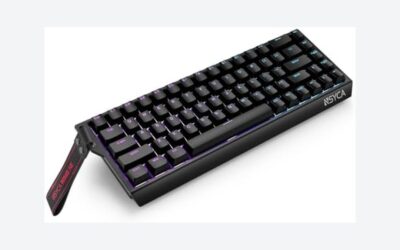
Specs per the listing: Wireless mechanical keyboard, 75% layout, Bluetooth, 2.4GHz and USB-C, custom RGB backlight, hot-swappable linear switches, creamy sound, retro beige.
The KN85 targets people who like the sound and look of custom keyboards without a custom price. The 75% layout is compact yet keeps arrow keys, and the creamy sound signals a dampened design. The retro beige finish stands out from standard black boards. Hot-swappable linear switches let you tune the feel later. Because the brand is smaller, check the return terms and software support before buying, and confirm the battery capacity and weight on the maker page, since the listing does not state them.
- Pros: Compact 75% layout; hot-swappable linear switches; distinctive retro look
- Cons: Smaller brand, so check return terms; battery details not listed

Kisnt KN85 Wireless Mechanical Keyboard, 75% Layout, Bluetooth/2.4GHz/USB-C, Custom RGB Backlit, Hot-Swappable Linear Switch, Creamy Sound for Gaming/Typing (Retro Beige)
Included for 'Best Bluetooth Keyboards for Typing, Gaming and Multi-Device Use' as a representative home product in this roundup; selection reflects the product set returned for this topic.
View on Amazon5. Redragon 75% Wireless Gaming Keyboard: Best for a quiet, portable membrane board
Specs per the listing: Portable 75% wireless keyboard, RGB backlight, Bluetooth, 2.4GHz and USB-C wired modes, mini quiet macro membrane design, rechargeable 4000mAh battery, anti-ghosting, works with Windows and Mac.
This is the quietest and simplest board here. Membrane keys press softly and make little noise, which suits shared rooms. The 75% size is easy to carry, and the 4000mAh rechargeable battery is a clear spec that helps you plan charging. It works across Windows and Mac, and anti-ghosting helps when you press several keys at once. Membrane keys do not have the crisp feel of mechanical switches, and you cannot swap them. For a travel keyboard or a budget secondary board, it is a sensible fit.
- Pros: Quiet membrane keys; portable 75% size; stated 4000mAh battery
- Cons: No hot-swap or mechanical feel; basic build

Redragon Wireless Gaming Keyboard, RGB Backlit, Portable 75% Design, Black | Bluetooth/2.4GHz/USB-C Wired, Mini Quiet Macro Membrane Keyboard, Rechargeable 4000mAh Battery, Anti-Ghosting for Win/MAC
Included for 'Best Bluetooth Keyboards for Typing, Gaming and Multi-Device Use' as a representative home product in this roundup; selection reflects the product set returned for this topic.
View on AmazonHow to Choose
Pick the layout that suits your desk
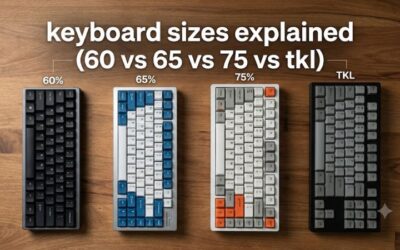
Full-size boards add a number pad, well suited to spreadsheets and accounting. 75% boards keep arrow keys and function keys in a smaller body, which suits most users. Smaller layouts save space for mouse movement, but you may need extra key combinations for some functions. If you type numbers daily, choose full-size; if you game, a compact layout usually works better. Also consider the keys you rely on: some 75% boards squeeze the right shift or arrow cluster, which can slow touch typists. Measure your desk, because a full-size board plus mouse needs more width than many people expect, and a narrow board leaves room for wide mouse swings.
Understand connection modes
Bluetooth is convenient and pairs with several devices, but it can add small delays compared with a 2.4GHz dongle. For gaming, use the dongle or USB-C wired mode. For typing across a laptop, tablet and phone, Bluetooth multi-device pairing fits best. Check how many devices a board can remember and how fast it switches. Confirm Mac, Windows and Linux support if you use more than one system. When you use a USB dongle, remember it occupies a port, and some laptops have few. A wired mode is also a safety net when the battery is low, so a board with USB-C wired support never leaves you stranded mid-task.
Choose a switch type deliberately
Membrane keys are quiet and soft. Mechanical switches are more durable and feel crisper; linear versions are smooth, tactile versions have a bump, and clicky versions are loud. Hot-swappable boards let you change switches later. Hall effect switches add adjustable actuation and rapid trigger for gaming. Think about noise first if you share a room, because loud switches annoy others. If you cannot try switches in person, linear and quiet tactile types are the safest starting point. Keycap material also affects sound, so a dampened design with a foam layer sounds softer than a hollow one, and this is where the creamy-sound labels come from.
Look at battery, software and what to avoid
Battery life varies with backlight and connection use, so treat listed hours as best cases and turn lighting down to extend them. Check that software, if needed, runs on your system. Skip listings that call a wired board wireless, and avoid boards that omit the connection modes. Read return terms for smaller brands, and remember that a keyboard feel is personal, so a flexible return policy matters. Finally, check the build: a metal plate or aluminum body adds weight and stability, while a plastic body is lighter for travel. Pick the mix of weight, noise and features that fits where you type most often.
Frequently Asked Questions
Is Bluetooth good enough for gaming?
For casual play, yes. For competitive games, use the 2.4GHz dongle or the wired USB-C mode, which usually has lower delay.
How many devices can a Bluetooth keyboard pair with?
Many store several devices, often three, but the listings here do not all say. Check the maker page for the exact number.
Do wireless keyboards work with Mac and Windows?
Most do. The Keychron K2 HE lists Mac, Windows and Linux, and the Redragon 75% lists Windows and Mac. Check the others before buying.
What does hot-swappable mean?
The switches plug into sockets, so you can change them without soldering. It lets you tune the feel later.
Which is quietest?
The Keychron B6 Pro and the Redragon 75% membrane board are the quietest here. Mechanical boards are louder, depending on the switch.