🛒 Best Price Today on Amazon
Prime members get fast, free shipping on everything above, plus member-only deals. New members get a 30-day free trial — cancel anytime.
- Top Pick: Hosyond 7 Inch IPS LCD Touch Screen Raspberry Pi Monitor Display 1024×600
- Best Value: SF3000 Retro Handheld Game Console,20000+ Games,Retro Gaming Console,E-Book/Music/Video Playback/Emergency Charging of Phone,14 Emulators,4.5-Inch IPS Screen,Dual Core Processor (Black)
- Premium Choice: Android 16 Tablet with Keyboard – 12 inch Tablet with 26GB+256GB+2TB Expand
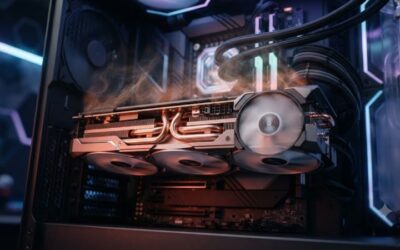
A black screen on startup in Helldivers 2 usually means the game reached the point where it attempts to hand off rendering to DirectX 12 but cannot establish a valid swap chain. Unlike games that crash to desktop with an error dialog, Helldivers 2 tends to leave you staring at a frozen black frame while the process sits in memory at low CPU usage. This behavior points to a handful of specific culprits rooted in the Autodesk Stingray engine’s initialization sequence, the game’s persistent settings file, and its Easy Anti-Cheat layer. If you are troubleshooting this issue in 2026, the symptom is more common on systems running older DirectX 12 feature-level drivers or configurations where another application already holds exclusive fullscreen priority.
Likely Causes
| Cause | How to confirm | Fix difficulty |
|---|---|---|
| Corrupted or invalid display mode in settings.sav | Game window opens black at ~2% CPU, no crash log in Event Viewer | Low |
| Overlay software intercepting the swap chain | Issue disappears when all overlays are disabled | Low |
| Stale or broken Easy Anti-Cheat service | Error string “EAC init failed” or “Secure Boot” in the game log file | Low |
| GPU driver bug in a specific DirectX 12 code path | Black screen appears after a driver update; DDU clean reinstall resolves it | Medium |
| Windows fullscreen optimizations or HDR conflict | Disabling both options resolves the hang | Low |
| Antivirus quarantining helldivers2.exe or a DLL | Windows Defender protection history lists a blocked item in the game directory | Medium |
| Missing or corrupted game files after a patch | Steam integrity check reports mismatches | Low |
Fix 1: Rename the settings.sav File
The most common reason for this specific black-screen hang is a display mode written to the settings file that your current monitor or driver cannot honor. The game does not fall back gracefully in this state; it simply stalls.
As an Amazon Associate we earn from qualifying purchases at no extra cost to you.




How to check
Navigate to Documents\My Games\Helldivers 2\. Open settings.sav in Notepad. Look for the resolution and refresh-rate values. If they reference a mode you do not currently have connected (for example, a 1440p 165Hz entry while only a 1080p 60Hz monitor is attached), this is your culprit.
What to do
Rename settings.sav to settings.sav.bak. Launch the game. Helldivers 2 will regenerate a default file with safe settings.
How to undo it
Delete the newly generated settings.sav and rename settings.sav.bak back to settings.sav.
Fix 2: Disable All Overlays
The Stingray engine’s presentation layer can deadlock when a third-party overlay attempts to hook the swap chain during the same frame the game is first compositing.
How to check
Launch the game with Steam overlay enabled and no other overlays, then the reverse. If either combination produces a black screen, the active overlay is interfering.
What to do
In Steam, right-click Helldivers 2 and select Properties. Under General, uncheck “Enable the Steam Overlay while in-game.” For Discord, go to Settings, Game Overlay, and disable it globally. For MSI Afterburner, RivaTuner, or GeForce Experience overlay, disable their in-game hooks. Relaunch.
How to undo it
Re-enable each overlay individually to identify which one (if any) is actually responsible, or simply turn them all back on once the game launches.
Fix 3: Add a Borderless Launch Option
Forcing windowed-borderless mode bypasses the exclusive-fullscreen initialization path where several driver bugs manifest as a black hang.
How to check
If Fix 1 changed the settings file but the game still black-screens, the issue may be in how the engine queries the display adapter for exclusive mode.
What to do
In Steam, right-click the game, Properties, General, and add -borderless in Launch Options. Save and relaunch. If the game loads, go into Settings, Display, and set the mode to Borderless permanently, then remove the launch option.
How to undo it
Delete -borderless from the Launch Options field and change the in-game display mode back to Exclusive Fullscreen if desired.
Fix 4: Clean-Reinstall GPU Drivers
A partially updated DirectX 12 driver can pass capability checks during initialization but fail at swap-chain creation. This is especially common after a major Windows feature update resets driver bindings.
How to check
Note your current driver version, then check whether the issue began within days of a driver update. If so, this is your likely path.
What to do
Download Display Driver Uninstaller (DDU). Boot into Safe Mode. Run DDU, select “Clean and restart,” then let Windows pull the basic display driver. Reboot normally and install the latest driver from NVIDIA or AMD directly.
How to undo it
The previous driver is replaced permanently. To roll back, run DDU again and install the specific older version you used before, available from the NVIDIA or AMD driver archive.
Fix 5: Disable Fullscreen Optimizations and Run as Admin
Windows compositing can interfere with how the engine transitions from the boot sequence to the first rendered frame.
How to check
Check whether the issue also appears in other DirectX 12 titles. If it is Helldivers 2 only, the problem may be in how UAC or the AppCompatibility layer interacts with the EAC service at launch.
What to do
Navigate to Steam\steamapps\common\Helldivers 2\binaries\. Right-click helldivers2.exe, select Properties, Compatibility tab. Check “Disable fullscreen optimizations” and “Run this program as an administrator.” Click Apply.
How to undo it
Uncheck both boxes in the same Properties window.
Fix 6: Repair Easy Anti-Cheat
If the EAC service fails to start, Helldivers 2 will not reach its own initialization routine, producing a black window that never renders.
How to check
Open Helldivers 2\binaries\ and locate the EasyAntiCheat folder. Check whether EasyAntiCheat.exe is present and not blocked. Also look for “EAC” strings in the game log at Documents\My Games\Helldivers 2\.
What to do
Run EasyAntiCheat_Setup.exe from the EAC folder. Select Helldivers 2 from the game list and click Repair. If the repair fails, click Uninstall, then reinstall from the same utility.
How to undo it
Reinstalling EAC is effectively always the desired state. No undo is needed, but if you must reverse it, run the setup utility and uninstall again, then reinstall the game entirely to restore the service.
Fix 7: Verify Game Files and Check Antivirus
Post-patch file mismatches and silent antivirus quarantine can both produce the same black-screen signature.
How to check
In Steam, right-click the game, Properties, Installed Files, Verify integrity of game files. Also open Windows Security, Protection history, and look for entries dated within the last several days referencing helldivers2.exe or a DLL in the game folder.
What to do
Let Steam repair any mismatched files. If Defender quarantined something, restore it from protection history and add the game folder to the exclusion list. For third-party antivirus, add steamapps\common\Helldivers 2 as an exclusion.
How to undo it
Remove the exclusion from your antivirus settings. Restored files are already the correct versions and require no further action.
If Nothing Works
At this stage the issue is almost always a hardware-level incompatibility between your GPU’s DirectX 12 feature level and what the Stingray renderer expects during swap-chain initialization. Try a fresh Windows install on a secondary drive to eliminate registry and component-store corruption. If the problem persists even there, contact Arrowhead Game Studios support through their official channels with your DxDiag output and a copy of settings.sav after the regeneration attempt. Some older integrated GPUs and first-generation discrete DirectX 12 cards (particularly certain early-gen architectures with limited compute shader models) may simply not meet the renderer’s requirements, and no software fix will resolve it.
FAQ
Will I lose my progress if I delete settings.sav?
No. Game saves, character stats, medals, and ship customizations are stored server-side and in a separate save slot file. Deleting or renaming settings.sav only resets graphics, audio, and control mappings to defaults.
Does the -borderless launch option hurt performance?
On modern Windows 11 with WDDM 3.x drivers, the difference is typically under one frame per second on a capable GPU. On older laptops with hybrid graphics, you may see a slightly larger drop. The tradeoff is usually worth it to get past the initialization hang.
Why does the game show a black screen but the process never crashes?
Because the stall occurs during the engine’s first Present call. The thread is waiting on the swap chain to become available, but the driver never signals completion. The process appears alive at low CPU usage but cannot progress past the render initialization step.
Can I run Helldivers 2 without Easy Anti-Cheat?
No. The game will refuse to load past the black screen if the EAC service is absent or unresponsive. There is no supported bypass, and attempting to force one violates the terms of service.