The best Steam Deck games to play in 2026 are the ones that stay readable on a 7-inch or 7.4-inch screen, hold a stable frame rate at low power draw, and carry Valve’s Verified badge. For short sessions, start with Balatro or Vampire Survivors. For long-form adventures, pick Baldur’s Gate 3 or Clair Obscur: Expedition 33 and accept a shorter battery life.
- Picks at a Glance
- Which Steam Games Are Worth Playing on Steam Deck Right Now?
- How We Chose These Games
- The 9 Best Steam Deck Games by Playstyle
- Also Consider
- Handheld Gear That Makes These Games Better
- Settings That Make Most of These Games Run Better
- LCD or OLED: Does Your Model Change the Picks?
- How to Check a Game’s Deck Status in Five Steps
- Which Games to Avoid on a Handheld
- Battery Math: What to Expect From Each Pick
- Buying Guide: How to Pick a Game for Your Deck
- Frequently Asked Questions
- Which One Should You Buy?
- Sources
This guide is built around how you play the handheld, not a flat ranking. Each pick lists why it suits the Deck, what to expect from battery life, and who should skip it. Compatibility ratings change as developers patch their games, so treat the badge on each store page as the final word and use this list to decide where to look first.
Picks at a Glance
| Game | Genre | Best for | Power draw tier | Session length |
|---|---|---|---|---|
| Balatro | Poker roguelike | Commutes, battery saving | Very low | 10 to 40 minutes |
| Vampire Survivors | Survivor-like action | Quick runs, cheap entry | Very low | 20 to 30 minutes |
| Stardew Valley | Farming sim | Couch play, long saves | Low | 30 minutes and up |
| Hades II | Action roguelike | Stylish combat, bite-size runs | Low to medium | 30 to 60 minutes |
| Hollow Knight | Metroidvania | Exploration fans | Low | 45 minutes and up |
| Dead Cells | Action roguelite | Fast combat on the go | Low | 20 to 45 minutes |
| Baldur’s Gate 3 | Party RPG | Epic campaigns | High | 1 hour and up |
| Clair Obscur: Expedition 33 | Turn-based RPG | Story-driven play | Medium to high | 1 hour and up |
| Elden Ring | Open-world action RPG | Plugged-in sessions | High | 1 hour and up |
Which Steam Games Are Worth Playing on Steam Deck Right Now?
Games worth playing on Steam Deck right now are Verified titles with controller-first design, readable text at 800p, and settings menus that let you cap frame rate. Late-2026 roundups from SteamDB, gamingonsteam and TechRadar keep returning to the same core: Balatro, Vampire Survivors, Stardew Valley, Hades II, Hollow Knight and Dead Cells for handheld-friendly play.
The newest wave of Verified ratings also includes larger games such as Enshrouded, Palworld and Clair Obscur: Expedition 33, according to a November 2026 summary on gamingonsteam. Forza Horizon 6 is reported to have arrived with the badge already in place, and Hollow Knight: Silksong and Split Fiction are mentioned as recent Verified additions. Ratings are a moving target, so confirm on the Steam store page before you buy.
How We Chose These Games
This list is research-based. We did not run these games on a Steam Deck ourselves. We compared several published 2026 roundups, looked for titles that appeared across multiple lists, and favored games that are described as Verified or Playable and that work well with a controller and a small screen. Where a source gave a number, such as a power draw figure, we attribute it; where we could not confirm a detail, we say so or leave it out.
- Verified status first. Verified means Valve reviewed the game for controller input, readable text and default settings that run on the Deck. Playable means it works but needs tweaks.
- Cross-source agreement. A game had to show up on more than one independent list.
- Handheld fit. Save systems, session length and how much the game punishes a dropped frame all counted.
- No unverified numbers. We do not give per-game frame rates because they vary with patches, settings and which Deck model you own.
The 9 Best Steam Deck Games by Playstyle
1. Balatro: Best for Battery Life
- Genre: poker-themed roguelike deckbuilder
- Controls: fully playable with buttons and touchscreen
- Power: SteamDB lists it as the most efficient game on its list, at roughly 6.5W at 60 fps
Balatro is the standard recommendation for anyone who wants hours of play from one charge. Runs are short, the interface is built around large cards, and the game barely taxes the chip. SteamDB’s estimate of around nine hours on OLED and seven on LCD is a useful ceiling, not a promise.
Best for: flights, commutes, and anyone who wants to leave the charger at home. Skip if: you dislike luck-driven runs or want a story.
Pros: tiny power draw, excellent pick-up-and-play pacing, touch support. Cons: repetitive after long streaks, no narrative payoff.
2. Vampire Survivors: Best Cheap Entry Point
- Genre: survivor-like auto-battler
- Controls: one stick, perfect for a handheld
- Price tier: budget, one of the cheapest entries on 2026 roundups
You move, the weapons fire on their own, and the screen fills with enemies and effects. That simple loop suits the Deck because there is almost nothing to configure and a single run fits into a coffee break. It is also easy on the battery, since the game does not rely on heavy lighting or large textures.
Best for: short sessions and anyone building a Deck library on a budget. Skip if: you want deep tactical choices.
Pros: instant to learn, huge replay value, low power draw. Cons: visual noise can tire your eyes, repetitive structure.
3. Stardew Valley: Best for Relaxed Long Saves
- Genre: farming and life sim
- Controls: gamepad support is built in, and menus work well in handheld
- Power: low, pixel-art rendering
Stardew Valley appears on nearly every Deck list because the day-by-day rhythm matches handheld play. You can stop at the end of any in-game day and the save is safe. The Deck also makes it easy to play in bed or on a train, which is where this game works best.
Best for: relaxed play, couples sharing a save, and long campaigns. Skip if: you need action.
Pros: effortless saves, huge content, gentle pacing. Cons: menu management can feel fiddly at first, slow start.
4. Hades II: Best Action Roguelike
- Genre: action roguelike from Supergiant
- Controls: designed for controllers
- Roundup note: named among the best pure-handheld picks in 2026 lists
Hades II keeps the run-based loop that made its predecessor popular, and it plays well on a small screen because the combat is readable and the interface is clean. Runs break into chunks, so you can stop after a boss and pick up later. The original Hades is also reported as a Deck favorite, so start there if you want a self-contained story.
Best for: fans of fast, stylish combat. Skip if: you dislike repeating runs.
Pros: smooth controller feel, strong art, short loops. Cons: demanding on reflexes, power draw rises with effects.
5. Hollow Knight: Best Exploration Game
- Genre: metroidvania
- Controls: precise platforming that suits the Deck’s buttons and sticks
- Related: Hollow Knight: Silksong is mentioned as a recent Verified title
Hollow Knight is large, handsome and calm at low power settings. Its hand-drawn world scales well to the Deck’s screen, and the save benches give you natural stopping points. If you finish it and want more, Silksong is the follow-up that several 2026 lists include as Verified.
Best for: patient explorers. Skip if: you dislike hard bosses.
Pros: huge world, great atmosphere, efficient. Cons: easy to get lost without a map habit, steep difficulty spikes.
6. Dead Cells: Best Quick-Hit Action
- Genre: action roguelite
- Controls: tight, fast, responsive
- Power: low to medium depending on effects
Dead Cells is a staple of handheld lists because each run is quick, the controls are crisp and the game handles well at a locked frame rate. It is a good alternative to Hades II if you prefer side-scrolling combat.
Best for: players who like fast, skill-based action. Skip if: you want a calm game.
Pros: excellent feel, replayable, efficient. Cons: steep learning curve, some repetition.
7. Baldur’s Gate 3: Best Big RPG Campaign
- Genre: party-based role-playing game
- Status: reported as Verified in 2026 roundups
- Trade-off: expect frame rate and battery compromises
Baldur’s Gate 3 is the game people mention when they want a huge campaign on the Deck. Turn-based combat is forgiving of a modest frame rate, which is why it works at all. Expect to lower settings, accept long loading in busy areas, and keep the charger nearby. It ranks near the top of a games.gg list of Verified games.
Best for: story lovers with time. Skip if: you only have short sessions.
Pros: enormous depth, turn-based pacing helps performance. Cons: heavy on battery, long sessions, text can be small in dense menus.
8. Clair Obscur: Expedition 33: Best Story-Driven Turn-Based RPG
- Genre: turn-based RPG with real-time defensive timing
- Status: reported as Verified in a November 2026 summary
- Power: medium to high
This is a newer addition to many Deck lists. It blends turn-based planning with timed dodges and parries, which make it more active than a classic menu RPG. It also asks more of the hardware than the indie picks above, so plan for a mid-range settings preset.
Best for: players who want cinematic story on a handheld. Skip if: you prefer very light games.
Pros: strong presentation, readable combat, fits a handheld format. Cons: heavier battery use, timing mechanics take practice.
9. Elden Ring: Best for Plugged-In Play
- Genre: open-world action RPG
- Status: Verified, per 2026 roundups
- Trade-off: frame rate and battery compromises
Elden Ring is playable on the Deck, but it is a plugged-in game for most people. A dock or a power bank makes the experience much better. Elden Ring Nightreign is described as Playable rather than Verified in the November 2026 summary, so treat the two differently.
Best for: patient players who accept compromises. Skip if: you want stable 60 fps.
Pros: massive world, controller-first design. Cons: demanding, short battery life, lower frame rates.
Also Consider
- Enshrouded: mentioned as a top Verified addition in November 2026, a survival crafting game for players who like building.
- Palworld: reported Verified in the same summary; a creature-collecting survival game that is heavier than the indie picks.
- Cyberpunk 2077: SteamDB lists it at a 30 fps cap with FSR and about two to two and a half hours of battery.
Handheld Gear That Makes These Games Better
Three accessories matter more than the rest for the games above: a case that protects the screen, a microSD card for storage, and a dock for the larger games. These are the listings we found in the store for each category.
Protective Case: Spigen Thin Fit Pro

Spigen Thin Fit Pro for Steam Deck LCD (2022), Steam Deck OLED (2023) | Dual Layer Protection, PC + TPU, Included Kickstand, Shock-Absorption Anti-Scratch Cover - Black
Included for 'Best Steam Deck Games to Play in 2026: 9 Picks by Playstyle' because the listing specifies Steam Deck OLED (2023) and Dual Layer Protection, details this guide uses to compare options.
View on AmazonSpigen’s Thin Fit Pro is a dual-layer PC and TPU case made for both the 2022 Steam Deck LCD and the 2023 Steam Deck OLED, with an included kickstand. A slim case like this protects the shell without adding the bulk that can make a handheld uncomfortable for long RPG sessions. Check the maker’s page for the exact fit and dock compatibility before ordering.
microSD Storage: SanDisk 512GB Extreme

SANDISK 512GB Extreme microSD Card + Adapter, Up to 190MB/s Read Speeds | UHS-I, V30, 5K & 4K UHD, U3, C10, A2, Up to 130MB/s Write Speeds, Ideal for Action Cams+Drones, Android- SDSQXAV-512G-GN6MA
Included for 'Best Steam Deck Games to Play in 2026: 9 Picks by Playstyle' because the listing specifies Up to 190MB/s Read Speeds and UHS-I, details this guide uses to compare options.
View on AmazonThe SanDisk 512GB Extreme microSD card is listed with up to 190MB/s read speeds, UHS-I, U3, V30 and A2 ratings, plus an adapter. A card with the A2 rating is a sensible choice for a game library, since large titles such as Baldur’s Gate 3 take a lot of room. Check the maker’s page for the exact specs of your version.
Dock: Anker 6-in-1 Steam Deck Dock
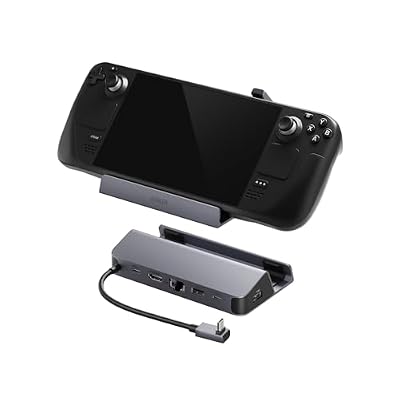
Anker Steam Deck Dock, 6-in-1 4K@60Hz HDMI Docking Station for Steam Deck | USB-C & 2 USB-A Data Ports, 1 Gbps Ethernet, Fast Charging, for Steam Deck (OLED)/ROG Ally/Legion Go (Not for Rog Ally X)
Included for 'Best Steam Deck Games to Play in 2026: 9 Picks by Playstyle' because the listing specifies 6-in-1 4K@60Hz HDMI Docking Station for Steam Deck and USB-C & 2 USB-A Data Ports, details this guide uses to compare options.
View on AmazonAnker’s dock is listed as a 6-in-1 station for the Steam Deck with a 4K HDMI output at 60Hz, USB-C and two USB-A data ports and a gigabit Ethernet port. It suits the heavier picks such as Elden Ring, since plugged-in play removes the battery worry. Confirm the exact port layout on the maker’s page.
Settings That Make Most of These Games Run Better
You do not need to be a tinkerer to get a smoother experience. These steps work for most of the games above, and each one has a reason behind it.
- Open the quick access menu and set a frame rate limit. A cap at 40 fps on the OLED model, or 30 fps on heavier titles, makes frame pacing smoother than an uncapped 45 to 55 fps that swings around. A stable cap also lowers power draw.
- Set the refresh rate to match the cap. On the OLED model a 90Hz panel pairs well with a 45 or 90 fps target. On the LCD model, 40Hz with a 40 fps cap is the common sweet spot in community guides.
- Lower the thermal power limit for light games. A 2D game such as Balatro does not need the full power budget. Dropping the limit saves battery and keeps the fan quiet.
- Turn on FSR in the game or the Deck’s scaling menu for large 3D games. It trades some sharpness for performance, which is how SteamDB’s Cyberpunk 2077 entry reaches a 30 fps cap.
- Enable the performance overlay. Showing frame rate and wattage tells you quickly whether a setting helped, instead of guessing.
- Use per-game profiles. The Deck saves settings per game, so you can give Balatro a low limit and Elden Ring a higher one without changing anything again.
LCD or OLED: Does Your Model Change the Picks?
Every game here is described as working on the Deck, but the two models behave differently. The OLED model has a larger 50Wh battery against 40Wh on the LCD model, so the same game lasts longer on the OLED. It also has a more efficient screen and a higher refresh rate option, which helps with frame pacing.
| Playstyle | LCD model advice | OLED model advice |
|---|---|---|
| Light indie games | Fine at default settings; cap at 40 fps | Fine; enjoy the longer runtime |
| Action roguelikes | Lock to 40 or 60 fps and keep brightness moderate | Try a higher refresh target |
| Big RPGs | Plan on the dock or a power bank | Better runtime, still plan for a charger |
If you are still deciding which model to buy, think about the games you want first. A library built on Balatro, Stardew Valley and Hollow Knight works well on either model. A library built on Baldur’s Gate 3 and Elden Ring will feel the extra battery capacity.
How to Check a Game’s Deck Status in Five Steps
- Open the game’s page in the Steam store, either on the Deck or on a desktop browser.
- Scroll to the Steam Deck compatibility section near the system requirements.
- Read the rating: Verified, Playable, Unsupported or Unknown.
- Read the short notes Valve lists under the rating. They often mention text size, launchers or required settings.
- Check recent reviews from players who mention the Deck. A rating can lag behind a patch, so a quick check of recent comments tells you whether something broke.
Playable games often come with a few caveats. Typical notes mention that you may need to use the touchscreen to get past a launcher or that the default text is small. None of that makes a game bad, but it does mean you should not expect the same plug-and-play feel as a Verified title.
Which Games to Avoid on a Handheld
Not every popular game belongs on a small screen. Games with tiny interface text, heavy mouse-and-keyboard design, online anti-cheat that does not support the Deck’s Linux-based system, or very high hardware demands are usually better on a desktop. If a game is only Unsupported or Unknown, read the notes and recent reviews before you spend money. Large multiplayer games are the most common source of surprises, since the anti-cheat support is decided by the developer.
Battery Math: What to Expect From Each Pick
Runtime is simple division: battery capacity in watt-hours divided by average system power in watts. The Steam Deck LCD has a 40Wh battery and the OLED model has a 50Wh battery. The wattages below are illustrative examples, not measurements, since real draw varies with settings, brightness and the game.
| Example average draw | LCD (40Wh) runtime | OLED (50Wh) runtime | Typical game type |
|---|---|---|---|
| 6W | about 6.7 hours | about 8.3 hours | Very light indie |
| 8W | 5 hours | about 6.3 hours | Light 2D game |
| 12W | about 3.3 hours | about 4.2 hours | Mid-weight action |
| 15W | about 2.7 hours | about 3.3 hours | Large 3D game |
| 20W | 2 hours | 2.5 hours | Heavy 3D game |
The point is that doubling the power draw halves your runtime. If you want more hours, cap the frame rate at 40 or 30, lower the screen brightness and use the built-in performance overlay to watch the wattage while you play.
Buying Guide: How to Pick a Game for Your Deck
Match the game to your session length
| Your situation | Choose | Why |
|---|---|---|
| Under 30 minutes at a time | Balatro, Vampire Survivors, Dead Cells | Short runs, low draw |
| Evenings on the couch | Stardew Valley, Hollow Knight, Hades II | Good stopping points |
| Long weekends, near an outlet | Baldur’s Gate 3, Clair Obscur, Elden Ring | Big campaigns |
| Docked to a TV | Any of the heavy picks | Power is no longer a limit |
Check the badge yourself
Open the game’s Steam store page and look for the Steam Deck compatibility section. Verified means Valve reviewed it, Playable means you may need to tweak settings or use a launcher, and Unsupported or Unknown means it is not confirmed. Because ratings change with patches, the store badge always wins over any list.
Check the storage before you buy
Large RPGs take a lot of space. Plan your library around your internal drive and consider a microSD card if you collect big games. Keep the games you play most on the internal drive for faster loading.
Frequently Asked Questions
What are the best Steam Deck games for battery life?
Balatro, Vampire Survivors and other 2D indie games draw the least power. SteamDB lists Balatro at around 6.5W at 60 fps, the lowest on its list.
Does Verified mean a game runs at 60 fps?
No. Verified means Valve checked controller input, text legibility and default settings. Frame rate still depends on the game and the settings you choose.
Can the Steam Deck run Baldur’s Gate 3?
Yes, roundups list it as Verified, but expect lowered settings and a shorter battery life. Turn-based combat is forgiving of a lower frame rate.
Is Elden Ring worth playing on Steam Deck?
It is playable and reported as Verified, but most players find it best when docked or plugged in. Expect frame rate and battery trade-offs.
What does Playable mean on the Steam Deck?
Playable means the game works but may need manual tweaks, such as using the touchscreen or changing launcher settings. Elden Ring Nightreign is described as Playable in one November 2026 summary.
Which games work best for short sessions?
Roguelikes and survivor-likes such as Balatro, Vampire Survivors, Dead Cells and Hades II work best because each run ends within about half an hour.
Do I need a microSD card?
Not at first, but a card helps when you collect large RPGs. A card with an A2 rating is a common choice for game libraries.
Which One Should You Buy?
Start with Balatro or Vampire Survivors if battery life and quick sessions matter most. Pick Stardew Valley or Hollow Knight for relaxed evenings. Choose Hades II or Dead Cells for fast combat. Save Baldur’s Gate 3, Clair Obscur: Expedition 33 and Elden Ring for nights when you can stay near a charger or dock. Whatever you choose, check the compatibility badge on the store page first.
Sources
- SteamDB: Best Steam Deck Games in 2026
- gamingonsteam: Steam Deck Verified games, November 2026
- GAMES.GG: Best Steam Deck Games, ranked by score
- TechRadar: Best Steam Deck games
- Valve: Steam Deck compatibility program
Last updated: November 2026