🛒 Best Price Today on Amazon
Prime members get fast, free shipping on everything above, plus member-only deals. New members get a 30-day free trial — cancel anytime.
The best steam deck charger should support USB-C Power Delivery (PD) and provide enough power for gaming while charging. Valve specifies a 45W PD 3.0 adapter for both the LCD and OLED models. A compact 65W charger offers useful headroom for other devices, while a basic 45W replacement suits players who want a straightforward alternative.
How to Choose a Steam Deck Charger
Start with USB-C PD compatibility and sustained output, not the largest wattage printed on the box. The Steam Deck accepts a 45W PD 3.0 supply, so a reputable 45W adapter meets its stated power requirement. A higher-rated charger can also work, but the Deck draws only the power it negotiates with the adapter.
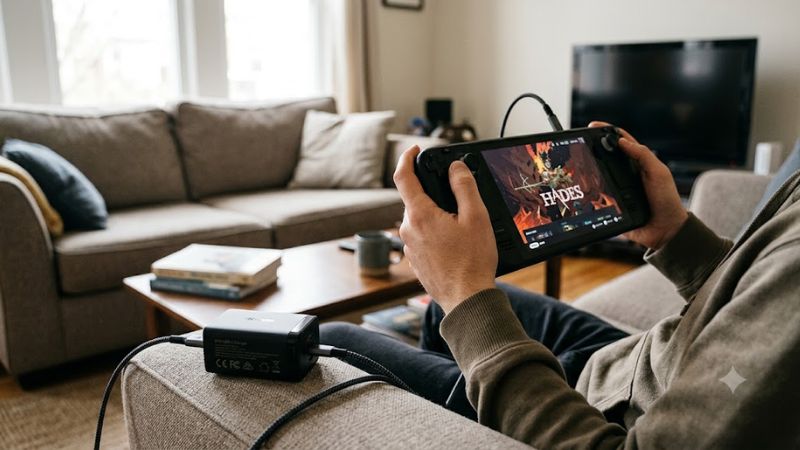
Match the Power Output to Your Gaming
Choose a 45W USB-C PD charger if you mainly replace the original adapter. Valve lists that rating for both the LCD and OLED Steam Deck, making it a sensible baseline. A lower-wattage phone charger may power the device but can charge slowly or struggle to replenish the battery during demanding gameplay.
A 65W model is a practical option if you also charge a phone or tablet. Extra capacity does not mean the Deck charges faster than its supported input allows; it gives you flexibility when powering other devices. Check the output available from the specific USB-C port rather than relying on the adapter’s combined headline rating.
Check USB-C PD and Cable Compatibility
USB-C describes the connector, not the charging capability. Look for explicit USB Power Delivery support and a reputable manufacturer. Valve specifies PD 3.0, so a charger that advertises only proprietary phone-charging modes is not the right choice. A suitable USB-C-to-USB-C cable is also necessary for the expected power delivery.
The cable supplied with a charger may be removable or permanently attached, depending on the model. For a replacement cable, verify its rated current and power capacity, plus the connector type at both ends. Avoid damaged cables, loose plugs, and adapters from unknown sellers that provide no meaningful electrical or safety information.
Consider Port Count and Travel Size
A single-port adapter keeps the setup simple and avoids power being shared with a second device. Multi-port chargers are useful for travel, but connecting a phone or tablet can change the output available to the Deck. Read the manufacturer’s simultaneous-output table before assuming each port can deliver its maximum wattage at once.
Gallium nitride (GaN) designs can offer higher output in a compact enclosure, although size varies by model and plug design. Travelers should also check whether the plug folds, whether the adapter supports the local mains voltage, and whether a suitable cable is included. A heavier multi-device charger may make more sense on a desk than in a small bag.
Choose for Your Actual Devices
The right choice depends on whether you need a direct replacement, a compact travel adapter, or one charger for several devices. For a Steam Deck alone, prioritize dependable 45W USB-C PD output and a suitable cable. If you share power with a laptop or phone, consider a model with greater total capacity and clear per-port limits.
Compatibility also depends on the devices sharing the adapter. The Steam Deck uses USB-C PD, but that does not mean every phone or laptop will accept the same charging speed. Confirm each device’s supported charging protocol and check the charger’s regional plug and voltage specifications before ordering.
Top Picks: Best Steam Deck Chargers
These recommendations cover different charging needs rather than claiming a universal winner. Valve’s adapter is the direct reference point, UGREEN’s 65W model adds multiple ports, and Anker’s 120W charger targets users with several power-hungry devices. Check the exact model number and regional version before purchase because port layouts and plug designs can vary.
| Product | Best For | Key Spec | Compatibility | Watch Out For |
| Valve Steam Deck power supply | Best Overall for a direct replacement | 45W, USB-C PD 3.0 | Steam Deck LCD and OLED | Limited flexibility for charging other devices |
| UGREEN Nexode 65W, 3-port | Best Value for multiple devices | 65W total, 2 USB-C and 1 USB-A | Steam Deck and compatible USB-C devices | Output is shared across ports |
| Anker 737 GaNPrime 120W | Best for a multi-device desk setup | 120W total, 2 USB-C and 1 USB-A | Steam Deck and compatible USB-C devices | Larger capacity may be unnecessary for the Deck alone |
| Anker Nano II 45W | Best for a compact replacement | 45W USB-C | Steam Deck with USB-C PD | One port limits simultaneous charging |
Valve Steam Deck Power Supply: Best Overall
The official Valve power supply is the simplest choice for owners who want the specification intended for the handheld. Valve lists a 45W USB-C PD 3.0 adapter for both LCD and OLED versions. The OLED specification lists a 2.5-meter cable, while the LCD specification lists a 1.5-meter cable.
Buy it if you want a straightforward replacement without extra ports or excess capacity. Its main weakness is limited versatility compared with multi-port alternatives. It is less suitable for someone who wants one adapter to charge a laptop and several accessories simultaneously. Check that the listing is an authentic Valve supply and that the included plug matches your region.
UGREEN Nexode 65W: Best Value
UGREEN’s official listing for the Nexode 65W three-port charger specifies two USB-C ports, one USB-A port, and compatibility with Steam Deck. Its 65W headline capacity makes it a useful option for people who regularly carry a phone and other USB-powered devices alongside the handheld.
Choose this model if you want one compact charging station for several devices rather than a dedicated Deck adapter. The key limitation is shared output: the charger does not necessarily provide its full 65W to every connected device at the same time. Check the port allocation for your intended combination, and compare the local price with a basic 45W adapter before buying.
Anker 737 GaNPrime 120W: Best for Multiple Devices
Anker’s official specifications list 120W maximum total output, two USB-C ports rated up to 100W individually, and one USB-A port rated up to 22.5W. The adapter supports 100–240V input, making it a flexible option for compatible mains supplies in different regions.
This model suits a desk where a Steam Deck shares charging duties with a laptop, tablet, or phone. Its weakness is overcapacity for a handheld that specifies a 45W supply, and the plug design differs by regional version. Skip it if you only need to replace a lost Deck charger; a smaller adapter can meet that requirement without paying for unused ports and output.
Anker Nano II 45W: Best for Compact Charging
The Anker Nano II 45W is a single-port USB-C charger listed in specialist Steam Deck charger comparisons as a compact replacement option. Its 45W rating matches the Deck’s stated adapter wattage, making it a reasonable candidate for players who prefer a small charging brick over a larger multi-port model.
Consider it if portability matters more than charging several devices at once. Its main weakness is the single USB-C port, so a phone needs another adapter or must wait until the Deck is disconnected. Confirm the exact Nano II model, regional plug, and included cable before ordering, as availability and package contents can differ between retailers.
FAQ: Choosing the Right Steam Deck Charger
Does the Steam Deck need a 45W charger?
A 45W USB-C PD 3.0 charger matches Valve’s stated power-supply specification for both Steam Deck LCD and OLED models. A lower-powered adapter may charge the device more slowly, particularly during demanding games, while a compatible higher-wattage adapter can provide power without forcing the Deck to draw its full rated output.
Can I use a 65W laptop charger with Steam Deck?
Yes, a 65W laptop charger can power the Steam Deck if it supports USB-C Power Delivery and provides a compatible output profile. The Deck negotiates the power it needs rather than automatically drawing all 65W. Check the charger’s port specifications, cable rating, and simultaneous-output limits before connecting additional devices.
Is a 100W or 120W charger better for Steam Deck?
A 100W or 120W charger is useful when you also power a laptop or other devices, but it does not inherently charge the Steam Deck faster than its supported input allows. For handheld-only use, a reputable 45W adapter is generally sufficient. Higher capacity is worth paying for when you will use the additional output elsewhere.
Can I charge Steam Deck while playing?
Yes, you can charge the Steam Deck while playing, provided the charger and cable deliver suitable power. Heavy workloads can increase power consumption, so a weak adapter may not replenish the battery quickly enough during gameplay. If the battery continues falling, check the adapter’s output, cable condition, and any dock’s power-passthrough rating.
Final Thoughts
The best steam deck charger depends on how you use your handheld. Choose Valve’s 45W adapter for a direct replacement, UGREEN’s 65W Nexode for multi-device convenience, or Anker’s 120W model for a larger desk setup. Prioritize USB-C PD support, credible specifications, and appropriate cable quality over wattage alone.