🛒 Best Price Today on Amazon
Prime members get fast, free shipping on everything above, plus member-only deals. New members get a 30-day free trial — cancel anytime.
Choosing the best samsung ssd depends on your motherboard, budget, storage needs, and workload. Samsung’s 9100 PRO targets high-end PCIe 5.0 systems, while the 990 PRO and 990 EVO Plus offer PCIe 4.0-class performance. The portable T9 suits external storage, backups, and moving large game libraries between compatible devices.
How to Choose the Right Samsung SSD
The right SSD should match your system rather than simply offer the highest advertised speed. Check the available M.2 slot, supported PCIe generation, drive capacity, cooling, and intended workload before purchasing. For gaming, a suitable PCIe 4.0 drive can provide excellent storage performance without requiring a motherboard upgrade.
Match the SSD to Your PCIe Generation
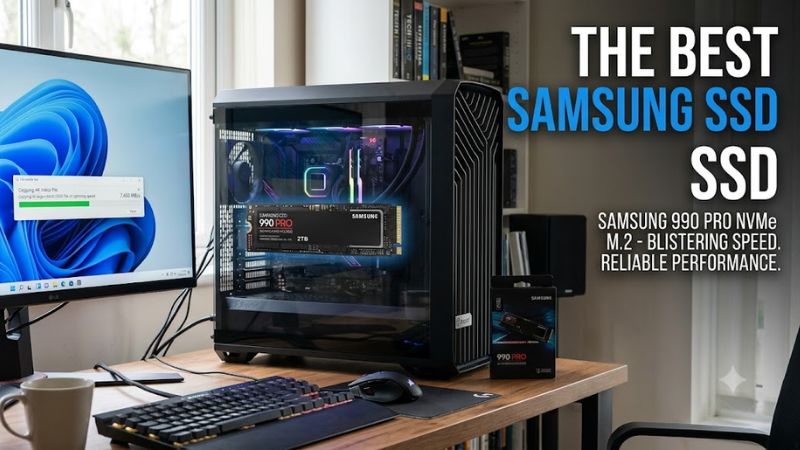
PCIe compatibility is an important starting point when selecting the best samsung ssd for a gaming PC. The 9100 PRO uses PCIe 5.0 x4, the 990 PRO uses PCIe 4.0 x4, and the 990 EVO Plus supports PCIe 4.0 x4 or PCIe 5.0 x2. These are M.2 NVMe drives, not SATA replacements.
A PCIe 5.0 SSD can operate in a compatible backward-compatible slot, but it will not reach its full interface potential when restricted to an older generation. Check the motherboard manual for slot bandwidth, CPU-lane limitations, and shared connections. Laptop owners should also verify physical clearance and manufacturer-approved drive configurations.
Choose Capacity for Your Game Library
Capacity determines how comfortably you can keep games, applications, recordings, and operating-system files installed together. A 1TB SSD can suit a modest library, while 2TB provides more room for several large games and creative applications. A 4TB option makes sense for users who prefer fewer storage drives.
Remember that advertised capacity is not identical to usable space after formatting, and games vary considerably in installation size. Leave room for operating-system updates, temporary files, and future installations. Buying extra capacity can be more useful than paying for a higher sequential transfer rate that your everyday workload rarely reaches.
Consider Cooling and Sustained Workloads
High-performance NVMe drives can generate significant heat during extended transfers. The 9100 PRO is designed for demanding PCIe 5.0 workloads, while the 990 PRO offers high-end PCIe 4.0 performance. A motherboard heatsink can help manage temperatures, but installation requirements differ between desktop boards, laptops, and consoles.
For gaming, loading levels and launching applications are not the same as repeatedly writing hundreds of gigabytes. Sustained video capture, large project exports, and frequent file transfers place different demands on storage. Check whether the chosen model includes a heatsink and whether it fits beneath the motherboard’s cover or within the device’s available space.
Check Warranty, Software, and Device Support
Samsung Magician provides drive information, health monitoring, firmware updates, and supported optimization features for compatible Samsung storage products. It is useful for checking drive status after installation, but it cannot make an incompatible slot support a newer PCIe generation. Confirm model-specific software support before relying on a particular feature.
Warranty coverage and endurance ratings vary by model and capacity, so check the manufacturer’s current terms for your exact SKU. Desktop users should verify M.2 2280 support, laptop buyers should consult the system service manual, and PlayStation 5 owners should confirm console requirements and heatsink clearance. A portable SSD instead needs a suitable USB connection.
Top Picks: Best Samsung SSD Models
The best samsung ssd depends on whether you prioritize peak transfer rates, gaming performance, purchase value, or portability. The following comparison uses manufacturer specifications rather than claims of independent testing by PC Gaming Universe. Advertised maximum speeds are sequential-transfer figures, not guaranteed game-loading times or average frame-rate improvements.
| Product | Best For | Key Spec | Compatibility | Watch Out For |
| Samsung 9100 PRO | Best Overall | PCIe 5.0 x4; up to 14,800 MB/s read | Compatible M.2 2280 NVMe systems | Higher platform and cooling demands |
| Samsung 990 EVO Plus | Best Value | Up to 7,250 MB/s read | PCIe 4.0 x4 / 5.0 x2 | Uses HMB rather than onboard DRAM |
| Samsung 990 PRO | Best For Gaming | Up to 7,450 MB/s read | PCIe 4.0 x4 NVMe | Premium pricing may not benefit every game |
| Samsung Portable SSD T9 | Best For Portable Storage | Up to 2,000 MB/s read | Compatible USB devices | Actual speed depends on USB connection |
Samsung 9100 PRO: Best Overall
The Samsung 9100 PRO is the premium choice for users who need high sequential throughput for large project files, demanding content creation, and compatible high-speed storage systems. Samsung specifies read speeds up to 14,700 MB/s for the 1TB and 2TB models, rising to 14,800 MB/s for the 4TB model. Write performance reaches up to 13,400 MB/s.
This drive suits buyers building a PCIe 5.0 desktop or upgrading a compatible workstation. Its main weakness is the additional cost and limited practical benefit for ordinary gaming compared with a capable PCIe 4.0 SSD. Avoid paying extra for it if your motherboard cannot provide suitable PCIe 5.0 bandwidth or your workload rarely involves large transfers.
Samsung 990 EVO Plus: Best Value
The Samsung 990 EVO Plus is a practical choice for a gaming PC that needs responsive storage without moving to a PCIe 5.0 platform. Samsung specifies sequential read speeds up to 7,150 MB/s for 1TB and 7,250 MB/s for 2TB and 4TB models, with sequential writes up to 6,300 MB/s. It uses an M.2 2280 interface.
Its HMB design uses host memory rather than dedicated onboard DRAM, which distinguishes it from the 990 PRO. This does not make it unsuitable for gaming, but sustained workloads and professional storage demands may favor a different design. Buyers seeking a capable everyday drive should compare current prices at the same capacity before choosing this model over the 990 PRO.
Samsung 990 PRO: Best For Gaming
The Samsung 990 PRO remains a strong premium PCIe 4.0 option for gaming desktops and compatible laptops. Its manufacturer-rated sequential speeds reach up to 7,450 MB/s read and 6,900 MB/s write. It uses TLC NAND and onboard DRAM, making it a different proposition from the HMB-based 990 EVO Plus.
This model is suited to gamers who want fast storage for the operating system, large game libraries, and workloads involving frequent file access. Its weakness is value: the difference in game-loading time may be modest compared with less expensive NVMe drives. Buyers should compare capacity-specific prices and check whether their system benefits from its additional performance.
Samsung Portable SSD T9: Best For Portable Storage
The Samsung Portable SSD T9 is the right choice when storage must travel between a desktop, laptop, and other compatible devices. It uses USB 3.2 Gen 2×2 at 20Gbps and offers capacities of 1TB, 2TB, and 4TB. Samsung rates sequential read speeds up to 2,000 MB/s, with write speeds up to 1,950 MB/s on the 1TB and 2TB versions.
Its compact enclosure, hardware-based AES 256-bit encryption, and drop resistance up to 3 metres make it useful for carrying files and backups. However, it is not a direct replacement for an internal NVMe drive when maximum performance is required. A USB port limited to a lower transfer rate will also reduce performance, regardless of the SSD’s advertised maximum.
Installation, Performance, and Compatibility
Selecting the best samsung ssd is only part of an upgrade. The drive must be installed correctly, detected by the system, and configured for the intended use. Manufacturer speed figures describe specific conditions and should not be confused with independent benchmark results. Gaming performance also depends on the game engine, CPU, memory, and graphics hardware.
Verify the Slot Before Installation
Before buying an internal drive, check whether your motherboard or laptop supports an M.2 2280 NVMe SSD and which PCIe generation its slot provides. M.2 describes the physical form factor, while NVMe and PCIe describe the storage protocol and interface. An M.2 SATA-only slot is not interchangeable with an NVMe-only configuration.
Shut down the computer, disconnect power, and follow the device manufacturer’s installation instructions. Secure the drive with the correct mounting hardware, and install the motherboard heatsink if required. Laptop owners should check the service manual first because some models have limited internal clearance or restrict supported drive thickness and capacity.
Understand What Advertised Speeds Mean
Samsung’s maximum sequential transfer rates are useful for comparing drive specifications, but they do not predict every workload. For example, the 9100 PRO’s rated sequential read speed is substantially higher than that of the 990 PRO, yet that difference does not translate directly into proportionally faster game launches or higher frame rates.
Independent benchmarks should be compared only when their testing conditions are comparable. A useful storage benchmark identifies the drive capacity, test platform, queue depth or workload, and measurement method. No independent gaming benchmark is presented here as a PC Gaming Universe result; the specifications in this article come from Samsung’s published product information.
Use Samsung Magician to Monitor Drive Health
Samsung Magician can help users inspect supported drives, check available firmware updates, and review health information. After installation, confirm that the drive is recognized and that its reported capacity matches the purchased model. Back up important files before performing firmware updates or changing storage configurations.
If the drive does not appear, check the physical connection, BIOS or UEFI storage settings, and operating-system disk management before assuming the SSD is defective. A new drive may need initialization and partitioning before it appears as a usable volume. Do not initialize a drive containing data you need to preserve.
Choose Internal or External Storage for the Job
An internal NVMe SSD is generally the better fit for an operating-system drive and games that benefit from direct access to fast local storage. The 990 EVO Plus and 990 PRO suit many PCIe 4.0 systems, while the 9100 PRO targets compatible PCIe 5.0 platforms. Existing systems do not automatically need a motherboard upgrade to benefit from an SSD.
The T9 is more appropriate for transferring files, keeping a portable game archive, or backing up projects between devices. Confirm the host USB port’s supported speed and the operating system’s compatibility before buying. External storage is convenient, but it should not be the only copy of important data; maintain a separate backup for irreplaceable files.
FAQ
Is the Samsung 990 PRO better than the 990 EVO Plus?
The Samsung 990 PRO has higher rated sequential speeds and onboard DRAM, while the 990 EVO Plus offers strong performance with an HMB-based design. The better purchase depends on price, capacity, and workload. For gaming alone, compare actual game-loading benchmarks before paying a premium for the PRO model.
Is the Samsung 9100 PRO worth buying for gaming?
The Samsung 9100 PRO is worth considering when you have a compatible PCIe 5.0 system and also perform demanding storage-intensive work. Its higher sequential throughput is useful for large transfers, but most games will not deliver proportionally shorter loading times. A quality PCIe 4.0 drive may offer better value.
Can I use a Samsung NVMe SSD in a PCIe 4.0 motherboard?
Yes, a PCIe 5.0 NVMe SSD can generally operate in a compatible PCIe 4.0 M.2 slot at the slower interface’s supported speed. Confirm the motherboard manual, slot configuration, and physical fit before installation. Compatibility can vary with system design, and a SATA-only M.2 slot does not support every NVMe drive.
Which Samsung SSD is best for a gaming laptop?
The Samsung 990 EVO Plus or 990 PRO can suit a gaming laptop that supports the corresponding M.2 NVMe drive format. Check the laptop’s service manual for physical clearance, supported capacity, and interface requirements. If the laptop cannot accommodate an internal upgrade, the portable T9 offers an external storage option through USB.
Final Thoughts
The best samsung ssd depends on the hardware you already own and the work you need it to handle. Choose the 9100 PRO for compatible PCIe 5.0 systems, the 990 PRO for premium PCIe 4.0 performance, the 990 EVO Plus for everyday value, or the T9 for portability. Compare current prices and compatibility before buying.