🛒 Best Price Today on Amazon
Prime members get fast, free shipping on everything above, plus member-only deals. New members get a 30-day free trial — cancel anytime.
Best ram for a gaming laptop upgrade usually means 32GB for an upgradeable DDR5 system, 32GB DDR4 for compatible older laptops, SO-DIMM form factor, and a matched two-module kit when two slots are available; check the laptop manual before buying.
How to Choose Laptop RAM
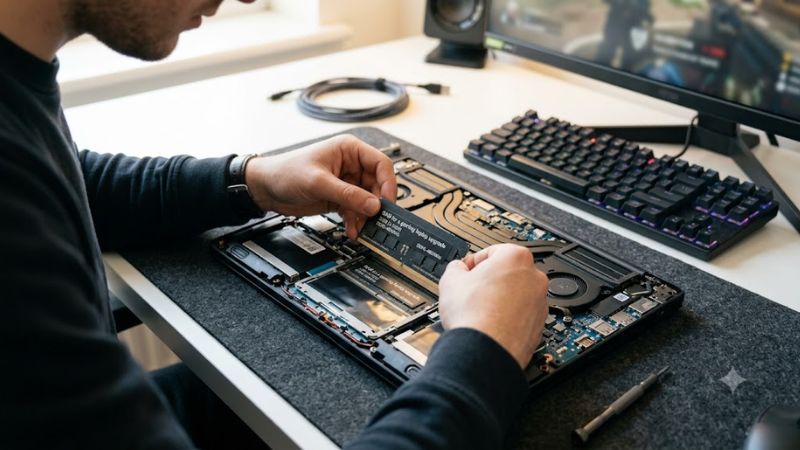
The right memory depends first on what the laptop motherboard accepts, because DDR4 and DDR5 are different standards and cannot be substituted for each other. Dell likewise advises checking compatibility before capacity or speed. A laptop may also use soldered memory, leaving no upgrade path, so the first step is identifying the exact model and its memory slots.
Check DDR4 or DDR5 Compatibility
For the best ram for a gaming laptop upgrade, identify the memory generation before considering speed. DDR4 SO-DIMM uses a different electrical standard and keying from DDR5 SO-DIMM, so a DDR5 module cannot replace DDR4 memory. Kingston’s current FURY Impact DDR4 line reaches 3200MT/s, while its DDR5 version includes 5600MT/s kits.
Also check whether the laptop has accessible SO-DIMM slots rather than soldered RAM. Current gaming laptops vary considerably: PCGamesN notes that some models use soldered memory while others combine soldered memory with an expansion slot. The upgrade therefore depends on the exact laptop model, not simply whether it is marketed as a gaming laptop.
Choose Capacity Around Your Workload
For most upgradeable gaming laptops, 32GB is a practical target when moving beyond an 8GB or 16GB configuration, particularly if games run alongside browsers, voice chat, recording software, or other applications. Dell specifically notes that gamers who stream, edit clips, or keep numerous browser tabs open may appreciate 32GB or more.
Capacity alone should not be treated as an automatic FPS upgrade. Tom’s Hardware’s Ryzen 5000 Mobile testing found less than a 2% gaming difference between 16GB and 32GB single-module configurations, while dual-channel configurations generally mattered more. That makes a matched 2x16GB kit relevant when the laptop supports two replaceable modules.
Match Speed to the Laptop
DDR5-5600 is a common specification among current SO-DIMM kits, but the laptop’s processor and firmware determine the speed it can actually use. Kingston’s 32GB FURY Impact kit specifies DDR5-5600 CL40 at 1.1V, while G.SKILL lists its 32GB Ripjaws kit at DDR5-5600 with CL40-40-40-89 timings.
Higher-rated memory does not automatically mean higher gaming performance. A 2026 laptop-memory comparison reports larger gains in CPU-limited games than GPU-limited games when comparing DDR5-4800 with DDR5-5600, while its figures come from 1080p High testing on RTX 4060 and RTX 4070 laptops. Treat those results as platform-specific rather than universal.
Prefer Matched Modules
When a laptop has two upgradeable slots, replacing the existing memory with a matched kit can simplify dual-channel operation. Tom’s Hardware found that a 2x8GB configuration outperformed a single 16GB module in Ryzen laptop gaming, illustrating why total capacity alone does not describe memory performance.
Matched kits also avoid mixing different memory modules with potentially different timings or characteristics. G.SKILL explicitly warns against mixing memory kits because doing so can cause instability or prevent the system from operating as expected. For an existing single module, check whether adding a matching module is supported before assuming any second SO-DIMM will behave identically.
Top Picks
The best ram for a gaming laptop upgrade varies by the memory generation and the laptop’s supported speed, so these picks cover common DDR5 and DDR4 upgrade paths rather than treating one module as universally compatible. None should be purchased without checking the exact laptop model, slot configuration and supported memory specification.
| Product | Best For | Key Spec | Compatibility | Watch Out For |
| G.SKILL Ripjaws DDR5 SO-DIMM 32GB | Best Overall | 2x16GB, DDR5-5600, CL40 | DDR5 SO-DIMM systems supporting the rated configuration | XMP support does not mean every laptop enables the rated profile |
| Crucial 32GB DDR5 SO-DIMM Kit | Best Value | 2x16GB, DDR5-5600 | Compatible DDR5 SO-DIMM laptops | Exact system compatibility still needs checking |
| Kingston FURY Impact DDR5 32GB | Best For DDR5 PnP | 2x16GB, DDR5-5600, CL40 | DDR5, 262-pin SO-DIMM | Maximum speed depends on BIOS and platform |
| Kingston FURY Impact DDR4 32GB | Best For DDR4 | 2x16GB, DDR4-3200, CL20 | DDR4, 260-pin SO-DIMM | Not compatible with DDR5 laptops |
G.SKILL Ripjaws DDR5 32GB
The G.SKILL Ripjaws F5-5600S4040A16GX2-RS is a 32GB dual-channel kit made from two 16GB DDR5 SO-DIMMs. Its manufacturer specification lists DDR5-5600, 40-40-40-89 timings, 1.10V operation and Intel XMP 3.0 support. It suits an upgrade where the laptop has two replaceable DDR5 slots and supports the rated configuration.
The main weakness is platform dependence. G.SKILL states that reaching an XMP-rated speed depends on motherboard and CPU capability, and that XMP requires a BIOS adjustment. That matters more on laptops than on many desktop systems because firmware controls memory behavior tightly. Do not buy this kit solely because the laptop uses DDR5; confirm its supported speed first.
Crucial 32GB DDR5-5600 Kit
Crucial’s CT2K16G56C46S5 provides two 16GB DDR5-5600 SO-DIMMs, giving a 32GB matched kit for compatible laptops. Crucial’s compatibility database identifies the kit as compatible with multiple laptop models, including the ASUS TUF Gaming F15 and MSI Katana 15 variants, demonstrating that compatibility is model-specific rather than universal.
The limitation is that a compatibility result for one laptop cannot be transferred to another model. A machine may limit the memory to a lower supported speed or use soldered memory instead. This kit therefore makes the most sense for owners who have confirmed two replaceable DDR5 SO-DIMM slots and a supported DDR5-5600 configuration in their laptop documentation.
Kingston FURY Impact DDR5 32GB
Kingston’s KF556S40IBK2-32 is a 32GB kit containing two 16GB DDR5-5600 CL40 SO-DIMMs. The modules use a 262-pin SO-DIMM format, 1.1V operating voltage and 1Rx8 configuration. Kingston also specifies Plug N Play timing options, while noting that the maximum usable speed is determined by the laptop’s BIOS.
Its real weakness is the same compatibility constraint that affects other high-speed laptop memory: the advertised rate is not a guarantee that every DDR5 notebook will operate there. It should not be purchased for a laptop with soldered RAM, DDR4 memory, or firmware that supports a lower DDR5 speed. The value comes from matching its specifications to the machine rather than from the label alone.
Kingston FURY Impact DDR4 32GB
For older upgradeable gaming laptops, Kingston’s KF432S20IBK2/32 provides two 16GB DDR4-3200 SO-DIMMs with CL20 timings and 1.2V operation. Kingston lists the kit as non-ECC unbuffered 260-pin SO-DIMM memory and provides it as a 32GB dual-module configuration, making it relevant to DDR4 laptops that support 3200MT/s memory.
The obvious weakness is platform age: this is a DDR4 solution, so it has no place in a laptop designed for DDR5. It also should not be treated as a universal 3200MT/s upgrade because the laptop’s CPU and firmware can impose lower limits. Choose it only after confirming DDR4 support, available SO-DIMM slots and the manufacturer’s maximum supported capacity and speed.
FAQ
The key best ram for a gaming laptop upgrade questions are whether 32GB is necessary, whether DDR5-5600 is faster enough to matter, whether mixing modules is acceptable, and whether every gaming laptop can be upgraded; the answers are workload-dependent, platform-dependent, preferably matched, and sometimes no.
Is 32GB RAM Necessary for Gaming Laptops?
No. Six-game testing summarized by GameStar found only a small average-FPS difference between 8GB, 16GB and 32GB in a desktop test system using Windows 11 and DDR4-3600, although minimum-frame behavior and individual games varied. Laptop requirements also depend on background applications and whether the machine has enough memory for the game itself.
For a laptop currently using 16GB without memory pressure, adding capacity is therefore not automatically an FPS upgrade. The case becomes stronger when games are competing with browsers, streaming, recording or other applications for memory. Dell similarly identifies 32GB or more as useful for heavier multitasking around gaming.
Does DDR5-5600 Improve Gaming Performance?
It can, but the size of the improvement depends on the laptop. A 2026 comparison using RTX 4060 and RTX 4070 laptops at 1080p High reported larger differences in CPU-limited games than GPU-limited games between DDR5-4800 and DDR5-5600. That means memory speed should be viewed as one part of the platform rather than an independent FPS setting.
The same principle applies when choosing the best ram for a gaming laptop upgrade: prioritize compatibility and adequate capacity before chasing a higher memory rating. If the laptop already limits its memory to a lower speed, installing a faster kit will not necessarily make the system operate at that advertised rate.
Can You Mix Two Different RAM Kits?
It may work, but it is not the cleanest upgrade path. Different modules can have different timings, memory organizations and operating requirements, while manufacturers such as G.SKILL explicitly advise against mixing kits because of potential stability problems. A matched kit removes one source of uncertainty when replacing two modules together.
If the laptop has one occupied slot and one free slot, check the exact existing module and the laptop manufacturer’s memory guidance before purchasing. The goal is not simply to reach a larger capacity; the two modules also need to operate correctly within the laptop’s supported memory configuration.
Can Every Gaming Laptop RAM Be Upgraded?
No. Some gaming laptops have replaceable SO-DIMM memory, while others use soldered RAM. PCGamesN specifically notes both designs, including gaming laptops where memory is soldered directly to the motherboard. This means the exact model and configuration matter more than the laptop’s gaming classification.
Before buying the best ram for a gaming laptop upgrade, verify the service manual or manufacturer specifications for memory type, number of slots, maximum capacity and supported speed. If the memory is soldered and there is no expansion slot, purchasing a SO-DIMM kit will not provide an upgrade path.
Final Thoughts
Choosing the best ram for a gaming laptop upgrade starts with compatibility, then capacity, speed and module configuration. For two-slot DDR5 machines, 32GB matched kits such as the listed 5600MT/s options are practical targets; DDR4 laptops need DDR4 SO-DIMMs, while soldered systems may not be upgradeable at all.