Affiliate disclosure: As an Amazon Associate we earn from qualifying purchases. This post contains affiliate links — we may earn a small commission at no extra cost to you. This never affects our picks. Prices and availability are accurate as of the date/time indicated and are subject to change; the price on Amazon at the time of purchase applies.
- What $1,000 Buys in a Prebuilt Gaming PC
- Quick Comparison Table
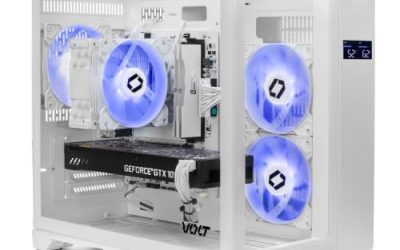
- 1. Skytech Gaming PC (Ryzen 5 5500, RTX 3050): Best overall under $1,000
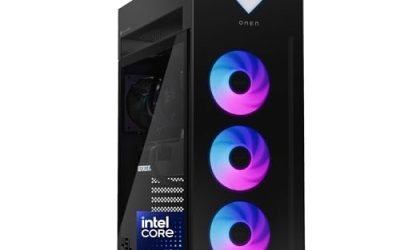
- 2. HP Victus Gaming Desktop (Core i5-14400F, GTX 1660 Super): Best for brand support
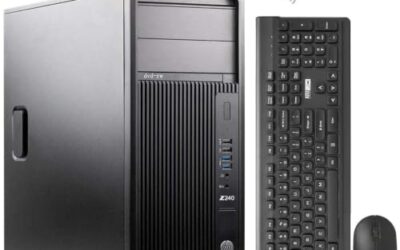
- 3. ZYNEEX Prebuilt Gaming Desktop (Ryzen 5 5500, RTX 3050 6GB): Closest rival to the Skytech
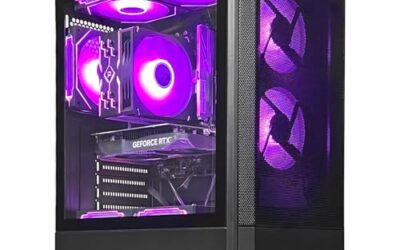
- 4. BYTE DEPOT Gamer Xtreme Gaming PC (Core i7, 32GB, RTX 3050): Best for memory and multitasking
- 5. CyberPowerPC Gamer Master (Ryzen 5 5500, RX 6500 XT): Cheapest way in
- How to Choose Between These Builds
- Frequently Asked Questions
- Related Guides
- Related Articles
- About the Author
- Related Articles
Quick answer: The Skytech Gaming PC with a Ryzen 5 5500 and RTX 3050 is the best-balanced prebuilt gaming PC under $1,000. Pick the HP Victus for brand support, or the BYTE DEPOT build if you want 32GB of RAM.
A budget of $1,000 buys a solid 1080p gaming PC, not a 1440p one. This guide compares five prebuilt desktops sold on Amazon, using the specifications each listing publishes: processor, graphics card, memory and storage. We have not run our own benchmarks on these machines, so the notes below are spec-based comparisons. Prices on Amazon move daily, so check the live price before you decide.
What $1,000 Buys in a Prebuilt Gaming PC
Three parts decide how a prebuilt performs: the graphics card, the processor and the memory. At this price the graphics card is almost always an RTX 3050-class or older card, paired with a six-core processor and 16GB of RAM. Put money into the graphics card first, then RAM, and treat RGB lighting as the lowest priority.
Quick Comparison Table
| # | Model | Key specs (per listing) | Best for |
|---|---|---|---|
| 1 | Skytech Gaming PC (Ryzen 5 5500, RTX 3050) | Ryzen 5 5500, GeForce RTX 3050, 16GB DDR4, 1TB NVMe SSD, 650W Gold PSU | Best overall under $1,000 |
| 2 | HP Victus Gaming Desktop (Core i5-14400F, GTX 1660 Super) | Core i5-14400F, GeForce GTX 1660 Super 6GB, 16GB RAM, 512GB SSD | Best for brand support |
| 3 | ZYNEEX Prebuilt Gaming Desktop (Ryzen 5 5500, RTX 3050 6GB) | Ryzen 5 5500, GeForce RTX 3050 6GB, 16GB DDR4 3200MHz, 1TB NVMe SSD, ARGB air cooling | Closest rival to the Skytech |
| 4 | BYTE DEPOT Gamer Xtreme Gaming PC (Core i7, 32GB, RTX 3050) | Intel Core i7, 32GB DDR RAM, 1TB PCIe SSD, GeForce RTX 3050, Wi-Fi 6 ready, Windows 11 | Best for memory and multitasking |
| 5 | CyberPowerPC Gamer Master (Ryzen 5 5500, RX 6500 XT) | Ryzen 5 5500, Radeon RX 6500 XT 4GB, 8GB DDR4, 500GB PCIe 4.0 SSD, Wi-Fi ready | Cheapest way in |
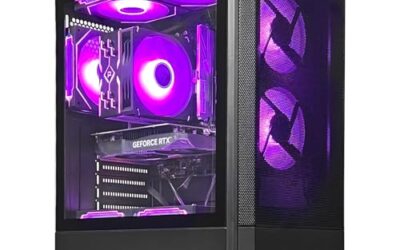
1. Skytech Gaming PC (Ryzen 5 5500, RTX 3050): Best overall under $1,000
Specs per the listing: Ryzen 5 5500, GeForce RTX 3050, 16GB DDR4, 1TB NVMe SSD, 650W Gold PSU.
This is the most balanced build in the group. A six-core Ryzen 5 5500 paired with an RTX 3050 handles 1080p gaming at medium to high settings in most current titles, and DLSS helps in the games that support it. The 1TB SSD and 650W 80+ Gold power supply listed are better than what many sub-$1,000 towers ship with, which leaves room to upgrade the graphics card later without replacing the power supply.
- Pros: Balanced CPU and GPU for 1080p; 1TB SSD and Gold-rated PSU per the listing; Upgrade headroom
- Cons: RTX 3050 is entry-level for new AAA releases at high settings; Wi-Fi 5 only, not Wi-Fi 6

Skytech Gaming PC Desktop, Ryzen 5 5500, RTX 3050, 16GB RAM, 1TB SSD | Windows 11, NVMe SSD, DDR4 3200, 650W GOLD PSU, Wi-Fi 5, Nebula Series
Included for '5 Best Prebuilt Gaming PCs Under $1,000: Specs Compared' as a representative home product in this roundup; selection reflects the product set returned for this topic.
View on Amazon2. HP Victus Gaming Desktop (Core i5-14400F, GTX 1660 Super): Best for brand support
Specs per the listing: Core i5-14400F, GeForce GTX 1660 Super 6GB, 16GB RAM, 512GB SSD.
The Victus is the pick if you want a mainstream brand, a compact case and a conventional warranty path rather than a boutique builder. The Core i5-14400F is a strong 10-core processor for the money, but the GTX 1660 Super is an older graphics card with no ray tracing or DLSS. It is fine for esports and 1080p play in older and mid-range titles; it is not the card to buy if you want the newest games at high settings.
- Pros: Strong 10-core Intel CPU; Familiar brand and compact tower; Fine for esports at 1080p
- Cons: Older GTX 1660 Super: no DLSS or ray tracing; 512GB SSD fills up quickly

HP Victus Gaming Desktop PC, Intel i5-14400F 2.5-4.7 GHz 16GB RAM 512GB SSD | GTX 1660S 6GB, RJ-45, HDMI, DisplayPort, WiFi Adapter, 15L, Windows 11 Home, 2026 Desktop Computers for Gamer & Professional
Included for '5 Best Prebuilt Gaming PCs Under $1,000: Specs Compared' as a representative home product in this roundup; selection reflects the product set returned for this topic.
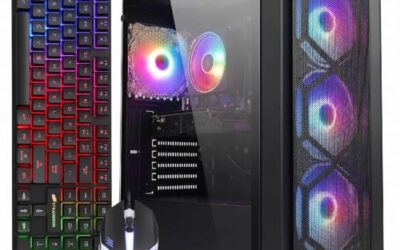
View on Amazon3. ZYNEEX Prebuilt Gaming Desktop (Ryzen 5 5500, RTX 3050 6GB): Closest rival to the Skytech
Specs per the listing: Ryzen 5 5500, GeForce RTX 3050 6GB, 16GB DDR4 3200MHz, 1TB NVMe SSD, ARGB air cooling.
On paper this is nearly identical to the Skytech: same Ryzen 5 5500, same RTX 3050 6GB, same 16GB and 1TB. The difference is the brand. ZYNEEX is a smaller seller than Skytech, so support and part transparency matter more here; check the return window and the exact power supply wattage on the listing before you buy. If the price is lower than the Skytech on the day you shop, it is a reasonable alternative.
- Pros: Same core specs as the Skytech; ARGB air cooling for a lit-up case; 1TB NVMe SSD
- Cons: Smaller brand, so check support terms; PSU and motherboard details are thinner on the listing

ZYNEEX Prebuilt Gaming Desktop PC, AMD Ryzen 5 5500, GeForce RTX 3050 6GB,16GB DDR4 3200MHz RAM, 1TB NVMe SSD, ARGB Air Cooling, Wi-Fi,Tower Computer for Gaming, Streaming, Editing
Included for '5 Best Prebuilt Gaming PCs Under $1,000: Specs Compared' because the listing adds cooling or gel-infused layers, which is the attribute this article compares.
View on Amazon4. BYTE DEPOT Gamer Xtreme Gaming PC (Core i7, 32GB, RTX 3050): Best for memory and multitasking
Specs per the listing: Intel Core i7, 32GB DDR RAM, 1TB PCIe SSD, GeForce RTX 3050, Wi-Fi 6 ready, Windows 11.
The pitch here is 32GB of RAM and a Core i7 on a sub-$1,000 budget. That helps if you stream, keep a browser and Discord open, or run creative apps next to your games. The RTX 3050 is still the limit for frame rates, so do not expect it to out-play the Skytech in games. Confirm the exact Core i7 generation on the listing, because older i7 chips trail newer Ryzen 5 and Core i5 parts in efficiency.
- Pros: 32GB RAM suits multitasking; Core i7 and 1TB SSD; Wi-Fi 6 ready
- Cons: Graphics card is the same RTX 3050 class; Core i7 generation needs checking on the listing

BYTE DEPOT Gamer Xtreme Gaming PC - Intel Core i7, 32GB DDR RAM, 1TB PCIe SSD, NVIDIA GeForce RTX 3050, WiFi 6 Ready & Windows 11 Pro
Included for '5 Best Prebuilt Gaming PCs Under $1,000: Specs Compared' as a representative home product in this roundup; selection reflects the product set returned for this topic.
View on Amazon5. CyberPowerPC Gamer Master (Ryzen 5 5500, RX 6500 XT): Cheapest way in
Specs per the listing: Ryzen 5 5500, Radeon RX 6500 XT 4GB, 8GB DDR4, 500GB PCIe 4.0 SSD, Wi-Fi ready.
CyberPowerPC is one of the best-known prebuilt brands, and this is its entry build. The Radeon RX 6500 XT has only 4GB of video memory, so it is best for esports and older games at 1080p. The 8GB of RAM is the weak spot: plan on adding another 8GB stick soon, which is an inexpensive upgrade. Buy this one only if the budget is tight and you accept those limits.
- Pros: Established brand; Lowest entry cost in this group; PCIe 4.0 SSD
- Cons: Only 4GB of video memory; 8GB RAM and 500GB SSD are tight

CyberPowerPC Gaming PC, AMD Ryzen 5 5500, Radeon RX 6500 XT 4GB | Gamer Master, 8GB DDR4, 500GB PCIe 4.0 SSD, WiFi Ready & Windows 11 Home (GMA3100A3)
Included for '5 Best Prebuilt Gaming PCs Under $1,000: Specs Compared' as a representative home product in this roundup; selection reflects the product set returned for this topic.
View on AmazonHow to Choose Between These Builds
If you only care about frame rates, choose the Skytech or the ZYNEEX: they have the same Ryzen 5 5500 and RTX 3050 6GB. Choose the HP Victus if you value a mainstream brand more than the newest graphics features. Choose the BYTE DEPOT build if you do more than game on the PC. Choose the CyberPowerPC only on a tight budget, and plan to add RAM.
GPU and CPU Balance
The graphics card drives gaming performance, so prioritise it, then pair a processor strong enough to avoid a bottleneck at 1080p. A six-core Ryzen 5 5500 is well matched to an RTX 3050.
RAM and Storage
16GB of RAM is the practical minimum for current games. A 1TB SSD is worth the extra cost over 500GB because modern games often exceed 100GB each.
Power Supply and Upgrades
A 650W 80+ Gold power supply leaves headroom for a better graphics card later. Check the wattage on every listing, since small brands sometimes omit it.
Frequently Asked Questions
Can you get a good prebuilt gaming PC for under $1,000?
Yes, if your target is 1080p. Builds in this range pair a six-core CPU with an RTX 3050-class card, 16GB of RAM and a 1TB SSD. For 1440p or the newest games at high settings, you generally need to spend more.
Is an RTX 3050 enough for gaming in 2026?
It is enough for 1080p at medium to high settings in most titles, and DLSS helps where supported. It struggles with the heaviest new releases at high settings, so lower a few options or use upscaling.
Is a prebuilt cheaper than building your own at this budget?
Often close. Prebuilts include Windows, a warranty and assembly, while a DIY build can offer better parts for the same money if you shop part prices carefully. Our RTX 5060 prebuilt guide covers the next step up.
What should I check before buying a prebuilt from a lesser-known brand?
Look for the exact power supply wattage and rating, the return window, warranty length, and whether the listing names the motherboard. If those are missing, treat the price advantage with caution.
Which upgrade is worth doing first?
RAM if the build ships with 8GB, then a larger SSD, then the graphics card. A Gold-rated 650W power supply leaves room for a card upgrade later.
Related Guides
Related Articles
Looking for more on this topic? Browse the hand-picked guides below — each one applies the same scoring rubric used in this review.