A triple monitor cockpit changes what a flight simulator asks of a PC. Microsoft Flight Simulator can render separate views across three displays, and three 1440p panels add up to roughly 11 million pixels — more than a single 4K screen. The graphics card has to fill all of that while the processor feeds a simulation that is famously demanding on a single main thread.
The five prebuilt desktops below are chosen for that workload. The flagship carries an RTX 5090 with 32GB of GDDR7 video memory, three machines pair an RTX 5080 with 16GB, and the mid-range pick uses an RTX 5070 Ti with the same 16GB frame buffer. Every one ships with at least 32GB of DDR5, fast NVMe storage for streamed scenery, and liquid cooling for long flights.
As an Amazon Associate, we earn from qualifying purchases.
Table of Contents
- Quick Answer
- HP OMEN 45L Gaming Desktop GT22-3090 (Core Ultra 9 285K, RTX 5090)
- Alienware Aurora ACT1250 (Core Ultra 9 285, RTX 5080)
- Corsair Vengeance i7500 (Core i9-14900KF, RTX 5080)
- MSI Aegis ZS2 (Ryzen 9 9900X, RTX 5080)
- Skytech King 95 (Ryzen 7 9800X3D, RTX 5070 Ti)
- How to Choose a Gaming PC for Triple Monitor Flight Simulators
- Who Should Skip These Gaming PCs
- FAQ
- Final Verdict
Quick Answer
For a triple monitor cockpit, the HP OMEN 45L GT22-3090 is the flagship pick: an RTX 5090 with 32GB of GDDR7, a Core Ultra 9 285K and 64GB of DDR5. The Alienware Aurora ACT1250 and Corsair Vengeance i7500 pair an RTX 5080 with 16GB of video memory for triple 1440p, while the Skytech King 95 pairs the Ryzen 7 9800X3D with an RTX 5070 Ti as the mid-range route.
HP OMEN 45L Gaming Desktop GT22-3090 (Core Ultra 9 285K, RTX 5090)

The OMEN 45L in this GT22-3090 configuration is the no-compromise triple-screen machine in the roundup. Its RTX 5090 carries 32GB of GDDR7 video memory, double the capacity of the RTX 5080 systems below, and that headroom is what a spanned cockpit consumes first: three rendered views, terrain textures and dense airport scenery all compete for the same memory pool. It is the only pick here specified for triple 4K panels.
The supporting hardware matches the card. An Intel Core Ultra 9 285K feeds the GPU, 64GB of DDR5 is the most system memory in this roundup — headroom for the simulator, add-on traffic and scenery tools running together — and a 2TB SSD holds the installation plus a large add-on library. HP’s Cryo Chamber design moves the liquid cooling radiator into a separate compartment at the top of the case, drawing cooler air from outside the main chamber to sustain performance on long-haul flights. The system runs Windows 11 Pro.
Specs
- Processor: Intel Core Ultra 9 285K
- Graphics: NVIDIA GeForce RTX 5090, 32GB GDDR7
- Memory: 64GB DDR5
- Storage: 2TB SSD
- Cooling: OMEN Cryo Chamber liquid cooling design
- Operating system: Windows 11 Pro
- Model: OMEN 45L GT22-3090
Alienware Aurora ACT1250 (Core Ultra 9 285, RTX 5080)

The Aurora ACT1250 is the balanced RTX 5080 pick for a triple monitor cockpit. The RTX 5080’s 16GB of GDDR7 video memory is the practical capacity for three 1440p views with high texture settings, and the card supports DLSS 4 with Multi Frame Generation: the base frame rate falls as the pixel count triples, and frame generation restores smooth motion.
Around the card, Alienware fits an Intel Core Ultra 9 285 with boost speeds up to 5.6GHz — clock speed the simulator’s main thread can use — a 240mm liquid cooler, and 32GB of dual-channel DDR5 at 5200 MT/s. The 1000W Platinum-rated power supply leaves headroom for a future GPU swap. Storage is the one modest figure, a 1TB NVMe SSD, and simulator libraries grow quickly, so plan on a second drive. Wi-Fi 7, 2.5Gb Ethernet and Windows 11 Home are included.
Specs
- Processor: Intel Core Ultra 9 285, up to 5.6GHz
- Graphics: NVIDIA GeForce RTX 5080, 16GB GDDR7
- Memory: 32GB DDR5, 5200 MT/s (2 x 16GB)
- Storage: 1TB NVMe M.2 PCIe SSD
- Cooling: 240mm liquid CPU cooler
- Power supply: 1000W Platinum rated
- Wireless: Wi-Fi 7, 2.5Gb Ethernet
- Operating system: Windows 11 Home
- Model: DACT1250-9575BLK-PUS
Corsair Vengeance i7500 (Core i9-14900KF, RTX 5080)

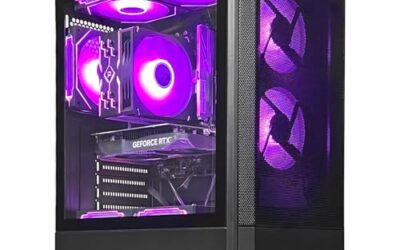
The Vengeance i7500 matches the Alienware on the part that decides triple-screen performance, an RTX 5080 with 16GB of GDDR7, and differentiates itself in how it is built. Corsair assembles the system almost entirely from its own retail components inside a 3500X ARGB mid-tower, so later memory, storage or graphics upgrades follow standard PC rules rather than a proprietary service path. For a cockpit builder who expects the rig to evolve, that openness is the argument here.
The Intel Core i9-14900KF behind the card is a 24-core, 32-thread processor, well suited to simmers who also run moving maps, weather tools or recording software beside the simulator. Storage is 2TB on an M.2 NVMe SSD, double the Alienware’s figure, and memory is 32GB of Vengeance RGB DDR5. The system is liquid cooled and ships with Windows 11 Home.
Specs
- Processor: Intel Core i9-14900KF, 24 cores, 32 threads
- Graphics: NVIDIA GeForce RTX 5080, 16GB GDDR7
- Memory: 32GB Vengeance RGB DDR5
- Storage: 2TB M.2 NVMe SSD
- Cooling: Liquid CPU cooler
- Case: Corsair 3500X ARGB mid-tower
- Operating system: Windows 11 Home
MSI Aegis ZS2 (Ryzen 9 9900X, RTX 5080)

The Aegis ZS2 is the AMD-platform entry among the RTX 5080 towers. Its Ryzen 9 9900X is a 12-core Zen 5 processor, a strong fit for simmers who split time between flying and multithreaded work such as rendering recorded flights. The graphics side matches the two Intel systems above: an RTX 5080 with 16GB of GDDR7, so the triple-screen ceiling at 1440p is the same.
The platform details are generous. A 360mm liquid cooler is the largest radiator in this roundup, storage is a 2TB SSD, and the 850W 80 Plus Gold power supply is properly matched to the card. Wi-Fi 7 is built in, a keyboard and mouse are included, and it ships with Windows 11 Pro rather than Home. MSI builds from largely standard parts, so the upgrade path stays open as the cockpit grows.
Specs
- Processor: AMD Ryzen 9 9900X, 12 cores
- Graphics: NVIDIA GeForce RTX 5080, 16GB GDDR7
- Memory: 32GB DDR5
- Storage: 2TB NVMe SSD
- Cooling: 360mm liquid CPU cooler
- Power supply: 850W 80 Plus Gold
- Wireless: Wi-Fi 7
- Operating system: Windows 11 Pro
- Model: Aegis ZS2 B9NVV-1409US
Skytech King 95 (Ryzen 7 9800X3D, RTX 5070 Ti)

The King 95 is the mid-range route into triple monitor flight simulation, and it trades in exactly one place: the graphics card steps down to an RTX 5070 Ti. That card still carries 16GB of GDDR7 video memory, the figure that decides whether three views and high texture settings fit comfortably, and it supports the same DLSS 4 upscaling and Multi Frame Generation as the RTX 5080 machines. Triple 1080p is its natural home, and triple 1440p works with DLSS quality mode carrying part of the load.
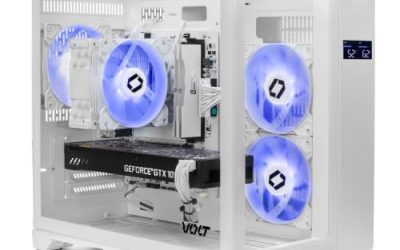
In exchange, Skytech fits the Ryzen 7 9800X3D, a processor with stacked 3D V-Cache regarded as one of the strongest gaming CPUs available, and this simulator rewards exactly that cache-heavy design on its main thread. The build rounds out with 32GB of DDR5-5600 RGB memory, a 1TB Gen4 NVMe SSD, an 850W Gold ATX 3.0 power supply, a 360mm ARGB liquid cooler and Wi-Fi, in a white case with Windows 11 Home. Skytech states the graphics card brand may vary between units.
Specs
- Processor: AMD Ryzen 7 9800X3D, 4.7GHz, up to 5.2GHz boost
- Graphics: NVIDIA GeForce RTX 5070 Ti, 16GB GDDR7
- Memory: 32GB DDR5-5600 RGB
- Storage: 1TB Gen4 NVMe SSD
- Cooling: 360mm ARGB liquid CPU cooler
- Power supply: 850W Gold, ATX 3.0
- Wireless: Wi-Fi
- Operating system: Windows 11 Home
- Model: ST-KING95-1671-W-AM
How to Choose a Gaming PC for Triple Monitor Flight Simulators
Start with the pixel count, because it sets everything else. Three 1080p monitors total about 6.2 million pixels, three 1440p monitors about 11.1 million, and three 4K monitors about 24.9 million — so a triple 1440p cockpit already asks more of the graphics card than a single 4K display. Match the GPU tier to the panels: an RTX 5070 Ti class card for triple 1080p, an RTX 5080 for triple 1440p, and an RTX 5090 for triple 4K. Video memory matters as much as the GPU tier, since three rendered views hold more textures at once; 16GB is the practical target, and 32GB removes the ceiling entirely.
Then check the outputs and the supporting parts. The graphics card needs at least three digital display outputs, ideally of the same connector type, so confirm the output panel on the listing before buying cables. For the processor, this simulator leans on one main thread, so high boost clocks and cache matter more than core count. Take 32GB of DDR5 as the floor and 64GB if you run add-on traffic, weather and map tools alongside. Storage at 2TB avoids juggling installations, because the simulator and its scenery grow quickly. Finally, prefer liquid cooling: a long flight holds both CPU and GPU at sustained load.
Who Should Skip These Gaming PCs
Skip this class of machine if you fly on a single monitor, because one 1440p or 4K display does not need this much graphics hardware. VR headset pilots should also look elsewhere: a headset renders two high-resolution views with different demands, and CPU and GPU priorities shift. And if your simulator time is mostly light aircraft in rural scenery at modest settings, a mid-range build will satisfy you; these prebuilts earn their tier only when three panels stay driven at high settings.
FAQ
Can Microsoft Flight Simulator really use three monitors?
Yes. The simulator supports multiple displays by rendering additional views, which is how home cockpits wrap scenery around the pilot. Each added view raises the total pixel count the graphics card must fill, which is why this roundup starts at 16GB of video memory.
How much VRAM does a triple monitor setup need?
For triple 1080p, 16GB is comfortable, and every PC here carries at least that. Triple 1440p pushes consumption higher with dense scenery and high textures, which the 16GB cards handle with DLSS support, while triple 4K is where the RTX 5090’s 32GB earns its place.
Does the CPU matter as much as the graphics card for flight simulation?
Both matter, in different ways. The graphics card fills three screens, but the simulator is also limited by its main CPU thread, so a processor with high boost clocks and large cache — the Ryzen 7 9800X3D is the standout example here — can raise frame rates even when the graphics card has headroom left.
Can I upgrade one of these PCs later?
Generally yes. Towers built from standard retail components, such as the Corsair, MSI and Skytech here, accept normal memory, storage and graphics upgrades. Before planning a GPU swap, check power supply wattage and case clearance, since each graphics generation asks more of both.
Final Verdict
Every PC here is specified for a three-screen cockpit: at least 16GB of video memory, DLSS 4 support, 32GB or more of DDR5 and liquid cooling. The HP OMEN 45L GT22-3090 is the flagship recommendation for triple 4K or maximum settings. The Alienware Aurora ACT1250 is the balanced RTX 5080 pick, the Corsair Vengeance i7500 suits upgraders and creators, and the MSI Aegis ZS2 covers AMD-platform buyers. The Skytech King 95 is the mid-range entry, pairing the strongest simulator CPU here with DLSS to carry its RTX 5070 Ti.
Product and ASIN Reference
| Product | ASIN |
|---|---|
| HP OMEN 45L Gaming Desktop GT22-3090 (Core Ultra 9 285K, RTX 5090) | B0F253VS8C |
| Alienware Aurora ACT1250 (Core Ultra 9 285, RTX 5080) | B0F9MPVT38 |
| Corsair Vengeance i7500 (Core i9-14900KF, RTX 5080) | B0DXVTNV29 |
| MSI Aegis ZS2 (Ryzen 9 9900X, RTX 5080) | B0GT9LGKYC |
| Skytech King 95 (Ryzen 7 9800X3D, RTX 5070 Ti) | B0DXX2T9JC |