Affiliate disclosure: As an Amazon Associate we earn from qualifying purchases. This post contains affiliate links — we may earn a small commission at no extra cost to you. This never affects our picks. Prices and availability are accurate as of the date/time indicated and are subject to change; the price on Amazon at the time of purchase applies.
- Quick Comparison Table
- 1. NZXT H5 Flow: Best for a first airflow build
- 2. Fractal Design Pop 2 Air: Best for quiet, mesh-front cooling
- 3. Lian Li O11D Mini V2 Flow: Best for showpiece builds and bundled fans
- 4. CORSAIR 4000D RS Frame (White): Best for radiator-ready builds with easy cable work
- 5. MONTECH AIR 100 ARGB: Best for compact micro-ATX builds
- How to Choose
- Frequently Asked Questions
- About the Author
- Related Articles
Quick answer: Among the best PC cases under 100, the NZXT H5 Flow is the safe all-round pick. The Fractal Pop 2 Air suits quiet mesh airflow, the Lian Li O11D Mini V2 Flow suits showpiece builds, the Corsair 4000D RS Frame suits radiator fans, and the Montech AIR 100 suits compact micro-ATX.
A good case sets how cool and quiet your build runs, and it stays through several upgrades. This guide compares five cases that fit a budget under 100: four mid-size ATX designs and one compact micro-ATX model. We use the fan counts, radiator support and board compatibility stated in each listing. We did not run our own thermal tests, so treat the notes as a fit and layout guide, and check GPU and cooler clearance before you order.
Quick Comparison Table
| # | Model | Key specs (per listing) | Best for |
|---|---|---|---|
| 1 | NZXT H5 Flow | ATX mid-tower, 2x120mm fans, 360mm front radiator, glass panel | a first airflow build |
| 2 | Fractal Design Pop 2 Air | ATX/mATX/ITX, mesh front, three 120mm fans | quiet, mesh-front cooling |
| 3 | Lian Li O11D Mini V2 Flow | ATX/mATX/ITX, five 120mm reverse fans, panoramic glass | showpiece builds and bundled fans |
| 4 | CORSAIR 4000D RS Frame (White) | Mid-tower, three RS fans, multiple 360mm radiators | radiator-ready builds with easy cable work |
| 5 | MONTECH AIR 100 ARGB | Micro-ATX (fits Mini-ITX), 4 fans, 330mm GPU, 161mm cooler | compact micro-ATX builds |
1. NZXT H5 Flow: Best for a first airflow build
Specs per the listing: Compact ATX mid-tower, two 120mm fans included, 360mm front radiator support, tempered glass side panel.
The H5 Flow is a straightforward choice that rarely causes surprises. Its compact ATX mid-tower body fits most standard parts, the Flow name points to a ventilated front for airflow, and the two included 120mm fans give you a working intake and exhaust from day one. The 360mm front radiator support means you can later move to liquid cooling without swapping the case. The listing even calls it a great first airflow build, which matches its role. GPU length and cooler height limits are not in the listing, so check the maker page.
- Pros: Compact ATX layout; two 120mm fans included; 360mm front radiator support
- Cons: GPU and cooler clearances not listed; only two fans in this version
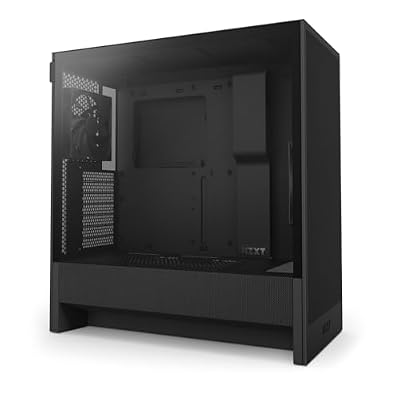
NZXT H5 Flow - Compact ATX Mid-Tower PC Case - Black | Compact mid-tower with 2 included 120mm fans, 360mm front radiator support, and tempered glass. A great first airflow build.
Included for 'Best PC Cases Under 100 for Airflow-Focused Gaming Builds' as a representative home product in this roundup; selection reflects the product set returned for this topic.
View on Amazon2. Fractal Design Pop 2 Air: Best for quiet, mesh-front cooling
Specs per the listing: Mesh front panel, three 120mm fans included, spacious interior, ATX, mATX and ITX motherboard support, black solid side panel.
The Pop 2 Air leans into the airflow theme with a mesh front and three pre-installed 120mm fans, so a gaming build gets good intake without extra purchases. The solid side panel keeps cable clutter out of view and trims noise compared with a glass panel, which is handy in a bedroom or office. The listing describes the interior as spacious, which helps with larger graphics cards and tidy cable runs. If you want to show off lighting, this is not the right case, because there is no window.
- Pros: Mesh front with three fans included; solid panel hides cables; ATX, mATX and ITX support
- Cons: No window to display parts; clearance figures not listed

Fractal Design Pop 2 Air Black Solid - Performance Airflow PC Gaming Case - Mesh Front Panel - Three 120 mm Fans Included - Spacious Interior - ATX/mATX/ITX Motherboard Support
Included for 'Best PC Cases Under 100 for Airflow-Focused Gaming Builds' as a representative home product in this roundup; selection reflects the product set returned for this topic.
View on Amazon3. Lian Li O11D Mini V2 Flow: Best for showpiece builds and bundled fans
Specs per the listing: Five 120mm non-RGB reverse-blade fans included, panoramic glass, 10-degree angled intake, supports ATX, M-ATX and Mini-ITX builds.
This case is about presentation first, with panoramic glass that shows the whole build. The surprise is the fan count: five 120mm reverse-blade fans come in the box, which is rare at this budget and can save you from buying fans separately. Reverse-blade fans put the decorative face toward the glass side, so a clean build looks tidy. The angled intake is meant to improve airflow. The compact footprint also saves desk space, though a mid-size chassis may limit very tall coolers, so verify clearances.
- Pros: Five fans included; panoramic glass; Mini-sized body that still supports ATX
- Cons: Glass-heavy design needs careful cable work; clearances not listed

Lian Li O11D Mini V2 Flow ATX PC Case with 5 Non-RGB Reverse Fans, Black | Includes five 120mm reverse-blade fans, panoramic glass, 10° angled intake and support for ATX, M-ATX and Mini-ITX builds.
Included for 'Best PC Cases Under 100 for Airflow-Focused Gaming Builds' as a representative home product in this roundup; selection reflects the product set returned for this topic.
View on Amazon4. CORSAIR 4000D RS Frame (White): Best for radiator-ready builds with easy cable work
Specs per the listing: Modular high-airflow mid-tower, three CORSAIR RS fans, InfiniRail fan mounting, fits multiple 360mm radiators, reverse connector motherboard compatible, white.
The 4000D line is known for flexible layouts. In this Frame version, the InfiniRail system lets you slide fans along rails to fit different radiators and layouts, and the case can accept multiple 360mm radiators, which is useful for a liquid-cooled CPU and a front intake. Reverse connector motherboard compatibility suits the newer boards that move connectors to the back. It is a good pick if you plan a custom loop later. The Frame name implies a more open design, so check dust filtering on the maker page.
- Pros: InfiniRail mounting; multiple 360mm radiator support; three fans included
- Cons: Frame design may reduce dust protection; lists no GPU clearance

CORSAIR 4000D RS Frame Modular High Airflow Mid-Tower PC Case – 3X CORSAIR RS Fans – InfiniRail™ Fan Mounting System – Fits Multiple 360mm Radiators – Reverse Connector Motherboard Compatible – White
Included for 'Best PC Cases Under 100 for Airflow-Focused Gaming Builds' as a representative home product in this roundup; selection reflects the product set returned for this topic.
View on Amazon5. MONTECH AIR 100 ARGB: Best for compact micro-ATX builds
Specs per the listing: Compact micro-ATX case, four fans, mesh front, fits Mini-ITX, 330mm GPU clearance, 161mm cooler clearance, lighting controller, swivel tempered glass, dust filters.
This is the small option and the only case here with exact clearances in the title: 330mm for the graphics card and 161mm for the CPU cooler. That clarity makes planning easy, though it also means you must pick a shorter card and a low-profile cooler. Four fans come included with ARGB lighting and a controller, the front is mesh, and dust filters help with upkeep. It will not take a full ATX board. For a compact gaming desktop or a tidy second PC, it is a strong fit.
- Pros: Clear 330mm GPU and 161mm cooler limits; four fans included; dust filters
- Cons: No full ATX board support; tight cooler height

MONTECH AIR 100 ARGB Compact Micro ATX Case, 4 Fans, Mesh Front, Black | Fits Mini-ITX too, 330mm GPU & 161mm cooler clearance, lighting controller, swivel tempered glass, dust filters
Included for 'Best PC Cases Under 100 for Airflow-Focused Gaming Builds' as a representative home product in this roundup; selection reflects the product set returned for this topic.
View on AmazonHow to Choose
Check the motherboard size first
Cases are built around board sizes. ATX boards need a mid-tower, micro-ATX boards fit smaller cases, and Mini-ITX boards fit nearly anything. Most cases here support smaller boards too, but a micro-ATX case will never fit ATX. Match the case to the board you own or plan to buy before looking at style, and note that bigger cases leave more room for cables and upgrades. If you may move to a larger board later, a mid-tower gives you that freedom, while a compact case locks you in. Also check front-panel ports: USB-C on the case needs a matching header on the motherboard.
Measure GPU length and cooler height
Your graphics card and CPU cooler must fit. The Montech lists 330mm GPU and 161mm cooler limits, which many cards and coolers exceed. For the others, find the limits on the maker page and compare them to your parts. Leave a few millimetres of spare room for power connectors and cables. Remember that a front radiator can reduce the room for a long card in some layouts. A simple rule is to leave at least 20mm between the card and the front fans or radiator, so air can move and cables can bend without strain.
Count the fans and the airflow path
A mesh or perforated front, with intake fans at the front and an exhaust fan at the rear, is the simplest way to keep parts cool. Included fans save money, but their quality varies. Two or three intake fans and one exhaust is a good minimum for a gaming build. Solid-front cases look cleaner but usually run warmer, so avoid them for a high-power graphics card. Fan noise also depends on fan speed control, so connect fans to motherboard headers rather than running them at full speed. Dust filters on the intake side are worth having, and they should slide out for easy cleaning.
Decide on glass, dust and radiator space
Glass panels look good but show every cable and weigh more. Solid panels are quieter and cleaner. If you want liquid cooling, look for 240mm or 360mm radiator support, and check which mount position the case allows. Avoid cases that do not list their board and radiator support clearly, and skip mounts or brackets that are not real cases at all. Finally, compare weight and build quality: thin steel panels flex during installation, and a case that is a little heavier is usually easier to build in. Read each listing for tool-free drive trays if you plan to add storage later.
Frequently Asked Questions
What size case do I need for a standard ATX board?
A mid-tower such as the NZXT H5 Flow, Fractal Pop 2 Air or Corsair 4000D RS Frame. The Lian Li also lists ATX support. The Montech is micro-ATX only.
Are included fans enough?
For most gaming builds, three or more is enough. The Lian Li includes five. Check the fan count in each listing and add one if your parts run warm.
Do I need a case with a glass panel?
No. Glass is for looks. A solid or mesh panel can run quieter and is often cheaper, so pick what suits your desk.
Can I use a 360mm radiator in these cases?
The NZXT H5 Flow and Corsair 4000D RS Frame list 360mm support. For the others, check the maker page for supported radiator sizes and positions.
Will a long graphics card fit?
It depends. Only the Montech states a limit of 330mm. For the rest, find the maximum GPU length on the maker page before ordering.