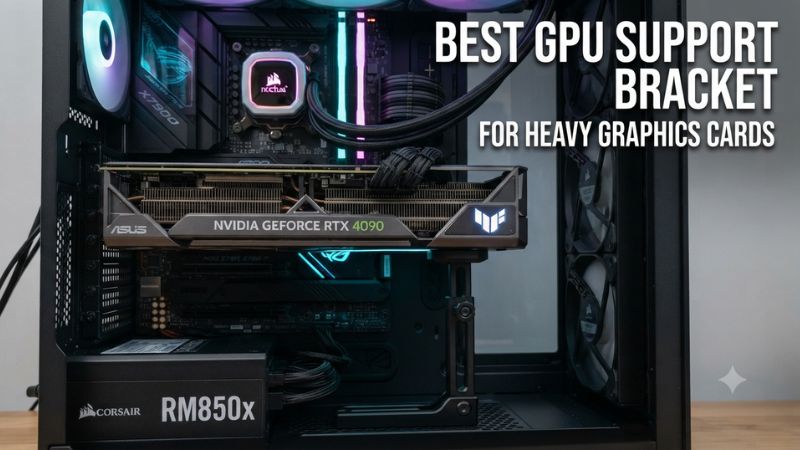
Heavy graphics cards can place considerable leverage on their PCIe slots and mounting points, making additional support worthwhile in many desktop builds. The best gpu support bracket for heavy graphics cards depends on case clearance, mounting style, adjustment range, and GPU weight. These picks focus on practical compatibility rather than decorative features.
How to Choose a GPU Support Bracket
The right support bracket should hold the graphics card level without interfering with its fans, power connectors, or surrounding components. Before choosing a model, identify where the bracket can attach, measure the available vertical space, and check whether the support surface can remain stable when the case is moved or serviced.
1. Choose the Right Mounting Style
Free-standing GPU supports are among the simplest options. They sit on the PSU shroud or case floor and extend upward to contact the graphics card. Their main advantage is straightforward installation without modifying the motherboard or occupying additional expansion slots.
Motherboard-mounted and PCIe-slot-mounted designs offer alternatives when there is insufficient room beneath the GPU. These brackets transfer support through different mounting points, making them useful for cases with bottom-mounted fans, radiators, or unusual internal layouts.
2. Measure GPU Clearance and Adjustment Range
Measure the distance between the intended mounting surface and the underside of the graphics card. A bracket that cannot reach the card is useless, while one that extends too far can push the GPU upward and create unnecessary pressure on the motherboard.
Also consider the graphics card’s length, thickness, and position. Large triple-fan models may have different contact locations from shorter dual-fan cards. A wide adjustment range helps accommodate different builds, but the bracket still needs a suitable contact surface.
3. Check Construction and Contact Materials
Metal construction can provide a rigid support structure, but material alone does not establish a bracket’s load capacity. Look at the base, adjustment mechanism, locking system, and upper contact pad together.
Rubber or padded contact surfaces help prevent scratches and reduce slipping against the GPU shroud. Avoid placing support directly against exposed circuit-board components, fan blades, or delicate cooler fins. The bracket should contact a structurally appropriate area.
4. Consider Airflow, Lighting, and Installation
A support post positioned below the graphics card should not obstruct bottom intake fans or interfere with the GPU’s fan operation. Check the case’s internal layout before choosing a wide stand or a model with a large decorative base.
RGB is optional rather than a functional requirement. If the bracket uses addressable lighting, verify that your motherboard has a compatible 5V three-pin ARGB connection or that the product includes an appropriate controller. Never connect a 5V ARGB device to a 12V four-pin RGB header.
Top GPU Support Brackets for Heavy Graphics Cards
These recommendations cover different installation requirements rather than treating every support bracket as interchangeable. The ASUS and Cooler Master options suit conventional free-standing installations, while LIAN LI provides a motherboard-mounted alternative. EZDIY-FAB offers a slot-mounted design with a documented weight and length limitation.
| Product | Best For | Key Spec | Compatibility | Watch Out For |
| ASUS ROG Herculx | Best Overall | 72–128mm adjustment; tool-free mechanism | Requires suitable floor clearance | Premium positioning; needs a stable base |
| LIAN LI GB-002 | Best Low-Profile Design | Steel construction; supports up to two GPUs | ATX and E-ATX motherboards | Motherboard mounting-point clearance |
| Cooler Master Atlas ARGB | Best Premium Display Build | Aluminum arm; 3kg maximum support-arm force | Compatible case surface and mounting arrangement | ARGB controller not included |
| EZDIY-FAB VH90 | Best Slot-Mounted Option | Supports cards up to 310mm and 1.2kg | Available PCIe expansion-slot mounting | Heavier or longer cards exceed its stated full-support specification |
1. ASUS ROG Herculx – Best Overall
BEST OVERALL · FREE-STANDING SUPPORT
The ASUS ROG Herculx is a strong choice for builders who want adjustable support without occupying a PCIe expansion slot. Its zinc-alloy construction, adjustable support platform, and integrated spirit level make it particularly convenient for positioning under large graphics cards.
Its documented support height ranges from 72mm to 128mm. An adjustment wheel and release button allow tool-free installation and removal, while the integrated 3D ARGB lighting works with ASUS Aura Sync. The included spirit level helps align the card without guessing its position.
The main limitation is its reliance on a suitable flat mounting surface beneath the graphics card. It may not be appropriate for builds where bottom-mounted fans, a radiator, or other components occupy that space. Buyers should also compare its premium feature set against simpler supports if lighting and tool-free adjustment are unnecessary.
Choose it if: You want a convenient, adjustable support for a large horizontal GPU and have sufficient space beneath the card.
2. LIAN LI GB-002 – Best Low-Profile Design
BEST LOW-PROFILE DESIGN · MOTHERBOARD-MOUNTED
The LIAN LI GB-002 takes a different approach by attaching to the motherboard rather than standing on the case floor. This makes it useful when a traditional vertical support post would interfere with bottom intake fans, a PSU shroud, or other hardware beneath the graphics card.
Its steel construction supports vertical and horizontal adjustment, allowing the mounting position to be changed to suit the graphics card. LIAN LI specifies compatibility with ATX and E-ATX motherboards and states that the bracket can support up to two graphics cards.
The trade-off is installation space around the motherboard. Large CPU coolers, heatsinks, M.2 hardware, and other components can complicate mounting. Unlike a free-standing holder, it also depends on the motherboard’s available mounting points.
Choose it if: You want a discreet support mechanism and prefer not to place a stand on the case floor or PSU shroud.
3. Cooler Master Atlas ARGB – Best Premium Display Build
BEST PREMIUM DESIGN · ARGB SUPPORT
The Cooler Master Atlas ARGB combines GPU support with an illuminated tempered-glass design. Its aluminum support arm and magnetic mounting arrangement make it an interesting option for showcase computers where the support hardware remains visible through a transparent side panel.
One particularly useful specification is its maximum support-arm force of 3kg. Cooler Master also lists an aluminum stand, tempered glass, magnetic components, and tool-free installation. The manufacturer specifies a two-year warranty and an ARGB cable measuring approximately 600mm.
However, the maximum support-arm force should not be interpreted as a universal guarantee for every GPU and case configuration. The ARGB controller is not included, so lighting control requires an appropriate compatible setup. Its decorative glass structure may also be unnecessary for builders who prioritize a compact, understated support.
Choose it if: You want an aluminum support with integrated lighting and a more elaborate appearance than a conventional adjustable stand.
4. EZDIY-FAB VH90 – Best Slot-Mounted Option
BEST SLOT-MOUNTED OPTION · ADJUSTABLE RAIL
The EZDIY-FAB VH90 uses a reinforced PCIe-slot mounting plate instead of relying on a stand beneath the graphics card. Its sliding rail and lift mechanism provide adjustment, while a front-mounted metal control knob helps position the support point.
The manufacturer’s compatibility specification is particularly important: the VH90 provides its stated full anti-sag support for graphics cards up to 310mm long and 1.2kg in weight. Longer or heavier cards may still be supported, but EZDIY-FAB acknowledges that some bracket sag can occur.
This makes the VH90 less suitable as a default choice for exceptionally heavy flagship graphics cards. Check the actual GPU dimensions and weight before purchasing, and make sure the case has the necessary expansion-slot mounting space. Its integrated ARGB lighting also requires a compatible connection.
Choose it if: Your card fits its published dimensions and weight limits, and you prefer an expansion-slot-mounted support over a free-standing post.
Comparing the Best GPU Support Bracket Options
The most important distinction between these products is where they transfer the graphics card’s weight. A floor-standing holder depends on the case floor, a motherboard-mounted brace uses motherboard mounting points, and a PCIe-slot bracket relies on the expansion-slot area. Matching that geometry to the build is more important than choosing the most elaborate design.
| Product | Mounting | Adjustment | Weight Specification | Main Limitation |
| ASUS ROG Herculx | Free-standing | 72–128mm | No numerical maximum published | Needs floor clearance |
| LIAN LI GB-002 | Motherboard-mounted | Vertical and horizontal | Up to two GPUs; no numerical weight limit published | Mounting-point clearance |
| Cooler Master Atlas ARGB | Magnetic/free-standing arrangement | Configurable support arrangement | 3kg maximum support-arm force | Controller not included |
| EZDIY-FAB VH90 | PCIe-slot-mounted | Sliding rail and lift | 1.2kg for stated full support | 310mm card-length limit |
These specifications come from manufacturer documentation. They should not be treated as equivalent laboratory load ratings because the manufacturers describe different mounting arrangements and support conditions.
FAQ
1. Do heavy graphics cards need a support bracket?
Heavy graphics cards can benefit from a support bracket when their unsupported ends visibly droop. Large coolers and long PCB designs increase the leverage applied to the card’s mounting area. A correctly positioned bracket helps keep the GPU level and reduces mechanical loading on its mounting points.
A bracket is not mandatory for every graphics card. Check the card after installation and consider its dimensions, weight, and case layout before purchasing additional support hardware.
2. Is a vertical GPU support bracket better than a free-standing stand?
Neither mounting style is universally better because the best choice depends on the case layout. Free-standing supports are easier to reposition, while motherboard-mounted and expansion-slot-mounted designs can work when the space beneath the GPU is occupied.
For the best GPU support bracket for heavy graphics cards, prioritize a stable mounting point and correct contact positioning rather than appearance alone.
3. Can a GPU support bracket damage the graphics card?
Yes, incorrect installation can create unnecessary pressure or interfere with GPU components. A bracket adjusted too high can push the graphics card upward, while poorly positioned contact points can damage delicate cooler or PCB areas.
Install the GPU securely first, then raise the bracket until it gently contacts an appropriate structural area. Do not use the bracket to force a visibly bent card into position.
4. Should I remove the GPU support bracket when transporting my PC?
Removing the bracket is generally sensible before transporting a desktop computer, particularly when it uses a loose free-standing support. Movement can shift the holder and create unwanted pressure against the graphics card.
For long-distance transportation, removing the graphics card and securing it separately is a more cautious approach for particularly heavy models. A support bracket should not be treated as a shipping restraint.
Final Thoughts
The best gpu support bracket for heavy graphics cards depends on mounting geometry and available clearance. The ASUS ROG Herculx is a versatile free-standing choice, LIAN LI GB-002 suits motherboard-mounted installations, and Cooler Master Atlas adds premium styling. Measure first and choose support that fits your build.