
A stream deck is one of those accessories that feels like a luxury until you use one, and then you cannot imagine going back to fumbling for hotkeys mid-broadcast. These programmable button panels let you switch scenes, trigger sound effects, launch apps, and control your whole setup with a single tap. This guide covers the best stream deck options for PC gamers and streamers in 2026, including budget-friendly FIFINE panels and the established favorites, so you can find the control surface that fits your workflow.
As an Amazon Associate I earn from qualifying purchases.
As an Amazon Associate we earn from qualifying purchases at no extra cost to you.




🛒 Best Price Today on Amazon
Prime members get fast, free shipping on everything above, plus member-only deals. New members get a 30-day free trial — cancel anytime.
What a Stream Deck Actually Does for Your Setup
At its core, a stream deck maps physical LCD or mechanical keys to actions you would otherwise dig through menus or memorize shortcuts to reach. During a broadcast that means instant scene switches, muting your mic without alt-tabbing, firing a clip or sound, and toggling your capture card feed, all without breaking immersion. FIFINE has entered this space with affordable panels that undercut the premium names while covering the essentials, which makes a stream deck accessible to first-time streamers who do not want to spend a fortune.
| Product | Best For | Standout Feature | Rating |
|---|---|---|---|
| Elgato Stream Deck MK.2 | All-round streaming control | Deep app integration | 4.8/5 |
| FIFINE Stream Deck (15-key) | Budget-conscious streamers | Low-cost LCD keys | 4.5/5 |
| Elgato Stream Deck + | Audio and dial control | Rotary dials + touch strip | 4.7/5 |
| FIFINE Stream Deck (6-key) | First-time streamers | Compact affordable layout | 4.4/5 |
| Elgato Stream Deck XL | Power users with many scenes | 32 programmable keys | 4.7/5 |
The Best Stream Deck Picks for 2026
From wallet-friendly FIFINE panels to feature-loaded flagships, these are the stream deck options worth your attention. Match the key count and features to how complex your broadcast really is.
Best Overall Stream Deck: Elgato Stream Deck MK.2
The 15-key MK.2 remains the benchmark thanks to its mature software and enormous plugin ecosystem. It integrates cleanly with broadcast apps, chat tools, and lighting, and the customizable LCD keys make your layout obvious at a glance. The main drawback is a higher price than the budget challengers. For streamers who want the most polished experience, it is the reference point, and our stream setup guide walks through the basics.
Best Budget Stream Deck: FIFINE 15-Key Panel
FIFINE’s 15-key stream deck delivers the core experience, scene switching, sound triggers, and app launches, at a fraction of the flagship cost. The LCD keys are responsive and the bundled software covers what most new streamers need. It lacks the deep third-party plugin library of the market leader, so power users may feel limited. As an entry into control surfaces it is a genuine bargain, as we highlight in our budget streaming gear roundup.
Best for Audio Control: Elgato Stream Deck +
The Stream Deck + adds physical rotary dials and a touch strip on top of programmable keys, which is a game changer for managing audio levels live. You can ride your mic, game, and chat volumes without touching a mixer app. It costs more and takes more desk space than a basic panel. Streamers who obsess over their audio mix will love it alongside a quality USB microphone.
Best Compact Stream Deck: FIFINE 6-Key Panel
For first-timers or tight desks, FIFINE’s 6-key panel covers the handful of actions you use constantly without overwhelming you. It is small, cheap, and dead simple to program. Six keys fill up fast once you get comfortable, so growth-minded streamers may outgrow it. As a low-risk way to try a stream deck it is excellent, and fits neatly into the setups in our small desk gaming guide.
Best for Power Users: Elgato Stream Deck XL
With 32 keys, the XL suits streamers juggling many scenes, sources, and integrations across a complex broadcast. Everything you need sits on one surface with no folder digging. It is the priciest and largest option, so casual streamers will not fill it. For serious creators running elaborate shows, it is the workhorse, especially paired with the multi-source tips in our advanced OBS guide.
Best Software-Based Alternative: Stream Deck Mobile
If you want to test the concept before buying hardware, a phone-based virtual stream deck turns a spare device into a touchscreen control panel. It is the cheapest way in and surprisingly capable. A touchscreen lacks the tactile confidence of physical keys, and it ties up a phone. It is a smart trial run before committing, and complements the workflow in our streaming software guide.
Getting the Most From Your Stream Deck
The value of a stream deck comes from thoughtful configuration, not just owning one. Start by mapping your most-used actions, scene switches, mic mute, and a start/stop toggle, to the easiest keys to reach by feel. Use folders or profiles to keep game-specific actions separate from your always-on controls, and add clear icons so you never squint mid-broadcast. Over time you can layer in advanced macros that chain several steps into one tap. Whether you choose a premium panel or an affordable FIFINE stream deck, a well-organized layout is what turns the device from a novelty into an indispensable part of your setup.
Frequently Asked Questions
Is a stream deck worth it for beginners?
Yes, even new streamers benefit from a stream deck because it removes the fumbling of keyboard shortcuts and lets you focus on your content. Budget panels from brands like FIFINE make entry affordable, and the productivity gain from instant scene switches and mic control is noticeable from your very first broadcast.
How many keys does a stream deck need?
Most streamers are well served by a 15-key panel, which balances enough buttons for scenes, audio, and effects without overwhelming a new user. Compact 6-key models suit simple setups, while power users running many scenes and integrations may prefer a larger 32-key surface to avoid nesting actions in folders.
Do budget stream decks work with OBS and Streamlabs?
Most stream decks, including affordable FIFINE panels, support the popular broadcast applications through their bundled software or plugins. Before buying, confirm that your chosen panel officially supports your streaming app so scene switching, source toggles, and mic control all function reliably during your live broadcasts.
Can I use a phone instead of a hardware stream deck?
Yes, several apps turn a phone or tablet into a virtual stream deck, giving you programmable touchscreen buttons at low cost. This is a great way to test whether the workflow suits you, though a touchscreen lacks the tactile feedback of physical keys and ties up a device you may need elsewhere.
Top picks from this guide
 ElgatoElgato Stream Deck XL Advanced Studio Controller, 32 Keys |…$225 \xc2\xb7 98/100
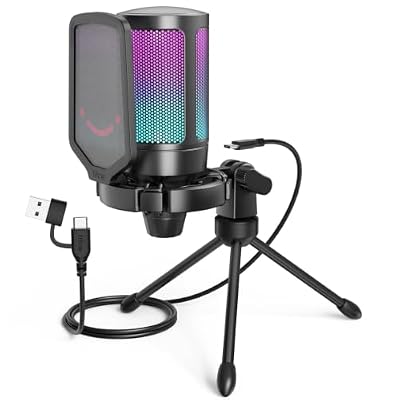 FIFINEFIFINE AmpliGame A6V USB Gaming Microphone, Condenser RGB Mic for…$33 \xc2\xb7 98/100
 ElgatoElgato Stream Deck Mini, 6 Customizable LCD Macro Keys |…$52 \xc2\xb7 97/100
 FIFINEFIFINE AmpliTank K688CT Podcast Microphone Kit, USB/XLR Dynamic Mic |…$80 \xc2\xb7 96/100








