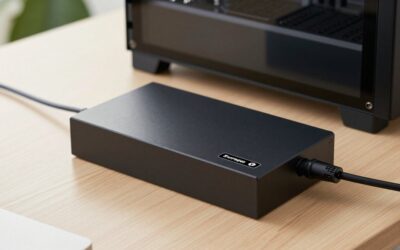
- Top Pick: Belkin USB-C Hub 11 in 1 Pro GaN 150W Triple 4K HDMI Windows, Laptops
- Best Value: Belkin USB-C Hub 8 in 1 Dual Display
- Premium Choice: Belkin Connect Thunderbolt 4 Docking Station, 5-in-1 USB-C Multiport Core Hub w/ 96W Power Delivery for Mac, Windows, Single 8K or Dual 4K Display, Thunderbolt 4 Cable & Power Supply Included
A cluttered laptop desk with a tangle of adapters is exactly the problem Belkin’s Connect docks are built to solve. The 11-in-1 Universal USB-C Pro Dock aims to be a single-cable command center, delivering triple 4K displays, high-wattage charging, and a full spread of ports to both Windows laptops and MacBooks over one connection.
This review examines Belkin’s 11-in-1 Pro dock alongside its wider docking lineup, including the Thunderbolt 4 5-in-1 and the 8-in-1 dual-display hubs, to help you figure out which fits your battlestation. Docks are a long-term investment, so getting the port count and power right matters.
As an Amazon Associate we earn from qualifying purchases at no extra cost to you.




🎮 Get More From Your Setup — Free
Prime Gaming gives you free PC games every month, in-game loot, and a free Twitch channel sub — plus fast free shipping on all the gear above. New members get a 30-day free trial.
Watch: Belkin Connect 11 In 1 Universal USB C Pro Dock — Video Review
Design & Build
Belkin builds these docks with the premium feel you’d expect from the brand: sturdy housings, quality cabling, and GaN internals on the 11-in-1 Pro that allow a compact body despite delivering 150W. It’s designed to sit flat or upright on a desk, and the port layout is logical, with display outputs and high-speed data clearly separated.
The lineup scales sensibly. The Thunderbolt 4 5-in-1 Core hub bundles a Thunderbolt 4 cable and power supply for Mac and Windows, while the 8-in-1 dual-display and 6-in-1 Core GaN models trim ports and cost for lighter setups. The USB-C Multiport Adapter in Space Gray covers travelers who need minimal bulk.
Performance
The 11-in-1 Pro’s headline is triple 4K HDMI output, a genuinely useful feature for multi-monitor productivity that many docks can’t match. Its 150W GaN power delivery comfortably charges even hungry laptops while driving displays and peripherals, so you won’t see the battery drain that plagues underpowered hubs.
Data ports run at full speed for external SSDs and accessories, and the Thunderbolt 4 model steps up to single 8K or dual 4K output with the bandwidth headroom Thunderbolt brings. Across the range, plug-and-play reliability is a strong point, with stable display and network connections.
Pros & Cons
- Triple 4K HDMI on the 11-in-1 Pro for serious multitasking.
- 150W GaN power delivery charges demanding laptops with headroom.
- Premium build and reliable plug-and-play operation.
- Broad lineup from travel adapters to Thunderbolt 4 docks.
- Premium pricing versus generic hubs.
- Display output limits depend on your laptop’s own capabilities.
- Some models are dual-display only, so match the SKU to your needs.
Alternatives to Consider
If you own a Thunderbolt-equipped laptop and want maximum single-display resolution, the Belkin Thunderbolt 4 5-in-1 Core dock with its bundled cable and power supply is the better match. Simpler setups with one or two monitors are well served by the 8-in-1 dual-display hub, while travelers should consider the compact USB-C Multiport Adapter.
Related Guides
- Dock MacBook Air m4 (2026)
- USB Hub For Mac Mini (2026)
- Mac Dock Station (2026)
- Thunderbolt Dock For MacBook Air (2026)
Frequently Asked Questions
Will the 11-in-1 dock drive three 4K monitors on a MacBook?
Triple 4K output depends on your Mac’s chipset. Many Apple silicon MacBooks limit external display counts, so confirm your model supports multiple monitors before relying on all three outputs.
Can it charge my laptop?
Yes, the 11-in-1 Pro delivers up to 150W via GaN, enough for most laptops including performance machines, while still powering displays and peripherals.
Do I need Thunderbolt to use it?
No. The 11-in-1 Pro is a USB-C dock that works with standard USB-C laptops. Belkin’s Thunderbolt 4 dock is a separate option for those who need Thunderbolt bandwidth.
Is it plug-and-play?
Yes, no drivers are required for core functions. Connect the single USB-C cable and displays, storage, and networking come online automatically.
Verdict
The Belkin Connect 11-in-1 USB-C Pro Dock is an excellent single-cable hub for multi-monitor Windows setups, combining triple 4K output with generous 150W charging. Mac users with display limits or Thunderbolt needs should weigh the Thunderbolt 4 model, but for a premium, reliable USB-C dock the 11-in-1 is a standout.