Choosing between qlc vs tlc nand for gaming storage comes down to balancing SSD capacity, sustained write performance, endurance, and price. TLC is generally the better all-around choice for gaming PCs, while QLC can make sense when you need more storage for less money. Understanding their differences helps you avoid paying for performance you rarely use.
What QLC and TLC NAND Mean for Gaming SSDs
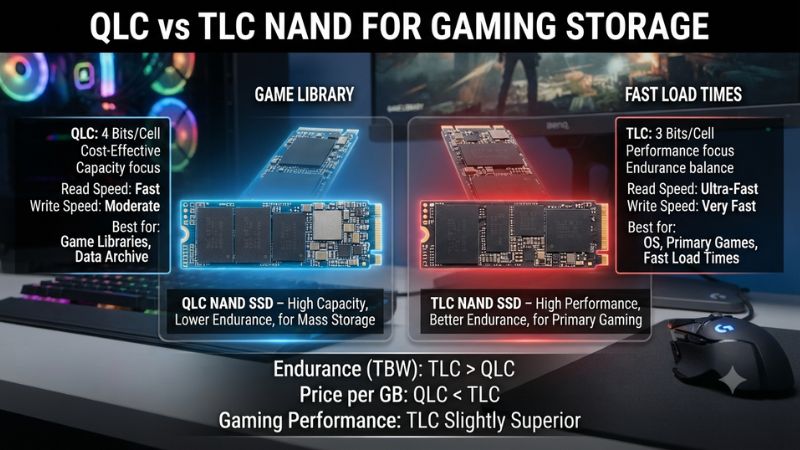
The main difference is storage density: TLC stores three bits per NAND cell, while QLC stores four. That extra density helps manufacturers produce higher-capacity SSDs at a lower cost per gigabyte, but it introduces trade-offs in write performance and endurance. For gaming, those trade-offs matter differently depending on how you use your PC.
1. How NAND cell design affects performance
TLC NAND represents data using eight voltage states per cell, while QLC uses sixteen. QLC therefore needs to distinguish more electrical states when programming and reading information. This makes its write operations more demanding and generally reduces native write endurance compared with TLC.
However, this architectural difference does not mean every QLC SSD is automatically slow. The controller, NAND generation, firmware, interface, and caching system all influence the finished drive. A well-designed QLC NVMe SSD can deliver responsive everyday gaming performance.
2. Why game loading does not always favor TLC
Most gaming workloads involve installing games, reading game assets, loading levels, and occasionally updating files. These activities are not equivalent to continuously writing large amounts of data. Once a game is installed, its storage workload is often dominated by reading rather than rewriting the entire game.
That is why the NAND label alone cannot predict loading times. TechSpot’s storage testing has found that differences between SSD specifications can have limited effects in many games. Interface, drive implementation, and the game itself also matter.
TechSpot+1
3. What SSD endurance means in practice
SSD endurance describes how much data a drive can write over its useful service life. Manufacturers commonly express this through TBW, or terabytes written. A higher TBW rating indicates a larger specified write allowance, although it is not a promise that a drive will fail immediately after reaching that figure.
TLC generally offers higher cell endurance than QLC, but the actual difference depends on the SSD’s NAND, capacity, controller, firmware, and warranty specification. A larger-capacity QLC drive can distribute writes across more available storage, so comparing NAND types without checking the drive’s TBW rating can be misleading.
IBM+1
4. Why SLC caching changes the comparison
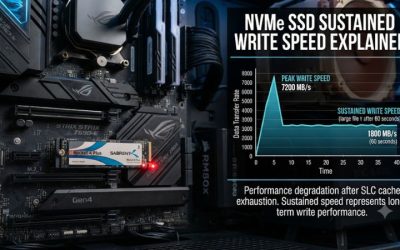
Many consumer SSDs use a portion of their NAND in a faster pseudo-SLC mode. This cache temporarily stores incoming data before the drive transfers it into its normal TLC or QLC format. It can make short writes appear much faster than the underlying NAND’s sustained write capability.
The limitation appears when a large transfer exceeds the available cache. Write speeds can then drop, sometimes substantially. Cache size and behavior vary by drive and available free space, so two SSDs using the same NAND type can behave quite differently during large installations or file transfers.
TechSpot+1
QLC vs TLC NAND for Gaming Storage: Key Differences
For a gaming PC, the most useful comparison is not simply which NAND type has the highest theoretical performance. You should consider game loading, large downloads, installation frequency, storage capacity, and the amount of data written over time. The following differences help determine whether paying extra for TLC is worthwhile or whether QLC provides better storage value.
1. Gaming load times and read performance
TLC is not automatically faster at loading every game. Both technologies can provide fast read access, and a QLC NVMe SSD can be a sensible location for a large collection of installed titles. In many situations, the difference between two well-designed NVMe drives matters less than the difference between an SSD and a mechanical hard drive.
For this reason, qlc vs tlc nand for gaming storage should not be treated as a simple FPS comparison. NAND type does not directly increase GPU rendering performance. If your games already load from an SSD, changing to a more expensive TLC model may produce little noticeable improvement in ordinary gameplay.
2. Installation speed and sustained writes
Comparison table: typical design tendencies, not guaranteed specifications for every SSD.
| Factor | TLC NAND SSD | QLC NAND SSD |
| Bits per cell | 3 | 4 |
| Storage density | Lower | Higher |
| Cost per GB | Usually higher | Usually lower |
| Native write performance | Generally stronger | Generally weaker |
| Sustained large writes | Usually more consistent | More dependent on cache |
| Read performance | Generally strong | Can be competitive |
| Write endurance | Generally higher | Generally lower |
| Game library storage | Excellent | Good |
| Frequent large transfers | Better choice | More limitations |
| Typical value proposition | Balanced performance | High capacity per dollar |
The biggest practical difference often appears when installing or copying large games. A QLC SSD may handle smaller downloads quickly through its cache, then slow down once that cache fills. TLC models generally have an advantage during sustained writes, although controller design and cache capacity still influence the result.
TechSpot+1
3. Capacity, price, and storage value
QLC is attractive when your main goal is fitting more games onto one drive without spending as much. Modern game libraries can consume substantial storage, particularly when you keep several large titles installed simultaneously. A high-capacity QLC SSD can therefore make sense as a secondary gaming library.
TLC may cost more, but its higher write endurance and stronger sustained-write characteristics can justify the difference for a primary drive. Compare actual prices at the same capacity rather than assuming QLC is always cheaper. Retail pricing, promotions, and individual SSD designs can change the value calculation.
4. Endurance and long-term ownership
For most gaming-only users, NAND endurance is not necessarily the deciding factor. Downloading and reading games does not create the same write workload as regularly editing large video files, running virtual machines, or moving huge datasets. Game updates do generate writes, but their effect depends on frequency and workload size.
TLC is generally preferable if the drive will also handle frequent downloads, recordings, content creation, and large file transfers. Nevertheless, qlc vs tlc nand for gaming storage should always include the manufacturer’s TBW rating and warranty. A high-capacity QLC drive with an appropriate endurance specification may be a better purchase than a smaller, lower-endurance TLC alternative.
Which NAND Type Should You Choose for a Gaming PC?
The right choice depends on whether your SSD is primarily a Windows drive, an active game installation drive, or a large secondary library. Rather than automatically choosing TLC, consider how frequently you write data, how much capacity you need, and whether the price difference buys a meaningful improvement for your workload.
1. Choose TLC for your primary gaming SSD
TLC is the safer all-around choice for a primary SSD that stores Windows, frequently updated games, applications, and other files. Its generally stronger write endurance and sustained-write performance make it suitable for a broader mix of workloads.
If you regularly install large games, record gameplay, download substantial updates, or transfer files between drives, TLC provides more flexibility. It is also a sensible option when the price difference between comparable TLC and QLC models is relatively small.
2. Choose QLC for a large secondary game library
QLC makes sense when storage capacity matters more than sustained write speed. You can use it to keep less frequently played games installed, store game recordings, or maintain a large collection without paying a premium for TLC storage.
For this workload, the drive primarily reads installed game data rather than repeatedly rewriting entire titles. A quality QLC NVMe SSD with sufficient capacity and a suitable warranty can therefore be a reasonable purchase for a secondary gaming drive.
3. Compare the complete SSD, not just NAND
NAND type is only one part of SSD performance. Before buying, examine these specifications:
- Interface: Confirm whether the drive uses SATA or PCIe NVMe and whether your motherboard supports the required connection.
- Sequential performance: Check manufacturer read and write specifications, but remember that advertised peak speeds may rely on caching.
- Sustained writes: Look for independent measurements after the SLC cache fills, especially if you regularly transfer large files.
- TBW rating: Compare the manufacturer’s write-endurance specification at the same capacity.
- Warranty: Check the warranty period and any workload or TBW limitations.
- Thermal management: Consider whether your motherboard provides an M.2 heatsink, particularly for high-performance NVMe drives.
A TLC SSD with a weak controller or small cache is not automatically better than every QLC alternative. Likewise, an expensive PCIe 5.0 drive does not necessarily provide a meaningful gaming advantage over a capable PCIe 4.0 model.
4. Understand what gaming benchmarks actually show
Independent results help explain why NAND type should not determine a gaming purchase by itself. In TechSpot’s August 2025 storage comparison, the test system used a Ryzen 7 9800X3D, 32GB DDR5-6000 memory, and GeForce RTX 5090.
The publication compared several drives, including the PCIe 3.0 TLC-based TeamGroup MP33 and QLC-based MP33Q. In Black Myth: Wukong, moving from the PCIe 3.0 QLC drive to a PCIe 5.0 TLC drive reduced initial loading time by 10%. This comparison involves different PCIe generations and SSD implementations, so it does not isolate the NAND difference.
TechSpot
The practical lesson is that a faster storage interface and a more expensive NAND configuration do not necessarily produce proportionate improvements in game loading. Your game library, motherboard, SSD controller, and actual workload all matter.
Frequently Asked Questions
1. Is QLC or TLC better for gaming?
TLC is generally better for an all-purpose gaming SSD because it offers stronger write endurance and sustained-write performance. However, QLC can provide comparable everyday game-loading experiences in suitable NVMe drives, making it attractive for large secondary libraries.
2. Does QLC NAND reduce FPS in games?
No, QLC NAND does not directly reduce GPU-generated FPS. Its main limitations concern write performance and endurance. Storage-related stuttering can have several causes, so a QLC label alone is not evidence that an SSD is responsible.
3. Is a QLC SSD suitable for Windows and gaming?
Yes, a good-quality QLC SSD can run Windows and games. However, check its endurance rating, sustained-write behavior, capacity, and warranty before using it as your only system drive, particularly if you regularly perform large file transfers.
4. Should I replace my QLC SSD with TLC?
Not necessarily. If your current QLC SSD provides sufficient capacity, acceptable loading times, and healthy drive status, replacing it solely because it uses QLC is difficult to justify. Upgrade when you need better sustained writes, more endurance, or additional storage.
Final Thoughts
The choice between qlc vs tlc nand for gaming storage ultimately depends on your workload and budget. TLC is the stronger general-purpose option for a primary gaming SSD, while QLC offers an attractive way to expand a game library. Compare capacity, TBW, sustained writes, and warranty before choosing your next drive.
Example Drives Using Each NAND Type
Check each drive’s spec sheet, because manufacturers sometimes change the NAND used between revisions.
Crucial P3 Plus 2TB
A Gen4 drive that uses QLC NAND. It offers high capacity at a low cost per terabyte for game libraries.

Crucial P3 Plus PCIe Gen4 NVMe 2TB SSD, Up to 5,000MB/s Read, Laptop & Desktop (PC) Compatible, Solid State Drive – CT2000P3SSD8
Included for 'QLC vs TLC NAND for Gaming Storage: A Smart Guide' as a representative home product in this roundup; selection reflects the product set returned for this topic.
View on AmazonCrucial P310 2TB
A Gen4 drive using QLC NAND with fast peak speeds. Sustained writes can slow once any cache is full.

Crucial P310 2TB SSD, PCIe Gen4 NVMe M.2 2280, Up to 7,100MB/s, for Laptop, Desktop (PC), & Handheld Gaming Consoles, Includes Acronis Data Recovery Software, Solid State Drive - CT2000P310SSD801
Included for 'QLC vs TLC NAND for Gaming Storage: A Smart Guide' as a representative home product in this roundup; selection reflects the product set returned for this topic.
View on AmazonSamsung 990 EVO Plus 2TB
A Gen4 drive using TLC NAND. It handles long writes more consistently.

Samsung SSD 990 EVO Plus 2TB, PCIe Gen 4x4 | 5x2 M.2 2280, Up to 7,250 MB/s | NVMe Internal Solid State Drive, Upgrade Storage for PC/Laptops, HMB Technology & Intelligent Turbowrite 2.0 (MZ-V9S2T0B/AM)
Included for 'QLC vs TLC NAND for Gaming Storage: A Smart Guide' as a representative home product in this roundup; selection reflects the product set returned for this topic.
View on AmazonSamsung 990 PRO 2TB
A high-end TLC drive for heavy workloads. It suits users who prioritize sustained speed over lowest cost.

Samsung SSD 990 PRO 2TB, PCIe 4.0 M.2 2280, Up to 7,450 MB/s | NVMe Internal Solid State Hard Drive for High End Computing, Gaming, and Heavy Duty Workstations, (MZ-V9P2T0B/AM)
Included for 'QLC vs TLC NAND for Gaming Storage: A Smart Guide' as a representative home product in this roundup; selection reflects the product set returned for this topic.
View on Amazon