Our Short List of 3

- Processor: Intel Core Ultra 9 285H (16 cores)
- Graphics: NVIDIA GeForce RTX 5070 Ti, 12GB GDDR7
- Memory: 32GB LPDDR5X (soldered)
- Storage: 2TB PCIe SSD

- Processor: Intel Core Ultra 9 275HX (24 cores, 32 threads)
- Graphics: NVIDIA GeForce RTX 5070 Ti, 12GB GDDR7
- Memory: 32GB DDR5 (SO-DIMM, upgradeable)
- Storage: 1TB PCIe SSD

- Processor: Intel Core Ultra 9 275HX (24 cores, 32 threads)
- Graphics: NVIDIA GeForce RTX 5070 Ti, 12GB GDDR7
- Memory: 32GB DDR5
- Storage: 1TB PCIe SSD
All 4 Picks at a Glance
| Product | Specs | Action |
|---|---|---|
| ASUS ROG Zephyrus G16 (2025) |
| Check price on Amazon |
| Lenovo Legion Pro 5i Gen 10 |
| Check price on Amazon |
| Acer Predator Helios Neo 16S AI |
| Check price on Amazon |
 MSI Vector 16 HX AI |
| Check price on Amazon |
The best gaming laptop for most architecture students is the ASUS ROG Zephyrus G16. Its OLED panel covers the full DCI-P3 color gamut for presentation boards, the GeForce RTX 5070 Ti brings the CUDA cores and 12GB of video memory that real-time renderers ask for, and at 4.3 pounds it is light enough to carry between studio, lectures and site visits. Students who want upgradeable memory and a full-power graphics card should look at the ASUS ROG Strix G16, while the MSI Vector 16 HX AI leads on storage, with 2TB fitted as standard.
Architecture coursework loads a laptop in a specific pattern. Revit and AutoCAD lean on single-core CPU speed, Enscape, Lumion, Twinmotion and V-Ray GPU lean on the graphics card and its video memory, and large models consume system memory quickly. That is why every pick below pairs 32GB of memory with an RTX 5070 Ti carrying 12GB of GDDR7 and a 16-inch 2.5K display. Every pick is a current model sold new on Amazon, compared from published specifications.
As an Amazon Associate, we earn from qualifying purchases.
Quick Answer
For most architecture students, the ASUS ROG Zephyrus G16 is the pick: an RTX 5070 Ti, 32GB of memory and a color-accurate OLED screen in a 4.3-pound chassis. The ROG Strix G16 adds upgradeable memory, the Legion Pro 5i and Predator Helios Neo 16S bring bright 2.5K panels in full-power frames, and the MSI Vector 16 HX AI leads on storage.
Table of Contents
- ASUS ROG Zephyrus G16 (2025)
- ASUS ROG Strix G16 (2025)
- Lenovo Legion Pro 5i Gen 10
- Acer Predator Helios Neo 16S AI
- MSI Vector 16 HX AI
- How to Choose
- Who Should Skip
- FAQ
- Final Verdict
ASUS ROG Zephyrus G16 (2025)
- Processor: Intel Core Ultra 9 285H (16 cores)
- Graphics: NVIDIA GeForce RTX 5070 Ti, 12GB GDDR7
- Memory: 32GB LPDDR5X (soldered)
- Storage: 2TB PCIe SSD
The Zephyrus G16 is the pick for students who carry their studio with them. It weighs 4.3 pounds and measures about 0.65 inches thin, yet it runs an Intel Core Ultra 9 285H and a GeForce RTX 5070 Ti with 12GB of GDDR7, the video memory tier that keeps Enscape and Lumion scenes smooth at 2.5K. The 32GB of LPDDR5X memory is soldered, so buy the capacity you need for the whole degree, and the 2TB SSD fits model libraries and texture packs with room to spare.
The 16-inch ROG Nebula OLED display is the standout for design work: 2560 x 1600, a 240Hz refresh rate, full DCI-P3 coverage and 500-nit peak brightness, so material colors stay close to what a printed board shows. The trade-off against the HX-class machines below is graphics wattage: the slim chassis runs the RTX 5070 Ti at up to 105W with Dynamic Boost, so long renders finish a little slower than on the full-power frames. The 90Wh battery suits a day of lectures away from an outlet.
ASUS ROG Strix G16 (2025)
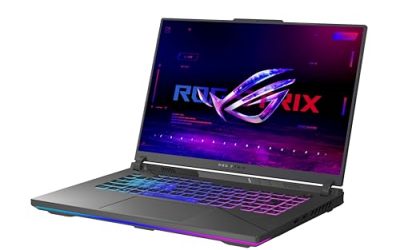
The Strix G16 is the full-power option, built around the 24-core Intel Core Ultra 9 275HX. Those cores matter when a V-Ray or Blender render runs alongside Revit, and the RTX 5070 Ti here runs at up to 140W, the highest graphics wattage in this roundup, which shortens GPU render queues on deadline nights. Memory is the practical headline: 32GB of DDR5 sits in SO-DIMM slots, so it can grow to 64GB when thesis-year models get heavy, and a second SSD slot stands ready for a project drive.
The 16-inch ROG Nebula display runs at 2560 x 1600 and 240Hz with 500 nits and full DCI-P3 coverage, and ASUS validates the panel for color work, which matters when a crit panel judges printed boards against the screen. The cost is size: at about 5.84 pounds plus a large power brick, the Strix is a studio desk machine that tolerates being carried rather than one built for it. A 90Wh battery and Wi-Fi 7 round out the spec sheet.
Specs
- Processor: Intel Core Ultra 9 275HX (24 cores, 32 threads)
- Graphics: NVIDIA GeForce RTX 5070 Ti, 12GB GDDR7, up to 140W
- Memory: 32GB DDR5 (SO-DIMM, upgradeable)
- Storage: 1TB PCIe SSD (second slot available)
- Display: 16-inch IPS, 2560 x 1600, 240Hz, 500 nits, full DCI-P3 coverage
- Battery: 90Wh
- Weight: 5.84 pounds
- Operating system: Windows 11 Home
Lenovo Legion Pro 5i Gen 10
- Processor: Intel Core Ultra 9 275HX (24 cores, 32 threads)
- Graphics: NVIDIA GeForce RTX 5070 Ti, 12GB GDDR7
- Memory: 32GB DDR5 (SO-DIMM, upgradeable)
- Storage: 1TB PCIe SSD
The Legion Pro 5i is the balanced workstation of the group. The Intel Core Ultra 9 275HX brings 24 cores for rendering and simulation electives, the RTX 5070 Ti carries the same 12GB of GDDR7 as its rivals, and the 32GB of DDR5 memory is socketed, so a mid-degree upgrade stays on the table. Lenovo’s Coldfront Hyper cooling aims to hold clock speeds through long Enscape exports.
The 16-inch WQXGA display runs at 2560 x 1600 with a 240Hz refresh rate and 500 nits, which reads well under bright studio lighting. The full-size keyboard includes a numeric keypad, a detail that pays off daily when typing dimensions in CAD. At about 5.62 pounds it sits between the Zephyrus and the Strix for carry weight, and the 80Wh battery is sized for a morning of classes rather than a full day away from power.
Acer Predator Helios Neo 16S AI
- Processor: Intel Core Ultra 9 275HX (24 cores, 32 threads)
- Graphics: NVIDIA GeForce RTX 5070 Ti, 12GB GDDR7
- Memory: 32GB DDR5
- Storage: 1TB PCIe SSD
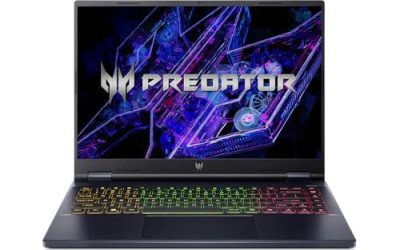
The Helios Neo 16S AI is the slim value play in this tier. Acer keeps the same headline hardware as the premium picks, an Intel Core Ultra 9 275HX and an RTX 5070 Ti with 12GB of GDDR7, but packages it in a chassis 0.78 inches thin that weighs 5.07 pounds. For students who walk or cycle to studio, that thinner frame is a daily quality-of-life gain, and the metal lid handles backpack duty well.
Its 16-inch OLED panel is a genuine highlight: 2560 x 1600, 240Hz, 500 nits and full DCI-P3 coverage, the specification set presentation work rewards. The compromise is the 76Wh battery, the smallest here; plan on carrying the adapter for full studio days. Memory is 32GB of DDR5 and storage a 1TB SSD, matching the Legion and Strix, and Wi-Fi 6E covers the everyday boxes.
MSI Vector 16 HX AI
- Processor: Intel Core Ultra 9 275HX (24 cores, 32 threads)
- Graphics: NVIDIA GeForce RTX 5070 Ti, 12GB GDDR7
- Memory: 32GB DDR5
- Storage: 2TB PCIe SSD
The Vector 16 HX AI is built for students who treat the laptop as a desktop that occasionally moves. Its 90Wh battery ties for the largest cell in this roundup, and it pairs that with a 2TB SSD as standard, the most storage here, suiting students accumulating years of models and point clouds. The Intel Core Ultra 9 275HX and RTX 5070 Ti match the Strix and Legion on core hardware, and MSI’s Cooler Boost 5 cooling is built for sustained render loads.
Connectivity is the other strength: Thunderbolt 5 ports drive a desk dock with external monitors and fast backup drives, and Wi-Fi 7 is standard. The 16-inch QHD+ display runs at 2560 x 1600 and 240Hz with full DCI-P3 coverage. The trade-offs are weight, about 5.95 pounds, and a gamer-styled chassis, neither of which matters much at one desk.
How to Choose
Start with the graphics card and its video memory. Real-time renderers such as Enscape, Lumion and Twinmotion load scenes into GPU memory, so the 12GB on the RTX 5070 Ti is the practical target; cards with 8GB force lower texture settings on complex models. Next, memory: 32GB is the comfortable floor for Revit with linked files, and a machine with SO-DIMM slots, like the Strix G16, Legion Pro 5i and Vector 16, lets you upgrade instead of replacing the laptop.
Then judge the display as a design tool, not a gaming spec. A 16-inch 2560 x 1600 panel with full DCI-P3 coverage keeps material colors honest from screen to printed board, and 500 nits holds up under studio lighting. Finally, weigh the carry: a laptop under 4.5 pounds, like the Zephyrus G16, suits students moving between buildings, while a heavier full-power frame earns its weight if most work happens at one desk. Check ports too: Thunderbolt or USB4 for docks, and HDMI for crit-room projectors.
Who Should Skip
Skip this entire category if your program teaches only 2D drafting and provides lab workstations for rendering; a lighter, quieter laptop will serve you better. Skip gaming laptops altogether if your school workflow is macOS-based, since Revit has no native Mac version. And skip the slim models if your degree leans on overnight rendering: the full-power Strix G16 and Vector 16 HX AI finish long GPU queues faster, and that gap compounds across a semester of deadlines.
FAQ
Is a gaming laptop good for architecture school?
Yes. Architecture software and games stress the same hardware: a fast CPU, a discrete NVIDIA GPU with CUDA support and plenty of memory. A gaming laptop with an RTX 5070 Ti and 32GB of RAM covers Revit, AutoCAD, Rhino and the common real-time renderers, usually in a lower price tier than a certified mobile workstation with equivalent graphics hardware.
How much RAM do architecture students need?
Treat 32GB as the working standard. Revit with several linked models, a browser of reference material and a renderer open at once will push past 16GB and start swapping to disk. Models with SO-DIMM slots let you move to 64GB later; soldered-memory machines should be bought at the capacity you expect to need in your final year.
Does Revit use the CPU or GPU more?
Revit modeling is mostly CPU-bound and favors high single-core clock speeds, which is why the HX-class processors here help. The GPU takes over in Enscape, Lumion, Twinmotion and V-Ray GPU rendering, where its video memory sets the ceiling on scene size. A balanced pick needs both, which is why every laptop here pairs a strong CPU with a 12GB graphics card.
Is the RTX 5070 Ti worth it over the RTX 5070 for rendering?
For architecture work, generally yes. The RTX 5070 Ti carries 12GB of GDDR7 against the 8GB fitted to most RTX 5070 laptops, and that extra video memory lets Lumion and Enscape hold large scenes with full textures. If your coursework stays in 2D CAD and light SketchUp models, the smaller card is adequate and the budget difference can go toward a monitor.
Final Verdict
Most architecture students should buy the ASUS ROG Zephyrus G16: it is the only pick here combining a color-accurate OLED screen, 12GB of GPU memory and a portable 4.3-pound chassis. Choose the ASUS ROG Strix G16 for full-power graphics and upgradeable memory, the Lenovo Legion Pro 5i for the balanced all-rounder with a numeric keypad, the Acer Predator Helios Neo 16S AI for a slim OLED machine in the mid-range tier, and the MSI Vector 16 HX AI when battery, storage and Thunderbolt 5 top the list.
Product and ASIN Reference
| Product | ASIN |
|---|---|
| ASUS ROG Zephyrus G16 (2025) | B0G1W7V6VP |
| ASUS ROG Strix G16 (2025) | B0DW1X5YCQ |
| Lenovo Legion Pro 5i Gen 10 | B0FSDPPZWX |
| Acer Predator Helios Neo 16S AI | B0G2BBXXQ2 |
| MSI Vector 16 HX AI | B0DTN26DYR |