Best Ryzen AI Max 392 laptops for gaming is a short list today: the clearest example is the ASUS TUF Gaming A14 (FA401EA), which VideoCardz describes as the first truly gaming-oriented laptop built on a Max 300-series chip, and one source also reports a Lenovo Legion 7a (15 inch, Gen 11) using the same Radeon 8060S graphics. The 392 pairs a 12-core processor with integrated graphics strong enough for 1080p and often 1440p play, but it is still integrated graphics, and SKU availability varies, so confirm the exact chip name on any listing before you buy.
- Quick Answer: What You Are Actually Buying
- Which Laptops Ship With the Ryzen AI Max 392?
- What Gaming Performance Can You Expect?
- Why the Memory Matters: A Worked Example
- Power, Heat and Battery
- Laptops to Look At
- How to Verify a Listing Before You Buy
- 392 Laptop or Dedicated-GPU Laptop?
- Decoding the Names on a Listing
- First-Day Setup Checklist for a New Laptop
- Common Mistakes When Shopping for a 392 Laptop
- Who Should Skip This Chip
- Buyer Scenarios
- What We Could Not Confirm
- Frequently Asked Questions
- Which Path Should You Take?
- Sources
Quick Answer: What You Are Actually Buying
The full name is Ryzen AI Max+ 392. It belongs to AMD’s “Strix Halo” family, was added alongside the Max+ 388, and was introduced at CES 2026, according to coverage from VideoCardz. It is a 12-core, 24-thread Zen 5 processor with boosts up to 5.0 GHz, 76 MB of cache and a configurable power range of roughly 45 to 120 W, paired with Radeon 8060S graphics (40 RDNA 3.5 compute units).
| Chip | CPU cores / threads | Integrated graphics | Compute units |
|---|---|---|---|
| Ryzen AI Max+ 395 | 16 / 32 | Radeon 8060S | 40 |
| Ryzen AI Max+ 392 | 12 / 24 | Radeon 8060S | 40 |
| Ryzen AI Max 390 | 12 / 24 | Radeon 8050S | 32 |
The surprising row is the middle one: the 392 has fewer CPU cores than the 395 but the same full-size graphics, while the 390 has the same CPU core count but a smaller GPU. For gaming, where the graphics unit matters more than extra CPU cores, that makes the 392 a sensible value step.
Which Laptops Ship With the Ryzen AI Max 392?
Availability is narrow, and sources do not agree on a long list. Here is what could be confirmed.
| Laptop | Chip / graphics | What is known |
|---|---|---|
| ASUS TUF Gaming A14 (FA401EA, 2026) | Ryzen AI Max+ 392, Radeon 8060S | Listing shows 32 GB LPDDR5X, a 1 TB PCIe Gen 4 SSD, a 14 inch WQXGA 16:10 165 Hz display and Wi-Fi 6E |
| Lenovo Legion 7a (15 inch, Gen 11) | Reported to use Radeon 8060S with no dedicated GPU | Reported by one source; confirm the exact processor name on the maker’s page |
Some other Max-series laptops are close relatives but use different chips. The ASUS ROG Flow Z13 comes with Max+ 395 or Max 390 configurations, and the HP ZBook Ultra G1a is a workstation sold with Max PRO 390 or 385 chips. These are not 392 machines, so do not mix them up when you compare listings.
If you were hoping for a long catalogue of 392 gaming laptops, the honest answer is that it is still small. Treat claims of availability for models not listed above as unconfirmed until the maker’s page says so. For the higher-end chip and its laptops, see our Ryzen AI Max 395 laptop guide.
What Gaming Performance Can You Expect?
Integrated graphics have improved a lot, and the Radeon 8060S is the strongest of them. Still, published results vary by game, resolution, power setting and driver, so read any figure as a range and not a promise.
- Versus older integrated graphics: LaptopMedia reports the Radeon 8060S as more than three times faster than the Radeon 890M in 3DMark Time Spy (Graphics).
- In a real game: in a SteamOS 3.9 run on the TUF Gaming A14 reported by VideoCardz, Crimson Desert held above 60 FPS at 1440p High with FSR Quality.
- Battery under load: the same report puts Cyberpunk 2077 at around 2 hours 25 minutes of battery life at 800p with a 60 FPS cap, which shows how quickly gaming drains any laptop battery.
- Against dedicated graphics: the sources note that dedicated GPUs still clearly offer more performance at the high end. LaptopMedia published a comparison asking whether integrated graphics can beat an RTX 5060, but treat that as a question, not a settled result.
The practical reading: expect solid 1080p performance in most modern games at moderate settings, and playable 1440p with upscaling in many. Do not expect a gaming laptop with a high-end dedicated card to be matched.
What settings suit integrated graphics?
| Target | Suggested approach | Reason |
|---|---|---|
| 1080p, demanding games | Medium to high presets, upscaling on if needed | Leaves headroom for frame rate stability |
| 1440p, demanding games | High preset with FSR Quality or similar | Upscaling recovers frame rate at a lower internal resolution |
| Esports titles | Competitive settings at the panel’s refresh rate | These games are light enough to run fast |
| On battery | Cap the frame rate (for example 60 FPS) and lower resolution | Cuts power draw and extends playtime |
These are general starting points, not measurements from a specific game or laptop.
Why the Memory Matters: A Worked Example
Strix Halo laptops use unified LPDDR5X memory shared between the processor and the graphics unit, and it is typically soldered to the board. That has two consequences. First, you cannot add RAM later, so the amount you buy is the amount you keep. Second, part of the memory is reserved for graphics.
Here is an illustrative calculation. The TUF Gaming A14 listing shows 32 GB. If a graphics allocation of 8 GB is set for games, that leaves 24 GB for Windows and everything else (32 minus 8). A modern game plus a browser, a chat app and a launcher can easily use 12 to 16 GB of system memory, so 24 GB leaves a comfortable buffer. With 16 GB total, the same 8 GB allocation would leave only 8 GB for the rest of the system, which is tight. This is why 32 GB is the sensible minimum for a gaming laptop in this class. The exact allocation options depend on the maker’s settings, so check them on the product page.
Power, Heat and Battery
The 392 can run in a range of about 45 to 120 W. Thin laptops usually sit at the lower end, while thicker machines can sustain more. That is why the chassis matters as much as the chip: two laptops with the same processor can perform differently if one cools better. A 14 inch design such as the TUF Gaming A14 is portable, but it has less thermal headroom than a larger chassis. When reading a review of any 392 laptop, look for sustained performance and fan noise, not only the peak figures.
- Plugged in: performance modes use more power, which is where gaming frame rates are highest.
- On battery: expect a large drop in graphics performance, and short runtimes under heavy load as the Cyberpunk figure above shows.
- Everyday use: the chip is efficient for browsing and office work, but gaming is a power-hungry task for any laptop.
Laptops to Look At
These are real listings from the store catalogue. Only the first uses the Ryzen AI Max+ 392; the others are included so you can see how the neighbouring chips are sold.
ASUS TUF Gaming A14 with Ryzen AI Max+ 392

ASUS TUF Gaming A14 Copilot+ PC Gaming Laptop, 14” WQXGA 16:10 165Hz Display, AMD Ryzen™ AI Max+ 392 Processor, 32GB LPDDR5X, 1TB PCIe® Gen 4.0 SSD, Wi-Fi 6E, Windows 11 Home, FA401, Jaegar Gray
Included for 'Ryzen AI Max 392 Laptops for Gaming: Models and Expectations' because the listing specifies 14” WQXGA 16:10 165Hz Display and AMD Ryzen™ AI Max+ 392 Processor, details this guide uses to compare options.
View on AmazonThe listing describes a 14 inch WQXGA 16:10 165 Hz display, the Ryzen AI Max+ 392 processor, 32 GB LPDDR5X, a 1 TB PCIe Gen 4.0 SSD, Wi-Fi 6E and Windows 11 Home, with a Copilot+ PC badge. It is the clearest match for this keyword. Best for: players who want a compact laptop with strong integrated graphics. Skip if: you need a laptop with a dedicated graphics card or upgradeable memory.
ASUS ROG Flow Z13 (2025) with Ryzen AI Max 390

ASUS ROG Flow Z13 (2025) Gaming Laptop, 13” ROG Nebula 16:10 2.5K 180Hz/3ms, the AMD Ryzen AI MAX 390 Processor, the RDNA 3.5 Graphics, 32GB LPDDR5X 8000MHz, 1TB PCIe Gen 4 SSD, Wi-Fi 7, Win 11 Home
Included for 'Ryzen AI Max 392 Laptops for Gaming: Models and Expectations' because the listing specifies 13” ROG Nebula 16:10 2.5K 180Hz/3ms and the AMD Ryzen AI MAX 390 Processor, details this guide uses to compare options.
View on AmazonThis 13 inch 2-in-1 listing pairs the Ryzen AI Max 390 with RDNA 3.5 graphics, a 2.5K 180 Hz display, 32 GB of LPDDR5X-8000 memory, a 1 TB Gen 4 SSD and Wi-Fi 7. It uses the smaller Radeon 8050S, so graphics performance sits a step below a 392 machine. Best for: people who want a portable tablet-style gaming device. Skip if: you want the full-size 8060S graphics.
HP ZBook Ultra G1a with Ryzen AI Max PRO 390
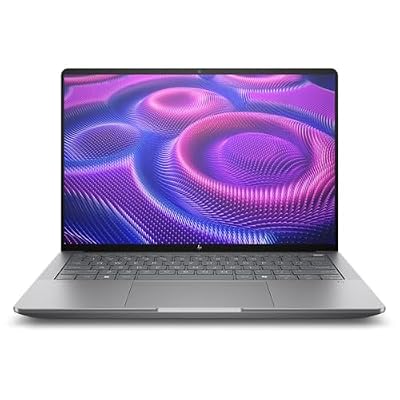
HP ZBook Ultra G1a 14" Touchscreen Mobile Workstation - 2.8K - AMD Ryzen AI MAX PRO 390-64 GB - English Keyboard - Meteor Silver - Smart Buy - AMD Chip - 2880 x 1800 - Windows 11 Pro - Radeon 8050S
Included for 'Ryzen AI Max 392 Laptops for Gaming: Models and Expectations' because the listing specifies 2.8K and AMD Ryzen AI MAX PRO 390-64 GB, details this guide uses to compare options.
View on AmazonThe listing is a 14 inch touchscreen mobile workstation with a 2.8K 2880 x 1800 display, the Ryzen AI Max PRO 390, 64 GB of memory, Windows 11 Pro and Radeon 8050S graphics. It is a professional machine, not a gaming laptop. Best for: creators and engineers who also game on the side. Skip if: gaming is your main goal.
How to Verify a Listing Before You Buy
- Read the exact chip name. “Ryzen AI Max+ 392”, “Ryzen AI Max 390” and “Ryzen AI Max PRO 390” are different parts. Only the first has the 8060S graphics with 12 cores.
- Check the graphics name. Radeon 8060S means 40 compute units; Radeon 8050S means 32. On paper, 40 compute units of 64 shaders each give 2,560 shaders, while 32 give 2,048, which is 20 percent fewer (2,048 divided by 2,560 equals 0.8).
- Confirm memory capacity. It is usually soldered, so choose 32 GB or more if gaming is the goal.
- Look at the display. A 14 inch WQXGA 165 Hz panel is demanding to drive; check that your target games run at that resolution with upscaling.
- Check storage and ports. Confirm there is room for your library and that charging and display ports suit your setup.
- Read independent reviews for sustained performance. Look for fan noise and throttling over long sessions.
392 Laptop or Dedicated-GPU Laptop?
The key trade-off is simple: a 392 laptop trades peak graphics power for efficiency, compactness and a single chip, while a dedicated-GPU laptop trades portability and battery for performance. Store catalogues also list Lenovo Legion 7a laptops built around a Ryzen AI 9 HX 470 with an RTX 5070, which is the kind of dedicated-GPU alternative to compare against.
| Your priority | Better fit |
|---|---|
| Highest frame rates at 1440p and above | Dedicated-GPU laptop |
| Thin, light and portable | Ryzen AI Max 392 laptop |
| Quiet everyday use plus occasional gaming | Ryzen AI Max 392 laptop |
| Ray tracing and the heaviest modern games | Dedicated-GPU laptop |
| Upgradeable memory later | Neither is guaranteed; check the model |
Decoding the Names on a Listing
AMD’s naming in this family is easy to misread, and a listing may use the short form of a name. This decoder helps you tell parts apart.
| Name on the listing | What it means | Typical laptop type |
|---|---|---|
| Ryzen AI Max+ 395 | Top chip: 16 cores with 40-compute-unit graphics | High-end gaming and creator laptops |
| Ryzen AI Max+ 392 | 12 cores with 40-compute-unit Radeon 8060S graphics | Gaming laptops such as the TUF Gaming A14 |
| Ryzen AI Max 390 | 12 cores with 32-compute-unit Radeon 8050S graphics | Portable gaming devices such as the ROG Flow Z13 |
| Ryzen AI Max PRO 390 / 385 | Professional variants with workstation features | Mobile workstations such as the HP ZBook Ultra G1a |
| Ryzen AI 9 HX series | A different family that normally pairs with a dedicated graphics card | Conventional gaming laptops |
The “Max+” label signals the higher-tier versions with the full-size graphics, while “PRO” marks the business and workstation variants. Always check the full model name on the maker’s page, since resellers sometimes shorten it.
First-Day Setup Checklist for a New Laptop
Once you have a Max-series laptop, a few steps get the best out of it.
- Install the latest graphics driver. Integrated graphics gain a lot from driver updates, especially for new releases.
- Update the BIOS and the maker’s control software. Power and fan profiles are often refined after launch.
- Choose a performance mode for gaming. The plugged-in mode that allows the highest power gives the best frame rates, at the cost of fan noise.
- Set the graphics memory allocation. If the maker’s software offers an option, choose a balanced value and keep enough memory for the system. With 32 GB, a moderate allocation leaves plenty for Windows.
- Turn on upscaling in games. FSR or similar tools recover frame rate at 1440p and help on battery.
- Cap the frame rate. Matching the cap to your display (for example 60 or 120) reduces heat and noise.
- Check the display refresh rate in Windows. A 165 Hz panel only runs at 165 Hz if it is set that way.
Common Mistakes When Shopping for a 392 Laptop
- Assuming every Max chip has the same graphics. The 390 uses a smaller GPU than the 392.
- Buying too little memory. Memory is shared and usually soldered, so 16 GB is a poor choice for gaming.
- Expecting desktop-class performance. A thin laptop limits sustained power, whatever the chip.
- Ignoring the chassis. A compact 14 inch laptop can run hotter and louder than a larger one with the same chip.
- Treating one benchmark as the whole story. Results change with drivers, settings and power mode, so look at several sources.
- Paying for a workstation by mistake. A PRO model is built for professional software, and may cost more without improving gaming.
Who Should Skip This Chip
A Ryzen AI Max 392 laptop is not for everyone. Skip it if you want the highest frame rates in the heaviest games, if you rely on features that favour a particular dedicated graphics vendor, or if you want a laptop whose memory you can upgrade later. In those cases, a conventional gaming laptop with a dedicated card is the better route. On the other hand, if you value portability, a single efficient chip, and solid performance in the games you actually play, the 392 is worth a close look.
Buyer Scenarios
| You are… | Recommended approach |
|---|---|
| A student who games on weekends and carries the laptop daily | A 14 inch 392 laptop with 32 GB, using upscaling and a frame cap |
| A creator who edits video and plays on the side | Consider a higher-core Max chip or a workstation model, and check software support |
| A competitive player who wants very high frame rates | Look at dedicated-GPU laptops with high-refresh panels |
| A traveller who wants a small gaming device | A portable 390 machine like the ROG Flow Z13 may be enough |
| Someone on a tight budget | Wait for more 392 models; availability is limited now |
Whichever row fits you, the key is to compare the exact model, not just the chip, because cooling, display and memory differ between laptops that share a processor.
What We Could Not Confirm
To keep this guide honest, here is what is uncertain. SKU availability for the 392 beyond the TUF Gaming A14 is unclear, and the Lenovo Legion 7a report comes from one source. Regional models and configurations change quickly. Benchmark figures cited here come from third-party coverage and depend on settings, so they should be treated as rough guides. No pricing is stated because it varies by region and configuration.
Frequently Asked Questions
Is the Ryzen AI Max+ 392 good for gaming?
Yes for 1080p and often 1440p with upscaling, thanks to Radeon 8060S graphics. Dedicated GPUs still outperform it at the high end.
How many cores does the Ryzen AI Max+ 392 have?
It has 12 cores and 24 threads, with boost clocks up to 5.0 GHz and 76 MB of cache, according to published specs.
What is the difference between the 392 and the 395?
The 395 has more CPU cores (16 versus 12), while both use the 40-compute-unit Radeon 8060S. For gaming the graphics match, so the gap is mostly in multi-threaded work.
What is the difference between the 392 and the 390?
Both have 12 cores, but the 392 uses the 40-compute-unit Radeon 8060S while the 390 uses the 32-compute-unit Radeon 8050S, so the 392 should be faster in games.
Which laptops use the Ryzen AI Max+ 392?
The ASUS TUF Gaming A14 (FA401EA) is the clearest example. One source also reports a Lenovo Legion 7a (15 inch, Gen 11) with Radeon 8060S graphics.
Can I upgrade the RAM in these laptops?
Usually not. The unified LPDDR5X memory is typically soldered, so buy the capacity you need at purchase, and 32 GB is a sensible minimum.
Do I need a dedicated graphics card with this chip?
No. The Radeon 8060S is integrated, and some laptops ship without any dedicated GPU, though a dedicated card will be faster in demanding games.
Which Path Should You Take?
If you want a compact gaming laptop that handles most games at 1080p or upscaled 1440p without a separate graphics card, a Ryzen AI Max+ 392 machine such as the TUF Gaming A14 is the most relevant option today. If maximum performance or ray tracing matters more, shop dedicated-GPU laptops instead. Whatever you choose, verify the exact chip name, memory amount and cooling, since those details decide the experience more than the headline.
Sources
- VideoCardz, Ryzen AI Max+ 392 and Max+ 388 launch coverage
- VideoCardz, ASUS Ryzen AI Max+ 392 gaming laptop and SteamOS 3.9 report
- LaptopMedia, Ryzen AI Max+ 392 and integrated GPU comparison
- Notebookcheck, Ryzen AI Max 390 processor page
- ASUS, TUF Gaming A14 (2026) product page
Last updated: November 2026