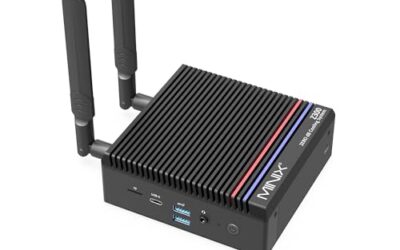
A mini PC with an OCuLink port gives a creative desk two things at once: a compact computer that fits beside a monitor, and a direct path to an external graphics card when a project needs more rendering muscle. OCuLink carries a PCIe 4.0 x4 link over a cable, which moves data between the mini PC and an external GPU dock with lower latency than a USB-based link. For video editing, 3D work, photo processing, and design, that expansion path matters as much as the processor inside the box.
Creative workflows stress different parts of a machine than gaming does. Video editing needs strong multi-core performance and fast storage for large files. 3D work needs a capable GPU, either built in or attached through OCuLink. Photo work needs enough RAM to hold large images and a display output that drives a high-resolution monitor. The picks below were compared on published specifications: processor, graphics, RAM, storage, OCuLink support, display outputs, ports, and cooling.
Each pick in this guide has an OCuLink port listed in its published specifications. Not every mini PC with a USB4 port supports an external GPU through OCuLink, so check the port list and confirm the dock matches the connection.
At a Glance
| Product | Best for | Key specification |
|---|---|---|
| MINISFORUM UM890 Pro | Video editing and 3D work | Ryzen 9 8945HS, 32 GB DDR5, OCuLink |
| GMKtec NucBox K11 | Heavy multitasking with eGPU | Ryzen 9 8945HS, OCuLink, dual 2.5GbE |
| MINISFORUM UM880 Plus | Balanced creative desk setup | Ryzen 7 8845HS, 32 GB DDR5, OCuLink |
| GMKtec NucBox M7 Ultra | Quiet creative work | Ryzen 7 PRO 6850U, 32 GB DDR5, OCuLink |
How to Choose
Processor cores and clock speed. Video encoding, 3D rendering, and photo exports all scale with core count and clock speed. An 8-core processor with a boost clock near 5 GHz handles timelines and renders well. Check the core count, thread count, and maximum boost clock in the published specifications.
OCuLink expansion. The OCuLink port is the reason to buy one of these machines for creative work. It connects an external GPU dock over PCIe 4.0 x4, which gives a desktop graphics card a direct link to the processor. Confirm the port is listed as OCuLink, not only as USB4, and confirm the external GPU dock you plan to use supports the same connection.
Integrated graphics. Before an external GPU is added, the integrated graphics handle the display and lighter work. The Radeon 780M integrated graphics in the Ryzen 9 models drives high-resolution monitors and handles photo editing and light video work on its own. The Radeon 680M in the Ryzen 7 PRO model is a step below but still capable for everyday creative tasks.
RAM capacity and speed. Creative apps hold large files in memory. A capacity of 32 GB of DDR5 memory suits video editing and 3D work, and a speed of 5600 MHz keeps data moving.
Storage speed and room to grow. Large video files need fast storage and space. A 1 TB PCIe 4.0 SSD gives a solid starting point, and a second M.2 slot lets a project library grow without an external drive.
Display outputs. A creative desk often runs two monitors, or one high-resolution monitor with a second screen for tools. Look for HDMI, DisplayPort, and USB4 outputs that support the resolution and refresh rate of your monitors. Quad display support helps when a timeline, a program feed, and a tool panel each need their own screen.
Cooling and noise. A mini PC that runs hot will throttle the processor during a long render. Dual-fan cooling and a well-vented case keep clock speeds up, and a quiet fan profile matters when the machine sits near a microphone.
MINISFORUM UM890 Pro

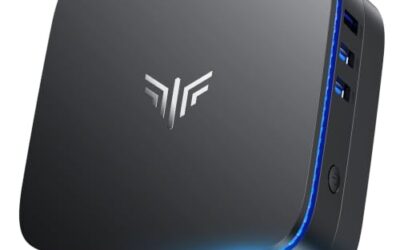
The MINISFORUM UM890 Pro is the strongest all-round pick in this group. It runs an AMD Ryzen 9 8945HS processor with 8 cores and 16 threads, boosting up to 5.2 GHz, with 32 GB of DDR5 memory at 5600 MHz and a 1 TB PCIe 4.0 SSD. The integrated Radeon 780M graphics drive high-resolution monitors, and the OCuLink port connects an external GPU dock over PCIe 4.0 x4 for heavier rendering.
Connectivity covers a creative desk well. Dual 2.5G LAN ports suit a network storage setup, USB4 handles fast external drives, and HDMI plus DisplayPort outputs drive multiple monitors. Quad display support lets a timeline, a program feed, and a tool panel each have their own screen. The compact case fits beside a monitor without taking over the desk.
Best for: video editing and 3D work where strong multi-core performance and an eGPU path matter.
Considerations: the integrated graphics handle lighter work on their own, but heavy 3D rendering needs an external GPU through OCuLink.
GMKtec NucBox K11
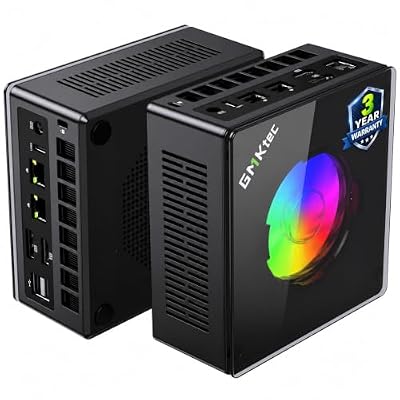
The GMKtec NucBox K11 pairs the same Ryzen 9 8945HS processor with a connectivity set built for a busy desk. It carries 32 GB of DDR5 memory and a 1 TB PCIe 4.0 SSD, with Radeon 780M integrated graphics. The OCuLink port is listed in the published specifications, alongside dual USB4 ports, HDMI 2.1, and DisplayPort 2.1 for quad display output.
Dual 2.5GbE LAN ports suit a desk with both a network storage link and a direct internet connection. Dual fan cooling keeps the processor running through long exports, and Wi-Fi 6 with Bluetooth 5.2 covers wireless peripherals. The K11 suits a creator who runs several apps at once and wants an external GPU ready for the heaviest tasks.
Best for: heavy multitasking with an external GPU dock in reserve.
Considerations: an external GPU dock is a separate purchase and needs to match the OCuLink connection.
MINISFORUM UM880 Plus

The MINISFORUM UM880 Plus balances capability with a smaller footprint. It runs an AMD Ryzen 7 8845HS processor with 8 cores and 16 threads, boosting up to 5.1 GHz, with 32 GB of DDR5 memory and a 1 TB PCIe 4.0 SSD. The integrated Radeon 780M graphics handle photo editing and light video work, and the OCuLink port connects an external GPU dock when a project needs more rendering muscle.
Display outputs include dual HDMI and USB4, which suit a two-monitor desk, and dual 2.5G LAN ports cover network storage. The UM880 Plus fits a creator who wants a compact machine for everyday design and editing, with the option to add an external GPU later rather than at the start.
Best for: a balanced creative desk setup with room to grow through OCuLink.
Considerations: the Ryzen 7 processor is a step below the Ryzen 9 models for the heaviest renders, so plan on an external GPU for demanding 3D tasks.
GMKtec NucBox M7 Ultra

The GMKtec NucBox M7 Ultra is the quiet pick in this group. It runs an AMD Ryzen 7 PRO 6850U processor with 8 cores and 16 threads, boosting up to 4.7 GHz, with 32 GB of DDR5 memory and a 1 TB PCIe 4.0 SSD. The integrated Radeon 680M graphics drive high-resolution monitors, and the OCuLink port connects an external GPU dock for heavier work.
The PRO processor suits a work desk with business features, and the compact case keeps the machine out of the way beside a monitor. Dual 2.5G LAN ports, USB4, and Wi-Fi 6 cover connectivity for a creative setup, and the lower-power processor runs cooler and quieter than the Ryzen 9 models during long sessions.
Best for: quiet creative work where a lower-power processor and a compact case matter.
Considerations: the Ryzen 7 PRO processor and Radeon 680M graphics are a step below the Ryzen 9 models for heavy rendering.
Which One Is Right for You?
Choose the MINISFORUM UM890 Pro when video editing and 3D work lead the decision and you want the strongest processor with an eGPU path. Choose the GMKtec NucBox K11 when the desk runs several apps at once and connectivity matters as much as raw speed. Choose the MINISFORUM UM880 Plus for a balanced desk setup with room to grow through OCuLink. Choose the GMKtec NucBox M7 Ultra when a quiet, compact machine matters and the heaviest work can run on an external GPU.
Frequently Asked Questions
What is OCuLink?
OCuLink is a cable connection that carries a PCIe 4.0 x4 link between a mini PC and an external GPU dock. It gives a desktop graphics card a direct link to the processor with lower latency than a USB-based connection.
Do I need an external GPU for creative work on a mini PC?
Not always. The integrated Radeon 780M graphics handle photo editing and light video work. An external GPU through OCuLink helps with heavy 3D rendering and long video exports.
How much RAM do creative workflows need?
A capacity of 32 GB of DDR5 memory suits video editing and 3D work. Larger projects and heavier multitasking benefit from more, so check whether the memory can be upgraded.
Can a mini PC drive two monitors?
Yes. Every pick in this guide supports multiple display outputs through HDMI, DisplayPort, and USB4. Check that the outputs match the resolution and refresh rate of your monitors.
Bottom Line
For creative workflows, the MINISFORUM UM890 Pro leads on processor speed with a clear eGPU path, while the GMKtec NucBox K11 leads on connectivity for a busy desk. The UM880 Plus is the balanced pick with room to grow, and the M7 Ultra is the quiet pick for a compact desk.
Disclosure: As an Amazon Associate, this site earns from qualifying purchases.