The best gaming setup for most players is a ready prebuilt PC paired with a monitor, keyboard, and mouse you already own or buy separately. A complete tower removes the guesswork of matching parts, and it lets you start playing on the day it arrives. Choose the graphics card first, then make sure the memory and storage leave room for the games you actually play.
As an Amazon Associate we earn from qualifying purchases
| Product | Best for | Key spec from title |
|---|---|---|
| Skytech Gaming Nebula Gaming PC | First setup on a modest desk | Intel i5 14400F, NVIDIA RTX 5060, 1TB NVMe SSD, 16GB DDR5 RAM 6000 |
| MSI Codex R2 C14NVL5-473US Gaming Desktop Computer | A tidy starter tower with keyboard and mouse included | Intel Core i5-14400F, 16GB RAM, 1TB SSD, NVIDIA GeForce RTX 5060 8GB |
| CyberPowerPC Gamer Xtreme Gaming PC | Heavy multitasking alongside demanding games | Intel Core i7-14700F, GeForce RTX 5060 Ti 8GB, 16GB DDR5, 1TB PCIe 4.0 SSD |
| iBUYPOWER Y40 PRO Gaming PC Desktop | Competitive play with room for streaming | AMD Ryzen 7 7800X3D, NVIDIA GeForce RTX 5060 Ti 8GB, 32GB DDR5 RGB 5200MHz RAM, 1TB NVMe SSD |
| Acer Nitro 60 N60-640-UR21 Gaming Desktop | A compact family-room setup with wired networking | Intel Core i5-14400F, NVIDIA GeForce RTX 5060, 16GB DDR5, 1TB PCIe Gen 4 SSD |
Skytech Gaming Nebula Gaming PC

The Skytech Nebula suits a first gaming setup because its parts line up well for 1080p play and lighter 1440p sessions without asking the buyer to assemble anything. Its Intel processor handles everyday multitasking, while the RTX 5060 graphics card supports modern titles with ray tracing and DLSS features. Fast DDR5 memory and a 1TB NVMe drive keep loading times short, and the included Wi-Fi connection helps when the router sits in another room.
Specs
- Intel i5 14400F 2.5GHz processor
- NVIDIA RTX 5060 8GB GDDR7 graphics card
- 16GB DDR5 RAM 6000
- 1TB NVMe SSD
- 650W Gold PSU
- Wi-Fi and Windows 11
Best for: A first setup where the tower needs to work straight out of the box.
Watch out for: The 8GB of graphics memory limits headroom at higher resolutions and texture settings.
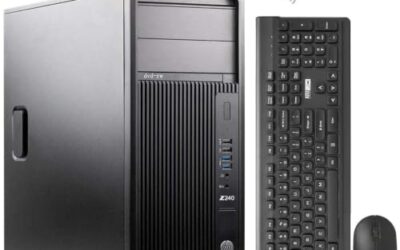
MSI Codex R2 C14NVL5-473US Gaming Desktop Computer

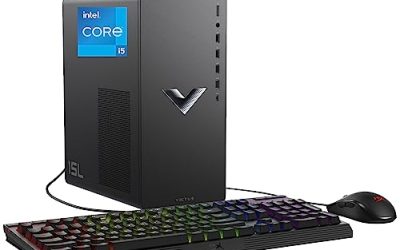
The MSI Codex R2 is a straightforward choice for a player who wants a clean black tower and the basics included in the box. Its Core i5 processor and RTX 5060 graphics card cover popular online games and story-driven titles at 1080p, and the 1TB SSD holds a reasonable library before an upgrade becomes necessary. A keyboard and mouse arrive with the desktop, so the remaining decision is the monitor rather than a pile of extra accessories.
Specs
- Intel Core i5-14400F 2.5GHz processor
- NVIDIA GeForce RTX 5060 8GB graphics card
- 16GB RAM
- 1TB SSD
- Windows 11 Home
- Black desktop with keyboard and mouse included
Best for: A starter setup where the keyboard and mouse should already be in the box.
Watch out for: Memory and storage are fixed at 16GB and 1TB, so a growing library will need an upgrade sooner.
CyberPowerPC Gamer Xtreme Gaming PC

The CyberPowerPC Gamer Xtreme fits a setup that doubles as a work and streaming station, because its 20-core Core i7 processor keeps background apps running while a game stays in focus. The RTX 5060 Ti graphics card steps up from the base RTX 5060, which helps at 1440p and in titles that lean on ray tracing. Its PCIe 4.0 SSD moves games and files quickly, and the B760 chipset platform gives the build a modern base for future storage additions.
Specs
- Intel Core i7-14700F 2.1GHz processor, 20 cores
- NVIDIA GeForce RTX 5060 Ti 8GB graphics card
- 16GB DDR5 memory
- 1TB PCIe 4.0 NVMe SSD
- Intel B760 chipset
- WiFi Ready and Windows 11 Home
Best for: A desk setup shared between gaming, streaming, and everyday multitasking.
Watch out for: The 16GB of memory is the tightest part of an otherwise strong configuration.
iBUYPOWER Y40 PRO Gaming PC Desktop

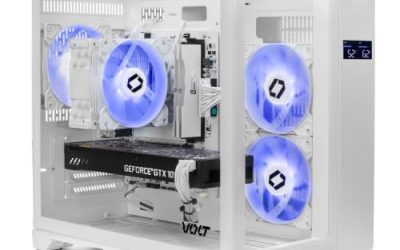
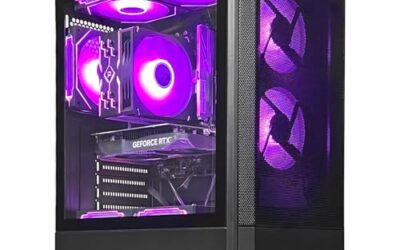
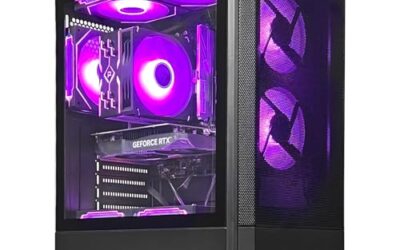
The iBUYPOWER Y40 PRO is built around the Ryzen 7 7800X3D, a processor known for strong gaming performance, and that focus shows in fast-paced matches where frame consistency matters. Its 32GB of DDR5 RGB memory leaves plenty of room for a game, voice chat, and a browser running at the same time. The panoramic Y40 case also makes the setup a visual centrepiece, with the graphics card and lighting visible through the glass panels.
Specs
- AMD Ryzen 7 7800X3D CPU
- NVIDIA GeForce RTX 5060 Ti 8GB GPU
- 32GB DDR5 RGB 5200MHz RAM
- 1TB NVMe SSD
- Windows 11 Home
- Keyboard and mouse included
Best for: Competitive play where smooth frames and a showpiece case both matter.
Watch out for: The 1TB drive fills quickly when several large modern games are installed together.
Acer Nitro 60 N60-640-UR21 Gaming Desktop
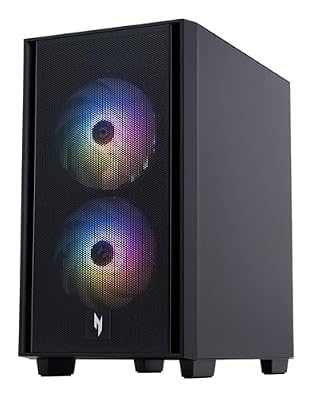
The Acer Nitro 60 works well as a shared setup in a living room or family office, where reliable wired networking and simple operation matter more than RGB excess. Its Core i5 processor and RTX 5060 graphics card handle 1080p gaming comfortably, and the 1TB PCIe Gen 4 SSD keeps the system responsive. Wi-Fi 6 and Gigabit Ethernet give two solid ways to connect, so the tower stays online whether it sits beside the router or across the room.
Specs
- Intel Core i5-14400F 10-core processor
- NVIDIA GeForce RTX 5060 graphics
- 16GB DDR5 memory
- 1TB PCIe Gen 4 SSD
- Wi-Fi 6
- Gigabit Ethernet
Best for: A family-room setup that needs dependable wired or wireless networking.
Watch out for: The configuration is aimed at 1080p play, so demanding 1440p titles will need lower settings.
Frequently Asked Questions
What do I need besides a prebuilt PC for a gaming setup?
You need a monitor, a keyboard, a mouse, and a headset or speakers, plus a stable internet connection. The tower itself arrives ready to run, so the monitor choice matters most: match its resolution and refresh rate to the graphics card. A desk with enough depth for the keyboard and room for the mouse keeps long sessions comfortable.
Is a prebuilt PC a good starting point for a first gaming setup?
Yes, because the parts are already matched and assembled, and Windows arrives installed. That removes the risk of an incompatible component or a missed cable. The trade-off is less control over individual parts, so check the graphics card, memory, and storage on the listing before ordering.
How much storage should a gaming setup have?
A 1TB SSD is a workable starting point for a handful of modern games alongside Windows and everyday apps. Large titles can each take over 100GB, so a library of ten or more games will need either a second drive or regular uninstalls. A 2TB drive suits players who keep many games installed at once.
Should I pick an RTX 5060 or an RTX 5060 Ti?
Pick the RTX 5060 for 1080p play and lighter 1440p sessions, where it delivers smooth performance in most current titles. Choose the RTX 5060 Ti when 1440p is the main target or when ray tracing matters, because the stronger card holds higher settings more comfortably. Both need a monitor that matches the resolution you plan to use.