A budget monitor for the Xbox Series S sounds simple until the spec sheets start shouting PC numbers. The console itself has a clear ceiling: it renders games at up to 1440p and outputs at up to 120Hz over HDMI. The real decision is which inexpensive 1440p panel reaches that ceiling cleanly, with working variable refresh rate, without charging you for a 4K screen or a refresh rate the Xbox can never use. Get that match right and the cheapest monitor on the list can look identical in play to the dearest one here.
The five picks below cover the main buyer groups: competitive players chasing 120Hz, households sharing one desk between console and PC, single-player fans who want a curved screen, and buyers who simply want the newest panel for the least fuss. Every pick is a 27-inch 1440p model, and each one was chosen from the product names and specifications published on its Amazon page.
Quick Picks
As an Amazon Associate we earn from qualifying purchases.
| Product | Best for | Key spec from title |
|---|---|---|
| ASUS TUF Gaming VG27AQ | Shared console and PC desks | 165Hz (supports 144Hz) |
| Samsung Odyssey G5 G50F | The newest, fastest panel | 180Hz Fast IPS |
| MSI G272QPF E2 | Sound and height adjustment included | 180Hz refresh rate |
| LG UltraGear 27GS60QC-B | Curved single-player immersion | 180Hz 1000R curved |
| MSI G272QPF | A stand that pivots and rises | 170Hz Rapid IPS |
How to Choose
Match the panel to the console’s 1440p, 120Hz ceiling
The Series S renders up to 1440p and outputs at most 120Hz, so the useful target is a native 2560 x 1440 panel that accepts a 120Hz signal over HDMI. A 4K screen costs more and adds nothing the console can use, while a 1080p screen throws away sharpness the console can deliver. Headline rates of 165Hz or 180Hz describe PC use over DisplayPort; on the console they simply mean the panel clears the 120Hz bar with room to spare. Check that the listing states 1440p resolution rather than a vague 2K label, and treat refresh figures as PC numbers unless HDMI is named.
Pick a panel type for how you play
Flat IPS panels, used by the ASUS, Samsung G50F, and both MSI models here, hold color and contrast well from off-center seats and suit shared rooms and couch play. A curved VA panel like the LG trades some viewing angle for deeper contrast and a wrap-around feel that racing and single-player games reward. Response-time claims of 1ms appear on every listing in this group, so they separate models less than panel type does. Decide by seating and genre first: one player up close can enjoy a curve, while a family room screen should stay flat IPS.
Treat sync and HDR as support acts
Variable refresh rate matters more than HDR at this tier. The Series S supports VRR over HDMI, and every monitor here lists FreeSync, Adaptive Sync, or G-Sync Compatible support, which smooths frame pacing when a game dips below its target. HDR10 appears on the Samsung G50F and the LG, while the ASUS and MSI models make softer HDR claims, and no budget panel renders HDR like a television costing several times more. Buy for clean 120Hz sync first, then let HDR be a bonus. Before ordering, confirm the listing names the sync standard rather than a generic gaming label.
Count ports, stand movement, and speakers
Budget monitors save money in the furniture, not the panel. Tilt-only stands, like the LG’s, are fine on a fixed desk but frustrate anyone who switches between a chair and a couch. Height adjustment appears on the ASUS and both MSI models, and the ASUS adds a built-in speaker, as does the MSI E2. Port counts vary too: the LG lists two HDMI inputs plus DisplayPort, while several listings here do not state their HDMI count at all. If a second console, a PC, or a capture device will share the screen, verify the port list on the product page before buying.
The 5 Best Options
ASUS TUF Gaming VG27AQ

The VG27AQ is the pick for a Series S setup that doubles as a PC desk. Its 27-inch 1440p IPS panel accepts the console’s 120Hz output over HDMI, and the stand adjusts for height, tilt, swivel, and pivot, which cheap monitors rarely offer. Built-in speakers cover casual play without a headset, and ELMB Sync plus G-SYNC Compatibility keep motion clean when a PC is connected. It is an older design than the 180Hz models here, but for console use the extra hertz were never the point: clean 1440p, a proper stand, and flexible inputs are.
Specs
- Screen size: 27 inches
- Resolution: 2560 x 1440 (QHD)
- Panel type: IPS
- Refresh rate: 165Hz (supports 144Hz)
- Response time: 1ms (MPRT)
- Adaptive sync: G-SYNC Compatible, ELMB Sync
- HDR: Supported
- Ports: DisplayPort 1.2, HDMI 2.0 (port counts not stated)
- Speakers: Built-in
- Stand: Height, tilt, swivel, and pivot adjustable
- VESA mounting: Yes
- Brightness: not stated
Best for: A Series S desk that also hosts a gaming or work PC.
Watch out for: The listing title says 165Hz while a feature line cites a 155Hz overclock; the console caps at 120Hz either way, but confirm the figure on the page before ordering.
Samsung Odyssey G5 G50F

The Odyssey G5 G50F is the newest design in this group and the one to pick if you want the fastest panel a budget allows. Its Fast IPS screen runs at 180Hz on a PC and takes the Series S signal at 1440p and 120Hz over HDMI, with HDR10 support and both FreeSync and G-Sync Compatible modes listed. The stand is adjustable, though the listing does not detail its full range of movement. For a console-first desk that may gain a PC later, it covers both jobs without paying for 4K resolution the Series S cannot use natively.
Specs
- Screen size: 27 inches
- Resolution: 2560 x 1440 (QHD)
- Panel type: Fast IPS
- Refresh rate: 180Hz
- Response time: 1ms (GtG)
- Adaptive sync: AMD FreeSync, NVIDIA G-Sync Compatible
- HDR: HDR10
- Model number: LS27FG502ENXZA
- Stand: Adjustable (range not stated)
- Ports: not stated
- Speakers: not stated
Best for: Buyers who want the newest panel design in this price tier.
Watch out for: The listing does not state its port counts or speakers, so verify the connection list if a PC or second console will share the screen.
MSI G272QPF E2
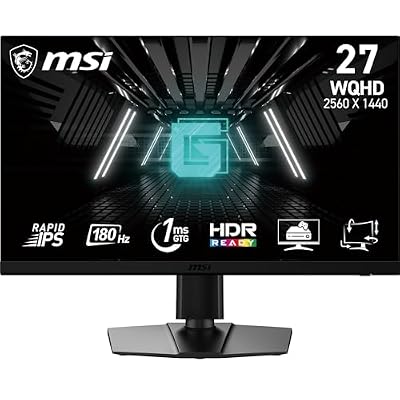
The G272QPF E2 suits players who want sound and screen height sorted without extra purchases. It lists a built-in speaker, a height-adjustable stand, and VESA mounting, so it can sit on its own stand today and move to an arm later. The 180Hz refresh rate and 1ms response are PC-side figures; over HDMI the Series S runs at its own 1440p, 120Hz ceiling, which this panel handles with Adaptive Sync. If your setup lives in a bedroom or shared room where a soundbar is not an option, this is the self-contained choice.
Specs
- Screen size: 27 inches
- Resolution: 2560 x 1440 (QHD)
- Panel type: not stated
- Refresh rate: 180Hz
- Response time: 1ms
- Adaptive sync: Adaptive Sync
- Ports: HDMI, DisplayPort (versions and counts not stated)
- Speakers: Built-in
- Stand: Tilt and height adjustable
- VESA mounting: Yes
- HDR: not stated
Best for: Bedroom and shared-room setups that need built-in sound.
Watch out for: The US listing does not state the panel type, and its 180Hz figure is a PC number; the Series S runs at 120Hz over HDMI.
LG UltraGear 27GS60QC-B

The 27GS60QC-B is the immersion pick. Its 1000R curved VA panel wraps the picture more tightly than the flat screens here, which suits racing games and single-player titles played up close, and it still runs 180Hz with a 1ms response and HDR10 support. Two HDMI ports plus DisplayPort make it easy to keep the Series S and a PC or second console connected. The trade-offs are a tilt-only stand and VA viewing angles that shift if you often watch from the side, so it fits a dedicated one-player gaming spot best.
Specs
- Screen size: 27 inches
- Resolution: 2560 x 1440 (QHD)
- Panel type: VA
- Curvature: 1000R
- Refresh rate: 180Hz
- Response time: 1ms
- Adaptive sync: AMD FreeSync
- HDR: HDR10
- Ports: 2 x HDMI, 1 x DisplayPort
- Stand: Tilt adjustable
- Speakers: not stated
Best for: One-player racing and single-player games at a dedicated desk.
Watch out for: The stand tilts only, and the VA panel loses contrast from side seats, so it suits one centered player better than a couch full of viewers.
MSI G272QPF

The G272QPF is the pick when the monitor has to earn its place on a shared desk. Its Rapid IPS panel runs 170Hz, and the stand offers tilt, swivel, height, and pivot adjustment, so it can sit low for console play and rotate or rise for PC work. G-Sync Compatible and Adaptive Sync support cover both a gaming PC and the Series S, and the 178-degree viewing angle keeps the picture steady from a couch-side seat. It lacks the E2 model’s listed speaker, so plan on a headset or external audio for sound.
Specs
- Screen size: 27 inches
- Resolution: 2560 x 1440 (QHD)
- Panel type: Rapid IPS
- Refresh rate: 170Hz
- Response time: 1ms
- Adaptive sync: G-Sync Compatible, Adaptive Sync
- HDR: HDR Ready
- Ports: HDMI, DisplayPort (counts not stated)
- Viewing angle: 178 degrees
- Stand: Tilt, swivel, height adjustable, pivot
- Speakers: not stated
Best for: Shared desks where the screen must pivot, rise, and swivel.
Watch out for: HDR is listed as HDR Ready rather than a certified tier, and no speaker is mentioned, so plan on a headset or external audio.
Which One Fits Your Situation
You play competitive shooters and want 120Hz above all
Start with the MSI G272QPF E2 or the ASUS VG27AQ. Both pair a 1440p panel with fast response and sync support, and both take the console’s 120Hz signal over HDMI. The MSI adds a built-in speaker and height adjustment at this tier, while the ASUS adds swivel and pivot. Skip the curved LG here; flat IPS keeps the whole screen readable at a glance.
Your Series S shares a desk with a PC
Choose the ASUS VG27AQ or the MSI G272QPF. Each offers DisplayPort for the PC, HDMI for the console, and a stand with height and pivot adjustment for switching between work posture and play posture. The ASUS includes speakers, the MSI answers with a 170Hz Rapid IPS panel. Either keeps one screen on the desk instead of two, which is the real budget win in a shared space.
You mostly play racing and single-player games
Pick the LG 27GS60QC-B. The 1000R curve pulls the edges of a cockpit or cockpit-view game into your peripheral vision, VA contrast flatters dark scenes, and 180Hz headroom keeps motion smooth on a connected PC as well. Sit centered and reasonably close, because the tilt-only stand and VA panel both reward one fixed seat. It is the least flexible monitor here and the most fun for its one job.
You want the newest screen and the least fuss
Take the Samsung Odyssey G5 G50F. It is the most recent design in this roundup, with a Fast IPS panel, 180Hz refresh, HDR10, and both major sync standards listed, so the Series S gets its 1440p, 120Hz feed with VRR and a future PC gets full value from the panel. Check the port details on the listing before ordering, since the page does not state every connection, then set the console to 1440p and 120Hz and play.
Common Mistakes
- Paying for a 4K monitor: the Series S targets 1440p, so the extra resolution budget buys nothing the console can output.
- Leaving the console on its default display settings: set 1440p and 120Hz manually, or the new monitor runs at 1080p and 60Hz.
- Reading the headline refresh rate as the console rate: 165Hz and 180Hz figures describe PC connections; the Xbox ceiling is 120Hz.
- Skipping the port check: several listings do not state their HDMI count, which matters the day a PC or second console joins the desk.
- Forgetting audio: listings that never mention speakers usually have none, so budget for a headset if the page is silent on sound.
Frequently Asked Questions
Can the Xbox Series S actually output 1440p at 120Hz?
Yes. The console supports a 1440p resolution at up to 120Hz over HDMI, and every monitor in this roundup has a native 2560 x 1440 panel rated at 144Hz or higher, so each can accept that signal. Set the resolution and refresh rate in the console’s display settings after connecting, because the Series S may default to 1080p or 60Hz on a first connection.
Is a 165Hz or 180Hz monitor wasted on a Series S?
No. The console tops out at 120Hz, so the extra refresh rate goes unused by the Xbox itself, but it costs little at this tier and pays off if a gaming PC joins the desk later. What matters for the console is that the panel is native 1440p, accepts 120Hz over HDMI, and supports variable refresh rate, which all five picks here do.
Do I need an HDMI 2.1 monitor for the Series S?
No. A 1440p picture at 120Hz fits within HDMI 2.0 bandwidth, which is why the HDMI 2.0-class inputs on budget monitors like these work with the console’s fastest mode. HDMI 2.1 earns its keep with 4K at 120Hz, a Series X and high-end television concern. For a Series S, spend the money on the panel, the stand, and sync support instead of the port label.
Should I choose flat IPS or curved VA for console play?
Choose by seat, not by spec sheet. Flat IPS keeps colors consistent for viewers spread across a couch and suits competitive games where the whole screen must read clearly. A curved VA panel like the LG here gives one centered player deeper contrast and a stronger sense of wrap. If friends regularly watch or join in, stay flat; if the desk is yours alone, the curve is a genuine pleasure.