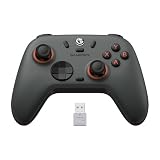
A charging dock changes how a wireless PC controller fits into a desk setup. Instead of a cable draped across the keyboard tray, the controller drops into a cradle after every session, tops up on contact pins or magnetic points, and is always at a full charge when the next session starts. For PC-first controllers with built-in batteries, the dock is designed around one exact shell, so fit matters more than raw charging speed.
This roundup covers the dock options that make sense for PC players: two 8BitDo controllers that ship with integrated cradles, a GameSir pro controller with an auto start-stop charging station, a Manba controller with a screen and a smart charging station, and one standalone dock from Flydigi. Every specification comes from published manufacturer and listing data, and each pick is labeled budget, mid-range, or premium so the tiers stay clear.
As an Amazon Associate, we earn from qualifying purchases.
Quick Answer
The best PC controller dock setup for most players is the 8BitDo Ultimate 2 Bluetooth, whose cradle keeps its battery topped up and doubles as a display stand. The Ultimate 2.4G is the budget route, the GameSir G7 Pro Wuchang edition adds an auto start-stop station, the Manba One pairs its dock with a built-in screen, and the Flydigi Dock 2 Pro serves Apex 5 and Vader 5 Pro owners.
Table of Contents
- Quick Answer
- 8BitDo Ultimate 2 Bluetooth Controller with Charging Dock
- 8BitDo Ultimate 2.4G Wireless Controller with Charging Dock
- GameSir G7 Pro Wuchang: Fallen Feathers Edition
- Manba One Wireless Controller with Charging Dock
- FLYDIGI Wireless Charger Dock 2 Pro
- How to Choose
- Who Should Skip
- FAQ
- Final Verdict
- Product and ASIN Reference
8BitDo Ultimate 2 Bluetooth Controller with Charging Dock

The Ultimate 2 Bluetooth is the premium pick and the most polished dock bundle here. Its charging dock is part of the standard package: the controller drops into the cradle after a session, charges while it sits on display, and leaves ready for either a PC or a Switch 2.
The pad carries 8BitDo’s flagship hardware. The listing specifies TMR joysticks, triggers that switch between tactile and Hall modes, vibration and motion control, and an RGB Fire Ring. Platform support covers Windows PC, Switch, and Switch 2 over Bluetooth and wired connections, and published listing data puts the set at 12 ounces.
Specs
- Compatibility: PC Windows, Nintendo Switch, Nintendo Switch 2
- Connection: Bluetooth, wired
- Battery: 1,000 mAh rechargeable, per manufacturer specifications
- Joysticks: TMR
- Triggers: Tactile and Hall modes, switchable
- Extras: Vibration, motion control, RGB Fire Ring
- Dock: Charging dock included
- Item weight: 12 ounces, as listed
- Tier: Premium
8BitDo Ultimate 2.4G Wireless Controller with Charging Dock

The original Ultimate 2.4G is the budget pick, and its dock story is nearly as strong as its newer sibling’s. The controller ships with a charging dock in the box and covers PC, Android, Steam Deck, and Apple devices, so one cradle can serve a desk and a handheld setup at the same time.
The listing specifies the Hall Effect joystick update, which addresses the drift concerns of the earliest production runs, and the package includes one lithium polymer battery. Published package data lists dimensions of 6.42 x 5.39 x 3.39 inches and a weight of 1.34 pounds for the boxed set. Connectivity covers 2.4G wireless through the adapter, Bluetooth, and wired play. It is a proven controller-and-cradle pairing that simply removes charging cables from the desk.
Specs
- Compatibility: Windows PC, Android, Steam Deck, Apple devices
- Connection: 2.4G wireless, Bluetooth, wired
- Battery: Lithium polymer, included (1,000 mAh per manufacturer specifications)
- Joysticks: Hall Effect, updated version
- Dock: Charging dock included in the box
- Item model number: 6922621504955, as listed
- Package weight: 1.34 pounds, as listed
- Tier: Budget
GameSir G7 Pro Wuchang: Fallen Feathers Edition

The G7 Pro is the premium pick for players who split time between a PC and an Xbox-shaped ecosystem. Its Smart Auto Start-Stop Charging Station begins charging when the controller is placed on it and stops when the controller is lifted away, and the station includes an integrated receiver storage bay so the 2.4G dongle has a permanent home. The Wuchang: Fallen Feathers Edition wraps that hardware in a themed finish with a swappable faceplate, and it is officially licensed for Xbox Series X|S and Xbox One while doing its wireless work on PC.
Published specifications list GameSir Mag-Res TMR sticks, Hall Effect analog triggers with mode switching, a 1,000Hz polling rate, and a 3.5mm audio jack. The built-in battery is rated at 1,200 mAh. Connection behavior is platform-dependent: on Xbox the controller is wired, while PC play runs over the 2.4G receiver or a cable, and Android connects over Bluetooth.
Specs
- Compatibility: Xbox Series X|S, Xbox One, Windows PC, Android
- Connection: Wired on Xbox; 2.4G wireless and wired on PC; Bluetooth on Android
- Battery: 1,200 mAh rechargeable
- Joysticks: Mag-Res TMR
- Triggers: Hall Effect analog with mode switching
- Polling rate: 1,000Hz
- Audio: 3.5mm jack
- Dock: Smart Auto Start-Stop Charging Station with receiver storage bay
- Tier: Premium
Manba One Wireless Controller with Charging Dock

The Manba One is the feature-heavy mid-range pick, built around a 2-inch interactive screen set into the controller face. Settings that rival controllers bury in a companion app are adjusted directly on that display, and the published specification list adds Hall Effect sticks and triggers, RGB lighting, and remappable buttons. It is aimed at PC players who also game on Switch, Switch 2, iOS, and Android.
Its smart charging station is part of the standard package rather than an upgrade. Manba’s published data describes a station with smart wake-up behavior and a visual battery indication, and the station contains the wireless receiver, keeping the dongle stored with the controller. The battery is the largest in this roundup at 1,800 mAh, which suits the screen’s extra draw. Players who want a plain pad should look at the 8BitDo picks instead.
Specs
- Compatibility: PC, Switch, Switch 2, iOS, Android
- Connection: 2.4G wireless, Bluetooth, wired
- Battery: 1,800 mAh rechargeable
- Display: 2-inch interactive screen for on-controller settings
- Joysticks and triggers: Hall Effect
- Extras: RGB lighting, remappable buttons
- Dock: Smart charging station with receiver storage and battery indication
- Item model number: S3-01
- Tier: Mid-range
FLYDIGI Wireless Charger Dock 2 Pro

The Dock 2 Pro is the only standalone dock in this roundup, and it exists for a narrow audience: owners of Flydigi’s Apex 5 and Vader 5 Pro controllers. It charges those controllers magnetically and wirelessly, so the pad settles onto the dock without a cable or exposed port alignment, and the listing’s product information describes a USB hardware interface with three total USB ports and four ports overall.
Compatibility is the whole buying decision here. The listing title states plainly that the dock only supports the Apex 5 and Vader 5 Pro, and it will not charge Flydigi’s earlier Vader 4 Pro or Apex 4, let alone controllers from other brands. Within that boundary it is a tidy premium accessory sold by the manufacturer’s own store, finished in white, and shaped to match the controllers it serves.
Specs
- Compatibility: Flydigi Apex 5 and Vader 5 Pro only
- Charging method: Magnetic wireless charging
- Hardware interface: USB, as listed
- Total USB ports: 3, as listed
- Number of ports: 4, as listed
- Color: White
- Controller included: No, dock only
- Tier: Premium
How to Choose
Start with the controller, not the dock. Almost every PC controller dock is molded or pinned for one exact shell, so a dock bought first is a dock that dictates your next controller. Decide which controller fits your hands and platforms, then confirm that the specific edition you are ordering actually includes the dock, because several controllers in this category sell dock and no-dock versions side by side.
Next, separate the two dock styles. Bundled cradles, like the 8BitDo and GameSir packages above, charge a built-in battery through contact points and usually store the 2.4G receiver inside the base. Standalone docks, like the Flydigi Dock 2 Pro, only make sense when you already own the matching controller, and their compatibility lists are strict.
Battery size shapes how much the dock matters. A 1,800 mAh controller like the Manba One can skip the dock for days, while a 1,000 mAh controller benefits from being topped up after every session. Also check what the dock does besides charge: receiver storage, a charge-status light, and auto start-stop behavior all reduce desk clutter.
Finally, confirm platform behavior in writing before buying. Several PC controllers are wireless on PC but wired-only on a console, and Bluetooth support often targets mobile devices rather than the gaming PC. If a listing is vague about which connection works where, treat that vagueness as a warning sign.
Who Should Skip
Skip docks entirely if you play wired. A cable already delivers power and the lowest-latency connection at once, and a cradle adds a desk object without solving any problem you actually have. Players who travel with their controller daily may also find a dock awkward, since the cradle stays home while the controller still needs a cable on the road.
Skip brand-locked standalone docks if there is any chance you will change controller brands next year. The Flydigi dock is excellent within its ecosystem and useless outside it, and the same logic applies to every molded cradle in this roundup. If your current controller has no dock option at all, a plain USB-C cable and a simple display stand will serve you better than a near-fit dock designed for a different shell.
FAQ
Do PC controller charging docks work with any controller?
No. Nearly all of them are designed for one controller model or one brand family, because the cradle shape and the charging contacts have to match the shell exactly. The Flydigi Dock 2 Pro, for example, only supports the Apex 5 and Vader 5 Pro. Always match the dock to the exact controller model and edition before ordering.
Is a dock better than charging with a USB-C cable?
A dock is more convenient rather than fundamentally faster. It gives the controller a fixed home, keeps the battery topped up between sessions, and often stores the wireless receiver. A cable charges the same battery and lets you play while charging, which a docked controller cannot do. Many players use the dock daily and keep a cable as the backup.
What does auto start-stop charging mean?
It means the station begins charging when the controller is placed on it and stops on its own when the battery is full or the controller is lifted away. The GameSir G7 Pro’s station works this way. The feature removes the need to check charge lights or unplug anything.
Can one dock charge two controllers at once?
None of the five picks in this roundup charges two controllers simultaneously; each is a single-controller cradle or station. Players running two identical PC controllers should either buy two matching docks or charge the second controller by cable. Multi-bay chargers exist mainly in the console battery-pack category, which follows a different design.
Final Verdict
For most PC players, the 8BitDo Ultimate 2 Bluetooth is the dock setup to buy first: the cradle keeps the controller charged and on display between sessions. The Ultimate 2.4G delivers most of that experience on a budget, the GameSir G7 Pro Wuchang edition is the premium cross-platform choice, and the Manba One suits screen fans. Flydigi owners should not overlook the Dock 2 Pro, provided their controller is an Apex 5 or Vader 5 Pro. Match the dock to the controller first, and the charging problem disappears.
Product and ASIN Reference
| Product | ASIN |
|---|---|
| 8BitDo Ultimate 2 Bluetooth Controller with Charging Dock | B0FJ89XD8N |
| 8BitDo Ultimate 2.4G Wireless Controller with Charging Dock (Purple) | B0CPY7H952 |
| GameSir G7 Pro Wuchang: Fallen Feathers Edition | B0G2XZXL63 |
| Manba One Wireless Controller with Charging Dock (White) | B0CY83CL2D |
| FLYDIGI Wireless Charger Dock 2 Pro (White) | B0FNRGX3D6 |