CPU cache latency explained for gaming starts with understanding how quickly a processor can retrieve the data it needs. Although CPU clock speed and core count receive much of the attention, cache performance also influences game responsiveness, frame times, and CPU-limited FPS. This guide explains cache levels, latency, cache misses, and what gamers should consider when comparing processors.
What CPU Cache Latency Really Comes Down To
CPU cache latency describes the time a processor needs to retrieve data from its cache after requesting it. Smaller, closer cache levels generally provide faster access, while larger cache levels can store more information. In gaming, the balance between access speed, cache capacity, and memory behavior can influence how efficiently a CPU handles demanding workloads.
1. Understanding L1, L2, and L3 Cache
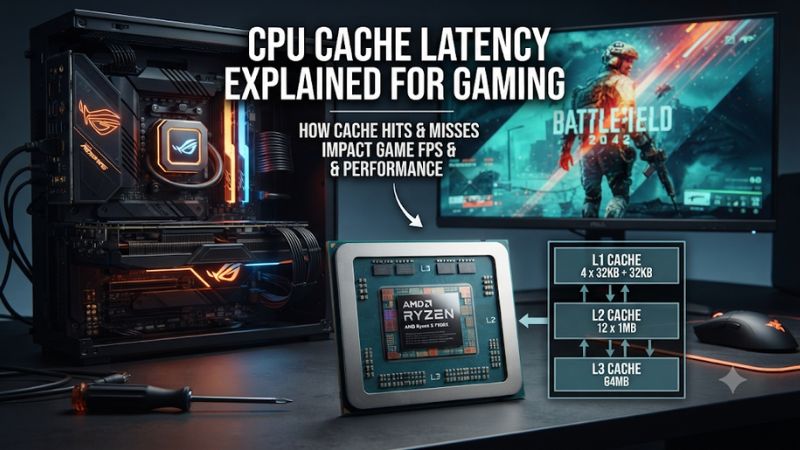
Modern desktop CPUs use multiple cache levels to keep frequently needed instructions and data close to their processing cores. L1 is generally the smallest and fastest, L2 provides more capacity with somewhat higher access latency, and L3 offers a larger storage area that is typically shared among multiple cores.
The hierarchy matters because a successful cache lookup avoids accessing a slower memory level. When information is available in L1, the processor can retrieve it quickly. If it misses L1 but finds the data in L2 or L3, it still avoids a trip to system RAM.
2. What Cache Latency Means in Practice
Latency measures the delay between requesting information and receiving it. It is commonly expressed in nanoseconds (ns) or CPU clock cycles. Lower latency means the processor spends less time waiting for a particular data request, assuming other conditions remain comparable.
However, a latency measurement is not a complete description of CPU performance. A processor can have relatively fast cache access but insufficient cache capacity for a particular workload. Another CPU might have slower access to its largest cache but achieve better results because more game data stays available locally.
3. Cache Hits, Cache Misses, and RAM Access
A cache hit occurs when requested data is already available in the cache level being checked. A cache miss occurs when the requested information is not present there, forcing the processor to search another level or retrieve it from system memory.
A miss in L1 does not automatically mean a RAM access. The information might still be available in L2 or L3. The biggest performance concern arises when the required data cannot be found in the processor’s caches and must be fetched from DRAM, which generally introduces considerably more delay.
4. Why Gaming Workloads Benefit From Cache
Games repeatedly process information such as object positions, physics calculations, character states, AI behavior, and world data. Some information is accessed frequently enough to benefit from remaining in CPU cache, reducing the need for repeated memory requests.
This is particularly relevant in CPU-heavy games with many active characters, complex simulation systems, or large numbers of interacting objects. However, not every game benefits equally. GPU-limited workloads may show little improvement from lower CPU cache latency because graphics processing is the primary performance constraint.
How CPU Cache Latency Affects Gaming Performance
The relationship between cache latency and gaming performance depends on how frequently a game accesses cached information and how effectively the processor handles those requests. Lower latency can reduce waiting time, but cache capacity, memory bandwidth, core architecture, and scheduling also matter. Understanding these interactions helps explain why CPUs with similar clock speeds can deliver different gaming results.
1. Average FPS and CPU Bottlenecks
When a game relies heavily on CPU calculations, cache performance can influence how quickly the processor completes each frame. Faster access to frequently requested data may help the CPU maintain higher processing throughput, potentially improving average FPS in suitable workloads.
However, average FPS does not reveal every performance difference. If a game is primarily limited by the graphics card, reducing CPU cache latency might produce little visible improvement. Lowering resolution can sometimes expose CPU limitations by reducing GPU workload, making processor differences easier to observe.
2. Cache Latency and 1% Low FPS
1% low FPS represents the slower portion of a game’s frame-rate results and helps describe consistency beyond the average. CPU delays caused by memory access, cache misses, background processes, or other bottlenecks can contribute to inconsistent frame delivery.
A processor with better cache behavior may improve 1% lows in games sensitive to memory access. Nevertheless, cache latency is only one possible contributor. Shader compilation, asset streaming, insufficient system memory, and CPU scheduling can also cause frame-time spikes, so low 1% FPS should not automatically be blamed on cache performance.
3. Why Larger L3 Cache Can Improve Gaming
A larger L3 cache gives the processor more space to retain frequently accessed information. This can increase the likelihood that a future request finds its data on the CPU rather than requiring a slower trip to system memory.
AMD’s 3D V-Cache technology uses vertically stacked cache to increase available L3 capacity on supported Ryzen processors. This design can benefit games with working sets that respond well to additional cache. AMD’s official documentation describes the technology and its implementation in Ryzen X3D processors.
AMD+1
More L3 cache does not automatically make every game faster. If a workload already fits comfortably within the existing cache, adding capacity may produce limited gains. Other factors, including core architecture and clock behavior, remain important.
4. Cache Latency Versus RAM Latency
CPU cache and system RAM serve different purposes. Cache is located on or within the processor package and provides relatively fast access to frequently needed information. RAM offers substantially more capacity but generally takes longer to access.
A processor that frequently retrieves data from L1, L2, or L3 can avoid some of the delays associated with DRAM. This is why cache efficiency and memory latency should be considered together rather than treated as interchangeable specifications.
| Memory level | Main purpose | Relative latency | Gaming relevance |
|---|---|---|---|
| L1 cache | Stores frequently accessed instructions and data close to a core | Very low | Fast access to immediately needed information |
| L2 cache | Provides additional local cache capacity | Low | Reduces requests reaching L3 or RAM |
| L3 cache | Provides larger, often shared cache capacity | Higher than L1 and L2 | Helps retain larger working sets |
| DDR4/DDR5 RAM | Stores the system’s active data and applications | Higher than CPU cache | Supplies information when cache misses occur |
The exact latency depends on CPU architecture, operating conditions, memory configuration, and access patterns. Intel’s optimization documentation also explains that cache and memory access delays vary with factors such as cache occupancy and memory-system behavior.
Intel+1
How to Evaluate CPU Cache Performance for Gaming
Comparing processors requires more than looking at their advertised cache capacities. A useful evaluation considers cache architecture, access latency, the types of games being played, and actual benchmark behavior. The following checks help distinguish meaningful gaming advantages from specifications that look impressive but may have limited impact on your particular workload.
1. Compare Cache Specifications Across CPUs
Start by checking the processor’s official specifications. Look for L1, L2, and L3 cache information where available, paying particular attention to total L2 and L3 capacity when comparing modern desktop gaming CPUs.
Be careful when interpreting total cache figures. Manufacturers sometimes advertise combined cache capacity, but that number does not explain how much cache is available to each core, how it is organized, or how quickly the processor accesses it. Two CPUs with similar totals can have different architectures and gaming behavior.
2. Examine Cache Latency Benchmarks
Synthetic tools can measure cache and memory latency using controlled access patterns. These measurements help identify differences between cache levels and reveal how a CPU behaves when its working data exceeds a particular cache’s capacity.
Intel VTune provides performance metrics related to L2 misses, L3 latency, and last-level cache access. Its documentation explains how cache misses can contribute to processor stalls.
Intel
However, synthetic results should not be treated as direct predictions of gaming FPS because real games use different access patterns.
3. Check Gaming Benchmarks at CPU-Limited Settings
Gaming benchmarks provide a more practical way to determine whether cache differences translate into better performance. Compare processors using the same games, graphics settings, resolution, GPU, and memory configuration whenever possible.
Pay attention to both average FPS and 1% lows. Lower-resolution testing can help expose CPU differences, while higher resolutions often increase GPU limitations. Results from different review systems should not be combined as if they represent a controlled comparison.
4. Consider Cache-Sensitive Games and CPU Architecture
Some games benefit more from large caches than others. Simulation-heavy titles, strategy games, competitive multiplayer games, and certain open-world experiences can place substantial demands on CPU processing and memory access.
Also consider architecture, clock speeds, core count, and power behavior. A newer CPU with improved processing capabilities may outperform an older processor despite having a smaller advertised cache. The best choice depends on the complete architecture and the games you actually play.
Practical Evaluation Checklist
| Setting or Step | Where | Effect | Risk |
|---|---|---|---|
| Check L1, L2, and L3 capacity | Official CPU specifications | Identifies cache organization and available capacity | Combined cache figures can be misleading |
| Measure cache latency | Cache and memory benchmark utilities | Shows access delays under specific test conditions | Synthetic results may not represent gaming |
| Compare gaming performance | Independent CPU gaming reviews | Reveals average FPS and 1% low differences | Different test systems can distort comparisons |
| Monitor CPU and GPU limitations | MSI Afterburner or another monitoring utility | Helps identify whether gaming performance is CPU- or GPU-limited | Incorrect interpretation of utilization can lead to false conclusions |
What Doesn’t Help
Increasing advertised RAM speed does not directly reduce the physical latency of a CPU’s L1, L2, or L3 cache. Similarly, clearing temporary files, running RAM cleaner utilities, or changing unrelated Windows settings does not make the processor’s cache architecture faster.
Manual overclocking is not a guaranteed solution either. Higher clock speeds may improve certain workloads, but they do not automatically reduce cache access delays. Start with accurate measurements and normal operating settings before considering any hardware adjustments.
Frequently Asked Questions
1. Does Lower CPU Cache Latency Increase Gaming FPS?
Lower CPU cache latency can improve gaming FPS when a game frequently waits for cached data and the processor is a performance bottleneck. However, the improvement depends on the game, CPU architecture, cache hit rate, and GPU limitations.
2. Is L3 Cache More Important Than L1 and L2 for Gaming?
L3 cache can have a substantial influence on gaming because it provides more capacity for frequently accessed information. However, L1 and L2 remain essential because they generally offer faster access. All three levels work together rather than competing independently.
3. Is More CPU Cache Always Better for Gaming?
More CPU cache is not always better because additional capacity does not necessarily improve every workload. Games that benefit from larger working sets may see meaningful advantages, while other titles respond more strongly to clock speed, architecture, or GPU performance.
4. Can DDR5 RAM Compensate for High CPU Cache Latency?
DDR5 can improve system memory bandwidth and, depending on the configuration, memory performance. However, it cannot directly compensate for inefficient CPU cache access. Cache and RAM operate at different levels of the memory hierarchy, so their performance characteristics should be evaluated separately.
Final Thoughts
Understanding CPU cache latency explained for gaming helps you look beyond clock speed and core count when comparing processors. Cache access speed, capacity, and hit rates all contribute to CPU efficiency, but their gaming impact varies by workload. Compare independent gaming benchmarks alongside cache specifications before deciding which processor deserves your upgrade budget.