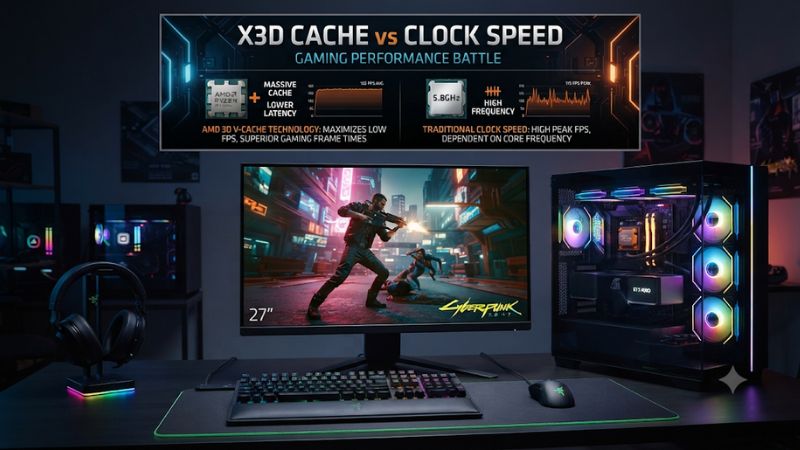
X3D cache vs clock speed gaming performance is not a simple contest between more cache and higher GHz. AMD’s 3D V-Cache can improve gaming performance by reducing memory access delays, while higher clock speeds benefit workloads that depend more heavily on raw CPU frequency. Understanding the difference helps you choose a processor that matches your games, GPU, and budget.
1. What X3D Cache and Clock Speed Mean for Gaming
A gaming CPU needs to process game logic, physics, AI, player inputs, and instructions sent to the GPU. Clock speed determines how frequently a processor can execute cycles, while cache stores frequently accessed data close to the CPU cores. These two characteristics influence performance differently, depending on the game engine and workload.
How AMD 3D V-Cache Works
AMD 3D V-Cache increases the processor’s L3 cache capacity by stacking additional cache silicon vertically on the CPU chiplet. This gives supported Ryzen processors more room to store frequently accessed game data, potentially reducing the need to retrieve information from system RAM.
The benefit is particularly relevant to games with complex simulations, numerous game objects, or frequent data access. However, X3D cache vs clock speed gaming performance depends on whether a particular game benefits from the additional cache. A larger cache does not automatically improve every game or application.
Why Clock Speed Still Matters
Clock speed, measured in GHz, describes how many clock cycles a processor completes per second. Higher operating frequencies can improve workloads that depend on individual CPU cores, particularly when architectural differences, instructions per clock, and other bottlenecks are reasonably similar.
However, maximum boost frequency is not the same as sustained gaming frequency. Actual operating speed changes according to temperature, power limits, workload, and processor behavior. A CPU advertising a higher boost clock does not necessarily deliver higher gaming FPS than an X3D processor.
Cache Capacity Versus Memory Latency
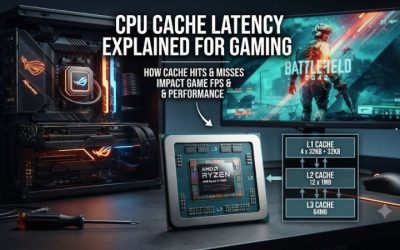
CPU cache is considerably closer to the processing cores than system memory. When requested information is available in cache, the processor can avoid fetching it from slower RAM. This can reduce memory-related delays and help maintain consistent frame delivery in cache-sensitive games.
Larger cache capacity does not mean every game benefits equally. Some workloads repeatedly access a relatively small amount of data, while others involve calculations that are more sensitive to processing frequency. Cache effectiveness also depends on access patterns, cache hits, and the game engine.
Why X3D Processors Sometimes Have Lower Clocks
Earlier generations of AMD X3D processors generally operated with lower clock frequencies than their non-X3D counterparts. This reflected the engineering and thermal considerations associated with vertically stacked cache technology, rather than an indication that lower frequencies were desirable for gaming.
AMD’s second-generation 3D V-Cache implementation in the Ryzen 9000X3D family changed some of these trade-offs. The Ryzen 7 9800X3D, for example, uses a redesigned cache arrangement that allows higher operating frequencies than its predecessor. Therefore, comparisons should account for processor generation rather than assuming every X3D CPU sacrifices substantial clock speed.
2. X3D Cache vs Clock Speed Gaming Performance: Benchmark Comparison
The best way to understand the difference is to compare processors with similar architectures and core counts but different cache or frequency characteristics. Independent CPU reviews show that additional cache can outweigh a clock-speed disadvantage in suitable games, although frequency differences still matter when other specifications remain comparable.
What CPU Benchmarks Reveal About Cache
One useful example is the Ryzen 7 7800X3D versus the Ryzen 7 7700X. Both are eight-core, 16-thread Zen 4 processors with 104 MB of combined L2 and L3 cache in the X3D model, but the 7700X has higher advertised clock speeds and less cache.
This comparison illustrates why specifications alone can be misleading. The 7800X3D’s additional 3D V-Cache gives it a gaming advantage over the conventional Ryzen 7 7700X in many CPU-limited workloads, despite the latter’s higher boost frequency. The size of that advantage depends on the game and test configuration.
When Higher Clock Speeds Win
Clock speed becomes more important when a game cannot benefit significantly from additional cache. Workloads that rely heavily on individual-core processing, frequent calculations, or instructions that do not repeatedly access cached data may favor a processor with stronger frequency and per-core performance.
A useful comparison is the Ryzen 7 7800X3D and 7700X3D. Tom’s Hardware found the 7800X3D approximately 4% faster on average across its gaming suite. The 7800X3D has a maximum boost clock of 5.0 GHz, compared with 4.5 GHz for the 7700X3D. This demonstrates that frequency differences remain relevant even when both processors have the same core count and cache capacity.
Average FPS Versus 1% Low Performance
Average FPS measures the overall rendering rate during gameplay, but it does not describe every fluctuation. A system can produce a high average while still experiencing occasional frame-time spikes that make movement feel inconsistent.
The 1% low metric provides another perspective by showing performance during the slower portions of a benchmark. Cache-sensitive games can benefit from reduced memory-access delays, potentially improving both average frame rates and lower-percentile performance. However, results vary by title, so compare both metrics instead of assuming every X3D processor has better 1% lows.
Resolution and GPU Bottlenecks Change the Result
At 1080p with a powerful graphics card, the CPU is more likely to limit maximum frame rates. This makes the differences between cache-heavy and high-frequency processors easier to observe, particularly in competitive games targeting very high refresh rates.
At 1440p and 4K, the graphics card often becomes the limiting component as rendering workloads increase. In those situations, a faster CPU may produce a smaller improvement in average FPS. That does not make CPU performance irrelevant, but it means paying extra for additional cache or frequency may deliver less visible value.
| Gaming factor | X3D cache advantage | Clock speed advantage |
|---|---|---|
| CPU-intensive simulations | Often stronger when data fits in cache | Helps calculation-heavy workloads |
| Competitive gaming | Can improve CPU-limited FPS and frame consistency | Useful for high-frequency processing |
| Large game worlds | Can reduce repeated RAM access | Helps with CPU instructions |
| 1080p gaming | Often easier to observe with a powerful GPU | Also benefits CPU-limited games |
| 1440p and 4K | Depends on remaining CPU bottlenecks | Gains may be limited by GPU performance |
| Productivity workloads | Depends on application and memory access | Often useful for frequency-sensitive tasks |
How to Interpret Benchmark Results Correctly
A useful benchmark comparison needs the same graphics card, memory configuration, game version, and graphics settings. Resolution matters too because a CPU comparison at 720p or 1080p can reveal differences that become less visible at higher resolutions.
For example, Tom’s Hardware compared the Ryzen 7 7800X3D and 7700X3D using an RTX 5090, 1080p resolution, a mixture of High and Ultra settings, and no upscaling or frame generation. Its reported 4% average advantage for the 7800X3D belongs to that test configuration, not every gaming PC.
Tom’s Hardware+1
3. Which Matters More When Choosing a Gaming CPU?
The right processor depends on the games you play, your graphics card, your monitor’s refresh rate, and whether you also use your PC for demanding applications. Rather than selecting a CPU by its highest GHz rating or largest cache number, evaluate the complete processor and its performance in workloads that resemble your actual usage.
Choose X3D Cache for CPU-Bound Gaming
An X3D processor is particularly attractive for players who prioritize high frame rates in CPU-intensive games. Strategy games, simulation titles, large multiplayer environments, and some open-world games can benefit from the additional cache when their workloads repeatedly access data that fits within it.
For competitive players, the advantage can be valuable when targeting high refresh rates. However, the graphics card, game engine, and system configuration still determine the final result. Compare independent benchmarks for your most-played games before deciding whether an X3D premium makes financial sense.
Choose Higher Clock Speed for Mixed Workloads
A conventional high-frequency CPU can be a sensible purchase when gaming is only one part of your PC usage. Some applications prioritize clock speed, core architecture, or multicore throughput rather than large L3 cache capacity.
This is especially relevant for users who frequently perform productivity tasks alongside gaming. Video encoding, rendering, compiling, and other workloads can respond differently to CPU architecture and core configuration. Check application-specific benchmarks rather than assuming a gaming advantage automatically translates into faster professional workloads.
Match Your CPU to Your GPU and Monitor
Your graphics card determines how much rendering work the system can complete, while the monitor determines how many frames you can meaningfully display each second. A powerful CPU paired with a slower GPU may spend much of its potential waiting for graphics processing.
For example, an X3D upgrade may make more sense for a high-refresh-rate 1080p gaming setup than for a GPU-limited 4K system. Consider the games, graphics settings, and actual frame rates you use before spending more on CPU performance that your current graphics card cannot fully utilize.
Consider Platform Compatibility and Upgrade Costs
A CPU upgrade involves more than choosing between cache and frequency. AMD Ryzen 7000 and 9000 desktop processors use the AM5 socket and DDR5 memory, but motherboard BIOS support must be checked for the specific processor. Older AM4 systems use a different socket and DDR4 memory platform.
Before upgrading, verify the motherboard’s CPU support list, required BIOS version, memory compatibility, cooler mounting support, and power requirements. Also account for the cost of replacing a motherboard or RAM kit if necessary. A less expensive conventional CPU may offer better overall value when a complete platform replacement is required.
Frequently Asked Questions
1. Is X3D cache more important than clock speed for gaming?
X3D cache is often more valuable in games that repeatedly access large amounts of data, but clock speed remains important for frequency-sensitive workloads. The best choice depends on the game engine, CPU architecture, and graphics card. Compare game-specific benchmarks instead of judging processors by GHz or cache capacity alone.
2. Does higher GHz always mean higher gaming FPS?
No, a higher advertised clock speed does not automatically produce higher gaming FPS. CPU architecture, instructions per clock, cache capacity, memory latency, and workload all influence performance. A processor with a lower boost frequency can outperform a faster-clocked competitor when its architecture and cache are better suited to the game.
3. Is an AMD X3D processor worth buying for 1440p and 4K gaming?
Yes, an X3D processor can still be worthwhile at 1440p and 4K, particularly when playing CPU-intensive games or targeting high refresh rates. However, GPU limitations often reduce the visible difference at higher resolutions. Check benchmarks using your graphics card and preferred games before paying extra.
4. Should I upgrade my CPU for more cache or higher clock speed?
Choose additional cache when your current games are demonstrably CPU-bound and benefit from X3D processors. Choose a higher-frequency alternative when your workloads favor clock speed and it offers better overall value. Before upgrading, check motherboard compatibility, BIOS support, cooling requirements, and the cost of replacing other components.
Final Thoughts
Understanding X3D cache vs clock speed gaming performance makes CPU shopping more straightforward: cache can deliver substantial advantages in suitable games, while higher frequencies remain important for other workloads. Prioritize independent benchmarks from your favorite titles, check your GPU limitations, and choose the processor that offers the best balance of performance and upgrade cost.