🛒 Best Price Today on Amazon
Prime members get fast, free shipping on everything above, plus member-only deals. New members get a 30-day free trial — cancel anytime.
Choosing the best Razer gaming chair depends on your budget, preferred seating style, and how long you sit at your PC. Razer offers distinct designs with different materials, adjustment options, and support features. This guide compares the leading options and explains which trade-offs matter before you spend.
How to Choose the Best Razer Gaming Chair
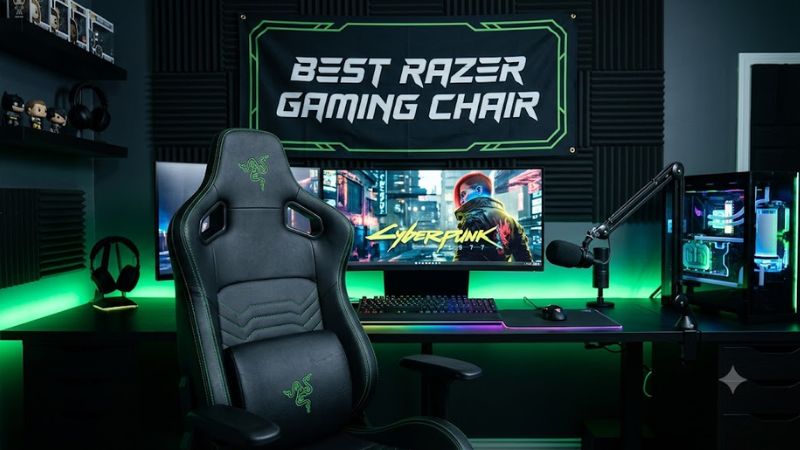
The right chair should fit your body and desk before you consider its appearance or branding. Razer’s Iskur, Enki, and Fujin families target different priorities, from adjustable lumbar support to broad cushioning and breathable mesh. Compare these four factors to avoid paying for features you may not need.
1. Lumbar support and adjustability
If lower-back positioning is your main concern, start with the Iskur family. The Iskur V2 offers an adjustable lumbar support system, while the Iskur V2 X uses a built-in lumbar curve with fewer adjustment options. The newer Iskur V2 NewGen introduces the HyperFlex lumbar system, making it a separate option worth comparing.
Adjustable support is not automatically comfortable for everyone. Your height, torso length, preferred sitting posture, and the chair’s seat depth affect the fit. Look for a design that lets you position your back naturally rather than forcing you into a rigid posture.
2. Seat shape and cushioning
The Enki family is designed around a wider seat base, pronounced shoulder arches, and cushioning intended to distribute pressure. This makes it worth considering if you prefer a more relaxed gaming-chair shape instead of the Iskur’s more support-focused design.
Seat width alone does not determine comfort. Check the usable seating area, the depth from the front edge to the backrest, and whether raised side bolsters interfere with your thighs. If possible, sit in the chair before buying, particularly if you have struggled with narrow bucket-style seats.
3. Upholstery, airflow, and maintenance
The Fujin family uses breathable mesh, making it a strong candidate for warm rooms or people who dislike sitting against synthetic leather for hours. Mesh also changes the seating feel: it provides a different type of support from a thick foam cushion covered in upholstery.
The Iskur and Enki families offer upholstered options, with materials varying by model and edition. Synthetic leather is generally easier to wipe clean, while fabric can feel less slick. Neither material is universally better, so consider room temperature, pets, spills, and the effort you are willing to spend on maintenance.
4. Fit, recline, and adjustment range
Check the manufacturer’s recommended height and weight ranges, then compare the chair’s seat dimensions with your body. The Iskur V2 and Iskur V2 X specifications list support for users up to 300 pounds, but that limit does not mean every user under it will find the seat comfortable.
Also consider armrest movement, seat-height adjustment, recline, and desk clearance. A chair that reclines substantially may still be uncomfortable if its armrests cannot align with your desk or its seat depth does not suit your legs. Treat the published fit guidance as a starting point, not a substitute for checking measurements.
Top Razer Gaming Chair Picks
These four options cover different seating priorities rather than assuming one design suits everyone. The recommendations are based on published product specifications and intended use, not firsthand testing. Because prices and availability vary by US retailer, compare the exact model and upholstery before purchasing instead of relying on a generic series name.
Quick comparison
| Product | Best For | Key Spec | Compatibility | Watch Out For |
| Razer Iskur V2 NewGen | Premium ergonomic features | HyperFlex lumbar system; 4D armrests | Check your height and desk fit | Higher-end positioning |
| Razer Iskur V2 X NewGen | Essential ergonomic features | Built-in lumbar support; 2D armrests | Check the specific size guidance | Fewer adjustments |
| Razer Enki | Broad, cushioned seating | Wide seat design; 152-degree recline on the original Enki specification | Compare seat dimensions with your body | Less emphasis on adjustable lumbar support |
| Razer Fujin | Breathable mesh seating | Mesh construction; adjustable ergonomic design | Confirm dimensions and adjustment needs | Mesh feels different from padded upholstery |
1. Razer Iskur V2 NewGen — Best for Premium Ergonomic Features
The Iskur V2 NewGen is the option to examine first if you want extensive back-support adjustment and a modernized upholstery design. Razer lists its HyperFlex lumbar support system, dual-density cold-cured foam cushioning, 4D armrests, and recline of up to 152 degrees. Its upholstery options include Gen-2 EPU leather with CoolTouch technology and fabric on the Dark Gray version.
The published specifications list a recommended height range of approximately 5 feet 3 inches to 6 feet 6 inches and a maximum weight of 299 pounds. Those limits help establish basic fit, but they do not establish that the chair will suit every body shape. It is also a premium-oriented option, so compare its price with less adjustable models before committing.
- Best for: Buyers prioritizing adjustable lumbar support and multiple armrest adjustments.
- Main limitation: Its feature set may be unnecessary if you mainly need a comfortable seat for casual gaming.
- Consider an alternative if: You prefer mesh or want a simpler, less feature-heavy design.
2. Razer Iskur V2 X NewGen — Best for Essential Ergonomic Features
The Iskur V2 X NewGen keeps the Iskur family’s built-in lumbar-support approach while reducing some adjustment options. Its published specifications include a high-density cold-cured foam seat cushion, 2D armrests, a steel frame, and recline of up to 152 degrees. It is a practical model to compare if you value a defined backrest shape but do not need the flagship’s full adjustment range.
Razer lists a maximum supported weight of 299 pounds and a recommended height range of approximately 5 feet 3 inches to 6 feet 3 inches for this model. Check the precise regional model and edition because dimensions and upholstery can differ. The main compromise is limited armrest movement compared with the Iskur V2 NewGen.
- Best for: Gamers who want an Iskur-style design without all the premium adjustments.
- Main limitation: Its fixed lumbar curve may not match every user’s preferred back position.
- Consider an alternative if: You need more control over lumbar placement or armrest positioning.
3. Razer Enki — Best for Broad, Cushioned Seating
The original Enki is designed for extended gaming and work sessions, with a wider seat base, pronounced shoulder arches, and cushioning intended to spread pressure across the seating area. Its published design includes a 152-degree recline and an integrated lumbar arch. This makes it a useful alternative for people who prefer a more relaxed, generously cushioned gaming-chair shape.
The trade-off is that the Enki’s support approach differs from the adjustable lumbar mechanism found on the Iskur V2. The chair’s shape may suit some users better than others, and a broad seat does not guarantee a good fit. Confirm the dimensions and distinguish the original Enki from the Enki X and Enki Pro before comparing prices or specifications.
- Best for: Users who prefer broad cushioning for gaming and everyday desk work.
- Main limitation: Less lumbar-position customization than the Iskur V2.
- Consider an alternative if: Breathability or highly adjustable back support is your priority.
4. Razer Fujin — Best for Breathable Mesh Seating
The Fujin is the option to prioritize if airflow matters more to you than the padded feel of a traditional gaming chair. Its mesh construction allows more air to circulate around the back and seating area. Razer’s Fujin range emphasizes ergonomic adjustment and a design that accommodates both gaming and general desk use.
Mesh is a preference, not a universal comfort upgrade. It has a different feel from thick foam upholstery, and the exact adjustment options depend on whether you choose the Fujin or Fujin Pro. The Pro is a separate, higher-positioned model, so do not assume its specifications apply to the standard Fujin.
- Best for: Gamers in warm rooms who prefer breathable seating.
- Main limitation: Mesh may feel less plush than an upholstered foam seat.
- Consider an alternative if: You prefer deep cushioning or a traditional padded backrest.
Which Razer Chair Offers the Best Value?
The Iskur V2 X NewGen is the logical starting point for buyers who want the Iskur design without paying for every adjustment available on the flagship. The original Enki deserves consideration if a broader, cushioned seat better matches your preferences. Meanwhile, the standard Fujin may be a better fit for buyers who specifically want mesh.
Value depends on the actual price of the exact model, not the number of features advertised. Compare the US selling price, return policy, warranty coverage, shipping costs, and any differences between fabric and synthetic-leather editions. A discount on the wrong size or an older model is not necessarily a better purchase.
FAQ
Is the Razer Iskur better than the Razer Enki?
The Iskur is the better starting point if adjustable lumbar support is your priority, while the Enki is worth considering if you prefer a broader, cushioned seat. Neither is automatically more comfortable for every user. Compare seat dimensions, adjustment options, and your preferred sitting position before choosing.
Are Razer gaming chairs suitable for long gaming sessions?
Razer gaming chairs can be used for extended gaming sessions, but comfort depends on fit, adjustment, and individual preference. Set the seat height so your feet are supported, position the armrests to avoid raised shoulders, and take regular movement breaks. A chair alone cannot compensate for an unsuitable desk setup or prolonged static posture.
Is mesh better than synthetic leather for gaming chairs?
Mesh is generally the better option to investigate if airflow is your main concern, while synthetic leather is often easier to wipe clean. The best choice depends on your room temperature, preferred seating feel, and maintenance needs. Compare the exact upholstery and cleaning guidance for the model you intend to buy.
What should I check before buying a Razer gaming chair?
Check the exact model name, seat dimensions, recommended height and weight range, armrest adjustments, upholstery, warranty, and return policy. Confirm whether you are buying the Iskur V2, V2 X, NewGen, Enki, or Fujin rather than assuming similarly named models share the same features. If possible, try the chair before making a final decision.
Final Thoughts
The best Razer gaming chair is the one that fits your body and preferred seating style, not necessarily the most expensive model. Start with the Iskur V2 NewGen for adjustable support, the V2 X NewGen for a simpler design, the Enki for broad cushioning, or the Fujin for mesh airflow. Compare fit and return terms before buying.