🛒 Best Price Today on Amazon
Prime members get fast, free shipping on everything above, plus member-only deals. New members get a 30-day free trial — cancel anytime.
For a desk setup that handles spreadsheets and games, best ergonomic chair for gaming and work depends on fit, lumbar adjustment, seat depth, arm support, and how far you recline. Current options range from office-first designs to gaming hybrids, so matching the chair to your posture matters more than choosing by appearance.
How to Choose an Ergonomic Chair for Gaming and Work
The right chair should support your normal working posture without restricting gaming positions, while its dimensions must suit your height and weight. Prioritize four areas: lumbar adjustment, seat fit, armrest positioning, and compatibility with your body size and desk. These criteria point toward different current models rather than one universal design.
Lumbar Support and Back Movement
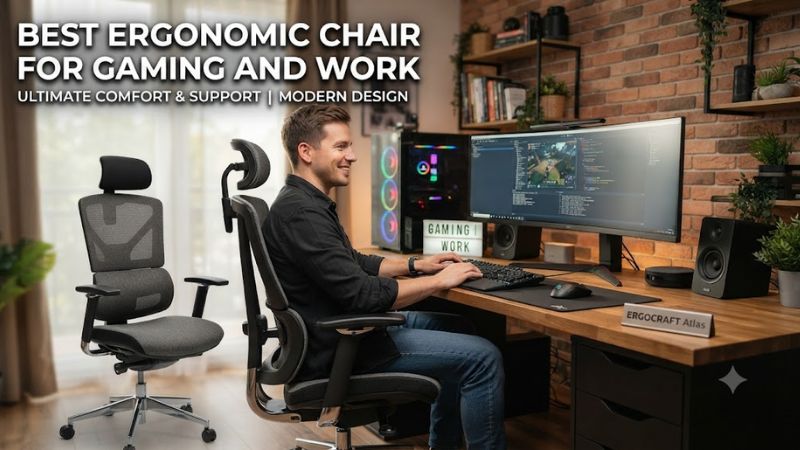
The best ergonomic chair for gaming and work should let the lower-back support match your sitting position instead of forcing one fixed curve. Secretlab’s TITAN Evo uses four-way L-ADAPT lumbar support, while Razer’s Iskur V2 provides adjustable lumbar height and depth. Both approaches are aimed at users who alternate between upright work and reclined gaming.
Independent reviews also identify lumbar adjustment as a major distinction between these gaming-oriented chairs and simpler bucket-style designs. Tom’s Hardware found the Iskur V2’s lumbar mechanism highly configurable, while WIRED noted that its support was substantial but paired with a relatively short, non-adjustable seat depth.
Seat Depth and Body Fit
Seat depth determines how much thigh support you receive without pressing the chair into the back of your knees. Steelcase Leap provides adjustable seat depth and a 15.5–20.5-inch seat-height range, while Branch’s Ergonomic Chair Pro offers adjustable depth and standard or tall cylinders. These options suit users who need finer fit control.
For gaming chairs, body-size compatibility needs closer attention because the adjustment range can be narrower. Secretlab offers Small, Regular, and XL versions, with the current XL rated for users up to 205 cm and 180 kg. Razer lists the Iskur V2 for users from 165–200 cm and up to 136 kg.
Armrests and Desk Position
Armrests matter during mouse and keyboard use because their position affects how your forearms meet the desk. Branch’s Ergonomic Chair Pro has 5D armrests, Steelcase Leap uses 4D arms, and both allow substantially more positioning than a fixed armrest. That makes them useful for people who switch between typing, mouse work, and controller gaming.
The best ergonomic chair for gaming and work should also leave enough room between the armrests and desk edge for your preferred keyboard and mouse position. Razer’s Iskur V2 includes 4D armrests, while Secretlab’s TITAN Evo uses four-direction armrests. Their gaming-focused designs make them particularly relevant when desk work and gaming share the same setup.
Compatibility With Your Body and Room
Chair compatibility is not a PC socket or operating-system requirement; it is primarily a matter of height, weight, seat dimensions, desk height, and available floor space. Branch rates its Pro for users around 5’2″–6’2″ and up to 275 pounds, while Steelcase lists Leap’s weight limit at 400 pounds. Check these limits before choosing a model.
Room conditions matter too. Mesh or breathable upholstery can be preferable in warm spaces, whereas thick foam and leatherette can feel warmer during long sessions. Independent reviews have specifically noted heat concerns with the Razer Iskur V2, while Branch’s Pro offers fine-weave mesh alongside leather and other upholstery choices.
Top Picks for Gaming and Work
These four picks cover different priorities rather than assuming every reader needs the same chair. Prices are US figures visible from current manufacturer or recent independent sources and can change; the table focuses on published specifications, fit, and documented drawbacks instead of hands-on claims from PC Gaming Universe.
| Product | Best For | Key Spec | Compatibility | Watch Out For |
| Secretlab TITAN Evo | Best Overall | 4-way lumbar, 165° recline | S/R/XL; XL up to 205 cm, 180 kg | Firm seat and warmer upholstery options |
| Branch Ergonomic Chair Pro | Best Value | 14 adjustments, 5D arms | 5’2″–6’2″, up to 275 lb | Headrest is optional |
| Steelcase Leap | Best For Work | Adjustable seat depth, LiveBack | Up to 400 lb; 15.5–20.5″ seat height | Office-first design and premium pricing |
| Razer Iskur V2 NewGen | Best For Gaming | Adaptive lumbar, 152° recline | 165–200 cm, up to 300 lb | Seat depth is fixed |
Secretlab TITAN Evo — Best Overall
The best ergonomic chair for gaming and work for a buyer who wants a gaming-oriented design with substantial ergonomic adjustment is the Secretlab TITAN Evo. Its current specification includes four-way L-ADAPT lumbar support, a magnetic memory-foam head pillow, four-direction armrests, three sizes, and a 165-degree recline. The US listing starts at $579.
The main weakness is that the chair’s firm, structured feel will not suit everyone, and the leatherette versions may be less comfortable in warm rooms than breathable mesh. Independent coverage has also noted the substantial size of the chair and its relatively firm seat. Buyers who prefer a lightweight mesh office chair should look elsewhere.
Branch Ergonomic Chair Pro — Best Value
The Branch Ergonomic Chair Pro is the best ergonomic chair for gaming and work for buyers who want an office-first design without moving into Steelcase or Herman Miller pricing. Branch lists it at $499 with 14 ergonomic adjustments, 5D armrests, two-way lumbar adjustment, seat-depth adjustment, forward tilt, and a seven-year warranty.
Its real limitation is gaming-specific support: the headrest is optional, and the chair does not provide the deep recline or racing-style seat structure found on gaming-focused models. WIRED also reported that the headrest can be difficult for shorter users to position. Buyers who frequently lean far back may prefer a more gaming-oriented mechanism.
Steelcase Leap — Best For Work
Steelcase Leap is the best ergonomic chair for gaming and work when the working portion of the day takes priority. Its LiveBack backrest, adjustable lumbar support, seat-depth adjustment, four recline settings, and Natural Glide system are designed around office posture changes. The current US store lists a 400-pound weight limit, 15.5–20.5-inch seat height, and 12-year parts-and-labor warranty.
The trade-off is that Leap looks and feels like an office chair rather than a gaming chair, and it does not offer the deep recline emphasis of the TITAN Evo or Iskur V2. Its value also depends heavily on configuration and pricing. Buyers wanting an unmistakably gaming-oriented chair may find the design less suitable.
Razer Iskur V2 NewGen — Best For Gaming
The best ergonomic chair for gaming and work for users who prioritize gaming features without giving up adjustable support is Razer’s Iskur V2 NewGen. The current Iskur V2 specification lists adaptive lumbar support, 4D armrests, memory-foam head support, a 152-degree recline, and compatibility with users from 165–200 cm and up to 136 kg.
Its real weakness is seat fit: the seat depth is fixed at about 450 mm, and independent reviews have found the cushion relatively short for some users. The NewGen version is listed around $649.99, placing it above the Branch Pro and Secretlab’s entry price. Users who need adjustable seat depth should consider an office-first alternative.
FAQ
The main questions are about whether gaming chairs can handle work, how much lumbar adjustment matters, whether a mesh office chair works for gaming, and what body-size limits mean. Those answers depend on the chair’s actual adjustment range rather than its marketing category, so the specifications above are more useful than the gaming or office label alone.
Is an ergonomic office chair good for gaming?
Yes, an ergonomic office chair can work very well for gaming when its seat depth, lumbar support, armrests, and recline match your posture. Steelcase Leap and Branch Ergonomic Chair Pro are designed around desk work but provide adjustments that also support keyboard, mouse, and controller sessions.
The main difference is recline behavior and styling. Gaming-oriented models such as Secretlab TITAN Evo and Razer Iskur V2 provide deeper recline ranges and integrated head support, while office chairs often emphasize movement and upright desk positioning. Choose according to how you actually sit rather than the product category.
How important is adjustable lumbar support?
Adjustable lumbar support is important because users do not all have the same spinal shape or preferred sitting angle. Secretlab provides four-way lumbar adjustment, Razer provides adjustable lumbar height and depth, and Branch offers two-way lumbar adjustment on the Pro. These mechanisms give more control than a fixed pillow.
More adjustment does not automatically make a chair suitable for every person, however. Seat depth, armrest height, desk height, and backrest shape still affect the final fit. If lumbar support feels intrusive even after adjustment, a different backrest design can be more appropriate than simply adding more adjustment points.
Is mesh better than foam for gaming and work?
Mesh can be preferable in warm rooms because the backrest allows more airflow, while foam seats can provide a more structured or cushioned feel. Branch offers a fine-weave mesh option, whereas Secretlab uses cold-cure foam and Razer uses high-density molded foam, so the materials produce distinctly different seating experiences.
Neither material is automatically superior for every user. A breathable mesh chair can still feel firm, while a foam chair can feel comfortable but warmer during extended use. Independent reviews of the Iskur V2 specifically identified heat management as a drawback, making room temperature an important selection factor.
What size chair should I buy?
Buy according to the manufacturer’s height and weight range rather than choosing a larger chair simply because it looks roomier. Secretlab offers three sizes, Branch lists its Pro for 5’2″–6’2″ and up to 275 pounds, and Razer lists the Iskur V2 for 165–200 cm and up to 300 pounds.
Seat depth is especially important for taller users because insufficient thigh support can make a chair uncomfortable even when its weight rating is adequate. Steelcase Leap provides adjustable seat depth, while the Iskur V2’s 450-mm seat depth is fixed. Check this dimension before choosing between gaming and office designs.
Final Thoughts
The best ergonomic chair for gaming and work is the one whose lumbar support, seat depth, armrests, recline, and size match your actual sitting habits. Secretlab favors gaming versatility, Branch targets adjustable office ergonomics, Steelcase emphasizes work posture, and Razer combines gaming features with substantial lumbar adjustment.