🛒 Best Price Today on Amazon
Prime members get fast, free shipping on everything above, plus member-only deals. New members get a 30-day free trial — cancel anytime.
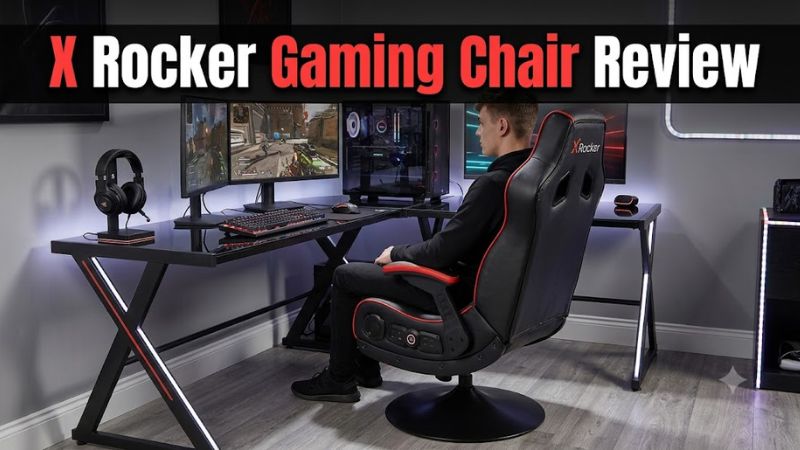
X Rocker chairs appeal to gamers who want built-in speakers, a low-profile seat, and a more immersive console setup without buying a separate audio system. This x rocker gaming chair review examines comfort, sound, compatibility, pricing considerations, and limitations to help you decide whether a rocker or pedestal model suits your gaming space.
How to Choose an X Rocker Gaming Chair
The right X Rocker depends on where you play, how long you sit, and whether integrated audio matters more than adjustable ergonomics. The brand sells several distinct designs, from floor rockers to elevated pedestal chairs and conventional desk chairs. Choosing the correct category matters more than buying a model with the most features.
1. Floor rocker, pedestal, or office chair?
Floor rocker
A floor rocker sits close to the ground and moves backward as you lean. This design suits console gaming in bedrooms, living rooms, and smaller entertainment spaces where a conventional desk chair would feel oversized. Its low seating position can be inconvenient for taller players or anyone who needs to sit at a standard-height desk.
Pedestal chair
A pedestal model raises the seat above the floor and generally offers a more elevated lounging position. It can work well for television gaming, but you should check the individual model’s swivel, recline, adjustment, and clearance features rather than assuming every pedestal chair offers the same movement.
Office-style chair
An office-style gaming chair is the more practical option if you play at a computer desk for several hours. Height adjustment and compatibility with a desk matter more here than integrated speakers. Check the precise model because X Rocker’s conventional gaming chairs do not necessarily share the audio features of its rocker range.
2. Comfort and body fit
An X Rocker can feel comfortable for relaxed gaming because its seating position encourages lounging rather than the upright posture of a desk chair. However, comfort depends on seat width, backrest height, padding, and your body proportions. A low rocker may be awkward if you have long legs or difficulty getting up from floor level.
For extended PC sessions, prioritize adjustable seat height, lumbar support, and the ability to position your feet comfortably. Floor rockers typically provide fewer ergonomic adjustments than conventional office chairs. If you regularly work, study, and game at one desk, compare an office chair before choosing a rocker solely for its built-in sound system.
3. Built-in audio and connectivity
Many X Rocker audio models integrate speakers and, depending on the model, a subwoofer, wireless audio equipment, or Bluetooth connectivity. These features can bring game sound closer to your seating position without requiring separate desktop speakers. They do not automatically provide the positional accuracy, microphone support, or isolation of a dedicated gaming headset.
Connection requirements vary substantially between models. Some chairs use analog audio cables, while others rely on wireless transmitters or Bluetooth. Before buying, check the manual for your exact model and identify the audio output available on your PC, console, or television. HDMI video connectivity alone does not mean a chair can receive sound directly.
4. Price, durability, and long-term value
The price of an X Rocker varies by design, audio configuration, age, and retailer. Compare the complete package rather than the advertised discount: a cheaper floor rocker may be suitable for occasional console play, while an audio-equipped pedestal model costs more because it combines seating and sound hardware.
Pay attention to warranty coverage, return terms, replacement cables, and the condition of the audio controls. Owner discussions report mixed experiences with electronic components and long-term wear, although individual accounts cannot establish a product-wide failure rate. For a used chair, verify that the audio system works and that the correct power supply and connection cables are included.
X Rocker Gaming Chair Review: Features, Value, and Verdict
X Rocker is best understood as a gaming furniture brand rather than one specific chair. Its floor rockers prioritize compact lounging, while audio-equipped models add built-in speakers and, on selected versions, a subwoofer or wireless connectivity. The table below compares representative designs and explains which type makes sense for different gaming setups.
Model comparison
| Model or type | Best For | Key Spec | Compatibility | Watch Out For |
| Surge floor rocker | Compact console gaming | Two headrest speakers; folding design | Supported consoles, PC, TV; confirm connection method | Low seating position |
| G-Force RGB floor rocker | Gaming room aesthetics | Two speakers, backrest subwoofer, RGB lighting | Wired or wireless options listed by the seller | More features mean more components |
| Geist 2.0 floor rocker | Simpler wired audio | Two speakers; 3.5 mm jack | Devices with compatible analog audio output | No transmitter included |
| Legend 2.1 pedestal | Elevated console gaming | Two speakers, subwoofer, Bluetooth, vibration | Verify the model’s Bluetooth and console requirements | Larger footprint and limited ergonomic adjustment |
Specifications vary by market and revision. The Surge and G-Force descriptions come from current US-facing product listings, while the Geist and Legend specifications come from the manufacturer’s UK listings. These are different regional configurations, so check the exact model sold in your market before purchasing.
X Rocker Surge: Best for compact gaming spaces
The Surge is a floor rocker designed for users who want integrated sound without a full-size gaming desk chair. Its listed features include two headrest-mounted speakers, a folding structure, and a padded faux-leather seat. The ability to fold it away makes the design attractive for smaller rooms where permanent seating takes up valuable floor space.
Its main limitation is the low seating position. It is better suited to gaming in front of a television than sitting at a conventional PC desk. Although the product listing describes multiple connection options, verify the actual regional version and supplied cables. Choose another chair if you need adjustable height or a more upright working posture.
X Rocker G-Force RGB: Best for a feature-focused setup
The G-Force RGB adds lighting and a more substantial integrated sound arrangement, including two speakers and a subwoofer in the backrest. It suits players who want their chair to contribute to the look and sound of a gaming room rather than function as a basic seat. The listed padded upholstery and rocking design support its entertainment-focused purpose.
However, RGB lighting and a subwoofer do not necessarily improve comfort or audio clarity enough to justify a higher price. The chair still occupies a low position, and its integrated electronics introduce additional components that can eventually need maintenance. Compare the complete package with a simpler rocker and separate speakers before paying extra for lighting.
X Rocker Geist 2.0: Best for straightforward wired audio
The Geist 2.0 is a simpler floor rocker with two speakers and a wired 3.5 mm audio connection. Its listed dimensions are 42 cm wide, 75 cm deep, and 64 cm high, with a seat width of 42 cm. The manufacturer lists a maximum user weight of 80 kg, making the exact specification particularly important for buyers checking fit and suitability.
Its straightforward connection can reduce the need to configure wireless audio, but the analog input limits how you connect it to modern equipment. Some televisions and consoles may require a compatible audio output or adapter. This model is worth considering for users whose setup already supports analog audio, but its listed weight limit rules it out for anyone exceeding that specification.
X Rocker Legend 2.1: Best for elevated console seating
The Legend 2.1 is a pedestal chair with two speakers, a subwoofer, Bluetooth connectivity, vibration functionality, and fixed padded armrests. The manufacturer’s listing gives overall dimensions of 65 cm wide, 78 cm deep, and 102.5 cm high. Its elevated design is a better match for users who prefer sitting above floor level while playing console games.
The trade-off is that a pedestal chair takes up more room and is not automatically a substitute for an adjustable office chair. Fixed armrests and limited ergonomic customization can make it less suitable for long desk sessions. Check the required connection method for your particular console and the available space around the pedestal before deciding.
Is an X Rocker Gaming Chair Worth the Money?
An X Rocker can be worthwhile if you specifically want a low-profile entertainment chair with integrated audio. It is less compelling if your main priority is ergonomic adjustment, competitive headset audio, or comfortable all-day desk use. The following considerations help establish whether the features justify the purchase price and which alternatives deserve consideration.
Strengths: Integrated entertainment features
The main advantage is combining seating and audio in one product. Depending on the model, built-in speakers, a subwoofer, Bluetooth, vibration, and lighting can reduce the need for separate entertainment accessories. A floor rocker can also be easier to store than a conventional gaming chair when the room serves multiple purposes.
These advantages are most relevant to casual console players, younger gamers, and people who enjoy gaming from a relaxed position. They matter less to players who already own good desktop speakers or a headset with a microphone. For those buyers, the extra electronics may offer less practical value than improved seat adjustment or better padding.
Weaknesses: Ergonomics and long-term reliability
Floor rockers do not offer the height adjustment and desk alignment that many PC gamers need. Body fit also varies: a chair that feels spacious to one person may have a short backrest or uncomfortable seat depth for another. Before purchasing, compare the seat dimensions with your own measurements rather than relying on promotional descriptions of comfort.
Owner reports also show that experiences with electronic components can vary, including complaints about connections and audio functionality. Individual reports are not enough to calculate failure rates, but they highlight why return terms and replacement-part availability matter. Inspect the audio controls, cables, upholstery, and folding or reclining mechanism when buying secondhand.
Price and value: What should you pay?
There is no single price for an X Rocker gaming chair because the range includes basic floor rockers, feature-rich audio models, and elevated pedestal designs. Prices also change with retailer, stock, and promotions. A meaningful comparison should use the exact model number and configuration rather than a brand-wide average or an advertised discount alone.
As a practical buying rule, pay extra only for features you will use. Bluetooth may simplify your setup if your devices support it; a subwoofer may matter if you want stronger bass; and RGB lighting is primarily an aesthetic choice. If you rarely use built-in audio, a simpler chair paired with separate speakers or a headset may provide better value.
Alternatives: When another chair makes more sense
A conventional office chair is usually a better choice for PC gamers who spend long periods at a desk. Height adjustment, seat depth, lumbar support, and armrest positioning can be more important than integrated sound. If you already own speakers or a gaming headset, you can avoid paying for audio hardware built into the chair.
A traditional pedestal or reclining chair may also suit players who want an elevated position without the restrictions of a floor rocker. Compare actual dimensions, adjustment options, material, warranty, and return costs. Do not assume a chair is suitable for extended sessions simply because its product description uses the terms gaming or ergonomic.
FAQ
Is an X Rocker gaming chair compatible with PS5 and Xbox Series X?
Yes, selected X Rocker models can work with modern consoles, but compatibility depends on the chair’s audio connections. A model with a 3.5 mm input may need a compatible controller, television output, or audio adapter. Bluetooth-equipped versions have different requirements. Check the manual for the exact model and console before purchasing.
Is an X Rocker gaming chair comfortable for long gaming sessions?
It can be comfortable for relaxed gaming, but comfort over long sessions depends on your body and the chair design. Floor rockers offer less adjustment than most office chairs, so seat height, back support, and leg position deserve attention. If you regularly play for several hours at a desk, prioritize an adjustable chair that fits your posture.
Does an X Rocker gaming chair need a separate power supply?
Some models need external power for their audio or lighting systems, while the requirements vary by model. Check the supplied power adapter, connection diagram, and manual before connecting the chair. Do not assume a USB cable alone powers every feature, and use only a compatible replacement adapter if one is required.
Is an X Rocker better than a regular gaming chair?
An X Rocker is a better fit when integrated audio and relaxed console seating are your priorities, while a conventional gaming or office chair is often more practical for desk use. Compare adjustment options, body fit, audio needs, and warranty coverage before deciding. Neither chair type is automatically better for every gamer.
Final Thoughts
This x rocker gaming chair review finds that the brand makes the most sense for console players who want compact seating and built-in entertainment features. Its main compromises are limited ergonomic adjustment and model-specific audio requirements. Before buying, measure your space, verify console connectivity, check the weight limit, and compare the return policy against a conventional office chair.