🛒 Best Price Today on Amazon
Prime members get fast, free shipping on everything above, plus member-only deals. New members get a 30-day free trial — cancel anytime.
If you want the best chair for streaming on camera, prioritize how the chair looks inside your frame, how well its size fits your body, and whether its adjustments let you maintain a consistent posture. For PC Gaming Universe, the current shortlist focuses on manufacturer specifications plus independent reviews, not detailed research.
How to Choose a Streaming Chair
The best chair for streaming on camera is not automatically the most expensive gaming chair because camera framing changes which features matter. A clean silhouette, controlled recline, suitable seat height, and upholstery that fits your lighting can matter as much as lumbar adjustment. A chair that looks oversized behind a compact desk can dominate the frame, while a bright logo or contrasting color can become a visual distraction.
Camera Appearance and Upholstery
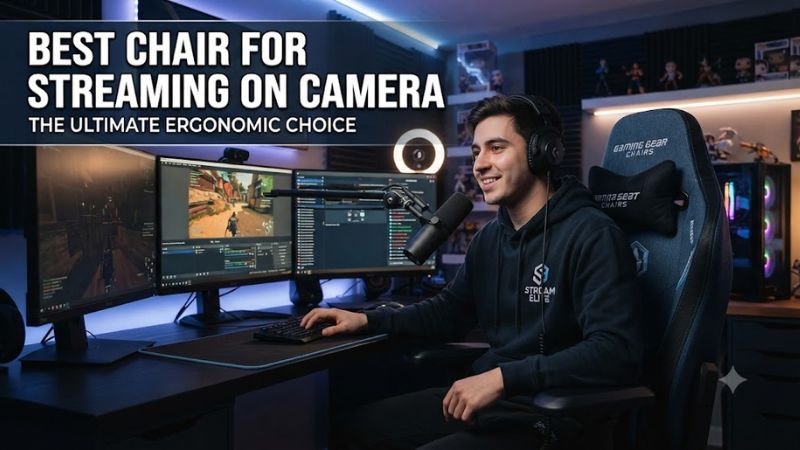
For an on-camera setup, the best chair for streaming on camera should complement the desk, wall, lighting, and camera crop rather than compete with them. Fabric can produce a softer visual texture, while leatherette gives a more defined gaming-chair outline. Dark upholstery is generally easier to integrate into varied backgrounds, but the final appearance still depends on key lighting, exposure, and how tightly the camera frames the streamer.
Secretlab offers the TITAN Evo in NEO Hybrid Leatherette and SoftWeave Plus Fabric, while Corsair offers the TC100 Relaxed in fabric and leatherette configurations. Those options provide different visual textures without requiring a separate chair cover. The TITAN Evo also uses a magnetic head pillow instead of a visible strap, which can keep the rear of the chair visually cleaner when the camera sees the upper backrest.
Fit and Body Compatibility
A streaming chair needs to match the user’s height and weight range before appearance or extra features enter the decision. Secretlab currently lists Small, Regular, and XL TITAN Evo sizes, with recommended height ranges extending from under 169 cm for Small through 181–205 cm for XL. The Regular model covers 170–189 cm, while XL supports 80–180 kg within its stated recommended range.
Other chairs use different fit ranges. Razer lists the Enki for users from 166.5–204 cm and under 136 kg, while Corsair lists the TC100 Relaxed for users up to 188 cm and 120 kg. Herman Miller lists the Vantum at a 457–559 mm seat-height range, with a 508 mm seat width and 136 kg maximum capacity. These figures make compatibility a measurable requirement rather than a styling preference.
Adjustments for Consistent Framing
The best chair for streaming on camera should let you reproduce a comfortable sitting position after breaks, because small changes in seat height or recline can alter how your shoulders and face sit relative to the camera. Secretlab’s TITAN Evo has a multi-tilt mechanism, 85–165° recline, 4D armrests, and four-way L-ADAPT lumbar support. These controls provide more positioning options than a basic fixed gaming chair.
The Vantum takes a different ergonomic approach, using an adjustable headrest, thoracic support pad, adjustable lumbar support, seat-depth adjustment, and 3D arms. Razer’s Enki provides 4D armrests and approximately 152° of recline, but its manufacturer specifications list no adjustable lumbar cushion. Corsair’s TC100 Relaxed offers 90–160° recline but uses 2D armrests, so its adjustment range is simpler.
Desk and Room Compatibility
The best chair for streaming on camera also needs enough physical space around the desk and enough clearance behind it for the camera composition. A chair with a wide base, large backrest, or pronounced side bolsters can occupy more of the visible frame than expected. Measure the desk opening, camera distance, and available rear clearance before buying, especially when using a compact streaming room.
Vantum measures approximately 724–775 mm wide and 686–737 mm deep, while Razer lists the Enki at approximately 670 mm wide and 680 mm deep. Corsair’s TC100 Relaxed has a 540 mm seat-base width and a 59.5 cm backrest width. These are not interchangeable dimensions, so room size and camera distance should be checked against the manufacturer’s measurements rather than judged from product photographs.
Top Picks for Streaming on Camera
For this roundup, the best chair for streaming on camera depends on the specific priority: visual presentation, ergonomic adjustability, price, or compatibility with a wider range of body sizes. The four models below are current products with specifications that can be checked against manufacturer documentation. Independent reviews are used for practical weaknesses, while PC Gaming Universe does not claim detailed research.
| Product | Best For | Key Spec | Compatibility | Watch Out For |
| Secretlab TITAN Evo | Best Overall | 4-way lumbar, 165° recline | S/R/XL; up to 205 cm and 180 kg | Firm seat; large visual footprint |
| Corsair TC100 Relaxed | Best Value | 90–160° recline, 54 cm seat | Up to 188 cm, 120 kg | 2D armrests |
| Herman Miller Vantum | Best For Ergonomics | Adjustable lumbar, thoracic support | 136 kg capacity; 457–559 mm seat height | Premium pricing and less gaming-focused styling |
| Razer Enki | Best For Taller Streamers | 4D arms, 152° recline | 166.5–204 cm, under 136 kg | No adjustable lumbar cushion |
Secretlab TITAN Evo — Best Overall
The TITAN Evo is a strong all-round choice for creators who want a recognizable gaming-chair appearance without giving up extensive adjustment. The current model offers four-way L-ADAPT lumbar support, 4D armrests, a magnetic memory-foam head pillow, a multi-tilt mechanism, and 85–165° recline. It is available in Small, Regular, and XL sizes, making fit selection part of the purchase rather than an afterthought.
The main weakness is its firm seating. Tom’s Hardware’s review of the TITAN Evo described the seat as firm and noted that some users may prefer more give, while its later NanoGen review also described the newer chair as supportive but firm. The TITAN Evo should therefore suit viewers who like a structured gaming-chair appearance and firm support; people seeking a softer office-chair feel should consider another design.
Corsair TC100 Relaxed — Best Value
The TC100 Relaxed is a useful value option when the streamer’s budget matters more than maximum adjustment range. Corsair specifies a 54 cm seat width, 50 cm seat depth, 90–160° recline, 2D armrests, a Class 4 gas lift, and a 120 kg weight capacity. Corsair also recommends it for users up to 188 cm, making the stated compatibility relatively straightforward to check before purchase.
Its real weakness is adjustment flexibility. PC Gamer’s review identifies the 2D armrests as a limitation, while PCGamesN also notes that taller users can find the neck pillow less useful. The chair makes sense for streamers who want a broad, relaxed-looking seat at a lower price tier; it is less suitable for buyers who depend on highly adjustable arm positioning during desk-heavy work.
Herman Miller Vantum — Best For Ergonomics
The Vantum targets an ergonomic appearance rather than the traditional racing-chair silhouette, which can work well when the camera frame also shows the desk and room. Its design includes a suspension backrest, adjustable lumbar support, thoracic support, adjustable headrest, sliding seat depth, and 3D adjustable arms. The chair has a 136 kg maximum capacity and a 457–559 mm seat-height range.
The compromise is its premium positioning and less overt gaming aesthetic. That is not necessarily a problem on camera, but it changes the visual character of the setup compared with a TITAN Evo or Enki. A streamer who wants a conventional gaming-chair identity should look elsewhere; someone whose camera background favors a cleaner office or creator-studio appearance can consider the Vantum’s design and adjustment system.
Razer Enki — Best For Taller Streamers
The Razer Enki is particularly relevant when the streamer needs a chair covering a relatively tall user range. Razer specifies a recommended height of 166.5–204 cm and a maximum load below 136 kg. It also has 4D armrests, a 525 mm seat depth, an 835 mm backrest height, an aluminum wheelbase, and approximately 152° of recline.
The major limitation is lumbar adjustment: Razer’s current specifications list no adjustable lumbar cushion or back support system. Independent coverage has praised the Enki’s comfort, but that does not change the feature gap for users who want tunable lumbar positioning. It is a sensible fit-oriented option for taller creators who like its appearance and need 4D arms, but not for buyers whose priority is adjustable lower-back support.
FAQ About Streaming Chairs
The best chair for streaming on camera depends on body fit, camera framing, comfort preferences, and the amount of adjustment needed rather than one universal chair specification. The models above cover different priorities, so the deciding factors should be measurable compatibility, room dimensions, upholstery, and the adjustments you will actually use.
Does a Streaming Chair Need To Look Like a Gaming Chair?
No, a streaming chair does not need a racing-style gaming design to work well on camera. The Vantum demonstrates an alternative approach with an ergonomic suspension backrest, headrest, thoracic support, and office-oriented proportions. A conventional task-chair silhouette can therefore fit a streaming setup when the creator wants the chair to blend into the room instead of becoming a dominant visual element.
A gaming chair can still make sense when the visual identity of the channel is part of the setup. The TITAN Evo, Enki, and TC100 Relaxed all have more recognizable gaming-chair forms, but their shapes differ significantly. Camera distance, lens choice, background color, and lighting can make the same chair appear much larger or more prominent than it does in manufacturer photographs.
Is a Headrest Important for Streaming?
A headrest is useful when your normal camera posture includes leaning back, but it is not required for every streaming setup. The TITAN Evo includes a magnetic memory-foam head pillow, Vantum has an adjustable headrest, and Enki includes a memory-foam head cushion. These designs provide different approaches to upper-body support while preserving the ability to recline.
The camera itself changes the calculation. If your frame is tightly cropped around the shoulders and face, a tall headrest may barely appear and therefore have little visual impact. A wider camera shot can expose the entire backrest, making its shape, color, and headrest more noticeable. Choose the support feature based on how you actually sit rather than treating it as a mandatory streaming feature.
Is Fabric Better Than Leatherette for Camera Use?
Neither upholstery type is universally better for camera use because the choice depends on appearance, room temperature, maintenance, and lighting. Secretlab offers both NEO Hybrid Leatherette and SoftWeave Plus Fabric on the TITAN Evo, while Corsair offers fabric and leatherette versions of the TC100 Relaxed. This gives creators practical options for matching the rest of the setup.
Fabric can provide a softer visual texture, while leatherette creates a smoother surface that can be easier to wipe clean. PC Gamer’s TC100 coverage lists both fabric and leatherette availability, while Tom’s Hardware noted the TITAN Evo’s leatherette is easy to maintain and its fabric option has a different tactile character. Lighting remains important because glossy surfaces can reflect a key light differently from matte fabric.
How Much Recline Does a Streaming Chair Need?
A streaming chair does not need an extreme recline angle if you normally sit upright while speaking to the camera. What matters more is having enough adjustment to change posture between active desk work, gaming, and relaxed viewing without changing your entire setup. The TITAN Evo reaches 165°, TC100 Relaxed reaches 160°, and Enki reaches approximately 152°.
For a creator setup, consistent positioning can matter more than the maximum number. A chair should allow you to set a repeatable seat height, back angle, and arm position while keeping your face inside the intended camera composition. If you rarely recline, paying specifically for a very large recline range may provide less practical value than spending that budget on a better-fitting size or more useful arm and lumbar adjustments.
Final Thoughts
The best chair for streaming on camera depends on the visual style and physical requirements of your setup. TITAN Evo offers broad size and adjustment options, TC100 Relaxed targets value, Vantum emphasizes ergonomic positioning, and Enki covers taller users. Check fit, dimensions, upholstery, and real weaknesses before choosing.