🛒 Best Price Today on Amazon
Prime members get fast, free shipping on everything above, plus member-only deals. New members get a 30-day free trial — cancel anytime.
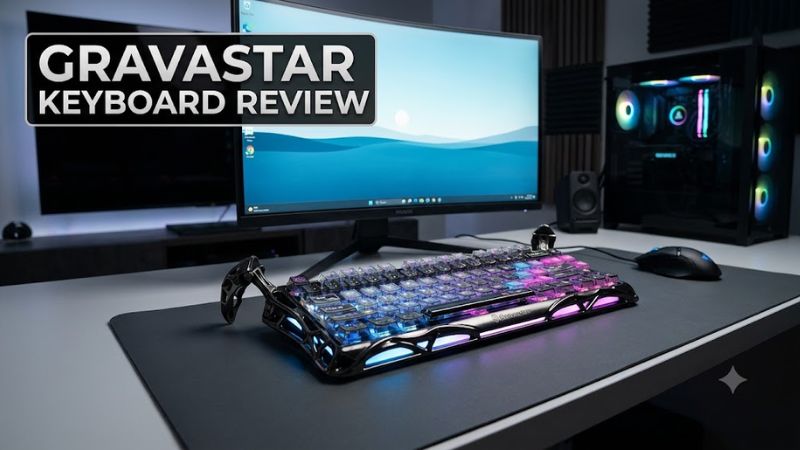
GravaStar keyboards stand out for their futuristic designs, mechanical switches, and customizable RGB lighting, but their premium prices demand careful consideration. This gravastar keyboard review focuses on the Mercury K1 Pro, examining its specifications, gaming suitability, comfort, connectivity, and value to help you decide whether it belongs on your desk.
How to Choose a GravaStar Keyboard
Choosing a GravaStar keyboard means balancing design, typing feel, gaming requirements, and price. The Mercury K1 Pro targets buyers who want a distinctive mechanical keyboard with wireless connectivity, while the Mercury K1 and K1 Lite offer alternatives with different construction and pricing. Understanding those differences helps you avoid paying for features you will rarely use.
1. Switches and typing feel
Mechanical switches determine how keys respond, how much force they require, and how they sound. The Mercury K1 Pro uses GravaStar and Kailh linear switches, with the Speedy Mint version specified at 45 grams of actuation force, 1.2 mm of pre-travel, and 3.5 mm of total travel. Linear switches move without a tactile bump, making them suitable for users who prefer a smooth keystroke.
Switch preferences remain subjective. Linear switches can work well for fast repeated inputs in games, but they do not provide the pronounced tactile feedback of many alternatives. If you spend long sessions typing, consider whether you prefer a smooth or tactile response before purchasing. A keyboard’s sound profile and keycap material also influence the experience.
2. Layout and desk space
The Mercury K1 Pro uses a compact 75% layout with 79 keys and a control knob. It retains a function row and dedicated arrow keys while taking up less space than a full-size keyboard with a numeric keypad. That arrangement leaves more room for mouse movement, which can benefit players who use low mouse sensitivity in competitive games.
The trade-off is the missing dedicated numeric keypad and the need to access some functions through key combinations. Its sculpted frame and claw-shaped feet also make it visually and physically different from conventional compact keyboards. Measure your available desk space and check the keyboard’s full dimensions before ordering, especially if your setup has a narrow keyboard tray.
3. Wired and wireless connectivity
The Mercury K1 Pro supports USB-C wired operation, Bluetooth, and 2.4 GHz wireless through its included receiver. Bluetooth is useful for everyday typing and compatible devices, while the 2.4 GHz connection is generally the more appropriate wireless option for gaming when responsiveness matters. Wired operation is another practical choice for players who prefer not to rely on a wireless connection.
Before buying, check your computer’s available USB ports and whether you can conveniently connect the receiver. Bluetooth availability also depends on the host device. Although the keyboard supports Windows and macOS, its software features and key assignments may differ by operating system, so confirm the current software support if customization is essential.
4. Price and long-term value
GravaStar positions its keyboards as design-focused mechanical peripherals, so part of the asking price pays for distinctive construction and lighting rather than gaming features alone. The Mercury K1 Pro’s aluminum-alloy exoskeleton, gasket-mounted structure, and dual RGB lighting systems appeal to buyers who want their keyboard to stand out as part of a gaming setup.
Value depends on your priorities. If you mainly want adjustable actuation, Hall effect switches, or advanced competitive-gaming features, compare the specifications of other keyboards at the same price. If you value wireless connectivity, an unusual appearance, and a substantial mechanical build, the Mercury K1 Pro becomes a more compelling option.
GravaStar Mercury K1 Pro Review: Features, Price, and Value
The Mercury K1 Pro is best understood as a premium mechanical keyboard that combines distinctive industrial styling with practical gaming and productivity features. Its aluminum-alloy frame, 75% layout, wireless connectivity, and cushioned mounting structure make it versatile, but its price and unusual appearance will not suit every buyer. The verdict depends on whether those extras matter to you.
Design and build quality
Product reference: GravaStar Mercury K1 Pro
The Mercury K1 Pro has an aluminum-alloy exoskeleton, sculpted supports, and two independent RGB lighting systems. Its futuristic frame looks more like a science-fiction prop than a conventional keyboard. The exposed structure and distinctive feet are central to its appeal, so this is a particularly strong candidate for buyers who want their peripherals to be a visible part of their setup.
The construction also adds weight: GravaStar lists the Ghost Silver version at approximately 2.60 pounds. Its gasket-mounted acoustic structure incorporates five layers of foam, intended to reduce vibration and shape the typing sound. The limitation is aesthetic as much as practical: the elaborate frame may clash with minimalist desks, and its weight makes frequent travel less convenient.
Specifications and compatibility
The manufacturer’s published specifications describe a compact keyboard with multiple connection modes and a rechargeable battery. The exact finish and keycap configuration can vary by edition, so verify the listing for the specific model you intend to purchase.
| Specification | Mercury K1 Pro |
| Layout | 75%, 79 keys plus control knob |
| Frame | Aluminum-alloy exoskeleton |
| Switches | GravaStar x Kailh Speedy Mint linear on the listed Ghost Silver model |
| Actuation force | 45 gf |
| Pre-travel / total travel | 1.2 mm / 3.5 mm |
| Connectivity | USB-C wired, Bluetooth, 2.4 GHz wireless |
| Battery capacity | 8,000 mAh |
| Operating systems | Windows and macOS |
| Current listed price | $199.95 USD for Ghost Silver |
| Warranty | 12-month limited hardware warranty |
Specifications and price are from GravaStar’s official Mercury K1 Pro product listing, checked October 19, 2026. Prices may vary by edition, retailer, and promotion.
For a typical Windows gaming PC, setup requires a compatible USB port for wired use or the receiver, or Bluetooth support for Bluetooth operation. No special CPU, GPU, or motherboard upgrade is required simply to use the keyboard. macOS is listed as supported, although you should verify software customization and key-mapping support for your intended operating system before purchasing.
Gaming performance and everyday typing
The Mercury K1 Pro’s linear switches, compact layout, and 2.4 GHz wireless option make it suitable for everyday gaming, from action-adventure titles to multiplayer shooters. GravaStar specifies 45 gf actuation force and 1.2 mm pre-travel for the listed Speedy Mint switches. These figures describe switch behavior, not a guarantee of better in-game performance or a measurable advantage over competing keyboards.
Independent reviews provide useful context. Tom’s Guide reported responsive typing and satisfactory casual gaming performance in its Mercury K1 Pro review, while noting that the small built-in screen could not be personalized. That is a reviewer’s assessment, not a benchmark proving superiority over rival keyboards. Buyers focused on competitive features should check for explicit support for adjustable actuation, rapid trigger, and other specialized functions rather than assuming the premium price includes them.
Tom’s Guide
+1
Battery, lighting, and software
An 8,000 mAh battery gives the Mercury K1 Pro substantial stated capacity for a wireless keyboard. However, actual runtime depends on lighting intensity, connection mode, and usage. GravaStar currently advertises up to 228 hours for the listed Ghost Silver edition, so buyers should not treat maximum runtime as a guaranteed everyday figure. Frequent RGB use may increase charging frequency.
The dual RGB systems provide visual customization, and the control knob makes audio adjustments convenient during games or desktop work. GravaStar also advertises key remapping and macro customization through its GS HUB Web Driver. The practical drawback is that software support and configuration workflows may not be as polished as buyers expect at this price. Confirm the available functions before choosing it for a complex macro setup.
Strengths, weaknesses, and alternatives
The strongest reasons to buy the Mercury K1 Pro are its distinctive construction, versatile connectivity, and compact mechanical layout. The aluminum frame and lighting give it a recognizable identity, while the function row and arrow keys preserve useful controls without taking up the space of a full-size keyboard.
Its main disadvantages are price, weight, and a design that prioritizes appearance over understated practicality. The keyboard also lacks the dedicated numeric keypad found on full-size models. If you want more competitive-specific input features, a conventional gaming keyboard with clearly documented actuation controls may be a better fit. If the visual design appeals to you but the price does not, the Mercury K1 Lite is worth comparing.
FAQ
Is the GravaStar Mercury K1 Pro worth buying?
The Mercury K1 Pro is worth considering if you value distinctive design, mechanical typing, and tri-mode connectivity more than competitive-specific features. At the listed Ghost Silver price of $199.95, it is a premium purchase rather than an obvious budget choice. Compare its features with similarly priced keyboards before paying extra for its appearance.
Does the GravaStar Mercury K1 Pro work with Windows and Mac?
Yes, GravaStar lists Windows and macOS compatibility for the Mercury K1 Pro. You can use its supported wired or wireless connection options, but confirm that the software customization features you need work with your particular operating system. Compatibility with basic keyboard input does not automatically mean every configuration tool works identically on both platforms.
Is the GravaStar keyboard good for competitive gaming?
The Mercury K1 Pro is suitable for general gaming, but it is not automatically the best choice for competitive play. Its linear switches and 2.4 GHz wireless connection support responsive input, while specialized features such as rapid trigger should be verified separately. Players who prioritize competitive controls should compare documented features rather than relying on appearance or price.
What is the difference between the Mercury K1 Pro and K1 Lite?
The Mercury K1 Pro uses an aluminum-alloy frame and an 8,000 mAh battery, whereas the K1 Lite has a polymer case and a smaller battery. GravaStar lists the K1 Lite at $89.95 for the Transparent Black edition, compared with $199.95 for the Ghost Silver K1 Pro. Those prices were checked on October 19, 2026, and can change.
Final Thoughts
This gravastar keyboard review finds the Mercury K1 Pro most appealing for gamers who want distinctive styling, a compact layout, and flexible connectivity in one premium peripheral. Its price is harder to justify if competitive-specific controls matter more than appearance. Compare the K1 Lite and competing mechanical keyboards, then choose the model that fits your budget and gaming priorities.