🛒 Best Price Today on Amazon
Prime members get fast, free shipping on everything above, plus member-only deals. New members get a 30-day free trial — cancel anytime.
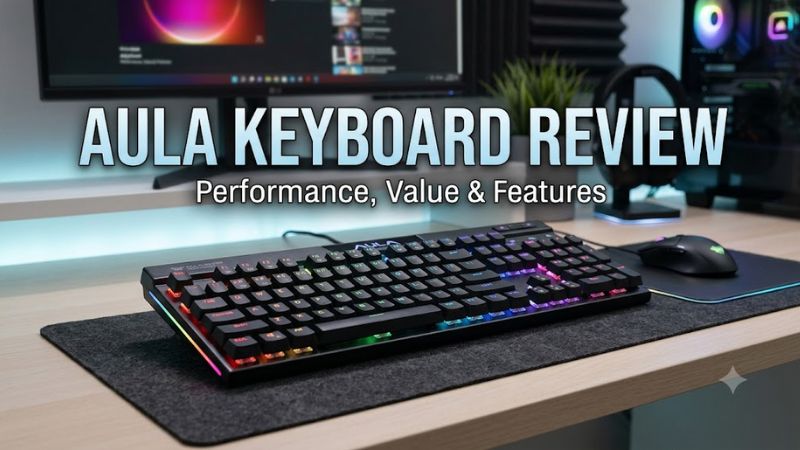
If you want a mechanical keyboard for gaming and everyday typing without spending premium prices, aula keyboard review searches often lead to the AULA F75. This compact wireless keyboard combines hot-swappable switches, RGB lighting, and three connection modes. Here’s what buyers should know about its specifications, limitations, and value.
How to Choose an AULA Keyboard
AULA sells several mechanical keyboard models, so the right choice depends on your desk space, preferred layout, switch feel, and connectivity needs. The F75 is a useful starting point for most gamers because it balances compact dimensions with dedicated arrow keys and a function row. However, buyers who need a number pad or advanced firmware customization should compare alternatives before purchasing.
1. Choose the Right Keyboard Layout
The AULA F75 uses a compact 75% layout that retains the function row, arrow keys, and several navigation keys while removing the dedicated number pad. This arrangement leaves more room for mouse movement, which can be useful in competitive shooters and other games that require broad mouse sweeps.
The trade-off is that some navigation keys occupy unfamiliar positions, and entering numbers takes longer if you rely on a separate numeric keypad. If your work involves spreadsheets, accounting, or frequent numerical entry, a larger AULA model such as the F99 may be a better fit.
2. Understand the Switch Options
Switch selection affects how a keyboard feels, how much force each key requires, and the sound produced during typing. Many F75 configurations use linear switches, which move without the tactile bump associated with tactile switches. The precise switch depends on the variant and seller, so check the product listing rather than assuming every F75 has identical components.
For gaming, linear switches appeal to players who prefer smooth key travel and consistent resistance. Tactile switches may suit people who want physical feedback while typing. Neither type automatically makes someone a better player, and the F75’s hot-swap design allows compatible mechanical switches to be replaced without soldering.
3. Check Connectivity and Software
The standard F75 offers three connection methods: USB-C wired mode, 2.4 GHz wireless through a USB receiver, and Bluetooth. Wired mode avoids battery management, while 2.4 GHz is generally the more suitable wireless option for gaming when compared with Bluetooth’s potentially higher latency. Actual performance depends on the configuration and operating environment.
AULA also provides configuration software for functions such as RGB lighting and key assignments, although support and features vary by model. Independent reviews have reported limitations with the software, including Windows-focused support. If you use macOS or Linux, confirm which functions work on your operating system before relying on custom mappings or macros.
4. Set a Realistic Budget
The F75 became popular because it combines features commonly associated with more expensive mechanical keyboards. An independent Parka Blogs review reported a price of around $50 on AliExpress in December 2025, but that figure is historical rather than a guaranteed current US retail price. Seller, switch, color, and bundle differences can change the total.
Compare the final checkout price, shipping costs, warranty terms, and return policy before buying. A cheaper marketplace listing may offer less convenient support than an established US retailer. If the F75 approaches the price of better-equipped competitors, reconsider whether its particular layout, sound profile, and wireless features justify the difference.
AULA F75 Keyboard Review: Features, Value, and Drawbacks
The AULA F75 is a budget-oriented wireless mechanical keyboard aimed at gamers and everyday users who want a customizable typing experience. Its gasket-mounted construction, hot-swappable switches, and compact layout make it more versatile than a basic membrane keyboard. However, its plastic case, software limitations, and missing number pad matter when comparing it with competing models.
AULA F75 Specifications at a Glance
Specifications can vary by revision, switch option, and retailer listing. Confirm the exact configuration before ordering.
| Specification | AULA F75 |
| Keyboard type | Mechanical |
| Layout | Compact 75% |
| Key count | Commonly listed as 80 or 81, depending on variant |
| Mounting | Gasket-style structure |
| Switches | Configuration-dependent mechanical switches |
| Hot-swappable | Yes |
| Connectivity | USB-C, 2.4 GHz wireless, Bluetooth |
| Lighting | RGB |
| Battery | 4,000 mAh in reviewed configurations |
| Number pad | No |
| Software | AULA configuration software; compatibility varies |
| Price | Varies by seller and configuration |
The 4,000 mAh battery specification comes from reviewed F75 configurations and should not be assumed to apply to every revision. Advertised battery runtime also depends on RGB brightness, connection mode, and usage. These specifications describe the product’s features, not a guarantee of identical performance across all variants.
What Makes the F75 Good for Gaming?
The F75’s compact layout gives the mouse more room without removing the dedicated arrow keys or function row. This is particularly helpful for players who use low mouse sensitivity in first-person shooters. Its mechanical switches also provide a different physical feel from the membrane keyboards bundled with many inexpensive desktop systems.
The 2.4 GHz receiver provides a practical wireless connection for gaming, while USB-C gives you a wired alternative. However, the available specifications alone do not establish a particular latency figure or prove that the F75 outperforms competing gaming keyboards. Buyers who prioritize competitive performance should look for independent latency measurements using the exact model and connection mode.
Typing Feel, Build Quality, and Sound
The gasket-mounted structure is one of the F75’s main attractions. It uses internal cushioning to create a softer, slightly springy typing feel compared with many rigid keyboard designs. Reviews have praised the typing experience, especially considering the keyboard’s budget positioning, although preferences differ depending on switch type and how firmly someone presses the keys.
There are limitations. RTINGS describes the F75/F99 family as offering excellent typing quality but only decent build quality, with plastic construction and relatively loud operation despite internal dampening. The sound can appeal to enthusiasts who prefer a deeper mechanical-keyboard profile, but it may be distracting in a shared room or quiet office. A quieter switch choice cannot guarantee a silent keyboard.
Strengths, Weaknesses, and Value
The F75’s strongest advantage is the combination of features in a relatively affordable package. You get three connection modes, hot-swappable switches, RGB lighting, and a compact layout without needing to build a custom keyboard. That makes it attractive to newcomers who want to experiment with mechanical switches while keeping the initial purchase relatively inexpensive.
Its weaknesses become more noticeable for specialized users. The plastic case does not deliver the premium construction of some higher-priced keyboards, and the software is less flexible than open firmware platforms such as QMK or VIA. The lack of a number pad also limits its suitability for some productivity tasks. At a significantly higher selling price, compare its features against newer alternatives instead of buying solely on popularity.
Is the AULA F75 Worth Buying?
The F75 is worth considering if you want a compact mechanical keyboard with wireless connectivity, hot-swappable switches, and a cushioned typing feel. It is especially appealing to gamers who also type, study, or work at the same desk. The ability to change compatible switches gives the keyboard a degree of customization that basic office keyboards do not provide.
It is a weaker choice for buyers who require a number pad, advanced cross-platform remapping, or premium case materials. Mac users should pay particular attention to key mapping: RTINGS identifies limitations involving the right Command key in its reviewed configuration. Before ordering, verify the specific layout and software support for your operating system, especially if you depend on keyboard shortcuts.
FAQ
Is the AULA F75 good for gaming?
Yes, the AULA F75 is a capable general-purpose gaming keyboard, offering mechanical switches, compact dimensions, and a 2.4 GHz wireless option. These features suit many casual and competitive players, but the available feature list does not establish its precise input latency relative to specialist esports keyboards.
How much does an AULA F75 keyboard cost?
The AULA F75’s price varies by retailer, configuration, and promotion. Parka Blogs reported a price of around $50 on AliExpress in December 2025, but buyers in the United States should check current listings, shipping, and return terms before treating that figure as a purchasing benchmark.
Can you replace the switches on an AULA F75?
Yes, the F75 has hot-swappable switch sockets, allowing compatible mechanical switches to be changed without soldering. Check the socket and switch specifications for your particular revision before buying replacements, and use a switch puller carefully to avoid damaging the keyboard’s components.
Does the AULA F75 work with Mac and Linux?
Basic keyboard input may work through a standard connection, but advanced software features and key mappings are not equally supported across operating systems. RTINGS reports Windows-only configuration software and a right-Command-key limitation in its reviewed configuration, so Mac and Linux users should verify their required functions before purchasing.
Final Thoughts
This aula keyboard review finds the F75 a compelling option for gamers seeking compact dimensions, mechanical switches, and wireless flexibility at a budget-oriented price. Its typing feel and hot-swap support are attractive, but software and layout limitations deserve attention. Compare current US listings and confirm your preferred switch configuration before buying.