🛒 Best Price Today on Amazon
Prime members get fast, free shipping on everything above, plus member-only deals. New members get a 30-day free trial — cancel anytime.
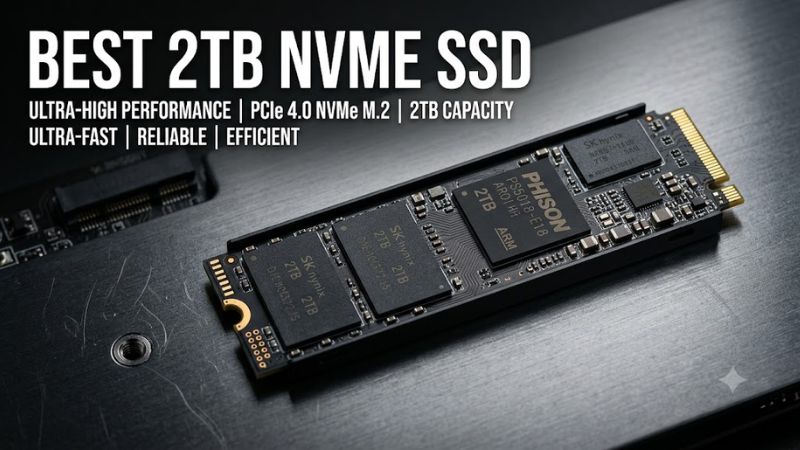
Choosing the best 2tb nvme ssd for a gaming PC means balancing capacity, sustained performance, endurance, cooling, and price. A quality PCIe 4.0 drive offers fast storage without requiring a newer PCIe 5.0 platform. The right choice depends on your motherboard, workload, and the price of each model.
How to Choose a 2TB NVMe SSD
A suitable SSD should match your system and workload rather than simply advertise the highest sequential transfer rate. For most gaming desktops, a PCIe 4.0 NVMe drive with TLC NAND offers a sensible balance of responsiveness, capacity, and cost. Check the exact model’s specifications before ordering, especially if your computer has limited cooling or only one M.2 slot.
PCIe Compatibility and Form Factor
Most mainstream gaming SSDs in this category use the M.2 2280 form factor, measuring approximately 22 mm wide and 80 mm long. However, an M.2 connector alone does not establish compatibility: the slot must support NVMe over PCIe, and the drive’s physical dimensions must fit the motherboard or laptop. Some compact systems accept shorter modules only.
PCIe 4.0 SSDs can generally operate in compatible PCIe 3.0 M.2 slots, but their maximum transfer rates will be limited by the older interface. A PCIe 5.0-capable motherboard can also support compatible PCIe 4.0 drives. For most existing gaming systems, the Samsung 990 PRO or WD_BLACK SN850X is a sensible starting point, provided the specific slot supports the drive.
NAND Type and Endurance
TLC NAND stores three bits per cell and is common in higher-performance consumer SSDs. QLC NAND stores four bits per cell and can help reduce costs, although sustained writes may slow after the available write cache fills. Neither type alone determines overall quality; controller design, firmware, capacity, and workload also affect performance.
Check the manufacturer’s endurance rating, expressed in terabytes written (TBW), alongside the warranty. Endurance is a rated write allowance, not a prediction of when the drive will fail. The Crucial T500 is worth considering for buyers who regularly move large project files, while the Crucial P310 targets users prioritizing capacity and cost over heavy sustained-write workloads.
Cooling and Heatsink Clearance
Fast NVMe drives can generate enough heat to reduce performance during lengthy transfers. A motherboard’s integrated M.2 heatsink may be sufficient, but installation needs to follow the motherboard manual, including the removal of any protective film on the thermal pad. Never stack a second heatsink over an existing assembly unless the hardware manufacturer permits it.
Some SSDs are sold in versions with factory-installed heatsinks and others without them. The WD_BLACK SN850X, for example, has both configurations, so the exact SKU matters. Desktop buyers should check clearance around the graphics card and M.2 cover. Laptop owners should follow the manufacturer’s restrictions because an aftermarket heatsink may not fit inside the chassis.
Price, Warranty, and Intended Workload
A premium drive makes the most sense when its extra features address a real need. Gamers primarily installing and launching games may not notice a substantial difference between several capable PCIe 4.0 models. Content creators who repeatedly write large files, however, should pay more attention to sustained transfers, NAND type, endurance ratings, and thermal behavior.
Compare current US retailer prices rather than relying on an old launch price or an advertised discount. The best 2TB NVMe SSD for your budget might be a premium TLC model on sale or a less expensive drive with sufficient performance for your library. Manufacturer warranties, regional terms, and seller reliability should also factor into the decision.
Top Picks: Best 2TB NVMe SSDs for Gaming
The following shortlist covers premium performance, gaming-focused features, creator workloads, and lower-cost storage. The specifications are manufacturer-rated maximum sequential speeds, not results from a single controlled comparison. Actual performance depends on the platform, firmware, temperature, workload, and available PCIe bandwidth. No independent benchmark figures are presented here as direct head-to-head results.
| Product | Best For | Key Spec | Compatibility | Watch Out For |
| Samsung 990 PRO 2TB | Best Overall | Up to 7,450 MB/s read and 6,900 MB/s write | PCIe 4.0 x4, M.2 2280 | Premium pricing |
| WD_BLACK SN850X 2TB | Best Value when discounted | Up to 7,300 MB/s read; write speed varies by version | PCIe 4.0, M.2 2280 | Check exact SKU and heatsink |
| Crucial T500 2TB | Best for Creators | Up to 7,400 MB/s read and 7,000 MB/s write | PCIe 4.0 x4, M.2 2280 | Sustained performance depends on workload and cooling |
| Crucial P310 2TB | Best Budget Option | Up to 7,100 MB/s read and 6,000 MB/s write | PCIe 4.0, M.2 2280 | QLC NAND and cache behavior matter for long writes |
Samsung 990 PRO 2TB: Best Overall
The Samsung 990 PRO 2TB is a strong premium option for gaming PCs that also handle demanding desktop work. Samsung rates the drive for sequential reads up to 7,450 MB/s and writes up to 6,900 MB/s. Its PCIe 4.0 interface, TLC NAND, and onboard DRAM make it suitable for operating-system storage, large game libraries, and mixed workloads.
Buy it if you want a high-performance primary SSD and the price is competitive with other premium models. It is not the right purchase if your budget is tight or your computer only supports a slower interface and you do not plan to reuse the drive in a future system. The standard model also requires suitable motherboard cooling or a compatible heatsink version.
WD_BLACK SN850X 2TB: Best Value When Discounted
The WD_BLACK SN850X 2TB is designed for gaming systems and offers sequential reads up to 7,300 MB/s. Its maximum rated write speed depends on the specific capacity and product version, so verify the 2TB specification before comparing it with another drive. The model is available in configurations with and without a factory heatsink.
Choose the SN850X when it costs less than a comparable premium SSD or when its heatsink configuration fits your build. It supports compatible PCIe 4.0 M.2 systems and can also operate at lower supported PCIe generations. Buyers seeking the lowest possible storage cost may not benefit from paying extra for its gaming-oriented positioning.
Crucial T500 2TB: Best for Creators
The Crucial T500 2TB combines a PCIe 4.0 x4 interface with manufacturer-rated sequential speeds of up to 7,400 MB/s read and 7,000 MB/s write. Its TLC NAND and high transfer-rate specifications make it a candidate for gaming, editing projects, and other workloads involving frequent large-file transfers. The exact performance depends on the system and workload.
Consider the T500 if you split your time between gaming and content creation, especially when its price compares favorably with the Samsung 990 PRO. It is less compelling when the workload consists mainly of launching games, browsing, and ordinary desktop tasks. Check the selected version’s heatsink arrangement and motherboard clearance before purchasing.
Crucial P310 2TB: Best Budget Option
The Crucial P310 2TB is aimed at users who want a spacious NVMe drive without paying for every feature found in premium models. Its manufacturer-rated sequential speeds reach 7,100 MB/s for reads and 6,000 MB/s for writes. The drive uses QLC NAND, making it important to distinguish short transfers from prolonged writing workloads.
This model suits game libraries, everyday computing, and users who prioritize capacity over sustained-write performance. It is a less suitable choice for workflows that continuously write large amounts of data or require predictable transfer rates after the cache fills. Check the exact P310 variant, because specifications and physical configurations can differ across product listings.
FAQ
Is a 2TB NVMe SSD enough for PC gaming?
Yes, a 2TB NVMe SSD is enough for many gaming PCs, although the number of installed games depends on their individual storage requirements. It provides space for Windows, applications, and a substantial game library without requiring a separate drive immediately. Some modern games occupy well over 100GB, so particularly large libraries can still fill the drive.
A 2TB drive is a capacity choice rather than a guarantee of better frame rates. Moving games from a hard drive to an SSD can reduce loading times, but replacing one capable NVMe SSD with a faster model usually has a smaller effect on gameplay than upgrading a limiting CPU or GPU. Leave room for updates and temporary files.
Does PCIe 5.0 make games load faster than PCIe 4.0?
Not necessarily; PCIe 5.0 offers greater theoretical bandwidth, but that does not translate directly into proportionally faster game loading. Many gaming workloads depend on random access, decompression, CPU processing, and the game’s storage design rather than peak sequential transfer rates alone. A well-chosen PCIe 4.0 SSD remains a practical option for most gaming builds.
Consider a PCIe 5.0 drive when your motherboard supports it and your professional workload benefits from the additional bandwidth. Otherwise, compare the cost, cooling requirements, and real workload benchmarks before paying more. Benchmark comparisons are meaningful only when the resolution, settings, test system, and software conditions are clearly identified.
Can I install a PCIe 4.0 NVMe SSD in a PCIe 3.0 motherboard?
Yes, a PCIe 4.0 NVMe SSD can generally work in a PCIe 3.0 M.2 slot if the motherboard supports NVMe drives and the module’s physical format fits. The connection negotiates a compatible link speed, so a PCIe 4.0 drive in a PCIe 3.0 x4 slot will be limited by the older interface rather than reaching its full rated speed.
Before buying, consult the motherboard manual for slot support, available lanes, and any restrictions when other expansion slots are occupied. Some M.2 connectors support SATA drives only, while others support NVMe. Laptop owners should also confirm the permitted drive length, thickness, and power or thermal limitations.
Should I buy an SSD with a heatsink for my gaming PC?
Buy a heatsink-equipped SSD if your system needs one and the heatsink fits its available space; otherwise, a bare drive paired with a suitable motherboard M.2 heatsink can be sufficient. Cooling helps manage temperatures during sustained transfers, but the benefits depend on airflow, workload, and the SSD’s thermal design rather than the heatsink alone.
Check whether your motherboard already includes an M.2 heatsink before paying extra for another. For laptops and compact PCs, use only a configuration that fits the manufacturer’s clearance requirements. On a PlayStation 5, follow Sony’s expansion-drive dimensions and cooling guidance rather than assuming every desktop heatsink will fit.
Final Thoughts
The best 2TB NVMe SSD depends on your budget, motherboard, and workload. The Samsung 990 PRO is a strong premium all-rounder, the WD_BLACK SN850X deserves attention when discounted, and the Crucial T500 suits mixed gaming and creator workloads. Choose the Crucial P310 for capacity-focused builds, provided its QLC design matches your writing demands.