🛒 Best Price Today on Amazon
Prime members get fast, free shipping on everything above, plus member-only deals. New members get a 30-day free trial — cancel anytime.
A best soundbar for a gaming desk setup needs more than volume: it should fit beneath a monitor, connect cleanly to a PC, and suit short-range listening. This roundup focuses on current desktop-friendly models with documented USB or Bluetooth support, while noting the trade-offs that matter before you buy.
How to Choose a Gaming Desk Soundbar
Desk fit comes first because a bar that blocks a monitor stand or occupies mouse space defeats its purpose. Check width, depth, height, and cable direction, then match the footprint to your display. The Razer Leviathan V2 X is 400 mm wide, while the Stage SE mini is 410 mm wide and 63 mm high for clearance planning.
Check PC Connection
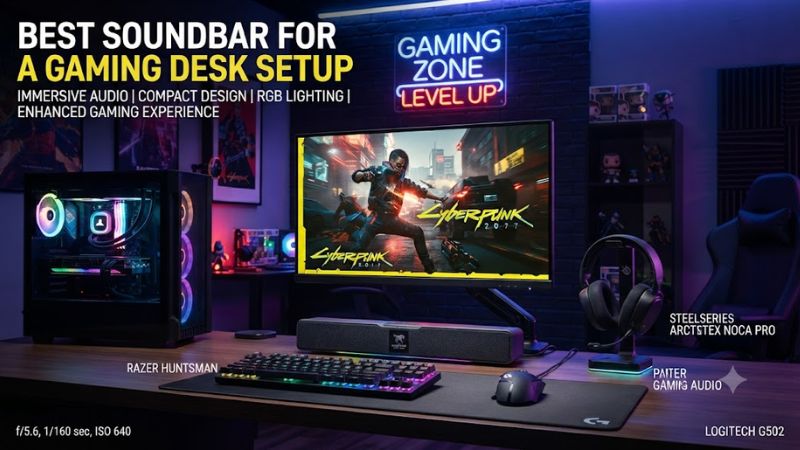
USB audio is the simplest wired route because the soundbar can receive digital audio directly from the PC. The Razer Leviathan V2 X supports USB Audio Input and Bluetooth, while the Creative Sound Blaster GS3 adds USB-C audio, AUX-in, headphone-out, and Bluetooth 5.4. Both suit straightforward PC use.
For a best soundbar for a gaming desk setup, wired USB keeps the signal path simple when a PC is the main source. The Leviathan V2 uses USB Audio Input, while Creative documents USB-C audio for the GS3 and Stage SE mini. Check the exact port before relying on an existing cable, especially with hubs.
Match the Sound to Your Desk
A compact two-channel bar can improve dialogue and game effects without separate speakers, but small cabinets have less room for deep bass. The GS3 uses racetrack drivers and a rear port, while the Stage SE mini uses two full-range drivers. Neither includes a subwoofer, so bass expectations should stay realistic.
The footprint should account for monitor stands and cable exits, not just width. Razer lists the V2 X at 400 mm, while Creative lists the GS3 and Stage SE mini at 410 mm. Measure the shelf area before choosing a fixed-display model, and keep cable exits clear behind the bar and monitor stand.
Consider Software Features
Gaming software matters when you want more control than a physical volume knob. The Razer Leviathan V2 supports Synapse and THX Spatial Audio on Windows 10 64-bit or higher, while the V2 X works with Synapse and the Razer Audio App. Creative’s GS3 keeps controls on the bar and uses SuperWide processing.
Software can add tuning options, but it should not replace the speaker’s physical design. The V2 has a dedicated subwoofer, whereas the V2 X, GS3, and Stage SE mini are one-piece bars. That difference remains important even with extra software processing, especially when desk space is limited or cable routing is tight.
Leave Room for Compatibility
Compatibility is mostly about the available audio path rather than a motherboard generation or GPU connector. The Razer Leviathan V2 and V2 X use USB audio, while the GS3 supports USB-C audio and AUX. Creative’s Stage SE mini supports Windows 10 or 11 through USB-C, plus Bluetooth A2DP on compatible devices.
Unlike PC components, these soundbars do not require a DDR4, DDR5, PCIe, socket, or PSU match. Check the supported input, required operating system, and clearance beneath the monitor before purchase. That makes compatibility simpler, but not something to skip on a desk setup with limited space or unusual monitor stands.
Top Picks for a Gaming Desk Setup
These four picks cover different desk priorities rather than one universal sound profile. The Leviathan V2 adds a subwoofer, the GS3 targets a lower-cost desk, the V2 X favors a compact Razer setup, and the Stage SE mini focuses on a small footprint. Reviews also identify clear limits for each model.
| Product | Best For | Key Spec | Compatibility | Watch Out For |
| Razer Leviathan V2 | Best Overall | THX Spatial Audio; subwoofer | PC via USB; Bluetooth devices | Subwoofer placement |
| Creative Sound Blaster GS3 | Best Value | 24W peak; Bluetooth 5.4 | Windows PC, Mac, consoles via supported inputs | Limited deep bass |
| Razer Leviathan V2 X | Best For Compact Razer Desks | 400 mm; USB-C audio/power | PC via USB; Bluetooth mobile/Switch | No dedicated subwoofer |
| Creative Stage SE mini | Best For Tight Desks | 410 × 82 × 63 mm; 24W peak | Windows, Mac, PS4/PS5, Switch 2 | Modest bass and output |
Razer Leviathan V2 — Best Overall
The Razer Leviathan V2 offers the broadest feature set here because it combines a multi-driver soundbar, down-firing subwoofer, USB audio, Bluetooth 5.2, THX Spatial Audio, and 18-zone Chroma RGB. Razer lists Windows 10 64-bit or higher for THX Spatial Audio, with Synapse providing software controls for PC users.
The weakness is physical rather than connectivity. GamesRadar found the subwoofer less forceful than expected and noted awkward bass balance on a standing desk. It suits buyers who want fuller low-end effects, but not those seeking a single compact bar with no floor unit or extra cable on the desk during everyday use.
Creative Sound Blaster GS3 — Best Value
The GS3 targets gaming desks with a 410 mm-wide chassis, USB-C audio, AUX-in, headphone-out, Bluetooth 5.4, RGB lighting, and SuperWide processing. Creative lists 24W peak power, 65–20,000 Hz response, and 85 dB SNR. PC Gamer’s review found it a solid stereo option for its size and price tier for desktop gaming.
Its limitation is low-frequency depth. PC Gamer and APH Networks describe the bass as limited versus systems with a subwoofer, while The Gadgeteer reported static through a docking station. Creative recommends direct USB-C for optimum volume, so it suits a direct connection better than a dock chain.
Razer Leviathan V2 X — Best For Compact Razer Desks
The Leviathan V2 X is the compact V2 model, measuring 400 mm and using two full-range drivers with two passive radiators. Razer says one USB Type-C cable carries power and audio from a PC, while Bluetooth 5.0 handles mobile devices and Nintendo Switch. It also supports 14-zone Chroma RGB lighting effects.
The trade-off is bass weight. GamesRadar described the low range as restrained but found useful mids, upper frequencies, and directional effects. The V2 X suits players who value a small footprint and clear effects over bass, but it is less suited to anyone expecting a subwoofer.
Creative Stage SE mini — Best For Tight Desks
The Stage SE mini is a 2.0 bar measuring 410 × 82 × 63 mm and weighing 0.73 kg, with USB audio, Bluetooth 5.3, headphone output, and a detachable 1.5 m USB-C cable. Creative lists Windows 10 or 11, Mac, PS4/PS5, and Nintendo Switch 2 support through documented USB or Bluetooth paths.
Its weakness is the small acoustic package. PCWorld found the sound adequate for desktop use but less convincing for music, with limited bass and no direct adjustment beyond volume. It makes more sense when desk space decides the purchase; buyers seeking stronger low-end effects should choose a subwoofer-equipped design.
FAQ
A soundbar can work well on a gaming desk when the model matches the available space and PC connection. The key distinction is between compact two-channel bars and systems that add a subwoofer or more processing. These four questions cover the practical issues most likely to affect a purchase for PC gamers and desk setups before ordering.
Is a soundbar good for a gaming desk?
Yes, a soundbar is useful for a gaming desk when you want one compact enclosure under the monitor instead of separate speakers, making it a practical best soundbar for a gaming desk setup for some layouts. The GS3 and Leviathan V2 X suit desktop placement, while the Leviathan V2 adds a subwoofer for stronger low-frequency effects.
The compromise is stereo width and bass versus larger speaker systems. A small bar places both channels close together, limiting physical separation. For desk gaming, that can still be practical when the goal is keeping the surface clear while improving monitor-speaker audio for everyday play and general media.
Which soundbar is easiest to connect to a PC?
The easiest connection is generally a documented USB audio path, and the Leviathan V2 X uses one USB Type-C connection for PC power and audio. The GS3 also supports USB-C audio, while the Leviathan V2 provides USB audio input. Bluetooth is available too, but wired USB is the direct desktop route for a PC-first setup.
For a best soundbar for a gaming desk setup, check the PC’s available port before ordering rather than assuming every USB-C connector carries the same function. Creative specifically notes direct USB-C connection for the GS3 when seeking optimum volume, while the Stage SE mini’s Windows USB audio requirements call for an available USB-C port.
Do gaming soundbars need a subwoofer?
No, a gaming soundbar does not need a subwoofer, but a separate low-frequency unit can provide deeper bass than a compact one-piece bar, so the best soundbar for a gaming desk setup depends on bass needs. The Leviathan V2 pairs its soundbar with a down-firing subwoofer, while the GS3, V2 X, and Stage SE mini use compact all-in-one designs.
For the best soundbar for a gaming desk setup, the choice depends on desk space and priorities. A subwoofer needs another placement area and adds another cable, which can complicate a clean workstation. A compact bar is easier to position, but smaller drivers and an enclosure limit low-end energy.
Can these soundbars work with consoles too?
Yes, several of these models support console use through documented USB or Bluetooth paths, although the exact connection depends on the console and product. Creative lists the GS3 for gaming consoles and the Stage SE mini for PS4, PS5, and Nintendo Switch 2, while Razer documents Bluetooth connections for the Leviathan V2 and V2 X.
For a PC-first desk, USB remains the simplest path when supported because it avoids wireless audio. If console use matters, check the console port and the soundbar’s current support page before purchase, especially when using a monitor rather than a television as the display source and audio path.
Final Thoughts
The best soundbar for a gaming desk setup depends on whether your priority is bass, compact size, software features, or the simplest cable layout. The Leviathan V2 adds a subwoofer, the GS3 balances gaming features with a compact bar, the V2 X saves space in a Razer setup, and the Stage SE mini keeps the footprint small.