🛒 Best Price Today on Amazon
Prime members get fast, free shipping on everything above, plus member-only deals. New members get a 30-day free trial — cancel anytime.
Choosing the best external speakers for PC depends on your desk space, budget, preferred sound, and available connections. Compact USB speakers suit everyday gaming, powered bookshelf speakers offer a fuller stereo setup, and subwoofer systems add deeper bass. These four options cover different needs without requiring a separate amplifier.
How to Choose External PC Speakers
Before comparing models, decide whether you need simple desktop audio, more detailed stereo sound, or a dedicated subwoofer for explosions and cinematic effects. Connection options matter just as much: a speaker can sound excellent yet be inconvenient if it lacks the input your computer supports.
1. Choose the Right Speaker Configuration
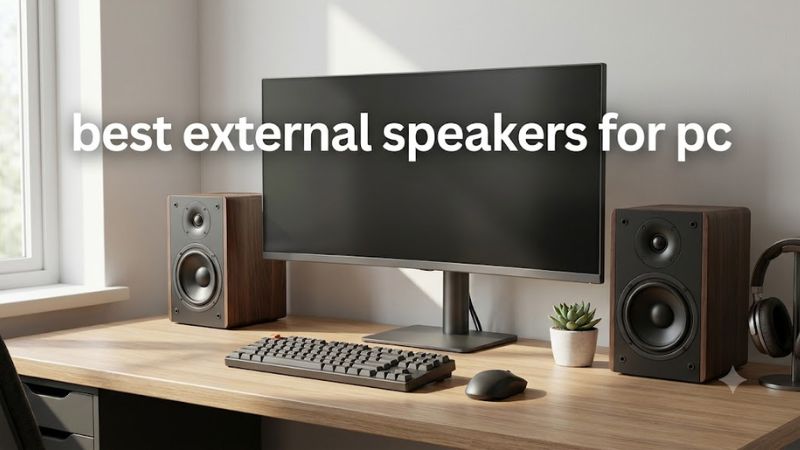
A 2.0 system has two speakers and no separate subwoofer. It is usually the simplest arrangement for competitive gaming, voice chat, music, and general desktop use. A 2.1 system adds a subwoofer that handles lower frequencies, making explosions and bass-heavy music more impactful.
Neither layout automatically sounds better. Speaker design, placement, room acoustics, and tuning all influence the result. A well-designed 2.0 pair can be more satisfying than a poorly balanced 2.1 system, especially if you prioritize clear dialogue and a natural stereo image.
2. Check USB, 3.5 mm, Optical, and Bluetooth
USB audio can simplify connections to a modern PC, while a 3.5 mm analog input works with many desktop audio outputs and laptop headphone jacks. Optical and coaxial digital inputs can help when connecting compatible motherboards, televisions, or other audio sources.
Bluetooth is useful for switching between a computer and a phone, but wireless audio introduces another connection to manage and may have more latency than a wired connection. For gaming where timing matters, prefer USB or wired analog audio when the speaker supports it.
3. Match the Speakers to Your Desk
Compact speakers fit beside a monitor without consuming much desk space. Larger bookshelf speakers generally require more room for their cabinets, separation, and positioning. A subwoofer adds another component that needs floor or desk space, depending on its design.
Position the left and right speakers approximately symmetrically, with their drivers directed toward your listening position. Keep them clear of obstructions, and avoid placing a bass-heavy subwoofer where its vibration becomes distracting. Correct placement can make a modest system sound more coherent.
4. Set a Realistic Budget
Entry-level USB speakers are suitable for casual gaming, video calls, and everyday media. Midrange powered speakers can offer more flexible connections and larger drivers, while premium compact speakers prioritize construction, connectivity, and stereo reproduction.
Do not pay extra for RGB lighting or wireless features unless you will use them. Also, compare the complete system: a pair that requires a separate amplifier or additional subwoofer may cost more than its initial price suggests. Check the included cables and power supply before buying.
Top Picks: Best External Speakers for PC
The strongest choice depends on the experience you want rather than a single universal winner. The following shortlist covers premium compact stereo, budget USB audio, traditional bookshelf speakers, and gaming-focused speakers with lighting. Specifications describe manufacturer-listed features; recommendations are based on intended use, not PC Gaming Universe firsthand testing.
| Product | Best For | Key Spec | Compatibility | Watch Out For |
| Audioengine A2+ | Premium compact stereo | 2.75-inch woofers; USB-C on the updated model | USB-C, analog, Bluetooth | No dedicated subwoofer |
| Creative Pebble Pro | Budget desktop setups | USB-C, 3.5 mm, Bluetooth 5.3 | Compatible USB audio devices and analog outputs | Limited low-bass output |
| Edifier R1280DBs | Music, gaming, and movies | 42W RMS; 4-inch drivers and 0.5-inch tweeters | Bluetooth, optical, coaxial, RCA | Larger footprint |
| Edifier G2000 | Gaming-focused compact setups | 16W RMS; USB, 3.5 mm, Bluetooth | Compatible USB and analog audio sources | Small cabinets limit deep bass |
1. Audioengine A2+ — Best Premium Compact Stereo
Best for: Gamers who also prioritize music and desktop listening.
The Audioengine A2+ is a strong choice if you want compact powered speakers without moving to a large bookshelf system. Its 2.75-inch aramid-fiber woofers and 0.75-inch silk-dome tweeters provide a two-way design in small cabinets. The updated version adds USB-C, Bluetooth 5.3, and support for 24-bit audio.
For gaming, a separate pair of speakers can provide clear dialogue and stereo separation without a headset. The A2+ also suits music and general media, making it useful beyond a gaming session. Its compact size is particularly appealing for desks with limited space.
Limitations: There is no included subwoofer, so deep bass is less prominent than with a dedicated 2.1 system. The volume and power control is positioned on the rear of the left speaker, which may be awkward if access is restricted. Buyers wanting strong low-frequency impact should consider a subwoofer-equipped alternative.
Buy if: You value compact construction, flexible connectivity, and a system for both gaming and music.
Consider an alternative if: Your main priorities are heavy bass, surround sound, or minimizing expenditure.
2. Creative Pebble Pro — Best Budget Desktop Speakers
Best for: Small desks, casual gaming, and everyday PC audio.
The Creative Pebble Pro uses a compact, rounded satellite design intended for close desktop listening. Its connection options include USB-C, a 3.5 mm analog input, and Bluetooth 5.3. That flexibility makes it suitable for a PC-centered workspace where you occasionally want to play audio from a phone or another compatible device.
Its small footprint is a practical advantage for laptop docks, compact keyboards, and multi-monitor desks. USB power also simplifies the setup compared with a larger powered bookshelf pair, although the available output depends on the supported power arrangement. Check the included power accessories and the manufacturer’s requirements before expecting maximum output.
Limitations: Small enclosures cannot reproduce deep bass with the same authority as a dedicated subwoofer. The Pebble Pro is best treated as an everyday desktop solution rather than a replacement for a larger music or home-theater system.
Buy if: You need convenient connections and compact speakers for games, calls, videos, and background music.
Consider an alternative if: You want a stronger bass response, more room-filling output, or a traditional bookshelf design.
3. Edifier R1280DBs — Best Bookshelf Speakers for Versatility
Best for: Users who split their time between gaming, music, and movies.
The Edifier R1280DBs is a powered bookshelf speaker pair rated at 42W RMS total, with a 4-inch mid-bass driver and a 0.5-inch tweeter in each speaker. Its wooden cabinets, remote control, and multiple inputs make it a practical choice for a desktop that also serves as a general entertainment system.
Connectivity includes Bluetooth, optical, coaxial, and dual RCA inputs. A dedicated subwoofer output also provides an upgrade path if you later want more low-frequency impact. Optical can be convenient when your PC or other source provides a compatible digital output; RCA offers a straightforward analog connection.
Limitations: These speakers occupy considerably more space than compact USB models. The quoted power rating is not a guarantee of sound quality or usable volume in every room, and the absence of a bundled subwoofer means bass-heavy games will not have the same low-frequency extension as a complete 2.1 system.
Buy if: You have room for bookshelf speakers and want several wired input options, a remote, and future subwoofer expansion.
Consider an alternative if: Your desk is cramped or you want a compact USB-powered arrangement with minimal cabling.
4. Edifier G2000 — Best for Gaming-Focused Compact Setups
Best for: Players who want compact speakers with gaming-oriented styling.
The Edifier G2000 combines a small desktop form factor with RGB lighting and multiple listening modes. Its listed output is 16W RMS, with a 32W peak rating. Connectivity includes USB-A, a 3.5 mm analog input, and Bluetooth 5.1, providing options for compatible computers and wireless playback devices.
Its angled design is intended to direct audio toward the listener, and its selectable modes give users a convenient way to change the sound presentation. The compact enclosure is easy to position around a monitor, while the lighting fits gaming setups where appearance matters alongside audio.
Limitations: The small cabinet limits deep-bass reproduction, and gaming-oriented sound modes do not guarantee accurate positional audio in every title. USB and analog connections are preferable when you want to avoid potential Bluetooth latency during play.
Buy if: You prefer compact gaming speakers with RGB lighting and several connection options.
Consider an alternative if: You prioritize music reproduction, more natural low-frequency extension, or a larger stereo soundstage over lighting and compact dimensions.
FAQ
Are external speakers better than a gaming headset?
External speakers are better for shared listening and taking breaks from wearing a headset, while headsets are generally more suitable for private listening and microphone communication. Speakers also let you hear room sounds, so the right choice depends on your environment and gaming habits.
Can I connect external PC speakers to a gaming laptop?
Yes, most gaming laptops can connect to external speakers through USB, a 3.5 mm audio jack, or Bluetooth, depending on the speaker and laptop. Check the available ports and supported connection types before purchasing, and use a wired connection when minimizing audio latency is important.
Do I need a subwoofer for PC gaming?
No, a subwoofer is optional for PC gaming. A good 2.0 speaker pair can handle dialogue, music, and general game audio, while a 2.1 system adds deeper bass for explosions and cinematic effects. Choose a subwoofer if you have room for it and want more low-frequency impact.
How much should I spend on external PC speakers?
Your budget should reflect how often you use the speakers and what you listen to. Compact entry-level models are suitable for everyday desktop audio, while powered bookshelf speakers offer more flexible connectivity and larger cabinets. Compare the complete feature set instead of choosing solely by wattage or price.
Final Thoughts
The best external speakers for PC depend on your priorities: choose the Creative Pebble Pro for compact everyday audio, the Audioengine A2+ for premium desktop stereo, the Edifier R1280DBs for flexible bookshelf listening, or the G2000 for gaming-focused styling. Before buying, confirm the connections, desk space, and bass performance you actually need.