🛒 Best Price Today on Amazon
Prime members get fast, free shipping on everything above, plus member-only deals. New members get a 30-day free trial — cancel anytime.
Upgrading your gaming setup does not require spending hundreds on studio gear. Following a practical budget microphone guide helps you find USB models that deliver clear voice chat for Discord and streaming. Modern budget options feature cardioid capsule patterns that capture your voice cleanly while filtering out fan rumble.
How to Choose a Budget Microphone
Selecting the right audio peripheral requires balancing pickup patterns, connection interfaces, hardware controls, and mounting requirements. Reading a comprehensive budget microphone guide clarifies how these technical factors influence clarity and background noise rejection in real rooms without acoustic dampening treatments.
Selecting Dynamic vs Condenser Capsules
Microphone capsule design directly determines how sensitive the transducer is to background ambient sounds. Dynamic microphones use a heavier moving coil structure that requires higher sound pressure to move, making them less prone to picking up mechanical keyboard clicks, PC case fan noise, and room reverberation during voice calls.
Condenser capsules utilize an ultra-thin diaphragm that reacts quickly to subtle audio frequencies, yielding detailed voice reproduction. However, entry-level condensers pick up significant room echo if used in untreated spaces. Gamers in noisy rooms benefit more from dynamic capsules like the one found on the Fifine AM8 dynamic mic.
Evaluating Connectivity and Sample Rates
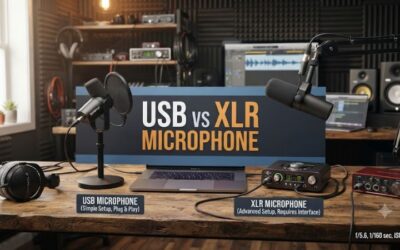
Connection types determine setup complexity and future upgrade flexibility for your desk audio. Consulting a budget microphone guide ensures you select between direct USB plug-and-play models or XLR interfaces. USB connectivity simplifies operation on Windows PCs, while hybrid XLR outputs allow connection to dedicated audio interfaces later.
Digital audio resolution depends on the analog-to-digital converter built into the microphone chassis. A resolution of 16-bit at 48kHz is sufficient for Discord voice channels and OBS streaming bitrates. Mics offering 24-bit at 96kHz provide extra headroom for digital signal processing without introducing audible audio quantization distortion.
Checking Physical Controls and Mute Functions
Onboard physical controls grant immediate adjustments without forcing you to alt-tab out of active full-screen games. Microphones featuring hardware gain knobs let you set input sensitivity on the fly, preventing digital clipping when speaking louder during intense matches or lowering levels when sitting closer to the capsule.
Quick muting capabilities are crucial during live broadcasts and team voice chat sessions. Capacitive tap-to-mute sensors located on top of models like the HyperX SoloCast offer silent muting without sending an audible mechanical click down the channel. Physical toggle switches provide tactile feedback but can add noise to recordings.
Verifying Mounting and Platform Compatibility
Physical mounting hardware determines how effectively a desktop microphone dampens low-frequency desk vibrations. Microphones included with basic desktop stands sit close to keyboard switches and mouse pads. Using built-in shock mounts or elastic suspension arms isolates the capsule from mechanical impact noises traveling through the desk.
Platform compatibility must be verified prior to purchase to avoid driver conflicts across systems. Standard USB audio class compliant microphones operate natively on Windows 11, macOS, and PlayStation 5 consoles. This budget microphone guide highlights mounting specs like 3/8-inch and 5/8-inch threading required for standard boom arms.
Top Budget Microphone Recommendations
Our budget microphone guide categorizes top models based on technical specifications and mechanical features. The comparison table below details primary use cases, key hardware specifications, operating system support, and design limitations. These options cover USB and XLR choices across price tiers under one hundred dollars.
| Product | Best For | Key Spec | Compatibility | Watch Out For |
| Fifine K688 | Best Overall | Dynamic, 16-bit/48kHz, USB-C & XLR | Windows, macOS, PS5 | Included stand is low height |
| Fifine AM8 | Best Value | Dynamic, 16-bit/48kHz, USB-C & XLR, RGB | Windows, macOS, PS5 | Touch mute lacks tactile click |
| HyperX SoloCast | Best Compact USB | Condenser, 24-bit/96kHz, USB-C | Windows, macOS, PS4, PS5 | Desktop stand picks up desk bumps |
| Audio-Technica AT2020 | Best Studio XLR | Condenser, 16-bit/48kHz, XLR | Requires Audio Interface | Needs 48V phantom power source |
Fifine K688
Streamers seeking broad device flexibility should consider the Fifine K688 dynamic microphone. As noted in this budget microphone guide, the Fifine K688 offers dual USB-C and XLR outputs alongside a 16-bit at 48kHz sampling rate. Its dynamic capsule provides off-axis noise rejection, keeping voice capture clear during loud PC gaming sessions.
The primary weakness of the Fifine K688 is its included compact desk stand, which places the capsule too low relative to mouth height. Gamers who prefer a clean desktop without purchasing an external boom arm should avoid this model. Adding a suspension arm resolves positioning while keeping keyboard vibration off the microphone recording.
Fifine AM8
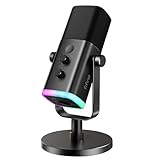
Budget-conscious creators wanting features like customizable RGB lighting alongside dynamic voice isolation will appreciate the Fifine AM8. This model includes USB-C and XLR dual connections, an integrated headphone monitoring jack, and a 16-bit at 48kHz audio converter. It delivers clear vocal reproduction for streaming and voice chat.
The main drawback of the Fifine AM8 is its sensitive top-mounted touch mute button, which lacks physical tactile feedback and can be accidentally triggered. Users who require a distinct mechanical switch or physical mute toggle should skip this unit. However, its low price and dual interface make it an excellent choice for beginner setups.
HyperX SoloCast
Gamers who need a compact plug-and-play solution with high audio resolution will find the HyperX SoloCast ideal. It features a cardioid condenser capsule supporting up to 24-bit at 96kHz sampling via USB-C. Its small footprint fits easily on crowded desks while delivering crisp vocal clarity for Discord and in-game communication channels.
A notable weakness of the HyperX SoloCast is its rigid plastic desktop stand, which transmits table vibrations directly into the condenser diaphragm. Users without an isolation mount or boom arm who type heavily on mechanical keyboards should avoid using this mic on its default stand, as keystrokes produce prominent low-end thump sounds.
Audio-Technica AT2020
Audio enthusiasts building a traditional analog setup will benefit from the Audio-Technica AT2020 studio condenser microphone. Featuring a custom low-mass diaphragm and a wide frequency response of 20Hz to 20kHz, this standard XLR microphone provides accurate voice translation for content creation, voiceover, and dedicated streaming setups.
The key limitation of the Audio-Technica AT2020 is its strict requirement for an external audio interface supplying 48V phantom power. Buyers seeking a direct USB connection to their PC without purchasing extra hardware should look elsewhere. Furthermore, its sensitive condenser diaphragm picks up ambient noise in unconditioned gaming rooms.
Frequently Asked Questions
This section of our budget microphone guide addresses key questions regarding audio setups, equipment requirements, and optimization. Understanding these technical details helps you select compatible peripherals and configure your system settings properly for optimal voice recording performance on Windows and gaming platforms.
Are USB Microphones Good Enough for Gaming?
Yes, modern USB microphones deliver clean audio quality that fully satisfies voice chat and streaming requirements. Built-in analog-to-digital converters process audio at 16-bit or 24-bit resolution, matching the bitrates supported by Discord and OBS. Plug-and-play USB operation removes the need to buy or configure external mixer hardware.
USB microphones are limited by their internal converters, meaning you cannot upgrade individual audio processing components later. Users who plan to build an expandable multi-channel studio setup eventually transition to XLR interfaces. However, for straightforward PC gaming and voice communication, USB microphones provide maximum convenience.
Do You Need an Audio Interface for XLR Mics?
Yes, standard XLR microphones require an audio interface or preamplifier to convert analog signals into digital PC audio. XLR microphones cannot plug directly into standard USB ports on a computer without an active adapter. The interface provides necessary gain staging and supplies 48V phantom power required by condenser models like the AT2020.
Selecting a hybrid USB and XLR microphone allows you to start with simple USB connectivity and upgrade to a dedicated interface later. Interfaces like the Focusrite Scarlett Solo offer hardware gain knobs, low-latency monitoring, and higher quality preamps. This upgrade path improves signal clarity without replacing your core microphone capsule.
How Does a Boom Arm Improve Mic Performance?
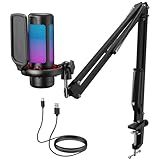
A boom arm improves microphone performance by placing the capsule closer to your mouth while decoupling it from desk vibrations. A complete budget microphone guide always recommends using an arm to reduce mechanical keyboard clack and mouse thumps. Moving the mic closer allows you to lower input gain, reducing ambient background noise.
Desk stands position the capsule at table level, forcing you to lean forward or turn up gain controls, which boosts room noise. Boom arms featuring standard 3/8-inch or 5/8-inch threads mount securely to desk edges using C-clamps. They clear desk space for your mouse pad and keyboard while maintaining consistent proximity to your mouth.
Does High Sample Rate Matter for Voice Chat?
No, sample rates above 48kHz do not improve audio quality over Discord or standard gaming voice chat services. Applications compress voice audio to save bandwidth, typically re-sampling inputs to 48kHz or lower. While 24-bit at 96kHz recording is valuable for music production, a 16-bit at 48kHz setting provides full vocal fidelity for gaming.
Configuring Windows Sound Control Panel to matching sample rates prevents operating system audio resample artifacts. Setting your default format to 16-bit 48000Hz aligns with Discord and OBS broadcast encoders. Selecting excessively high sample rates increases CPU overhead on older system processors without delivering audible voice improvements.
Final Thoughts
Choosing an affordable microphone comes down to understanding your gaming environment and mounting preferences. Utilizing this budget microphone guide allows you to select between dynamic capsules for noisy rooms or condenser mics for quiet spaces. Equipping your setup with proper mounting hardware ensures clear voice communication.