🛒 Best Price Today on Amazon
Prime members get fast, free shipping on everything above, plus member-only deals. New members get a 30-day free trial — cancel anytime.
Choosing between a usb vs xlr microphone setup determines how easily you communicate with teammates during intense multiplayer matches. USB models connect straight to your motherboard with zero added equipment required. XLR options require an external audio interface, providing superior upgrade flexibility over time.
How to Choose Between USB and XLR Microphones
Navigating a usb vs xlr microphone choice requires matching your hardware budget with your long-term streaming goals. Direct USB connections serve solo creators who value clean desks and fast configuration. XLR setups suit users building multi-channel voice configurations that require analog adjustment hardware.
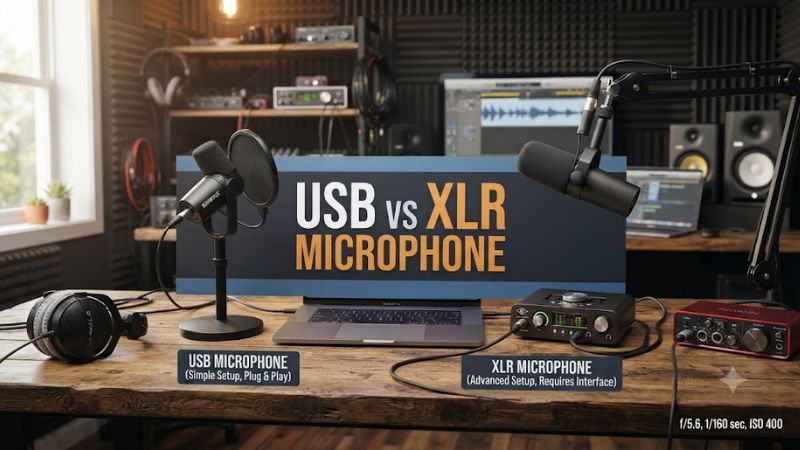
Simplified USB Connectivity for Fast Desktop Setup
When assessing a usb vs xlr microphone design, initial setup effort represents a major practical factor. USB models feature built-in analog-to-digital converters and preamps inside the chassis. Gamers simply connect the supplied USB-C cable directly into a free port on their Windows motherboard to begin talking on Discord.
This single-cable approach removes the physical footprint of external mixer desktop hardware completely. Software drivers install automatically across modern operating systems without manual configuration. Solo players who record quick voiceovers or communicate during casual matches benefit most from this straightforward design.
Hardware Expandability with External Audio Interfaces
An XLR connection relies on a balanced three-pin cable that carries raw analog audio signals. This design requires a dedicated USB audio interface or mixer to amplify the signal and feed digital data to your PC. Users can swap individual components without replacing their entire microphone whenever upgrades become necessary.
Audio interfaces provide physical gain knobs, direct headphone monitoring, and multi-input recording capability. Gamers can attach XLR dynamic microphones alongside instruments or additional commentary mics on one interface. This hardware versatility supports expanding setups as content creation demands grow in complexity over time.
Background Noise Rejection and Capsule Mechanics
Room acoustics play a substantial role when comparing a usb vs xlr microphone in gaming environments. Dynamic capsules reject ambient mechanical keyboard clicks and room reflections far better than sensitive condenser designs. Selecting dynamic hardware prevents loud desktop fans from dominating your live stream commentary audio.
Condenser capsules capture wide frequency ranges with detailed vocal warmth, but they record subtle background sounds easily. While USB condenser mics often include digital noise suppression filters, dynamic XLR models isolate your voice mechanically. Matching microphone capsule design to your room acoustics prevents unwanted noise.
Platform Compatibility and Windows Audio Settings
Compatibility remains a crucial criteria when integrating new microphone hardware into a gaming rig. Standard USB microphones require available USB 2.0 or USB 3.0 Type-A and Type-C ports on your computer case. External audio interfaces use standard USB connections while supplying forty-eight volt phantom power to condenser mics.
Windows 11 detects both audio interfaces and USB microphones as primary sound recording input devices. Users manage sample rates, bit depths, and input gain levels within the sound control panel directly. Hardware options featured in top hardware roundups meet standard motherboard voltage and driver requirements without issues.
Top USB and XLR Microphones for PC Gaming
Selecting the right usb vs xlr microphone depends on whether you prioritize easy installation or total hardware modularity. The comparison table below highlights key specifications, platform compatibility details, and potential limitations for leading audio options to help you determine the ideal microphone for your gaming space.
| Product | Best For | Key Spec | Compatibility | Watch Out For |
| Shure MV7+ | Hybrid USB/XLR Versatility | 24-bit/48kHz, Touch Panel | USB-C, 3-pin XLR | Higher price tier than standard USB |
| Audio-Technica AT2020USB-X | Budget Studio Clarity | 24-bit/96kHz, Condenser | USB-C (Windows, macOS) | Picks up ambient room noise easily |
| Shure SM7dB | Professional XLR Voice | Dynamic, +28dB Built-in Preamp | 3-pin XLR (Interface Required) | Requires separate audio interface |
| Elgato Wave:3 | Streaming Digital Control | 24-bit/96kHz, Clipguard | USB-C (Windows, macOS) | Lightweight plastic frame construction |
Shure MV7+ Dual Output Microphone
The Shure MV7+ caters to users who desire a usb vs xlr microphone hybrid that adapts to changing needs. Featuring both USB-C and standard XLR connectors, this dynamic microphone plugs straight into a PC or hooks into an external audio interface. It offers twenty-four bit forty-eight kilohertz recording for clear voice output.
An onboard touch panel allows instant mute control and gain adjustments during active gaming sessions. Its dynamic capsule isolates vocal tones while suppressing mechanical switch clacks. Players seeking dual connectivity will appreciate this design, though its premium price point makes it less suitable for tight hardware budgets.
Audio-Technica AT2020USB-X Cardioid Condenser
The Audio-Technica AT2020USB-X offers crisp vocal clarity for gamers wanting straightforward USB operation. Its studio-grade condenser capsule captures voice detail with a high twenty-four bit ninety-six kilohertz sampling rate. Direct USB-C connectivity ensures fast plug-and-play setup across all modern Windows desktop systems.
Integrated headphone monitoring with volume control enables zero-latency voice tracking directly on the unit body. However, the sensitive condenser capsule captures quiet room reflections and heavy mechanical keyboard switches easily. Gamers without treated room acoustics should consider dynamic alternatives to avoid ambient background pickup.
Shure SM7dB Dynamic Vocal Microphone
The Shure SM7dB stands out as a dedicated XLR dynamic mic engineered for high-end voice broadcasting. It includes a built-in phantom-powered preamp providing up to plus twenty-eight decibels of clean gain boost. This dynamic capsule blocks surrounding room reflections, rendering voice streams exceptionally clear in loud spaces.
Because this unit features an XLR output exclusively, users must purchase an external audio interface and XLR cable separately. It requires forty-eight volt phantom power from the interface to run the active preamp circuit. Budget-conscious gamers who prefer simple single-cable USB setups should avoid this multi-piece hardware investment.
Elgato Wave:3 Premium USB Microphone
The Elgato Wave:3 provides streamers with specialized digital mixing software alongside clear USB audio capture. It operates at twenty-four bit ninety-six kilohertz resolution while featuring proprietary Clipguard technology to prevent distortion. Users connect the microphone via USB-C without needing extra external hardware.
Wave Link software allows PC gamers to route separate voice chat, game audio, and music tracks directly on Windows. The primary drawback involves its lightweight plastic chassis, which feels less rugged than metal alternatives. Gamers seeking an expandable XLR signal path should look toward modular audio interface setups instead.
Frequently Asked Questions About PC Microphones
Understanding how a usb vs xlr microphone impacts your daily gaming experience helps avoid common setup issues. The following answers address core questions regarding audio latency, signal processing, physical cabling requirements, and long-term upgrade paths across both dynamic and condenser desktop microphone configurations.
Does an XLR microphone sound better than a USB mic?
An XLR microphone generally provides superior sound clarity because it pairs with high-grade external preamps inside audio interfaces. In a usb vs xlr microphone comparison, raw analog signals retain higher dynamic range before digital conversion occurs. This modular hardware separation keeps electrical interference away from the capsule.
Modern USB microphones still deliver excellent vocal performance for casual Discord voice chat and basic streaming. However, integrated circuits inside USB bodies face thermal and spatial limits compared to dedicated interface hardware. Gamers chasing professional studio broadcast depth will achieve better results with XLR equipment.
Can you plug an XLR microphone directly into a PC?
You cannot plug an XLR microphone directly into a standard PC motherboard audio jack without an interface. XLR cables use three-pin balanced connectors that require preamplification and digital conversion from a USB audio interface. Attempting simple adapter cables results in extremely low vocal volume and high background noise.
An external audio interface connects to your computer via USB while providing balanced inputs and necessary power for your mic. Condenser XLR models require forty-eight volts of phantom power provided directly by the interface unit. Budgeting for both the microphone and interface ensures your PC receives a proper audio signal.
Is a USB microphone better for casual PC gaming?
A USB microphone is better for casual PC gaming due to its simple setup and affordable price. Gamers do not need to configure external gain boxes or buy additional balanced cables to start talking with friends. Pluggable USB connectivity saves valuable desk space while delivering instant voice clarity out of the box.
USB models also consume minimal power directly from standard motherboard USB 3.0 ports without external wall adapters. Integrated gain dials and mute buttons allow immediate control during fast-paced multiplayer matches. Gamers who prioritize convenience over hardware expandability find USB options perfectly matched to their needs.
Do USB microphones introduce audio latency during streams?
Modern USB microphones do not introduce noticeable audio latency during livestreams or voice chat sessions. Built-in headphone jacks on the microphone chassis provide direct hardware monitoring without processing delay from Windows audio drivers. Streamers hear their own voice in real time while broadcasting game audio.
When comparing a usb vs xlr microphone setup, both options achieve under five milliseconds of latency through proper driver configuration. Latency issues usually stem from software audio filters or buffer size settings inside OBS Studio rather than the physical cable. Keeping system drivers updated ensures smooth real-time voice transmission.
Final Thoughts on PC Audio Configurations
Choosing the right usb vs xlr microphone comes down to your desktop space, audio goals, and budget limits. USB models deliver fast setup and solid voice quality for casual multiplayer gaming without extra equipment. XLR setups provide long-term flexibility and superior control for dedicated streamers building an expandable setup.